Solved Error code 800F0900 and 800B0100 windows update error

Kwekxh2

New member
Local time
12:48 PM
Messages
4
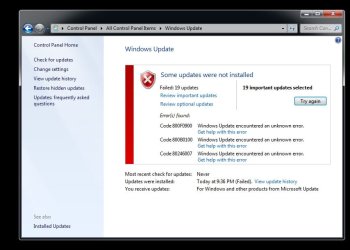
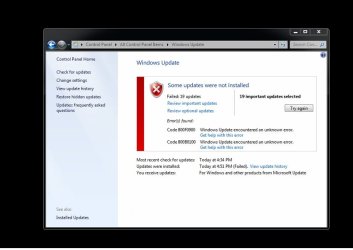
When i try to install my windows update, i always get both error code 800F0900 and 800B0100. i tried installing the updates manually, used MS Fix it and the system update readiness tool. I use sfc /scannow and it says "No integrity violations found". Still error. Can anyone help? I have uploaded my CBS zipfile to googledrive CBS.rar - Google Drive. (Since datahost is not working.) and attached the sfc text file overhere.

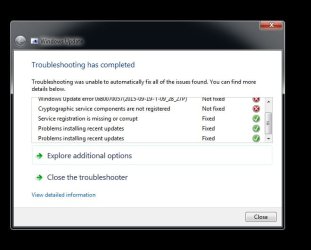
I have tried Windows Update Troubleshooter then tried windows update again and a new error Code 80246007 appear.
Hope you guys can help me solve it.

This is my Farbar scan.

Farbar Service Scanner Version: 26-07-2015
Ran by Finance Server (administrator) on 19-09-2015 at 17:00:41
Running from "C:\Users\Finance Server\Downloads"
Microsoft Windows 7 Ultimate Service Pack 1 (X64)
Boot Mode: Normal
****************************************************************

Internet Services:
============

Connection Status:
==============
Localhost is accessible.
LAN connected.
Google IP is accessible.
Google.com is accessible.
Yahoo.com is accessible.


Windows Firewall:
=============

Firewall Disabled Policy:
==================


System Restore:
============

System Restore Policy:
========================


Action Center:
============


Windows Update:
============

Windows Autoupdate Disabled Policy:
============================


Windows Defender:
==============
WinDefend Service is not running. Checking service configuration:
The start type of WinDefend service is set to Demand. The default start type is Auto.
The ImagePath of WinDefend service is OK.
The ServiceDll of WinDefend service is OK.


Windows Defender Disabled Policy:
==========================
[HKEY_LOCAL_MACHINE\SOFTWARE\Microsoft\Windows Defender]
"DisableAntiSpyware"=DWORD:1


Other Services:
==============


File Check:
========
C:\Windows\System32\nsisvc.dll => File is digitally signed
C:\Windows\System32\drivers\nsiproxy.sys => File is digitally signed
C:\Windows\System32\dhcpcore.dll => File is digitally signed
C:\Windows\System32\drivers\afd.sys => File is digitally signed
C:\Windows\System32\drivers\tdx.sys => File is digitally signed
C:\Windows\System32\Drivers\tcpip.sys => File is digitally signed
C:\Windows\System32\dnsrslvr.dll => File is digitally signed
C:\Windows\System32\mpssvc.dll => File is digitally signed
C:\Windows\System32\bfe.dll => File is digitally signed
C:\Windows\System32\drivers\mpsdrv.sys => File is digitally signed
C:\Windows\System32\SDRSVC.dll => File is digitally signed
C:\Windows\System32\vssvc.exe => File is digitally signed
C:\Windows\System32\wscsvc.dll => File is digitally signed
C:\Windows\System32\wbem\WMIsvc.dll => File is digitally signed
C:\Windows\System32\wuaueng.dll => File is digitally signed
C:\Windows\System32\qmgr.dll => File is digitally signed
C:\Windows\System32\es.dll => File is digitally signed
C:\Windows\System32\cryptsvc.dll => File is digitally signed
C:\Program Files\Windows Defender\MpSvc.dll => File is digitally signed
C:\Windows\System32\ipnathlp.dll => File is digitally signed
C:\Windows\System32\iphlpsvc.dll => File is digitally signed
C:\Windows\System32\svchost.exe => File is digitally signed
C:\Windows\System32\rpcss.dll => File is digitally signed


**** End of log ****
 

Attachments
  • windows update error.jpg
    windows update error.jpg
    94.6 KB · Views: 0
  • Windows update troubleshooter results.jpg
    Windows update troubleshooter results.jpg
    70.1 KB · Views: 12
  • new error.jpg
    new error.jpg
    110.1 KB · Views: 0

My Computer

Computer type
PC/Desktop
Computer Manufacturer/Model Number
Custom Build
OS
Windows 7 Ultimate x64
CPU
i7 4770
Motherboard
Gigabyte GA-Z87N-WIF
Memory
16gb
Here's the errors from the CheckSUR scan...
Code:
Summary:
Seconds executed: 219
 Found 17 errors
  CSI Manifest All Zeros Total count: 10
  CBS MUM Corrupt Total count: 6
  CBS Catalog Corrupt Total count: 1

Unavailable repair files:
	winsxs\manifests\msil_smsvchost.resources_b03f5f7f11d50a3a_6.1.7601.18532_zh-cn_83739c8c3e5c5f22.manifest
	winsxs\manifests\msil_smdiagnostics.resources_b77a5c561934e089_6.1.7601.22743_zh-cn_ec8ce401cd4e71f5.manifest
	winsxs\manifests\msil_smsvchost.resources_b03f5f7f11d50a3a_6.1.7601.22743_zh-cn_6ca6df2a5802f271.manifest
	winsxs\manifests\msil_system.runtime.serialization.resources_b77a5c561934e089_6.1.7601.22743_zh-cn_326fb94a4e00f058.manifest
	winsxs\manifests\msil_system.servicemodel.resources_b77a5c561934e089_6.1.7601.18532_zh-cn_e00c6cca2b37539d.manifest
	winsxs\manifests\msil_system.runtime.serialization.resources_b77a5c561934e089_6.1.7601.18532_zh-cn_493c76ac345a5d09.manifest
	winsxs\manifests\msil_system.identitymodel.resources_b77a5c561934e089_6.1.7601.22743_zh-cn_7b5c84e07718c85d.manifest
	winsxs\manifests\msil_smdiagnostics.resources_b77a5c561934e089_6.1.7601.18532_zh-cn_0359a163b3a7dea6.manifest
	winsxs\manifests\msil_system.servicemodel.resources_b77a5c561934e089_6.1.7601.22743_zh-cn_c93faf6844dde6ec.manifest
	winsxs\manifests\msil_system.identitymodel.resources_b77a5c561934e089_6.1.7601.18532_zh-cn_922942425d72350e.manifest
	servicing\packages\Package_102_for_KB2992611~31bf3856ad364e35~amd64~~6.1.1.0.mum
	servicing\packages\Package_116_for_KB2984972~31bf3856ad364e35~amd64~~6.1.1.4.mum
	servicing\packages\Package_23_for_KB2973112~31bf3856ad364e35~amd64~~6.1.1.0.mum
	servicing\packages\Package_23_for_KB2973112~31bf3856ad364e35~amd64~~6.1.1.0.mum
	servicing\packages\Package_25_for_KB2978120~31bf3856ad364e35~amd64~~6.1.1.0.mum
	servicing\packages\Package_78_for_KB2984972~31bf3856ad364e35~amd64~~6.1.1.4.mum
	servicing\packages\Package_78_for_KB2992611~31bf3856ad364e35~amd64~~6.1.1.0.mum
	servicing\packages\Package_102_for_KB2992611~31bf3856ad364e35~amd64~~6.1.1.0.cat
	servicing\packages\Package_116_for_KB2984972~31bf3856ad364e35~amd64~~6.1.1.4.cat
	servicing\packages\Package_23_for_KB2973112~31bf3856ad364e35~amd64~~6.1.1.0.cat
	servicing\packages\Package_23_for_KB2973112~31bf3856ad364e35~amd64~~6.1.1.0.cat
	servicing\packages\Package_25_for_KB2978120~31bf3856ad364e35~amd64~~6.1.1.0.cat
	servicing\packages\Package_78_for_KB2984972~31bf3856ad364e35~amd64~~6.1.1.4.cat
	servicing\packages\Package_78_for_KB2992611~31bf3856ad364e35~amd64~~6.1.1.0.cat

I'll post a fix protocol a little later.
 

My Computer

Computer type
Laptop
Computer Manufacturer/Model Number
Asus K52F or Lenovo B51-80
OS
Win 7 x64 Home Premium (and x86 VirtualBox VM)/Win10
CPU
i3 370M/i7 6500U
Motherboard
Asus/Lenovo
Memory
8GB - finally :)/8GB
Graphics Card(s)
it's an i3, dude!/dual Intel&nVidia
Sound Card
onboard
Monitor(s) Displays
15.6" built-in
Screen Resolution
1366x768/1920x1080
Hard Drives
750GB Seagate internal
Sundry external drives attached to other computers on the local network
1TB SSD on the Lenovo
PSU
n/a
Internet Speed
as much as I can get - usually on a dongle/phone, so <1MB/s
Antivirus
MSE/Defender
Browser
IE11/12/Edge/Chrome/FF(if I must)
I've uploaded a file - kk2aa.zip - to my OneDrive at Noel's OneDrive
Please download and save it.
Right-click on the downloaded file, and select Extract all…
Extract to the default location - which will create a new folder kk2aa in the same place.
Open this folder - there should be two folders inside it (Manifests, and Packages)

Copy the content of the Packages folder to the folder
C:\Windows\Temp\CheckSur\Servicing\Packages

And the content of the manifests folder (.manifest files) into this folder:

C:\Windows\Temp\CheckSur\Winsxs\Manifests

Now run the CheckSUR tool again (it may take a while)

Post the new CheckSUR.log file, and the CheckSUR.persist.log file.
 

My Computer

Computer type
Laptop
Computer Manufacturer/Model Number
Asus K52F or Lenovo B51-80
OS
Win 7 x64 Home Premium (and x86 VirtualBox VM)/Win10
CPU
i3 370M/i7 6500U
Motherboard
Asus/Lenovo
Memory
8GB - finally :)/8GB
Graphics Card(s)
it's an i3, dude!/dual Intel&nVidia
Sound Card
onboard
Monitor(s) Displays
15.6" built-in
Screen Resolution
1366x768/1920x1080
Hard Drives
750GB Seagate internal
Sundry external drives attached to other computers on the local network
1TB SSD on the Lenovo
PSU
n/a
Internet Speed
as much as I can get - usually on a dongle/phone, so <1MB/s
Antivirus
MSE/Defender
Browser
IE11/12/Edge/Chrome/FF(if I must)
Hi Noel thank you for your prompt reply!

After replacing both folders, i install System Update Readiness Tool. I tried windows update again the old errors are gone and a new Code 80080008 Error appear. Attach is the 2 log files.
 

Attachments

My Computer

Computer type
PC/Desktop
Computer Manufacturer/Model Number
Custom Build
OS
Windows 7 Ultimate x64
CPU
i7 4770
Motherboard
Gigabyte GA-Z87N-WIF
Memory
16gb
Looks like I missed one :(
Code:
Unavailable repair files:
	servicing\packages\Package_25_for_KB2978120~31bf3856ad364e35~amd64~~6.1.1.0.mum
	servicing\packages\Package_25_for_KB2978120~31bf3856ad364e35~amd64~~6.1.1.0.cat

I've uploaded a file - kk2ab.zip - to my OneDrive at Noel's OneDrive
Please download and save it.
Right-click on the downloaded file, and select Extract all…
Extract to the default location - which will create a new folder kk2ab in the same place.
Open this folder - there should be one folders inside it (Packages)

Copy the content of the Packages folder to the folder
C:\Windows\Temp\CheckSur\Servicing\Packages

Now run the CheckSUR tool again (it may take a while)

Post the new CheckSUR.log file, and the CheckSUR.persist.log file.

Then run an SFC /SCANNOW, and post the new CBS.log file (you'll need to copy it to the desktop for compression and upload)
 

My Computer

Computer type
Laptop
Computer Manufacturer/Model Number
Asus K52F or Lenovo B51-80
OS
Win 7 x64 Home Premium (and x86 VirtualBox VM)/Win10
CPU
i3 370M/i7 6500U
Motherboard
Asus/Lenovo
Memory
8GB - finally :)/8GB
Graphics Card(s)
it's an i3, dude!/dual Intel&nVidia
Sound Card
onboard
Monitor(s) Displays
15.6" built-in
Screen Resolution
1366x768/1920x1080
Hard Drives
750GB Seagate internal
Sundry external drives attached to other computers on the local network
1TB SSD on the Lenovo
PSU
n/a
Internet Speed
as much as I can get - usually on a dongle/phone, so <1MB/s
Antivirus
MSE/Defender
Browser
IE11/12/Edge/Chrome/FF(if I must)
Everything is going smoothly from multiple updates to only 2 :D
I have Attach the logs and the picture of the last 2 updates that give the 8024200D Error.
 

Attachments

My Computer

Computer type
PC/Desktop
Computer Manufacturer/Model Number
Custom Build
OS
Windows 7 Ultimate x64
CPU
i7 4770
Motherboard
Gigabyte GA-Z87N-WIF
Memory
16gb
Great - with luck those two updates will install from the standalone files
Download Security Update for Microsoft .NET Framework 3.5.1 on Windows 7 Service Pack 1 and Windows Server 2008 R2 Service Pack 1 from Official Microsoft Download Center

Install one at a time - reboot after the first one (KB2973112), then leave the machine alone for an hour while it optimises, then reboot again, and install KB2978120 - reboot after the install.
 

My Computer

Computer type
Laptop
Computer Manufacturer/Model Number
Asus K52F or Lenovo B51-80
OS
Win 7 x64 Home Premium (and x86 VirtualBox VM)/Win10
CPU
i3 370M/i7 6500U
Motherboard
Asus/Lenovo
Memory
8GB - finally :)/8GB
Graphics Card(s)
it's an i3, dude!/dual Intel&nVidia
Sound Card
onboard
Monitor(s) Displays
15.6" built-in
Screen Resolution
1366x768/1920x1080
Hard Drives
750GB Seagate internal
Sundry external drives attached to other computers on the local network
1TB SSD on the Lenovo
PSU
n/a
Internet Speed
as much as I can get - usually on a dongle/phone, so <1MB/s
Antivirus
MSE/Defender
Browser
IE11/12/Edge/Chrome/FF(if I must)
All updates are installed!! Awesome job Neol !! Thank you !:)
 

My Computer

Computer type
PC/Desktop
Computer Manufacturer/Model Number
Custom Build
OS
Windows 7 Ultimate x64
CPU
i7 4770
Motherboard
Gigabyte GA-Z87N-WIF
Memory
16gb
You're welcome - good luck!
 

My Computer

Computer type
Laptop
Computer Manufacturer/Model Number
Asus K52F or Lenovo B51-80
OS
Win 7 x64 Home Premium (and x86 VirtualBox VM)/Win10
CPU
i3 370M/i7 6500U
Motherboard
Asus/Lenovo
Memory
8GB - finally :)/8GB
Graphics Card(s)
it's an i3, dude!/dual Intel&nVidia
Sound Card
onboard
Monitor(s) Displays
15.6" built-in
Screen Resolution
1366x768/1920x1080
Hard Drives
750GB Seagate internal
Sundry external drives attached to other computers on the local network
1TB SSD on the Lenovo
PSU
n/a
Internet Speed
as much as I can get - usually on a dongle/phone, so <1MB/s
Antivirus
MSE/Defender
Browser
IE11/12/Edge/Chrome/FF(if I must)
Back
Top