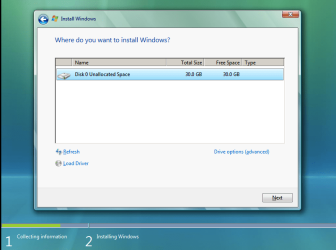
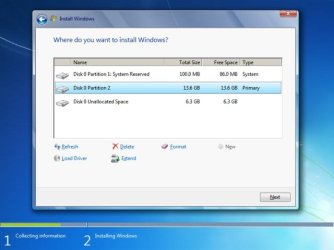
error during set up

mimigrozeva

New member
Local time
6:35 PM
Messages
8
Hello,
I've been trying to install windows 7 on my new Samsung np-n100 notebook but unfortunately without success. When I go to the partitions and I try to start the instalation process it says "Setup was unable to create a new system partition". Help please! :(
 

My Computer

OS
Windows 7

My Computer

Computer Manufacturer/Model Number
Toshiba Satelite P300D 13J (Short model No: PSPDCE)
OS
Windows 7 Enterprise x64 SP1 Version 6.1 Build 7601
CPU
x64bit AMD Turion(tm) X2 Ultra Dual-Core Mobile ZM-82
Memory
4096 (2048 + 2048) MB, DDR2 RAM (800 MHz), max 8,192 MB
Graphics Card(s)
ATI Mobility Radeon™ HD 3650+HyperMemory™(512MB VRAM+2302MB)
Sound Card
Manufacturer: harman/kardon
Monitor(s) Displays
Generic PnP Monitor (MONITOR\LPLA101)
Screen Resolution
1440 x 900 (19" LCD)
Hard Drives
HDD1: TOSHIBA MK3252GSX ATA Device (IDE 320 GB 5,400 o/min) ,
HDD2: Msft Virtual Disk SCSI Disk Device (Virtual Hard Drive),
HDD3: TOSHIBA MK3263GSX USB Device (USB Mobile HDD) (TakeMS MemLine)
PSU
Batery: technology : lithium-ion
Cooling
integrated cooler + 3x external cooler
Keyboard
USB Logitech S520
Mouse
USB Logitech S520
Internet Speed
WAN: 7,2 Mbit/sec, WLAN: 54 Mbit/sec + Bluetooth®
No. I've done that only through started windows, but I don't know how to do it without os installed
 

My Computer

OS
Windows 7
i didn't see the links first time. Thank you. I'll try this :)
 

My Computer

OS
Windows 7
OK,
insert your installatin DVD/USB and proceed to the step where it ask you for partition choosing to install windows.
then press SHIFT+F10 to open up command promt.
now folow the steps given in my first link Partition or Volume - Create New
 

My Computer

Computer Manufacturer/Model Number
Toshiba Satelite P300D 13J (Short model No: PSPDCE)
OS
Windows 7 Enterprise x64 SP1 Version 6.1 Build 7601
CPU
x64bit AMD Turion(tm) X2 Ultra Dual-Core Mobile ZM-82
Memory
4096 (2048 + 2048) MB, DDR2 RAM (800 MHz), max 8,192 MB
Graphics Card(s)
ATI Mobility Radeon™ HD 3650+HyperMemory™(512MB VRAM+2302MB)
Sound Card
Manufacturer: harman/kardon
Monitor(s) Displays
Generic PnP Monitor (MONITOR\LPLA101)
Screen Resolution
1440 x 900 (19" LCD)
Hard Drives
HDD1: TOSHIBA MK3252GSX ATA Device (IDE 320 GB 5,400 o/min) ,
HDD2: Msft Virtual Disk SCSI Disk Device (Virtual Hard Drive),
HDD3: TOSHIBA MK3263GSX USB Device (USB Mobile HDD) (TakeMS MemLine)
PSU
Batery: technology : lithium-ion
Cooling
integrated cooler + 3x external cooler
Keyboard
USB Logitech S520
Mouse
USB Logitech S520
Internet Speed
WAN: 7,2 Mbit/sec, WLAN: 54 Mbit/sec + Bluetooth®
when i type create partition primary it says there is not enough usable space for this operation
the partition is 298 GB
 

My Computer

OS
Windows 7
i finally passed all the steps, but when i closed the comand prompt the same error appeared when i tried to install
 

My Computer

OS
Windows 7
when you close command promt after partition/s have been created using DISKPART, hit F5 or click on link refresh to refresh partitions:
SANDeploy-iSCSI-SAN-Install-Windows-Vista-5.png

whole disk should be partitioned in command promt with one or more partitions.


I've forgot, but try to create 2 partitions like this:

diskpart
lis dis
(see all disks)
sel dis 0
(your disk)
cre par pri 143000
(half of a disk for 1. partition)
cre par pri
(create second partition from rest of unusable space)
lis par
(list partitions)
sel par 1
(select first one)
format fs=ntfs quick
active
(make it bootable)
sel par 2
(select second one)
format fs=ntfs quick
inactive
(make it non bootable)
exit


close command promt and
click on refresh and select partition marked as system and install.

see system partition in this image (there is only one (active) )
windows-7-install-layout.jpg
it must work :p
 

My Computer

Computer Manufacturer/Model Number
Toshiba Satelite P300D 13J (Short model No: PSPDCE)
OS
Windows 7 Enterprise x64 SP1 Version 6.1 Build 7601
CPU
x64bit AMD Turion(tm) X2 Ultra Dual-Core Mobile ZM-82
Memory
4096 (2048 + 2048) MB, DDR2 RAM (800 MHz), max 8,192 MB
Graphics Card(s)
ATI Mobility Radeon™ HD 3650+HyperMemory™(512MB VRAM+2302MB)
Sound Card
Manufacturer: harman/kardon
Monitor(s) Displays
Generic PnP Monitor (MONITOR\LPLA101)
Screen Resolution
1440 x 900 (19" LCD)
Hard Drives
HDD1: TOSHIBA MK3252GSX ATA Device (IDE 320 GB 5,400 o/min) ,
HDD2: Msft Virtual Disk SCSI Disk Device (Virtual Hard Drive),
HDD3: TOSHIBA MK3263GSX USB Device (USB Mobile HDD) (TakeMS MemLine)
PSU
Batery: technology : lithium-ion
Cooling
integrated cooler + 3x external cooler
Keyboard
USB Logitech S520
Mouse
USB Logitech S520
Internet Speed
WAN: 7,2 Mbit/sec, WLAN: 54 Mbit/sec + Bluetooth®
cre par pri 143000 - it doesn;t work(the arguments specified for this command are not valid)

this notebook is really getting me crazy
 

My Computer

OS
Windows 7
when i make it with one partition it becomes system partition but the error is still the same..
 

My Computer

OS
Windows 7
OH I'm trully sorry :confused: that was a typo

it should be:
cre par pri size=143000

number is in megabytes.
 

My Computer

Computer Manufacturer/Model Number
Toshiba Satelite P300D 13J (Short model No: PSPDCE)
OS
Windows 7 Enterprise x64 SP1 Version 6.1 Build 7601
CPU
x64bit AMD Turion(tm) X2 Ultra Dual-Core Mobile ZM-82
Memory
4096 (2048 + 2048) MB, DDR2 RAM (800 MHz), max 8,192 MB
Graphics Card(s)
ATI Mobility Radeon™ HD 3650+HyperMemory™(512MB VRAM+2302MB)
Sound Card
Manufacturer: harman/kardon
Monitor(s) Displays
Generic PnP Monitor (MONITOR\LPLA101)
Screen Resolution
1440 x 900 (19" LCD)
Hard Drives
HDD1: TOSHIBA MK3252GSX ATA Device (IDE 320 GB 5,400 o/min) ,
HDD2: Msft Virtual Disk SCSI Disk Device (Virtual Hard Drive),
HDD3: TOSHIBA MK3263GSX USB Device (USB Mobile HDD) (TakeMS MemLine)
PSU
Batery: technology : lithium-ion
Cooling
integrated cooler + 3x external cooler
Keyboard
USB Logitech S520
Mouse
USB Logitech S520
Internet Speed
WAN: 7,2 Mbit/sec, WLAN: 54 Mbit/sec + Bluetooth®
Where did you get the Win7 installer? Did you burn it yourself? If so burn another using ImgBurn at 4x speed, or write the ISO to flash stick using Universal USB Installer with Win7 in drop down menu. Boot under USB, Removable or HD's.

Try wiping the HD first with Diskpart Clean command from DVD Command Line:
Diskpart Clean Command
DISKPART At PC Startup

Then follow these steps to Clean Install Windows 7.

After install you can find any drivers missing in Device Manager here: http://www.samsung.com/in/support/d...-DA01BD&prd_mdl_name=NP-N100&srchword=NP-N100 Go online to check optional Windows Updates first.
 
Last edited:
Hello,
I've been trying to install windows 7 on my new Samsung np-n100 notebook but unfortunately without success. When I go to the partitions and I try to start the instalation process it says "Setup was unable to create a new system partition". Help please! :(

If you have decided to do away with MeeGo, I would advise that you first partition and format your hard drive with a third party software like Partition Wizard.
Partition Wizard Bootable CD allows user to boot computer directly to manage partition.

Since you do not have an optical drive, download the bootable CD ISO and make a bootable pendrive using Universal USB Installer. Universal USB Installer – Easy as 1 2 3 | USB Pen Drive Linux

Partition and format your Hard drive the way you want.(atleast two partitions one for the OS and one for Data)

Install Windows 7 to the already formatted partition. (Download all the necessry Windows 7 drivers from the Samsung Support site. I have already checked that these are available)

This is always much easier, especially for the first timers.

I presume that you have a valid retail Windows 7 and media , made your ISO from that media and the bootable pendrive with that ISO or you have an external optical drive.

Good luck.
 
Last edited:

My Computer

OS
Windows 7 Home Premium 32 bit
i've tried absolutely everything(thank you for the answers :) ). After I've tried with licensed and 2 types of unlicensed windows and all the comands I've called the technical service of the shop. They haven't heard about appearing of the same errors that appeared and it seems that the problem is in the notebook and they'll just change it :)). You're right and what you told me should fix the problems with windows, but the computer's broken :confused:
 

My Computer

OS
Windows 7
Looks like we were putting the cart before the horse.:roflmao:
Just curious. Was the netbook fine with MeeGo?
 

My Computer

OS
Windows 7 Home Premium 32 bit
Back
Top