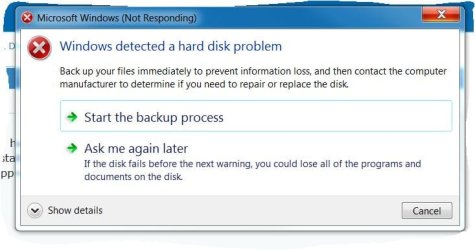
Error Message "Windows has detected a hard disk problem"

crossfireltd

New member
Local time
6:53 PM
Messages
29
Greetings,
I have recently been receiving this error message "Windows has detected a hard disk problem". I noticed this error appeared after a recent windows update, below is a list of the updates that were installed and system information. Also included are the results of ChkDsk and sfc /scannow. Any help regarding this issue would be greatly appreciated.


2018-11 Preview of Monthly Quality Rollup for Windows 7 for x64-based Systems (KB4467108)

Installation date: ‎12/‎10/‎2018 7:06 PM

Installation status: Successful

Update type: Optional

Install this update to resolve issues in Windows. For a complete listing of the issues that are included in this update, see the associated Microsoft Knowledge Base article for more information. After you install this item, you may have to restart your computer.

More information:
Access Denied

Help and Support:
Access Denied
____________________________________


Definition Update for Windows Defender Antivirus - KB915597 (Definition 1.283.233.0)

Installation date: ‎12/‎10/‎2018 7:05 PM

Installation status: Successful

Update type: Important

Install this update to revise the definition files that are used to detect viruses, spyware, and other potentially unwanted software. Once you have installed this item, it cannot be removed.

More information:
Latest definition updates for Windows Defender Antivirus and other Microsoft antimalware - Windows Defender Security Intelligence

Help and Support:
Access Denied
_________________________________________


Definition Update for Windows Defender Antivirus - KB915597 (Definition 1.283.233.0)

Installation date: ‎12/‎10/‎2018 7:05 PM

Installation status: Successful

Update type: Important

Install this update to revise the definition files that are used to detect viruses, spyware, and other potentially unwanted software. Once you have installed this item, it cannot be removed.

More information:
Latest definition updates for Windows Defender Antivirus and other Microsoft antimalware - Windows Defender Security Intelligence

Help and Support:
Access Denied


System Information:
HP 810-135qe
Windows 7 Professional 64-bit Service Pack 1
Processor: Intel(R) Core (TM)i7-4770 CPU @ 3.40 ghz 3.40 ghz
Installed Memory (RAM) 10.0 GB
System Type 64-bit Operating system


ChkDsk and sfc/scannow results:


Microsoft Windows [Version 6.1.7601]
Copyright (c) 2009 Microsoft Corporation. All rights reserved.

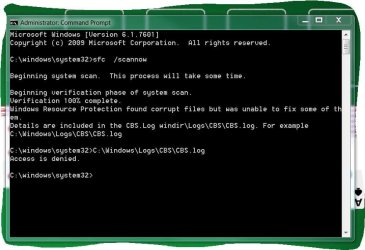
C:\windows\system32>sfc /scannow

Beginning system scan. This process will take some time.

Beginning verification phase of system scan.
Verification 100% complete.
Windows Resource Protection found corrupt files but was unable to fix some of th
em.
Details are included in the CBS.Log windir\Logs\CBS\CBS.log. For example
C:\Windows\Logs\CBS\CBS.log

C:\windows\system32>
_____________________________


Microsoft Windows [Version 6.1.7601]
Copyright (c) 2009 Microsoft Corporation. All rights reserved.

C:\windows\system32>Chk Dsk
'Chk' is not recognized as an internal or external command,
operable program or batch file.

C:\windows\system32>ChkDsk
The type of the file system is NTFS.
Volume label is OS.

WARNING! F parameter not specified.
Running CHKDSK in read-only mode.

CHKDSK is verifying files (stage 1 of 3)...
460288 file records processed.
File verification completed.
2469 large file records processed.
0 bad file records processed.
2 EA records processed.
47 reparse records processed.
CHKDSK is verifying indexes (stage 2 of 3)...
579240 index entries processed.
Index verification completed.
0 unindexed files scanned.
0 unindexed files recovered.
CHKDSK is verifying security descriptors (stage 3 of 3)...
460288 file SDs/SIDs processed.
Security descriptor verification completed.
59477 data files processed.
CHKDSK is verifying Usn Journal...
35494944 USN bytes processed.
Usn Journal verification completed.
The Volume Bitmap is incorrect.
Windows found problems with the file system.
Run CHKDSK with the /F (fix) option to correct these.

1936390143 KB total disk space.
145484016 KB in 387012 files.
220788 KB in 59478 indexes.
0 KB in bad sectors.
625043 KB in use by the system.
65536 KB occupied by the log file.
1790060296 KB available on disk.

4096 bytes in each allocation unit.
484097535 total allocation units on disk.
447515074 allocation units available on disk.

C:\windows\system32>
 

Attachments
  • Capture.JPG
    Capture.JPG
    58.3 KB · Views: 60

My Computer

Computer type
PC/Desktop
Computer Manufacturer/Model Number
HP ENVY Phoenix 810-135qe
OS
Windows 7 Professional 64-bit Service Pack 1
CPU
Intel(R) Core(TM) i7-4770 CPU @ 3.40GHz
Motherboard
2AF3 1.0
Memory
10GB
Graphics Card(s)
NVIDIA High Definition Audio
Hard Drives
San Disk SDSA6DM-016G-100 SCSI
ST2000DM-001-1CH164 SCSI
Antivirus
Norton Security Suite, Spy Bot Pro - S&D+AV ver. 2.5.42.0
Browser
Mozilla Firefox, Google Chrome
You have not run chkdsk c:: /f so it's found errors but hasn't corrected the error's run again with /f
 

My Computer

Computer type
PC/Desktop
OS
win 8 32 bit
Hi crossfireltd,

CHKDSK must be run from an elevated command prompt:

(1) Click Start.
(2) In the search box type cmd.
(3) Right-click the cmd icon from the search results under Programs and select Run as administrator.
(4) The elevated command prompt window will now open.

Run CHKDSK in repair mode. This one repairs errors on the disk without scanning for any bad sectors. Copy chkdsk C: /F [yes there are 2 spaces there] and Paste it [you need to use the mouse right-click and paste for this as CTRL+V doesn’t work] into the elevated command prompt window and press Enter - This does repair any file system errors or corruptions on drive C:\, provided that the disk isn’t in use. If the disk is in use [locked], CHKDSK displays a prompt that asks whether you want to schedule the disk to be checked the next time you restart the OS, click Yes to schedule this check and then Restart. After CHKDSK has completed, Windows should boot normally [possibly after a second auto-reboot].

NOTE: The CHKDSK log can be found in the Event Viewer:

(1) Click Start.
(2) In the search box type eventvwr.msc and press Enter.
(3) On the left-hand sidebar, expand Windows Logs and click Application.
(4) On the right-hand side click Filter current log.
(5) In the Event sources: dropdown list select Wininit, press Enter, and click OK.

You should now only see the log files from the Wininit event sources displayed, which is where the CHKDSK logs are located.

ALTERNATIVELY: You can create your own log location on the Root of C:/ for example at the same time you run CHKDSK. Here is an example for the option above, assuming that the HDD is C:/ and you want the log created on the Root of C:/:

chkdsk C: /F > C:\ chkdskCF_log.txt [change the log name to your own].

Delete the log when you have finished with it!

I hope this helps!
 

My Computer

Computer type
Laptop
Computer Manufacturer/Model Number
Fujitsu LIFEBOOK
OS
Win 7 HP SP1 64-bit Vista HB SP2 32-bit Linux Mint 18.3
CPU
Intel(R) Pentium(R) CPU P6200 @ 2.13GHz
Motherboard
FUJITSU FJNBB06
Memory
4.00 GB
Graphics Card(s)
Intel(R) Graphics Media Accelerator HD
Sound Card
[1] Realtek High Definition Audio [2] Intel(R) Display Audio
Screen Resolution
1366 x 768 x 32 bits (4294967296 colors) @ 59 Hz
Hard Drives
TOSHIBA MK5076GSX
Antivirus
AVG FREE
I would like to thank you all for your responses regarding my issue. Can anyone recommend an affordable replacement drive as HP does not have them available for sale. The driver that is failing is SanDisk SSA6DM-016g-100 SCSI disk drive, if not mistaken this a solid state drive. Doing a bit of research on the web this type of drive is very expensive and I am a man of limited means. Any help or suggestions will be greatly appreciated.
 

My Computer

Computer type
PC/Desktop
Computer Manufacturer/Model Number
HP ENVY Phoenix 810-135qe
OS
Windows 7 Professional 64-bit Service Pack 1
CPU
Intel(R) Core(TM) i7-4770 CPU @ 3.40GHz
Motherboard
2AF3 1.0
Memory
10GB
Graphics Card(s)
NVIDIA High Definition Audio
Hard Drives
San Disk SDSA6DM-016G-100 SCSI
ST2000DM-001-1CH164 SCSI
Antivirus
Norton Security Suite, Spy Bot Pro - S&D+AV ver. 2.5.42.0
Browser
Mozilla Firefox, Google Chrome
Why do you want a new drive there is nothing wrong with the one you have as it says 0 KB in bad sectors. All you have is file structure errors which windows can fix with the /f check
 

My Computer

Computer type
PC/Desktop
OS
win 8 32 bit
Why do you want a new drive there is nothing wrong with the one you have as it says 0 KB in bad sectors. All you have is file structure errors which windows can fix with the /f check
I agree with samuria!
 

My Computer

Computer type
Laptop
Computer Manufacturer/Model Number
Fujitsu LIFEBOOK
OS
Win 7 HP SP1 64-bit Vista HB SP2 32-bit Linux Mint 18.3
CPU
Intel(R) Pentium(R) CPU P6200 @ 2.13GHz
Motherboard
FUJITSU FJNBB06
Memory
4.00 GB
Graphics Card(s)
Intel(R) Graphics Media Accelerator HD
Sound Card
[1] Realtek High Definition Audio [2] Intel(R) Display Audio
Screen Resolution
1366 x 768 x 32 bits (4294967296 colors) @ 59 Hz
Hard Drives
TOSHIBA MK5076GSX
Antivirus
AVG FREE
Hi crossfireltd,

CHKDSK must be run from an elevated command prompt:

(1) Click Start.
(2) In the search box type cmd.
(3) Right-click the cmd icon from the search results under Programs and select Run as administrator.
(4) The elevated command prompt window will now open.

Run CHKDSK in repair mode. This one repairs errors on the disk without scanning for any bad sectors. Copy chkdsk C: /F [yes there are 2 spaces there] and Paste it [you need to use the mouse right-click and paste for this as CTRL+V doesn’t work] into the elevated command prompt window and press Enter - This does repair any file system errors or corruptions on drive C:\, provided that the disk isn’t in use. If the disk is in use [locked], CHKDSK displays a prompt that asks whether you want to schedule the disk to be checked the next time you restart the OS, click Yes to schedule this check and then Restart. After CHKDSK has completed, Windows should boot normally [possibly after a second auto-reboot].

NOTE: The CHKDSK log can be found in the Event Viewer:

(1) Click Start.
(2) In the search box type eventvwr.msc and press Enter.
(3) On the left-hand sidebar, expand Windows Logs and click Application.
(4) On the right-hand side click Filter current log.
(5) In the Event sources: dropdown list select Wininit, press Enter, and click OK.

You should now only see the log files from the Wininit event sources displayed, which is where the CHKDSK logs are located.

ALTERNATIVELY: You can create your own log location on the Root of C:/ for example at the same time you run CHKDSK. Here is an example for the option above, assuming that the HDD is C:/ and you want the log created on the Root of C:/:

chkdsk C: /F > C:\ chkdskCF_log.txt [change the log name to your own].

Delete the log when you have finished with it!

I hope this helps!


Followed your instructions and I am still getting the error message, below is a copy of the event viewer log. Does this mean that the drive is mechanically failing?


Log Name: Application
Source: Microsoft-Windows-Wininit
Date: 12/13/2018 12:16:36 PM
Event ID: 1001
Task Category: None
Level: Information
Keywords: Classic
User: N/A
Computer: RobertsPC-HP
Description:


Checking file system on C:
The type of the file system is NTFS.
Volume label is OS.


A disk check has been scheduled.
Windows will now check the disk.

CHKDSK is verifying files (stage 1 of 3)...
Cleaning up instance tags for file 0x26283.
470272 file records processed. File verification completed.
2754 large file records processed. 0 bad file records processed. 2 EA records processed. 47 reparse records processed. CHKDSK is verifying indexes (stage 2 of 3)...
589598 index entries processed. Index verification completed.
0 unindexed files scanned. 0 unindexed files recovered. CHKDSK is verifying security descriptors (stage 3 of 3)...
470272 file SDs/SIDs processed. Cleaning up 901 unused index entries from index $SII of file 0x9.
Cleaning up 901 unused index entries from index $SDH of file 0x9.
Cleaning up 901 unused security descriptors.
Security descriptor verification completed.
59664 data files processed. CHKDSK is verifying Usn Journal...
36772136 USN bytes processed. Usn Journal verification completed.
CHKDSK discovered free space marked as allocated in the volume bitmap.
Windows has made corrections to the file system.

1936390143 KB total disk space.
145611228 KB in 397355 files.
227924 KB in 59665 indexes.
0 KB in bad sectors.
636539 KB in use by the system.
65536 KB occupied by the log file.
1789914452 KB available on disk.

4096 bytes in each allocation unit.
484097535 total allocation units on disk.
447478613 allocation units available on disk.

Internal Info:
00 2d 07 00 47 f9 06 00 b5 0f 0d 00 00 00 00 00 .-..G...........
02 29 00 00 2f 00 00 00 00 00 00 00 00 00 00 00 .)../...........
00 00 00 00 00 00 00 00 00 00 00 00 00 00 00 00 ................

Windows has finished checking your disk.
Please wait while your computer restarts.

Event Xml:
<Event xmlns="http://schemas.microsoft.com/win/2004/08/events/event">
<System>
<Provider Name="Microsoft-Windows-Wininit" Guid="{206f6dea-d3c5-4d10-bc72-989f03c8b84b}" EventSourceName="Wininit" />
<EventID Qualifiers="16384">1001</EventID>
<Version>0</Version>
<Level>4</Level>
<Task>0</Task>
<Opcode>0</Opcode>
<Keywords>0x80000000000000</Keywords>
<TimeCreated SystemTime="2018-12-13T17:16:36.000000000Z" />
<EventRecordID>2073257</EventRecordID>
<Correlation />
<Execution ProcessID="0" ThreadID="0" />
<Channel>Application</Channel>
<Computer>RobertsPC-HP</Computer>
<Security />
</System>
<EventData>
<Data>

Checking file system on C:
The type of the file system is NTFS.
Volume label is OS.


A disk check has been scheduled.
Windows will now check the disk.

CHKDSK is verifying files (stage 1 of 3)...
Cleaning up instance tags for file 0x26283.
470272 file records processed. File verification completed.
2754 large file records processed. 0 bad file records processed. 2 EA records processed. 47 reparse records processed. CHKDSK is verifying indexes (stage 2 of 3)...
589598 index entries processed. Index verification completed.
0 unindexed files scanned. 0 unindexed files recovered. CHKDSK is verifying security descriptors (stage 3 of 3)...
470272 file SDs/SIDs processed. Cleaning up 901 unused index entries from index $SII of file 0x9.
Cleaning up 901 unused index entries from index $SDH of file 0x9.
Cleaning up 901 unused security descriptors.
Security descriptor verification completed.
59664 data files processed. CHKDSK is verifying Usn Journal...
36772136 USN bytes processed. Usn Journal verification completed.
CHKDSK discovered free space marked as allocated in the volume bitmap.
Windows has made corrections to the file system.

1936390143 KB total disk space.
145611228 KB in 397355 files.
227924 KB in 59665 indexes.
0 KB in bad sectors.
636539 KB in use by the system.
65536 KB occupied by the log file.
1789914452 KB available on disk.

4096 bytes in each allocation unit.
484097535 total allocation units on disk.
447478613 allocation units available on disk.

Internal Info:
00 2d 07 00 47 f9 06 00 b5 0f 0d 00 00 00 00 00 .-..G...........
02 29 00 00 2f 00 00 00 00 00 00 00 00 00 00 00 .)../...........
00 00 00 00 00 00 00 00 00 00 00 00 00 00 00 00 ................

Windows has finished checking your disk.
Please wait while your computer restarts.
</Data>
</EventData>
</Event>
 

My Computer

Computer type
PC/Desktop
Computer Manufacturer/Model Number
HP ENVY Phoenix 810-135qe
OS
Windows 7 Professional 64-bit Service Pack 1
CPU
Intel(R) Core(TM) i7-4770 CPU @ 3.40GHz
Motherboard
2AF3 1.0
Memory
10GB
Graphics Card(s)
NVIDIA High Definition Audio
Hard Drives
San Disk SDSA6DM-016G-100 SCSI
ST2000DM-001-1CH164 SCSI
Antivirus
Norton Security Suite, Spy Bot Pro - S&D+AV ver. 2.5.42.0
Browser
Mozilla Firefox, Google Chrome

My Computer

Computer type
Laptop
Computer Manufacturer/Model Number
Fujitsu LIFEBOOK
OS
Win 7 HP SP1 64-bit Vista HB SP2 32-bit Linux Mint 18.3
CPU
Intel(R) Pentium(R) CPU P6200 @ 2.13GHz
Motherboard
FUJITSU FJNBB06
Memory
4.00 GB
Graphics Card(s)
Intel(R) Graphics Media Accelerator HD
Sound Card
[1] Realtek High Definition Audio [2] Intel(R) Display Audio
Screen Resolution
1366 x 768 x 32 bits (4294967296 colors) @ 59 Hz
Hard Drives
TOSHIBA MK5076GSX
Antivirus
AVG FREE

My Computer

Computer type
PC/Desktop
Computer Manufacturer/Model Number
HP ENVY Phoenix 810-135qe
OS
Windows 7 Professional 64-bit Service Pack 1
CPU
Intel(R) Core(TM) i7-4770 CPU @ 3.40GHz
Motherboard
2AF3 1.0
Memory
10GB
Graphics Card(s)
NVIDIA High Definition Audio
Hard Drives
San Disk SDSA6DM-016G-100 SCSI
ST2000DM-001-1CH164 SCSI
Antivirus
Norton Security Suite, Spy Bot Pro - S&D+AV ver. 2.5.42.0
Browser
Mozilla Firefox, Google Chrome

My Computer

Computer type
Laptop
Computer Manufacturer/Model Number
Fujitsu LIFEBOOK
OS
Win 7 HP SP1 64-bit Vista HB SP2 32-bit Linux Mint 18.3
CPU
Intel(R) Pentium(R) CPU P6200 @ 2.13GHz
Motherboard
FUJITSU FJNBB06
Memory
4.00 GB
Graphics Card(s)
Intel(R) Graphics Media Accelerator HD
Sound Card
[1] Realtek High Definition Audio [2] Intel(R) Display Audio
Screen Resolution
1366 x 768 x 32 bits (4294967296 colors) @ 59 Hz
Hard Drives
TOSHIBA MK5076GSX
Antivirus
AVG FREE
As explained before the output that there is 0 bad sectors means the drive is ok. The errors are not hardware it but just the file system which windows is correcting. If you shut down or system crashes it can cause these errors
 

My Computer

Computer type
PC/Desktop
OS
win 8 32 bit
As explained before the output that there is 0 bad sectors means the drive is ok. The errors are not hardware it but just the file system which windows is correcting. If you shut down or system crashes it can cause these errors


Thank you for your reply, how would one go about fixing the file system?
 

My Computer

Computer type
PC/Desktop
Computer Manufacturer/Model Number
HP ENVY Phoenix 810-135qe
OS
Windows 7 Professional 64-bit Service Pack 1
CPU
Intel(R) Core(TM) i7-4770 CPU @ 3.40GHz
Motherboard
2AF3 1.0
Memory
10GB
Graphics Card(s)
NVIDIA High Definition Audio
Hard Drives
San Disk SDSA6DM-016G-100 SCSI
ST2000DM-001-1CH164 SCSI
Antivirus
Norton Security Suite, Spy Bot Pro - S&D+AV ver. 2.5.42.0
Browser
Mozilla Firefox, Google Chrome
Hi crossfireltd,

Thank you for your reply, how would one go about fixing the file system?

To run SFC [System File Checker], please follow my instructions below!

SFC [System File Checker]

SFC [System File Checker] is a Windows utility program for detecting and repairing corruptions in the protected system files of the Windows OS. If any files are missing or corrupted, they are replaced with a cached copy that is located in a compressed folder at %WinDir%\System32\dllcache. The %WinDir% placeholder represents the Windows OS folder C:\Windows. SFC MUST be run from an elevated command prompt:

(1) Click Start.
(2) In the search box type cmd.
(3) Right-click the cmd icon from the search results under Programs and select Run as administrator.
(4) The elevated command prompt window will now open.

Copy sfc /scannow [yes there is a space there] and Paste it [you need to use the mouse right-click and paste for this as CTRL+V doesn’t work] into the elevated command prompt window and press Enter. When the scan has completed re-boot.

IMPORTANT: Do NOT close the elevated command prompt window until the verification is 100% complete.

IMPORTANT: It might ask for the Win 7 installation DVD to enable SFC to make more than minor repairs. Some files saved on your computer might get deleted during this process.

The scan results will be shown after this process is finished. If any errors are reported, then run it again two or three more times, re-booting in between. For some reason, this can make a difference. I think it has to do with the settings.ini file sometimes showing false positives! If after that, you get a message saying Windows Resource Protection found corrupt files but was unable to fix some of them, then post the CBS.log in C:\Windows\Logs\CBS\CBS.log. I am sure that someone here will be able to look at the log file and give you an answer or advice.

This tutorial [Published by Brink] will show you how to upload the file => Screenshots and Files - Upload and Post in SevenForums.

I hope this helps!
 

My Computer

Computer type
Laptop
Computer Manufacturer/Model Number
Fujitsu LIFEBOOK
OS
Win 7 HP SP1 64-bit Vista HB SP2 32-bit Linux Mint 18.3
CPU
Intel(R) Pentium(R) CPU P6200 @ 2.13GHz
Motherboard
FUJITSU FJNBB06
Memory
4.00 GB
Graphics Card(s)
Intel(R) Graphics Media Accelerator HD
Sound Card
[1] Realtek High Definition Audio [2] Intel(R) Display Audio
Screen Resolution
1366 x 768 x 32 bits (4294967296 colors) @ 59 Hz
Hard Drives
TOSHIBA MK5076GSX
Antivirus
AVG FREE
I was just thinking back to the day this all started, and I am not sure if this may have some bearing on the problem. The day before this happened we had a bad snow storm and had a few electrical rollovers. When the first one happened it shut down my machine and Ihad to reboot it. The next few (3) rollovers did not shut the pc down completely, but my monitors clipped on and off and so did the CPU and I did not have to reboot the system. The next day is when I started getting the error message, could this have caused an issue with the file system?
 

My Computer

Computer type
PC/Desktop
Computer Manufacturer/Model Number
HP ENVY Phoenix 810-135qe
OS
Windows 7 Professional 64-bit Service Pack 1
CPU
Intel(R) Core(TM) i7-4770 CPU @ 3.40GHz
Motherboard
2AF3 1.0
Memory
10GB
Graphics Card(s)
NVIDIA High Definition Audio
Hard Drives
San Disk SDSA6DM-016G-100 SCSI
ST2000DM-001-1CH164 SCSI
Antivirus
Norton Security Suite, Spy Bot Pro - S&D+AV ver. 2.5.42.0
Browser
Mozilla Firefox, Google Chrome
Hi crossfireltd,

I was just thinking back to the day this all started, and I am not sure if this may have some bearing on the problem. The day before this happened we had a bad snow storm and had a few electrical rollovers. When the first one happened it shut down my machine and I had to reboot it. The next few (3) rollovers did not shut the pc down completely, but my monitors clipped on and off and so did the CPU and I did not have to reboot the system. The next day is when I started getting the error message, could this have caused an issue with the file system?

YES. It could produce system file corruptions. samuria also mentioned that shut downs or system crashes can cause these errors as per his post below.

The errors are not hardware but just the file system which windows is correcting. If you shut down or system crashes it can cause these errors

You should have mentioned the storm and the affect it had on your system. In your initial post you seemed to think it was due to an update or something!

I have recently been receiving this error message "Windows has detected a hard disk problem". I noticed this error appeared after a recent windows update.

I suggest you run SFC [System File Checker] as per my post above!

I hope this helps!
 

My Computer

Computer type
Laptop
Computer Manufacturer/Model Number
Fujitsu LIFEBOOK
OS
Win 7 HP SP1 64-bit Vista HB SP2 32-bit Linux Mint 18.3
CPU
Intel(R) Pentium(R) CPU P6200 @ 2.13GHz
Motherboard
FUJITSU FJNBB06
Memory
4.00 GB
Graphics Card(s)
Intel(R) Graphics Media Accelerator HD
Sound Card
[1] Realtek High Definition Audio [2] Intel(R) Display Audio
Screen Resolution
1366 x 768 x 32 bits (4294967296 colors) @ 59 Hz
Hard Drives
TOSHIBA MK5076GSX
Antivirus
AVG FREE
Hi crossfireltd,


You should have mentioned the storm and the affect it had on your system. In your initial post you seemed to think it was due to an update or something!


Indeed I should have.....and I apologize for that. Will follow your instructions and report back. Also here are the results from CrystalDiskInfo:


----------------------------------------------------------------------------
CrystalDiskInfo 8.0.0 (C) 2008-2018 hiyohiyo
Crystal Dew World : https://crystalmark.info/
----------------------------------------------------------------------------

OS : Windows 7 Professional SP1 [6.1 Build 7601] (x64)
Date : 2018/12/13 19:04:16

-- Controller Map ----------------------------------------------------------
+ Intel(R) 8 Series/C220 Chipset Family SATA AHCI Controller [ATA]
- ST2000DM 001-1CH164 SCSI Disk Device
- hp BD E DH12E3SHB SCSI CdRom Device
- SanDisk SDSA6DM-016G-100 SCSI Disk Device

-- Disk List ---------------------------------------------------------------
(1) ST2000DM001-1CH164 : 2000.3 GB [0/0/0, pd1] - st
(2) SanDisk SDSA6DM-016G-1006 : 16.0 GB [1/0/0, pd1] - sd
(3) WDC WD10EACS-00D6B1 : 1000.2 GB [2/X/X, sa1] (V=1058, P=1100) - wd


----------------------------------------------------------------------------
(2) SanDisk SDSA6DM-016G-1006
----------------------------------------------------------------------------
Model : SanDisk SDSA6DM-016G-1006
Firmware : U221006
Serial Number : 141288400596
Disk Size : 16.0 GB (8.4/16.0/16.0/----)
Buffer Size : Unknown
Queue Depth : 32
# of Sectors : 31277232
Rotation Rate : ---- (SSD)
Interface : Serial ATA
Major Version : ACS-2
Minor Version : ACS-2 Revision 3
Transfer Mode : SATA/600 | SATA/600
Power On Hours : 1727 hours
Power On Count : 1874 count
Host Reads : 10613 GB
Host Writes : 60013 GB
Temperature : 22 C (71 F)
Health Status : Good
Features : S.M.A.R.T., APM, 48bit LBA, NCQ, TRIM, DevSleep
APM Level : 0000h [OFF]
AAM Level : ----
Drive Letter :

-- S.M.A.R.T. --------------------------------------------------------------
ID Cur Wor Thr RawValues(6) Attribute Name
01 100 100 __2 000000000000 Vendor Specific
05 100 100 __2 000000000000 Retired Block Count
09 100 100 __0 0000000006BF Power On Hours
0C 100 100 __0 000000000752 Power Cycle Count
A5 100 100 __0 000000BB7B3A Vendor Specific
AA 100 100 __5 000000000000 Reserve Block Count
AB 100 100 __0 000000000000 Program Fail Count
AC 100 100 __0 000000000000 Erase Fail Count
AD 100 100 __0 00000000180B Vendor Specific
AE 100 100 __0 000000000026 Unexpected Power Loss Count
B8 100 100 _97 000000000000 Vendor Specific
BB 100 100 __0 00000000A61D Reported Uncorrectable Errors
BC 100 100 __0 000000000000 Vendor Specific
C2 _78 _22 __0 002D00090016 Temperature
C6 100 100 __0 000000000000 Vendor Specific
C7 200 200 __0 000000000000 Vendor Specific
E6 100 100 __0 000000002710 Vendor Specific
EA 100 100 __0 0000000025F0 Vendor Specific
F1 100 100 __0 001D4DB6739C Total Host Writes
F2 100 100 __0 00052EAC97F1 Total Host Reads

-- IDENTIFY_DEVICE ---------------------------------------------------------
0 1 2 3 4 5 6 7 8 9
000: 0040 3FFF C837 0010 0000 0000 003F 0000 0000 0000
010: 3134 3132 3838 3430 3035 3936 2020 2020 2020 2020
020: 0000 0000 0000 5532 3231 3030 3620 5361 6E44 6973
030: 6B20 5344 5341 3644 4D2D 3031 3647 2D31 3030 3620
040: 2020 2020 2020 2020 2020 2020 2020 8001 4000 2F00
050: 4000 0200 0000 0007 3FFF 0010 003F FC10 00FB 9101
060: 40B0 01DD 0000 0007 0003 0078 0078 0078 0078 4000
070: 0000 0000 0000 0000 0000 001F 850E 0086 0148 0048
080: 03F0 0110 706B 7D09 4123 7469 BC01 4123 407F 0001
090: 0001 0000 FFFE 0000 0000 0000 0000 0000 0000 0000
100: 40B0 01DD 0000 0000 0000 0008 4000 0000 5001 B44B
110: F106 E2D4 0000 0000 0000 0000 0000 0000 0000 401C
120: 401C 0000 0000 0000 0000 0000 0000 0000 0029 0000
130: 0000 0000 0000 0000 0000 0000 0000 0000 0000 0000
140: 0000 0000 0000 0000 0000 0000 0000 0000 0000 0000
150: 0000 0000 0000 0000 0000 0000 0000 0000 0000 0000
160: 0000 0000 0000 0000 0000 0000 0000 0000 0004 0001
170: 0000 0000 2020 2020 0000 0000 0000 0000 0000 0000
180: 0000 0000 0000 0000 0000 0000 0000 0000 0000 0000
190: 0000 0000 0000 0000 0000 0000 0000 0000 0000 0000
200: 0000 0000 0000 0000 0000 0000 0000 0000 0000 4000
210: 0000 0000 0000 0000 0000 0000 0000 0001 0000 0000
220: 0000 0000 103E 0000 0000 0000 0000 0000 0000 0000
230: 0000 0000 0000 0000 0008 0010 0000 0000 0000 0000
240: 0000 0000 0000 0000 0000 0000 0000 0000 0000 0000
250: 0000 0000 0000 0000 0000 1CA5

-- SMART_READ_DATA ---------------------------------------------------------
+0 +1 +2 +3 +4 +5 +6 +7 +8 +9 +A +B +C +D +E +F
000: 01 00 01 2F 00 64 64 00 00 00 00 00 00 00 05 33
010: 00 64 64 00 00 00 00 00 00 00 09 32 00 64 64 BF
020: 06 00 00 00 00 00 0C 32 00 64 64 52 07 00 00 00
030: 00 00 A5 02 00 64 64 3A 7B BB 00 00 00 00 AA 33
040: 00 64 64 00 00 00 00 00 00 00 AB 02 00 64 64 00
050: 00 00 00 00 00 00 AC 02 00 64 64 00 00 00 00 00
060: 00 00 AD 02 00 64 64 0B 18 00 00 00 00 00 AE 02
070: 00 64 64 26 00 00 00 00 00 00 B8 33 00 64 64 00
080: 00 00 00 00 00 00 BB 32 00 64 64 1D A6 00 00 00
090: 00 00 BC 32 00 64 64 00 00 00 00 00 00 00 C2 22
0A0: 00 4E 16 16 00 09 00 2D 00 00 C6 30 00 64 64 00
0B0: 00 00 00 00 00 00 C7 32 00 C8 C8 00 00 00 00 00
0C0: 00 00 E6 02 00 64 64 10 27 00 00 00 00 00 EA 02
0D0: 00 64 64 F0 25 00 00 00 00 00 F1 02 00 64 64 9C
0E0: 73 B6 4D 1D 00 00 F2 02 00 64 64 F1 97 AC 2E 05
0F0: 00 00 00 00 00 00 00 00 00 00 00 00 00 00 00 00
100: 00 00 00 00 00 00 00 00 00 00 00 00 00 00 00 00
110: 00 00 00 00 00 00 00 00 00 00 00 00 00 00 00 00
120: 00 00 00 00 00 00 00 00 00 00 00 00 00 00 00 00
130: 00 00 00 00 00 00 00 00 00 00 00 00 00 00 00 00
140: 00 00 00 00 00 00 00 00 00 00 00 00 00 00 00 00
150: 00 00 00 00 00 00 00 00 00 00 00 00 00 00 00 00
160: 00 00 00 00 00 00 00 00 00 00 00 00 78 00 00 51
170: 03 00 01 00 02 03 00 00 00 00 00 00 00 00 00 00
180: 00 00 00 00 00 00 00 00 00 00 00 00 00 00 00 00
190: 00 00 00 00 00 00 00 00 00 00 00 00 00 00 00 00
1A0: 00 00 00 00 00 00 00 00 00 00 00 00 00 00 00 00
1B0: 00 00 00 00 00 00 00 00 00 00 00 00 00 00 00 00
1C0: 00 00 00 00 00 00 00 00 00 00 00 00 00 00 00 00
1D0: 00 00 00 00 00 00 00 00 00 00 00 00 00 00 00 00
1E0: 00 00 00 00 00 00 00 00 00 00 00 00 00 00 00 00
1F0: 00 00 00 00 00 00 00 00 00 00 00 00 00 00 00 EE

-- SMART_READ_THRESHOLD ----------------------------------------------------
+0 +1 +2 +3 +4 +5 +6 +7 +8 +9 +A +B +C +D +E +F
000: 01 00 01 02 00 00 00 00 00 00 00 00 00 00 05 02
010: 00 00 00 00 00 00 00 00 00 00 09 00 00 00 00 00
020: 00 00 00 00 00 00 0C 00 00 00 00 00 00 00 00 00
030: 00 00 A5 00 00 00 00 00 00 00 00 00 00 00 AA 05
040: 00 00 00 00 00 00 00 00 00 00 AB 00 00 00 00 00
050: 00 00 00 00 00 00 AC 00 00 00 00 00 00 00 00 00
060: 00 00 AD 00 00 00 00 00 00 00 00 00 00 00 AE 00
070: 00 00 00 00 00 00 00 00 00 00 B8 61 00 00 00 00
080: 00 00 00 00 00 00 BB 00 00 00 00 00 00 00 00 00
090: 00 00 BC 00 00 00 00 00 00 00 00 00 00 00 C2 00
0A0: 00 00 00 00 00 00 00 00 00 00 C6 00 00 00 00 00
0B0: 00 00 00 00 00 00 C7 00 00 00 00 00 00 00 00 00
0C0: 00 00 E6 00 00 00 00 00 00 00 00 00 00 00 EA 00
0D0: 00 00 00 00 00 00 00 00 00 00 F1 00 00 00 00 00
0E0: 00 00 00 00 00 00 F2 00 00 00 00 00 00 00 00 00
0F0: 00 00 00 00 00 00 00 00 00 00 00 00 00 00 00 00
100: 00 00 00 00 00 00 00 00 00 00 00 00 00 00 00 00
110: 00 00 00 00 00 00 00 00 00 00 00 00 00 00 00 00
120: 00 00 00 00 00 00 00 00 00 00 00 00 00 00 00 00
130: 00 00 00 00 00 00 00 00 00 00 00 00 00 00 00 00
140: 00 00 00 00 00 00 00 00 00 00 00 00 00 00 00 00
150: 00 00 00 00 00 00 00 00 00 00 00 00 00 00 00 00
160: 00 00 00 00 00 00 00 00 00 00 00 00 00 00 00 00
170: 00 00 00 00 00 00 00 00 00 00 00 00 00 00 00 00
180: 00 00 00 00 00 00 00 00 00 00 00 00 00 00 00 00
190: 00 00 00 00 00 00 00 00 00 00 00 00 00 00 00 00
1A0: 00 00 00 00 00 00 00 00 00 00 00 00 00 00 00 00
1B0: 00 00 00 00 00 00 00 00 00 00 00 00 00 00 00 00
1C0: 00 00 00 00 00 00 00 00 00 00 00 00 00 00 00 00
1D0: 00 00 00 00 00 00 00 00 00 00 00 00 00 00 00 00
1E0: 00 00 00 00 00 00 00 00 00 00 00 00 00 00 00 00
1F0: 00 00 00 00 00 00 00 00 00 00 00 00 00 00 00 48
 
Last edited:

My Computer

Computer type
PC/Desktop
Computer Manufacturer/Model Number
HP ENVY Phoenix 810-135qe
OS
Windows 7 Professional 64-bit Service Pack 1
CPU
Intel(R) Core(TM) i7-4770 CPU @ 3.40GHz
Motherboard
2AF3 1.0
Memory
10GB
Graphics Card(s)
NVIDIA High Definition Audio
Hard Drives
San Disk SDSA6DM-016G-100 SCSI
ST2000DM-001-1CH164 SCSI
Antivirus
Norton Security Suite, Spy Bot Pro - S&D+AV ver. 2.5.42.0
Browser
Mozilla Firefox, Google Chrome
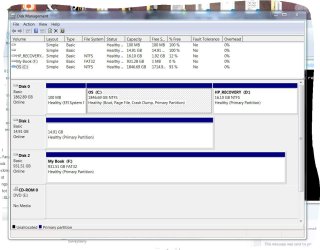
Paul Black & samuria......I have followed your instructions, ran sfc /scannow now 4x with reboots in between. The problem still persists, I have posted a screenshot of the last test results. Also I tried to access the CBS log and was denied access. I have also run DISKMGMT.MS, results are also listed below.
 

Attachments

  • Scannow.JPG
    Scannow.JPG
    88.5 KB · Views: 0
  • dskmgmt.JPG
    dskmgmt.JPG
    170.3 KB · Views: 0
Last edited:

My Computer

Computer type
PC/Desktop
Computer Manufacturer/Model Number
HP ENVY Phoenix 810-135qe
OS
Windows 7 Professional 64-bit Service Pack 1
CPU
Intel(R) Core(TM) i7-4770 CPU @ 3.40GHz
Motherboard
2AF3 1.0
Memory
10GB
Graphics Card(s)
NVIDIA High Definition Audio
Hard Drives
San Disk SDSA6DM-016G-100 SCSI
ST2000DM-001-1CH164 SCSI
Antivirus
Norton Security Suite, Spy Bot Pro - S&D+AV ver. 2.5.42.0
Browser
Mozilla Firefox, Google Chrome

Attachments

  • HDTune.JPG
    HDTune.JPG
    174.3 KB · Views: 1

My Computer

Computer type
PC/Desktop
Computer Manufacturer/Model Number
HP ENVY Phoenix 810-135qe
OS
Windows 7 Professional 64-bit Service Pack 1
CPU
Intel(R) Core(TM) i7-4770 CPU @ 3.40GHz
Motherboard
2AF3 1.0
Memory
10GB
Graphics Card(s)
NVIDIA High Definition Audio
Hard Drives
San Disk SDSA6DM-016G-100 SCSI
ST2000DM-001-1CH164 SCSI
Antivirus
Norton Security Suite, Spy Bot Pro - S&D+AV ver. 2.5.42.0
Browser
Mozilla Firefox, Google Chrome
Run from an administrative CMD prompt chkdsk c: / f
 

My Computer

Computer type
PC/Desktop
OS
win 8 32 bit
Run from an administrative CMD prompt chkdsk c: / f


samuria......I have done this several times and get the same results and I am still receiving the error message.
 

My Computer

Computer type
PC/Desktop
Computer Manufacturer/Model Number
HP ENVY Phoenix 810-135qe
OS
Windows 7 Professional 64-bit Service Pack 1
CPU
Intel(R) Core(TM) i7-4770 CPU @ 3.40GHz
Motherboard
2AF3 1.0
Memory
10GB
Graphics Card(s)
NVIDIA High Definition Audio
Hard Drives
San Disk SDSA6DM-016G-100 SCSI
ST2000DM-001-1CH164 SCSI
Antivirus
Norton Security Suite, Spy Bot Pro - S&D+AV ver. 2.5.42.0
Browser
Mozilla Firefox, Google Chrome
Back
Top