Error on installation

fahl

New member
Member
Local time
7:20 AM
Messages
54
Location
Essex UK
Getting following error on boot screen when installing from usb drive
Code:
B1initialiselibrary FAILED DXC0000009e
Tried several drives but same error
 

My Computer

Computer type
PC/Desktop
Computer Manufacturer/Model Number
custom build
OS
Windows 7 Ultimate x64
CPU
QuadCore AMD A8-7650K, 3800 MHz (38 x 100)
Motherboard
Asus A88XM-A
Memory
16 gb ddr3
Graphics Card(s)
AMD Radeon R7 Series
Hard Drives
SanDisk SDSSDHP128G SATA Disk Device
Antivirus
mcafee
Browser
Firefox
Have you resolved this?
 

My Computer

Computer type
Laptop
Computer Manufacturer/Model Number
Dell M6500 Precision Work Station
OS
Windows 7 Pro SP1 64 bit
Memory
8 GB
Screen Resolution
1920x
Internet Speed
30 Mbps
Antivirus
Norton Security
Browser
IE 11
Try installing a newer operating system like Windows 8 or 10, then make a 6-10 GB partition out of your hard drive. Then copy the contents of the Windows 7 Setup USB to the partition. Then use EasyBCD to make it bootable. If you have any questions, lemme know.
 

My Computer

Computer type
Laptop
Computer Manufacturer/Model Number
MSI
OS
Windows 11 x64
Would it be possible to install to a seperated drive,not a partition?
 

My Computer

Computer type
PC/Desktop
Computer Manufacturer/Model Number
custom build
OS
Windows 7 Ultimate x64
CPU
QuadCore AMD A8-7650K, 3800 MHz (38 x 100)
Motherboard
Asus A88XM-A
Memory
16 gb ddr3
Graphics Card(s)
AMD Radeon R7 Series
Hard Drives
SanDisk SDSSDHP128G SATA Disk Device
Antivirus
mcafee
Browser
Firefox
So make w7 usb drive using rufus & Windows USB Installation Tool
Copy files to New drive,Can i copy them using windows ?how do i need to use Rufus to make it bootable?
Can i use external usb drive or does it need to be installed drive?
Sorry,bit slow at moment,elderly & unwell.
Thanks
 

My Computer

Computer type
PC/Desktop
Computer Manufacturer/Model Number
custom build
OS
Windows 7 Ultimate x64
CPU
QuadCore AMD A8-7650K, 3800 MHz (38 x 100)
Motherboard
Asus A88XM-A
Memory
16 gb ddr3
Graphics Card(s)
AMD Radeon R7 Series
Hard Drives
SanDisk SDSSDHP128G SATA Disk Device
Antivirus
mcafee
Browser
Firefox

My Computer

Computer type
PC/Desktop
Computer Manufacturer/Model Number
HP Desktop & Compaq Laptop
OS
Win 10 x64, Linux Lite, Win 7 x64, BlackArch, & Kali
Hard Drives
Samsung 850 Pro 256Gb,
Hitachi HDD 1Tb,
Crucial MX SSD 250Gb
Segate 3Tb USB 3.0 Ext. Backup HDD
Internet Speed
150Mbps dn, 20Mbps up
Antivirus
Avast Free, Malwarebytes Anti-Exploit & Anti-Ransomware
Browser
Firefox, Chrome, Opera, & VPN
Thanks Snick but i knows how to do all that.
Rufus loads win 7 to usb stick & Usb drivers are essential as windows 7 does not have naative usb 3 support on install

Question was for 2W10 & his proccess,
 

My Computer

Computer type
PC/Desktop
Computer Manufacturer/Model Number
custom build
OS
Windows 7 Ultimate x64
CPU
QuadCore AMD A8-7650K, 3800 MHz (38 x 100)
Motherboard
Asus A88XM-A
Memory
16 gb ddr3
Graphics Card(s)
AMD Radeon R7 Series
Hard Drives
SanDisk SDSSDHP128G SATA Disk Device
Antivirus
mcafee
Browser
Firefox
I used this tool from Microsoft when I installed Windows 7 onto my Netbook. To my surprise it worked without a hitch and was the first time I ever installed Windows via USB. I've always used optical media. The thing about Rufus is that there are several options that need to be checked off and can be overlay complicated. So if you find yourself not getting the right options set then try this very simple tool. I'd encourage you to try a USB 3.0 drive first as that would be the fastest. https://www.microsoft.com/en-us/download/windows-usb-dvd-download-tool
 

My Computer

Computer type
PC/Desktop
OS
Windows 7 Ultimate x64
Rufus with default options works for my Win7 install USBs every time! Don't see & never had a problem with it!
 

My Computer

Computer type
PC/Desktop
Computer Manufacturer/Model Number
HP Desktop & Compaq Laptop
OS
Win 10 x64, Linux Lite, Win 7 x64, BlackArch, & Kali
Hard Drives
Samsung 850 Pro 256Gb,
Hitachi HDD 1Tb,
Crucial MX SSD 250Gb
Segate 3Tb USB 3.0 Ext. Backup HDD
Internet Speed
150Mbps dn, 20Mbps up
Antivirus
Avast Free, Malwarebytes Anti-Exploit & Anti-Ransomware
Browser
Firefox, Chrome, Opera, & VPN
[Rufus with default options works for my Win7 install USBs every time! Don't see & never had a problem with it!/QUOTE]
Try it with a Ryzen cpu!!
 

My Computer

Computer type
PC/Desktop
Computer Manufacturer/Model Number
custom build
OS
Windows 7 Ultimate x64
CPU
QuadCore AMD A8-7650K, 3800 MHz (38 x 100)
Motherboard
Asus A88XM-A
Memory
16 gb ddr3
Graphics Card(s)
AMD Radeon R7 Series
Hard Drives
SanDisk SDSSDHP128G SATA Disk Device
Antivirus
mcafee
Browser
Firefox

My Computer

Computer type
PC/Desktop
Computer Manufacturer/Model Number
HP Desktop & Compaq Laptop
OS
Win 10 x64, Linux Lite, Win 7 x64, BlackArch, & Kali
Hard Drives
Samsung 850 Pro 256Gb,
Hitachi HDD 1Tb,
Crucial MX SSD 250Gb
Segate 3Tb USB 3.0 Ext. Backup HDD
Internet Speed
150Mbps dn, 20Mbps up
Antivirus
Avast Free, Malwarebytes Anti-Exploit & Anti-Ransomware
Browser
Firefox, Chrome, Opera, & VPN
Tried this using SIW2 post.
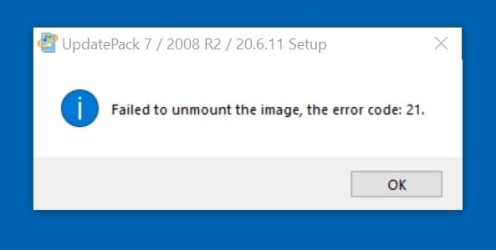
All worked fine till i got this.


Code:
The installation log of UpdatePack 7 / 2008 R2 / 20.6.11
Installation start time - 7:45:11 03.07.2020
Operating system - Windows 7 Ultimate SP1 x64

KB917607 - Integration of the update has been successfully completed
KB2533552 - Integration of the update has been successfully completed
KB2545698 - Integration of the update has been successfully completed
KB2547666 - Integration of the update has been successfully completed
KB2574819-v2 - Integration of the update has been successfully completed
KB2592687 - Integration of the update has been successfully completed
KB2603229 - Integration of the update has been successfully completed
KB2667402-v2 - Integration of the update has been successfully completed
KB2670838 - Integration of the update has been successfully completed
KB2685811 - Integration of the update has been successfully completed
KB2685813 - Integration of the update has been successfully completed
KB2698365 - Integration of the update has been successfully completed
KB2729094-v2 - Integration of the update has been successfully completed
KB2732059-v5 - Integration of the update has been successfully completed
KB2750841 - Integration of the update has been successfully completed
KB2761217 - Integration of the update has been successfully completed
KB2773072 - Integration of the update has been successfully completed
KB2818604 - Integration of the update has been successfully completed
KB2830477 - Integration of the update has been successfully completed
KB2834140-v2 - Integration of the update has been successfully completed
KB2862330-v2 - Integration of the update has been successfully completed
KB2894844 - Integration of the update has been successfully completed
KB2900986 - Integration of the update has been successfully completed
KB2919469 - Integration of the update has been successfully completed
KB2970228 - Integration of the update has been successfully completed
KB2984972 - Integration of the update has been successfully completed
KB2990941-v3 - Integration of the update has been successfully completed (Recovery)
KB3004375-v3 - Integration of the update has been successfully completed
KB3006137 - Integration of the update has been successfully completed
KB3046269 - Integration of the update has been successfully completed
KB3059317 - Integration of the update has been successfully completed
KB3064209 - Integration of the update has been successfully completed
KB3087873-v2 - Integration of the update has been successfully completed (Recovery)
KB3102429-v2 - Integration of the update has been successfully completed
KB3138612 - Integration of the update has been successfully completed
KB3156016 - Integration of the update has been successfully completed
KB3159398 - Integration of the update has been successfully completed
KB3161102 - Integration of the update has been successfully completed
KB3161949 - Integration of the update has been successfully completed
KB3179573 - Integration of the update has been successfully completed
KB3184143 - Integration of the update has been successfully completed
KB4019990 - Integration of the update has been successfully completed
KB4474419-v3 - Integration of the update has been successfully completed
KB4490628 - Integration of the update has been successfully completed
KB4562030 - Integration of the update has been successfully completed
UpdRoots - Integration of the update has been successfully completed
Internet Explorer 11 - Integration of the update has been successfully completed
IE-Hyphenation-en - Integration of the update has been successfully completed
IE-Spelling-en - Integration of the update has been successfully completed
KB3125574-v4 - Integration of the update has been successfully completed
KB4528069 - Integration of the update has been successfully completed
KB4538483 - Integration of the update has been successfully completed
KB4552940 - Integration of the update has been successfully completed
KB4561643 - Integration of the update has been successfully completed

Installation finish time - 8:22:30 03.07.2020
The number of installed updates - 54
Total installation time of UpdatePack - 37:19
Operation of the program has been successfully finished

 

Attachments

  • Untitled.jpg
    Untitled.jpg
    10.9 KB · Views: 6

My Computer

Computer type
PC/Desktop
Computer Manufacturer/Model Number
custom build
OS
Windows 7 Ultimate x64
CPU
QuadCore AMD A8-7650K, 3800 MHz (38 x 100)
Motherboard
Asus A88XM-A
Memory
16 gb ddr3
Graphics Card(s)
AMD Radeon R7 Series
Hard Drives
SanDisk SDSSDHP128G SATA Disk Device
Antivirus
mcafee
Browser
Firefox
Try installing a newer operating system like Windows 8 or 10, then make a 6-10 GB partition out of your hard drive. Then copy the contents of the Windows 7 Setup USB to the partition. Then use EasyBCD to make it bootable. If you have any questions, lemme know.


Maybe try doing that. Or if that dosen't work, try manually installing Windows 7 with the command line.

Hold the Shift key, then press F10.

You will see a command prompt.

Now enter these commands if your computer supports GPT.
diskpart
sel disk 0
clean
convert gpt
create part efi size=500
format fs=fat32 quick
assign letter w
create part primary
format fs=ntfs quick
assign letter c
exit
cd /d D:\sources
dism /apply-image /imagefile:install.wim /index:1 /applydir:C:\
bootrec /scanos
bootrec /fixboot
bootrec /fixmbr
bootrec /rebuildbcd
A
bcdboot C:\Windows /s W:

Enter these commands if your computer does not support GPT. (Do it this way if you get an error trying to convert to GPT)
diskpart
sel disk 0
clean
convert mbr
create part primary
format fs=ntfs quick
assign letter c
exit
cd /d D:\sources
dism /apply-image /imagefile:install.wim /index:1 /applydir:C:\
bootrec /scanos
bootrec /fixboot
bootrec /fixmbr
bootrec /rebuildbcd
A
bcdboot C:\Windows

Now restart. Then setup Windows like you normally would.
 

My Computer

Computer type
Laptop
Computer Manufacturer/Model Number
MSI
OS
Windows 11 x64
Back
Top