
Error saving tubes in psp 7 in win 7

Bon

New member
Local time
2:53 AM
Messages
3
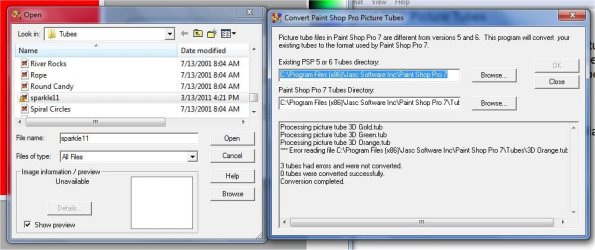
I am trying to save a sparkle tube from a web page and I got the instructions but when I get to the part where I pick where it is to go, and I say paint shop pro7 and click it, I get an error and it looks like it is trying to put something else in there. I can't figure out why I can't get the sparkle11 to go in the tube. I took a screen print and I am going to try to send it with this note as an attachment
At one point it did go in the tube file but as you will see in the attachment, it has a different kind of icon next to it and it won't show up in psp when I click on tubes. Please help! Thanks,Bon
 

Attachments
  • PSP-ScreenPrint.jpg
    PSP-ScreenPrint.jpg
    66.6 KB · Views: 12

My Computer My Computer

OS
Windows 7 Home Premium 64 bit
It's old software you may want to navigate to the jasc folder in your program files find the main psp exe file right click it, choose properties, then the compatibility tab and put it in xp compatibility mode.
 

My Computer My Computer

Computer Manufacturer/Model Number
Insane hobo technologies. ;-)
OS
Windows 7 x64
CPU
Intel i7 2600k
Motherboard
Asrock z68 extreme 4 gen 3
Memory
G.skill Ripjaw 16gigs @ 1866
Graphics Card(s)
Nvidia gtx580 (evga)
Sound Card
Integrated HD audio + hdmi
Monitor(s) Displays
24" ASUS widescreen + 42" insignia
Screen Resolution
1080p (1920x1080)
Hard Drives
128 Samsung 830
256 Samsung 840
3 x 1tb storage drive (various)
1 western digital 1tb (eSATA)
1 Seagate 1tb (eSATA)
PSU
1 kilowatt SLI/Crossfire rated Silverstone modular
Case
NZXT Phantom + additional 220 fan
Cooling
Zalmann
Keyboard
Microsoft wireless 3000 (v2)
Mouse
MS - wireless 5000 (bluetrack)
Internet Speed
depends on if you ask me or my provider.
Other Info
The above information is provided as is, and the author assumes no responsibility for issues it may cause with your sanity or fanboyism.
Hi, I set the compatibility to windows xp and then I tried to save that sparkle by clicking save,and
the window showed that it was a zip file and that it was suppose to go to Paint Shop Pro- tubes, I clicked on save and a window pops up that said it already exists and do I want to replace it, yes or no, I said no, and
then went to look to see if it was in and it wasn't, so I tried it over and said yes to replace it, then I
looked to see if it was in and it wasn't, and also my other sparkles by a different name (jewelsparkles)
were all gone.
Then I tried to save it by left clicking on the sparkle that I wanted and clicked open, then the window
came up for directions where it should go, and it already had the directions so I clicked ok and then
it had that message that is on that screen print that I sent. So what do you think I shoud do?
 

My Computer My Computer

OS
Windows 7 Home Premium 64 bit
Honestly I can only suggest you try and get your hands on a newer version of psp or find a computer with win xp on it.
I have a copy of psp8 and was not able to reproduce your error.
 

My Computer My Computer

Computer Manufacturer/Model Number
Insane hobo technologies. ;-)
OS
Windows 7 x64
CPU
Intel i7 2600k
Motherboard
Asrock z68 extreme 4 gen 3
Memory
G.skill Ripjaw 16gigs @ 1866
Graphics Card(s)
Nvidia gtx580 (evga)
Sound Card
Integrated HD audio + hdmi
Monitor(s) Displays
24" ASUS widescreen + 42" insignia
Screen Resolution
1080p (1920x1080)
Hard Drives
128 Samsung 830
256 Samsung 840
3 x 1tb storage drive (various)
1 western digital 1tb (eSATA)
1 Seagate 1tb (eSATA)
PSU
1 kilowatt SLI/Crossfire rated Silverstone modular
Case
NZXT Phantom + additional 220 fan
Cooling
Zalmann
Keyboard
Microsoft wireless 3000 (v2)
Mouse
MS - wireless 5000 (bluetrack)
Internet Speed
depends on if you ask me or my provider.
Other Info
The above information is provided as is, and the author assumes no responsibility for issues it may cause with your sanity or fanboyism.
Thanks for trying anyway, I had psp 8 but I liked my psp7 better because I knew how everything worked
and it did work ok in xp, but know I have windows 7 and most of psp works ok, except for trying to get
certain tubes in. I guess I will restore in order to at least get those other sparkles back in ( I hope).
I was really trying to figure out how my friend could get that certain sparkle tube in her xp psp 7.
I still have my old xp computer hooked up, so maybe I will try in that one to see how to get that tube
in. Thanks again for trying.
 

My Computer My Computer

OS
Windows 7 Home Premium 64 bit
Out of all the PSP versions 7.0 or 7.04 is by far the best (used it since it first came out). vers 8 and 9 had all kinds of problems that were never solved. After that all the versions looked more like Photoshop than PSP and they do not work the same way and do the same things version 7 will do.

When I first installed Win 7, I installed ver 7.0 and tried to update to 7.04. This absolutely would NOT work. Win 7 would NOT accept the update (which I think is needed).

I finally found the Anniversary Edition of of PSP 7.04 and it installed and runs how it did with Win XP (with a few minor exceptions). I do not have any issues createing tubes.

I am not sure how you installed PSP but if possible use the compatibilty mode and that may help with your issues.

Good luck
 

My Computer My Computer

OS
Windows 7 Pro
CPU
Intel(R) Pentium(R) Duel CPU E2200 2.20 Ghz
Motherboard
GA-G41M-ES2L
Memory
4 gb 2.96 Usable
Graphics Card(s)
Onboard
Sound Card
Onboard
Hard Drives
2 - 1TB WD Sata Drives
Back
Top