
Error while shrinking partition, Windows states it has less space

KingJ92

New member
Local time
11:08 PM
Messages
9
I tried to shrink my Windows partition as I want to try using Ubuntu again (had some issues with some AMD/ATI drivers the last time I tried). I went into Disk Management and used the shrink volume tool. Everything was alright until, alas, the power went out. Now I'm stuck with Windows stating that it only has 1275.71GB available though the partition never shrank and the shrink tool states that it can't shrink the partition at all. Does anyone know if there is any way to revert this? I'm not to confident with having Ubuntu shrink the volume since Windows is having issues with it.
 

Attachments
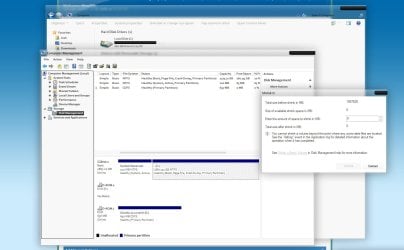
  • shrink error.jpg
    shrink error.jpg
    92.6 KB · Views: 63

My Computer

Computer Manufacturer/Model Number
Custom Bulid
OS
Windows 7 Ultimate 64bit
CPU
AMD Phenom II x4 965 3.4Ghz
Motherboard
ASUS M4A89GTD
Memory
8GB Patriot Memory
Graphics Card(s)
AMD Radeon HD 6800
Monitor(s) Displays
Samsung SyncMaster / Generic Monitor
Screen Resolution
1920x1080 / 1280x1024
Hard Drives
2TB HITACHI Deskstar 7K3000
How big is the drive? Your specs say you have WD 120GB WD 200GB but looks like that is no longer the case.
 

My Computer

Computer type
PC/Desktop
Computer Manufacturer/Model Number
Lenovo IdeaCenter 450
OS
Windows 10 Pro X64
CPU
Intel Quad Core i7-4770 @ 3.4Ghz
Memory
16.0GB PC3-12800 DDR3 SDRAM 1600 MHz
Graphics Card(s)
Intel Integrated HD Graphics
Sound Card
Realtek HD Audio
Monitor(s) Displays
HP 22" LCD
Screen Resolution
1680 x 1050
Hard Drives
250GB Samsung EVO SATA-3 SSD
2TB Seagate ST2000DM001 SATA-2
1.5TB Seagate ST3150041AS SATA
Keyboard
Dell USB
Mouse
Lenovo USB
Internet Speed
Cable via Road Runner 3MB Upload, 30MB Download
Antivirus
Windows Defender, MBAM Pro, MBAE
Browser
Seamonkey
Other Info
UEFI/GPT
PLDS DVD-RW DH16AERSH
Yeah I set up a new PC a few months ago. I haven't been here for a while.
I have one 2TB HITACHI Deskstar 7K3000. Sorry about the confusion.
 

My Computer

Computer Manufacturer/Model Number
Custom Bulid
OS
Windows 7 Ultimate 64bit
CPU
AMD Phenom II x4 965 3.4Ghz
Motherboard
ASUS M4A89GTD
Memory
8GB Patriot Memory
Graphics Card(s)
AMD Radeon HD 6800
Monitor(s) Displays
Samsung SyncMaster / Generic Monitor
Screen Resolution
1920x1080 / 1280x1024
Hard Drives
2TB HITACHI Deskstar 7K3000
So I've tried chkdsk and a few other tools. Some on Windows and Ubuntu. Nothing seems to fix the issue. I'm thinking about trying to re-size the the partition in Ubuntu (after backing up first) and if that doesn't work than I'll probably just reformat. Any other ideas that I could try first?
 

My Computer

Computer Manufacturer/Model Number
Custom Bulid
OS
Windows 7 Ultimate 64bit
CPU
AMD Phenom II x4 965 3.4Ghz
Motherboard
ASUS M4A89GTD
Memory
8GB Patriot Memory
Graphics Card(s)
AMD Radeon HD 6800
Monitor(s) Displays
Samsung SyncMaster / Generic Monitor
Screen Resolution
1920x1080 / 1280x1024
Hard Drives
2TB HITACHI Deskstar 7K3000

My Computer

Computer Manufacturer/Model Number
HP Pavilion Elite 495UK
OS
Windows 7 Ultimate SP1 64-Bit
CPU
Intel Core i7 870 @ 2.93GHz
Motherboard
MSI 2A9C (CPU1)
Memory
8Gb Dual-Channel DDR3 @ 664MHz
Graphics Card(s)
nVidia GeForce GTX 460 1024MB dedicated RAM
Sound Card
Realtek HD Audio
Monitor(s) Displays
HP2310i
Screen Resolution
1920 x 1080
Hard Drives
1x1954GB Hitachi HDS22020ALA 330 (RAID), 1x1954GB Hitachi External for backup and storage
PSU
460W
Case
HP Elite
Cooling
Air cooled
Keyboard
Logitech K750 solar-powered keyboard
Mouse
Logitech Wireless M180 mouse
Internet Speed
2Mb
Other Info
Pure Avanti Flow Internet Radio with iPod Dock, 64Gb iPod, HP USB Speakers, Sony MDR-V500 Headphones, Sony Vaio F-Series Laptop
Back
Top