Ethernet Connection Unresponsive

chitoh

New member
Local time
4:35 PM
Messages
4
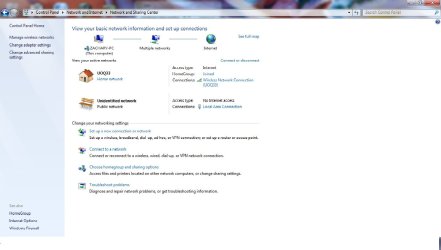
Hey all, I looked around but could not find anything else like the problem that I have now. I can get online with WiFi fine but i'm assuming that my LAN adapter isn't working correctly.

Here's some things I've tried:
re-installing drivers for my Ethernet port
went through my routers settings and it failed to receive any packets
tried 2 other cables
ipconfig release > renew (said it failed because there was no response to DHCP?)


Does anyone have any idea of what I can do to fix this?

Thanks in advance!

Microsoft Windows [Version 6.1.7601]
Copyright (c) 2009 Microsoft Corporation. All rights reserved.

C:\Users\Zachary>ipconfig /all

Windows IP Configuration

Host Name . . . . . . . . . . . . : Zachary-PC
Primary Dns Suffix . . . . . . . :
Node Type . . . . . . . . . . . . : Hybrid
IP Routing Enabled. . . . . . . . : No
WINS Proxy Enabled. . . . . . . . : No
DNS Suffix Search List. . . . . . : home

Ethernet adapter Local Area Connection:

Connection-specific DNS Suffix . :
Description . . . . . . . . . . . : Intel(R) 82579V Gigabit Network Connectio
n
Physical Address. . . . . . . . . : C8-60-00-6A-39-AA
DHCP Enabled. . . . . . . . . . . : Yes
Autoconfiguration Enabled . . . . : Yes
Link-local IPv6 Address . . . . . : fe80::ac3b:7945:3950:2789%14(Preferred)
Autoconfiguration IPv4 Address. . : 169.254.39.137(Preferred)
Subnet Mask . . . . . . . . . . . : 255.255.0.0
Default Gateway . . . . . . . . . :
DHCPv6 IAID . . . . . . . . . . . : 248012800
DHCPv6 Client DUID. . . . . . . . : 00-01-00-01-17-0C-63-D9-C0-C1-C0-69-B5-12

DNS Servers . . . . . . . . . . . : fec0:0:0:ffff::1%1
fec0:0:0:ffff::2%1
fec0:0:0:ffff::3%1
NetBIOS over Tcpip. . . . . . . . : Enabled

Wireless LAN adapter Wireless Network Connection:

Connection-specific DNS Suffix . : home
Description . . . . . . . . . . . : Linksys AE2500
Physical Address. . . . . . . . . : C0-C1-C0-69-B5-12
DHCP Enabled. . . . . . . . . . . : Yes
Autoconfiguration Enabled . . . . : Yes
Link-local IPv6 Address . . . . . : fe80::60ec:7eca:e162:74ef%11(Preferred)
IPv4 Address. . . . . . . . . . . : 192.168.1.4(Preferred)
Subnet Mask . . . . . . . . . . . : 255.255.255.0
Lease Obtained. . . . . . . . . . : Saturday, May 05, 2012 3:48:49 AM
Lease Expires . . . . . . . . . . : Sunday, May 06, 2012 3:48:49 AM
Default Gateway . . . . . . . . . : 192.168.1.1
DHCP Server . . . . . . . . . . . : 192.168.1.1
DHCPv6 IAID . . . . . . . . . . . : 247513536
DHCPv6 Client DUID. . . . . . . . : 00-01-00-01-17-0C-63-D9-C0-C1-C0-69-B5-12

DNS Servers . . . . . . . . . . . : 192.168.1.1
71.242.0.12
NetBIOS over Tcpip. . . . . . . . : Enabled

Tunnel adapter isatap.home:

Media State . . . . . . . . . . . : Media disconnected
Connection-specific DNS Suffix . : home
Description . . . . . . . . . . . : Microsoft ISATAP Adapter
Physical Address. . . . . . . . . : 00-00-00-00-00-00-00-E0
DHCP Enabled. . . . . . . . . . . : No
Autoconfiguration Enabled . . . . : Yes

Tunnel adapter Local Area Connection* 9:

Connection-specific DNS Suffix . :
Description . . . . . . . . . . . : Teredo Tunneling Pseudo-Interface
Physical Address. . . . . . . . . : 00-00-00-00-00-00-00-E0
DHCP Enabled. . . . . . . . . . . : No
Autoconfiguration Enabled . . . . : Yes
IPv6 Address. . . . . . . . . . . : 2001:0:4137:9e76:38e2:252:9f0b:82c(Prefer
red)
Link-local IPv6 Address . . . . . : fe80::38e2:252:9f0b:82c%15(Preferred)
Default Gateway . . . . . . . . . : ::
NetBIOS over Tcpip. . . . . . . . : Disabled

Tunnel adapter isatap.{CA7E860A-508A-4887-A421-DB79356AAC01}:

Media State . . . . . . . . . . . : Media disconnected
Connection-specific DNS Suffix . :
Description . . . . . . . . . . . : Microsoft ISATAP Adapter #2
Physical Address. . . . . . . . . : 00-00-00-00-00-00-00-E0
DHCP Enabled. . . . . . . . . . . : No
Autoconfiguration Enabled . . . . : Yes

EDIT: Ipconfig /all just in case it's asked for :)
 

Attachments

  • ethernet.jpg
    ethernet.jpg
    144.7 KB · Views: 18
Last edited:

My Computer

OS
Windows 7 64 bit

My Computer

Computer Manufacturer/Model Number
HP Pavilion Elite 495UK
OS
Windows 7 Ultimate SP1 64-Bit
CPU
Intel Core i7 870 @ 2.93GHz
Motherboard
MSI 2A9C (CPU1)
Memory
8Gb Dual-Channel DDR3 @ 664MHz
Graphics Card(s)
nVidia GeForce GTX 460 1024MB dedicated RAM
Sound Card
Realtek HD Audio
Monitor(s) Displays
HP2310i
Screen Resolution
1920 x 1080
Hard Drives
1x1954GB Hitachi HDS22020ALA 330 (RAID), 1x1954GB Hitachi External for backup and storage
PSU
460W
Case
HP Elite
Cooling
Air cooled
Keyboard
Logitech K750 solar-powered keyboard
Mouse
Logitech Wireless M180 mouse
Internet Speed
2Mb
Other Info
Pure Avanti Flow Internet Radio with iPod Dock, 64Gb iPod, HP USB Speakers, Sony MDR-V500 Headphones, Sony Vaio F-Series Laptop
Hey all, I looked around but could not find anything else like the problem that I have now. I can get online with WiFi fine but i'm assuming that my LAN adapter isn't working correctly.

Here's some things I've tried:
re-installing drivers for my Ethernet port
went through my routers settings and it failed to receive any packets
tried 2 other cables
ipconfig release > renew (said it failed because there was no response to DHCP?)


Does anyone have any idea of what I can do to fix this?

Thanks in advance!

Microsoft Windows [Version 6.1.7601]
Copyright (c) 2009 Microsoft Corporation. All rights reserved.

C:\Users\Zachary>ipconfig /all

Windows IP Configuration

Host Name . . . . . . . . . . . . : Zachary-PC
Primary Dns Suffix . . . . . . . :
Node Type . . . . . . . . . . . . : Hybrid
IP Routing Enabled. . . . . . . . : No
WINS Proxy Enabled. . . . . . . . : No
DNS Suffix Search List. . . . . . : home

Ethernet adapter Local Area Connection:

Connection-specific DNS Suffix . :
Description . . . . . . . . . . . : Intel(R) 82579V Gigabit Network Connectio
n
Physical Address. . . . . . . . . : C8-60-00-6A-39-AA
DHCP Enabled. . . . . . . . . . . : Yes
Autoconfiguration Enabled . . . . : Yes
Link-local IPv6 Address . . . . . : fe80::ac3b:7945:3950:2789%14(Preferred)
Autoconfiguration IPv4 Address. . : 169.254.39.137(Preferred)
Subnet Mask . . . . . . . . . . . : 255.255.0.0
Default Gateway . . . . . . . . . :
DHCPv6 IAID . . . . . . . . . . . : 248012800
DHCPv6 Client DUID. . . . . . . . : 00-01-00-01-17-0C-63-D9-C0-C1-C0-69-B5-12

DNS Servers . . . . . . . . . . . : fec0:0:0:ffff::1%1
fec0:0:0:ffff::2%1
fec0:0:0:ffff::3%1
NetBIOS over Tcpip. . . . . . . . : Enabled

Wireless LAN adapter Wireless Network Connection:

Connection-specific DNS Suffix . : home
Description . . . . . . . . . . . : Linksys AE2500
Physical Address. . . . . . . . . : C0-C1-C0-69-B5-12
DHCP Enabled. . . . . . . . . . . : Yes
Autoconfiguration Enabled . . . . : Yes
Link-local IPv6 Address . . . . . : fe80::60ec:7eca:e162:74ef%11(Preferred)
IPv4 Address. . . . . . . . . . . : 192.168.1.4(Preferred)
Subnet Mask . . . . . . . . . . . : 255.255.255.0
Lease Obtained. . . . . . . . . . : Saturday, May 05, 2012 3:48:49 AM
Lease Expires . . . . . . . . . . : Sunday, May 06, 2012 3:48:49 AM
Default Gateway . . . . . . . . . : 192.168.1.1
DHCP Server . . . . . . . . . . . : 192.168.1.1
DHCPv6 IAID . . . . . . . . . . . : 247513536
DHCPv6 Client DUID. . . . . . . . : 00-01-00-01-17-0C-63-D9-C0-C1-C0-69-B5-12

DNS Servers . . . . . . . . . . . : 192.168.1.1
71.242.0.12
NetBIOS over Tcpip. . . . . . . . : Enabled

Tunnel adapter isatap.home:

Media State . . . . . . . . . . . : Media disconnected
Connection-specific DNS Suffix . : home
Description . . . . . . . . . . . : Microsoft ISATAP Adapter
Physical Address. . . . . . . . . : 00-00-00-00-00-00-00-E0
DHCP Enabled. . . . . . . . . . . : No
Autoconfiguration Enabled . . . . : Yes

Tunnel adapter Local Area Connection* 9:

Connection-specific DNS Suffix . :
Description . . . . . . . . . . . : Teredo Tunneling Pseudo-Interface
Physical Address. . . . . . . . . : 00-00-00-00-00-00-00-E0
DHCP Enabled. . . . . . . . . . . : No
Autoconfiguration Enabled . . . . : Yes
IPv6 Address. . . . . . . . . . . : 2001:0:4137:9e76:38e2:252:9f0b:82c(Prefer
red)
Link-local IPv6 Address . . . . . : fe80::38e2:252:9f0b:82c%15(Preferred)
Default Gateway . . . . . . . . . : ::
NetBIOS over Tcpip. . . . . . . . : Disabled

Tunnel adapter isatap.{CA7E860A-508A-4887-A421-DB79356AAC01}:

Media State . . . . . . . . . . . : Media disconnected
Connection-specific DNS Suffix . :
Description . . . . . . . . . . . : Microsoft ISATAP Adapter #2
Physical Address. . . . . . . . . : 00-00-00-00-00-00-00-E0
DHCP Enabled. . . . . . . . . . . : No
Autoconfiguration Enabled . . . . : Yes

EDIT: Ipconfig /all just in case it's asked for :)

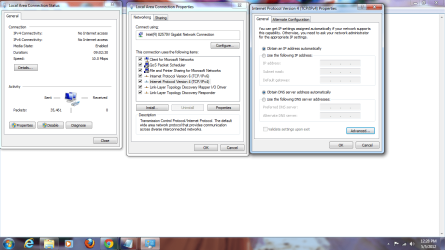
You should check your IPv4 properties window for the wired connection and make sure nothing is entered there and that you have the dot filled to "obtain and IP address automatically, which will enable DHCP.

I can tell by looking at your wireless connection that you have a DNS entry for IPv4 properties, you should also delete that entry and let the router find the DNS for you.

Make sure you have two DNS servers typed in at your routers set up page where it says DNS servers.

You may need to reset the router and start all over again on the settings.
 

My Computer

Computer type
PC/Desktop
Computer Manufacturer/Model Number
Home built
OS
Windows 7 Ult, Windows 8.1 Pro,
CPU
Q9650-4.275GHz, E8600 4.5GHz, E6750-3.8GHz
Motherboard
Evga 780i FTW
Memory
G.Skill PC2 9600 1200Mhz 5 5 5 15 2T
Graphics Card(s)
GTX480
Sound Card
Asus Xonar D2
Monitor(s) Displays
HannsG
Screen Resolution
1680X1050
Hard Drives
GSkill Phoenix Pro 120GB SSD
PSU
ThermalTake Toughpower 1000Watt modular
Case
ThermalTake XaserV
Cooling
Xigmatek S1283
Keyboard
Logitech G15
Mouse
Logitech G9
Internet Speed
T1
You should check your IPv4 properties window for the wired connection and make sure nothing is entered there and that you have the dot filled to "obtain and IP address automatically, which will enable DHCP.

I can tell by looking at your wireless connection that you have a DNS entry for IPv4 properties, you should also delete that entry and let the router find the DNS for you.

Make sure you have two DNS servers typed in at your routers set up page where it says DNS servers.

You may need to reset the router and start all over again on the settings.

I've uploaded a pic below showing that there's nothing manually inputted in either ip/dns. Should I continue to reset the router with new settings?
 

Attachments

  • response.png
    response.png
    259 KB · Views: 23
Last edited:

My Computer

OS
Windows 7 64 bit
You should check your IPv4 properties window for the wired connection and make sure nothing is entered there and that you have the dot filled to "obtain and IP address automatically, which will enable DHCP.

I can tell by looking at your wireless connection that you have a DNS entry for IPv4 properties, you should also delete that entry and let the router find the DNS for you.

Make sure you have two DNS servers typed in at your routers set up page where it says DNS servers.

You may need to reset the router and start all over again on the settings.

I've uploaded a pic below showing that there's nothing manually inputted in either ip/dns. Should I continue to reset the router with new settings?


Yes I would reset the router then go through the routers set up page making sure everything is set up correctly. Type in the DNS servers you want to use, enable DHCP, set up wireless access with SSID and password, WPA-2 security with AES encryption.

From what I could see you had a DNS address entered in the IPv4 settings of your wireless connection >DNS Servers . . . . . . . . . . . : 192.168.1.1, 71.242.0.12, the first DNS entry points to the routers default gateway as it should, the second indicates that there is a DNS server entry, in bold which should be removed. You should add the DNS servers to your routers set up page instead. :)

If that doesn't work then the driver may be at fault or something is blocking the connection.

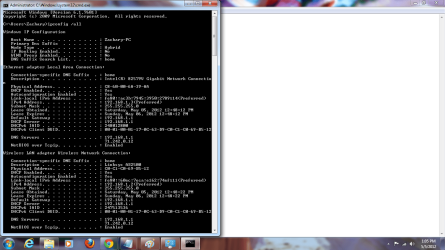
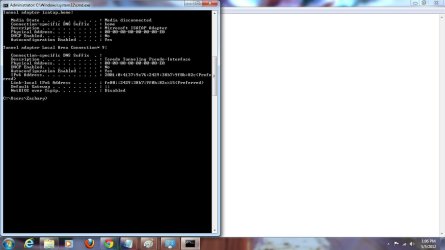
Also with the ipconfig read out, it may be helpful if you can post an actual screen shot with the ipconfig fully expanded. I need to see how many of those tunnel adaptors you have there. It looks like you aren't getting any from the router for your wired connection.
 

My Computer

Computer type
PC/Desktop
Computer Manufacturer/Model Number
Home built
OS
Windows 7 Ult, Windows 8.1 Pro,
CPU
Q9650-4.275GHz, E8600 4.5GHz, E6750-3.8GHz
Motherboard
Evga 780i FTW
Memory
G.Skill PC2 9600 1200Mhz 5 5 5 15 2T
Graphics Card(s)
GTX480
Sound Card
Asus Xonar D2
Monitor(s) Displays
HannsG
Screen Resolution
1680X1050
Hard Drives
GSkill Phoenix Pro 120GB SSD
PSU
ThermalTake Toughpower 1000Watt modular
Case
ThermalTake XaserV
Cooling
Xigmatek S1283
Keyboard
Logitech G15
Mouse
Logitech G9
Internet Speed
T1
What I had posted earlier in the ipconfig readout is all that's there but for both of the tunnel adapters that are showing up, they both say DHCP is not enabled.

First part..............................................................................................Second Part
 

Attachments

  • first part.png
    first part.png
    235.2 KB · Views: 8
  • second part.jpg
    second part.jpg
    135.4 KB · Views: 10

My Computer

OS
Windows 7 64 bit
From what I'm seeing there both the wireless and the wired connection are now online. The DHCP = NO is correct for the tunnel adaptor, nothing to worry about there.

I'm not sure why but Windows seems to be allowing both connections to be active where usually it will choose the wired connection over the wireless if both are active.

I'm not sure why two DNS servers are still showing up, it should only show the default gateway which points to the router as the DNS server. You should check that setting in your routers set up page.

You should disable the wireless connection if you want to use the wired connection, the wired connection should be working at this point according to your ipconfig?
 

My Computer

Computer type
PC/Desktop
Computer Manufacturer/Model Number
Home built
OS
Windows 7 Ult, Windows 8.1 Pro,
CPU
Q9650-4.275GHz, E8600 4.5GHz, E6750-3.8GHz
Motherboard
Evga 780i FTW
Memory
G.Skill PC2 9600 1200Mhz 5 5 5 15 2T
Graphics Card(s)
GTX480
Sound Card
Asus Xonar D2
Monitor(s) Displays
HannsG
Screen Resolution
1680X1050
Hard Drives
GSkill Phoenix Pro 120GB SSD
PSU
ThermalTake Toughpower 1000Watt modular
Case
ThermalTake XaserV
Cooling
Xigmatek S1283
Keyboard
Logitech G15
Mouse
Logitech G9
Internet Speed
T1
Just tried disconnecting wireless to see if the problem had been resolved. Still shows no Internet access. Do you think it could be a problem with the router? I'm using a actiones router from verizon.
 

My Computer

OS
Windows 7 64 bit
Just tried disconnecting wireless to see if the problem had been resolved. Still shows no Internet access. Do you think it could be a problem with the router? I'm using a actiones router from verizon.

It could be a problem with the router.

Resetting the router seems to have fixed the problem according to your ipconfig which shows the wired connection as working.

If it's still not online with the wired connection try saving the file below, unzip and click on the file and let it run, your system will reboot. This should fix any problems related to the network stack or winsock.
 

Attachments

My Computer

Computer type
PC/Desktop
Computer Manufacturer/Model Number
Home built
OS
Windows 7 Ult, Windows 8.1 Pro,
CPU
Q9650-4.275GHz, E8600 4.5GHz, E6750-3.8GHz
Motherboard
Evga 780i FTW
Memory
G.Skill PC2 9600 1200Mhz 5 5 5 15 2T
Graphics Card(s)
GTX480
Sound Card
Asus Xonar D2
Monitor(s) Displays
HannsG
Screen Resolution
1680X1050
Hard Drives
GSkill Phoenix Pro 120GB SSD
PSU
ThermalTake Toughpower 1000Watt modular
Case
ThermalTake XaserV
Cooling
Xigmatek S1283
Keyboard
Logitech G15
Mouse
Logitech G9
Internet Speed
T1
Back
Top