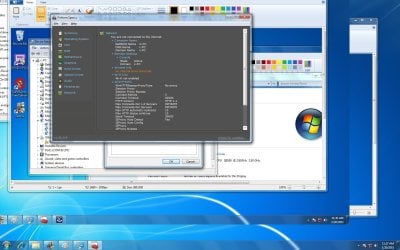
ethernet controller exclamation mark

boien

New member
Local time
5:28 PM
Messages
8
Im having problems wiht my "ethernet conntroller" under "other devices" in my device manager, I see a yellow exclamation next to it. Last time i formatted my machine (this one) I was able to find the driver, although it was a hassle and chase for it. My mb is a "Gigabyte EP45-DS3L". I have downloaded all kinds of drivers for it which seemed to fix another issue, but i just cant seem to get the right driver for the "ethernet controller" to get recognized. Ive installed a few "hardware detection" software programs and I was able to get the mb model at least, and if i remember correctly this boards drivers used the intel chipset but since im not online with it it wont tell me what chipset it is. For some reason I just cant find the correct drivers for this damn controller. Is this is a motherboard/hardware issue? Is this still a software fixable thing? Can someone help me out please?

Thanks
-boien
 

My Computer

Computer Manufacturer/Model Number
Myself
OS
windows 7 64 bit
CPU
Intel core 2 quad Q9550 @ 2.83ghz
Memory
Gigabyte technology co, ltd. EP45-DS3L (Socket 775)
Graphics Card(s)
Nvidia Geforce 9800 GT
Sound Card
High definition audio device (onboard)
Monitor(s) Displays
Gateway hd2201
Screen Resolution
1680x1050@59hz
Hard Drives
488GB Western Digital WDC
PSU
Cooler master 650 watts
Case
Cooler master
Cooling
Cant remember but it's a strong fan
Keyboard
Dynex generic
Mouse
Logitech g500
Internet Speed
Fast

My Computer

Computer Manufacturer/Model Number
Pugh Technologies
OS
W7 Professional x64
CPU
AMD Athlon II X3 445 Rana 3.10 GHz
Motherboard
MSI 870A-G54
Memory
PNY XLR DDR3 1600 4x2GB
Graphics Card(s)
NVIDIA GeForce GTS 450 (fermi) 1GB GDDR5
Sound Card
Realtek ALC892 onboard
Monitor(s) Displays
ASUS VE205t, Viewsonic VX2035WM
Screen Resolution
1600x900, 1600x1050
Hard Drives
977GB Hitachi Hitachi HDS721010CLA332
244GB Western Digital WDC WD2500AAJS-65B4A0
488GB Western Digital WDC WD5000AAJS-00A8B0
488GB Western Digital WDC WD5000AAKS-00UU3A0
PSU
Antec EarthWatts EA650 650W
Case
ThermalTake Armor A90 Mid Tower
Cooling
3x 120mm in, 1x 120mm & 200mm out, self built hydro-cooler
Keyboard
Logitec 55
Mouse
Razer Deathadder
Internet Speed
20 Mbps D/L, 9 Mbps U/L
What If I just installed those drivers and I still see the yellow exclamation? I'm goin to try and just reformat it after but I wanted to try one last thing before I took that step.
 

My Computer

Computer Manufacturer/Model Number
Myself
OS
windows 7 64 bit
CPU
Intel core 2 quad Q9550 @ 2.83ghz
Memory
Gigabyte technology co, ltd. EP45-DS3L (Socket 775)
Graphics Card(s)
Nvidia Geforce 9800 GT
Sound Card
High definition audio device (onboard)
Monitor(s) Displays
Gateway hd2201
Screen Resolution
1680x1050@59hz
Hard Drives
488GB Western Digital WDC
PSU
Cooler master 650 watts
Case
Cooler master
Cooling
Cant remember but it's a strong fan
Keyboard
Dynex generic
Mouse
Logitech g500
Internet Speed
Fast
DEAR boien,
Welcome and you have put two probs. before us! 1) Ethernet Controller (E-C) per se is a chip in the MB and thus strictly speaking is HARDWARE,but the SOFTWARE needed to make it operable is the E-C Driver,as suggested by @liquidsnack! Thusly to solve the riddle, you may (in fact ,must) install the driver on offer and 2) IF the yellow exclamation mark still persists,two possibilities persist.A) The driver was not compatible and/or the hardware "might" have been affected by issues like power probs. and/or your E-C driver has married some malware, b'cause your E-C seems to be affected quite frequently!

So check for Virus,Rootkits and Trojans with the appropriate software!Ideally the MB website (i do not know much about "Gigabyte") will be having the updated and/or the appropriate drivers.I have had many probs. while trying to download drivers from third party sites and you please keep that as your last option! HAVE YOU VISITED THE MB'S SITE AND LOOKED FOR THE DRIVER? Very sorry for the bold type, it was purely for emphasis! If it were i, since i downloaded drivers from so many third party sites,my first focus will be to identify and root out malware as mentioned above!BECAUSE,your drivers will be hit again and again! All said and done, kindly install the driver first, identify any infection next and if it's a Rootkt then i am on your side about formatting!

Please let us know how it all went off! Cheer up Dragon-slayer, we are with you!

regards,
DR.Sreedhav
 

My Computer

Computer Manufacturer/Model Number
Sony Vaio C series VPCCB35FN laptop
OS
MS Windows 7 Home Premium 64-bit SP1
CPU
IntelCore [email protected]; Sandy Bridge 32nm Tech.
Motherboard
Sony Vaio Version:C609NJYJ
Memory
4096Mb RAM; Single ChannelDDR3@665MHz; DRAM Freq:662MHz
Graphics Card(s)
AMD Radeon HD 6630M; GPU:Whistler;BIOS Core&mem Clock:123.36
Sound Card
REALTEK High Definition Audio Device; INTEL Display Card
Monitor(s) Displays
Generic PnP Intel HD;Resolution:1920*1040 Pixels; BPP:32bits
Screen Resolution
Current Resolution:1920*1080 Pixels; Monitor Frequency:60Hz
Hard Drives
Internal HD:TOSHIBA MK5061GSY; Real Size:488 GB;NTFS; 3 Partitions; SATA; HEADS:16

External HDD: WD Elements 1023 PORTABLE; Estimated Size: 1TB; NTFS; 3 Partitions
Cooling
Lateral Exhaust with a Cooling Pad Placed Beneath.
Keyboard
Logitech Bluetooth+ Generic Integrated K-B
Mouse
Logitech Bluetooth
Internet Speed
2MBPS
Other Info
1)Trend Micro Titanium Maximum Security Suite Version:3
2)SAS-PRO

3)MBAM--PRO


4)WATERFOX+IE9 +WOT+LINKEXTEND+ DRWEBCUREIT LINK CHECKER

5)SPYWAREBLASTER

6) WINPATROL PLUS

7) SANDBOXIE and
8) A BIT OF COMMON SENSE.
The hardware detection software I tried was CPUz, driver agent, and driver update, they all told me the same thing about my motherboard. It looks like the LAN driver link is the one that usually worked when I reformatted earlier times, but I'm still seeing the exclamation. Thus is really strange, now I'm strting to think that I could have some malware or Trojans eating up those drivers or something. What spyware/malware/ Trojan antivirus or malware apps would you guys suggest for me even though I can't get online? I tried out avg but that needs an Internet connection to even begin the installation process so that was a dead end.
 

My Computer

Computer Manufacturer/Model Number
Myself
OS
windows 7 64 bit
CPU
Intel core 2 quad Q9550 @ 2.83ghz
Memory
Gigabyte technology co, ltd. EP45-DS3L (Socket 775)
Graphics Card(s)
Nvidia Geforce 9800 GT
Sound Card
High definition audio device (onboard)
Monitor(s) Displays
Gateway hd2201
Screen Resolution
1680x1050@59hz
Hard Drives
488GB Western Digital WDC
PSU
Cooler master 650 watts
Case
Cooler master
Cooling
Cant remember but it's a strong fan
Keyboard
Dynex generic
Mouse
Logitech g500
Internet Speed
Fast
I should have mentioned those apps.,in the previous post! Anyway,here we go: SUPER ANTI SPYWARE. site to download : SUPERAntiSpyware.com | Remove Malware | Remove Spyware - AntiMalware, AntiSpyware, AntiAdware! MBAM--------------------------------->malwarebytes.org IOBIT MALWARE FIGHTER(BETA)-----> |MG| IObit Malware Fighter 1.0 BETA Download Rootkits are a double menace because at times a simple formatting may not completely remove all of them! IMO, the procedure should be A) Identify their presence using at least TWO ANTI ROOTKITS 1)GMER : GMER - Rootkit Detector and Remover As you can see in the downloaded page, any RED entries indicate Rootkits. 2)SOPHOS (you have the advantage here of identifying and "removing"(?) them Sophos Anti-Rootkit - Free Rootkit Detection and Removal Tool .A lot of personal details are asked from unwary entrants, unless you pick and tick that it's for "home use". I do not think Sysinternal's anti rootkit works on Win.7 platform. 2) "erase the HD" with Active Kill disk (free ,single pass,very effective and quite fast). Website to download : Active@ Kill Disk - Hard Drive Eraser - Free software downloads and software reviews - CNET Download.com B) Then partition and format. I prefer to do the partitioning personally, according to my taste and thus do not use any partition Manager. EASEUS website has a free and excellent P-M! Thus my "SOLILOQUY" ( A dramatic or literary form of discourse in which a character talks to himself or reveals his thoughts without addressing a listener.") ends, Regards, sreedhav
 

My Computer

Computer Manufacturer/Model Number
Sony Vaio C series VPCCB35FN laptop
OS
MS Windows 7 Home Premium 64-bit SP1
CPU
IntelCore [email protected]; Sandy Bridge 32nm Tech.
Motherboard
Sony Vaio Version:C609NJYJ
Memory
4096Mb RAM; Single ChannelDDR3@665MHz; DRAM Freq:662MHz
Graphics Card(s)
AMD Radeon HD 6630M; GPU:Whistler;BIOS Core&mem Clock:123.36
Sound Card
REALTEK High Definition Audio Device; INTEL Display Card
Monitor(s) Displays
Generic PnP Intel HD;Resolution:1920*1040 Pixels; BPP:32bits
Screen Resolution
Current Resolution:1920*1080 Pixels; Monitor Frequency:60Hz
Hard Drives
Internal HD:TOSHIBA MK5061GSY; Real Size:488 GB;NTFS; 3 Partitions; SATA; HEADS:16

External HDD: WD Elements 1023 PORTABLE; Estimated Size: 1TB; NTFS; 3 Partitions
Cooling
Lateral Exhaust with a Cooling Pad Placed Beneath.
Keyboard
Logitech Bluetooth+ Generic Integrated K-B
Mouse
Logitech Bluetooth
Internet Speed
2MBPS
Other Info
1)Trend Micro Titanium Maximum Security Suite Version:3
2)SAS-PRO

3)MBAM--PRO


4)WATERFOX+IE9 +WOT+LINKEXTEND+ DRWEBCUREIT LINK CHECKER

5)SPYWAREBLASTER

6) WINPATROL PLUS

7) SANDBOXIE and
8) A BIT OF COMMON SENSE.
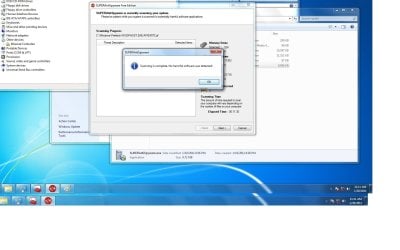
So I ran the superantispyware and both of the root kits that you linked. Fortunately no results on the spyware software or the root kit app any root kit or spyware detected. This is the second time I have formatted and I'm starting to think that its having something to do with the motherboard now. Is there any way I can test out if the mother board hardwaree is messed up now or did these few tests and elimination processes just determine that?

Thanks,
Stumped
 

My Computer

Computer Manufacturer/Model Number
Myself
OS
windows 7 64 bit
CPU
Intel core 2 quad Q9550 @ 2.83ghz
Memory
Gigabyte technology co, ltd. EP45-DS3L (Socket 775)
Graphics Card(s)
Nvidia Geforce 9800 GT
Sound Card
High definition audio device (onboard)
Monitor(s) Displays
Gateway hd2201
Screen Resolution
1680x1050@59hz
Hard Drives
488GB Western Digital WDC
PSU
Cooler master 650 watts
Case
Cooler master
Cooling
Cant remember but it's a strong fan
Keyboard
Dynex generic
Mouse
Logitech g500
Internet Speed
Fast
Here's an idea. Along with the Ethernet driver there is a Realtek Ethernet controller diagnostic tool. You can run it and hopefully it will give you an idea of what's going on.

Here it is already scanned with MSE no problems found. View attachment mb_driver_lan_realtek_rtltool.zip

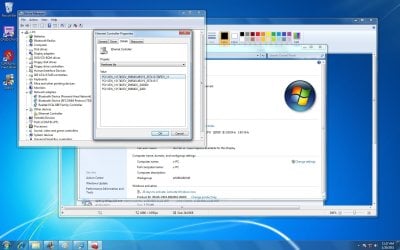
Secondly you can try going to device manager>clicking in the device>properties>drop down menu>select hardware ID>Copy and Paste the hardware Id string and we can look for a driver for you that way.

If the Realtek driver provided above installs yet you still have the exclamation point it's probably because the controller is bad, but running the file I provided should test it and you'll find out.

Also please go to your User cp top of the page, scroll down on the right to edit system specs and fill in all your system specs.

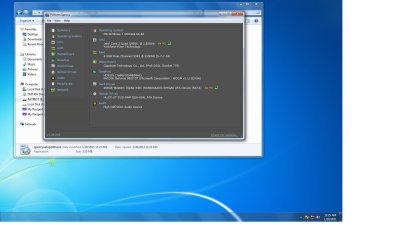
If you need a program to help you with that you can use one of these Speccy - Download

Or this one |MG| HWiNFO32 3.67 Download
Thanks. Fabe
 

My Computer

Computer Manufacturer/Model Number
Self Built
OS
Windows 7 ultimate 64 bit / XP Home sp3
CPU
intel Core 2 Duo E8400 3.0ghz
Motherboard
Asus P5ND bios 1401
Memory
8 gigs 1066 OCZ Fata1ty
Graphics Card(s)
EVGA GTX 580 Call of Duty Black Ops Edition
Sound Card
Creative Soundblaster Audigy 2zs
Monitor(s) Displays
Asus 24in LCD's 2MS X2
Screen Resolution
1920x1080p @60Hz
Hard Drives
WD Caviar 500 Black/ WD Caviar 200 Blue
PSU
OCZ 700W GameXtreme
Case
NZXT Apollo
Cooling
Corsair H50 CPU/120mm x3 /60mm x2 /Corsair Dominator Ram
Keyboard
Logitech Bluetooth Wireless MX5000
Mouse
Logitech Bluetooth Wireless MX1000
Internet Speed
Download 19.83 Upload 0.97
Other Info
Logitech Z2300 Speakers/ Bose Noise Cancelling Headphones/Avermedia PCI-e Hybrid TV Bravo/Epson NX415 all in one/ 4 Port Powered USB Hub/ LG 10x Bluray Burner /TSST Corp DVDRW External
Here's an idea. Along with the Ethernet driver there is a Realtek Ethernet controller diagnostic tool. You can run it and hopefully it will give you an idea of what's going on.

Here it is already scanned with MSE no problems found. View attachment 133188

Secondly you can try going to device manager>clicking in the device>properties>drop down menu>select hardware ID>Copy and Paste the hardware Id string and we can look for a driver for you that way.

If the Realtek driver provided above installs yet you still have the exclamation point it's probably because the controller is bad, but running the file I provided should test it and you'll find out.

Also please go to your User cp top of the page, scroll down on the right to edit system specs and fill in all your system specs.

If you need a program to help you with that you can use one of these Speccy - Download

Or this one |MG| HWiNFO32 3.67 Download
Thanks. Fabe

Nice ideas! The prob.for the@OP is, he cannot connect to the net using his PC! I would rather suggest, that he use a pen drive ,go a cyber cafe ,download the driver you suggested along with UBCD : website : UBCD for Windows
 

My Computer

Computer Manufacturer/Model Number
Sony Vaio C series VPCCB35FN laptop
OS
MS Windows 7 Home Premium 64-bit SP1
CPU
IntelCore [email protected]; Sandy Bridge 32nm Tech.
Motherboard
Sony Vaio Version:C609NJYJ
Memory
4096Mb RAM; Single ChannelDDR3@665MHz; DRAM Freq:662MHz
Graphics Card(s)
AMD Radeon HD 6630M; GPU:Whistler;BIOS Core&mem Clock:123.36
Sound Card
REALTEK High Definition Audio Device; INTEL Display Card
Monitor(s) Displays
Generic PnP Intel HD;Resolution:1920*1040 Pixels; BPP:32bits
Screen Resolution
Current Resolution:1920*1080 Pixels; Monitor Frequency:60Hz
Hard Drives
Internal HD:TOSHIBA MK5061GSY; Real Size:488 GB;NTFS; 3 Partitions; SATA; HEADS:16

External HDD: WD Elements 1023 PORTABLE; Estimated Size: 1TB; NTFS; 3 Partitions
Cooling
Lateral Exhaust with a Cooling Pad Placed Beneath.
Keyboard
Logitech Bluetooth+ Generic Integrated K-B
Mouse
Logitech Bluetooth
Internet Speed
2MBPS
Other Info
1)Trend Micro Titanium Maximum Security Suite Version:3
2)SAS-PRO

3)MBAM--PRO


4)WATERFOX+IE9 +WOT+LINKEXTEND+ DRWEBCUREIT LINK CHECKER

5)SPYWAREBLASTER

6) WINPATROL PLUS

7) SANDBOXIE and
8) A BIT OF COMMON SENSE.
screenshots

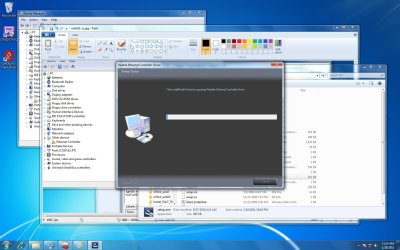
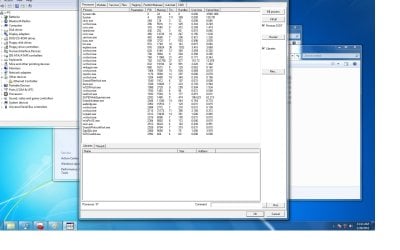
Hi guys. So i have filled out my cpu specs on the cp menu page. I did all of the steps with the diagnostic tools and I have taken several screenshots to do the rest of the talking for me. I figure it will explain more than just words. I have attached them to show you the results of each recommended rootkit/malware/diagnostic tool from you all. Btw I am online via wifi which is how ive been able to use the apps on my pc, its just my pc thats offline so im dl'ing apps from my lap and transfering/installing via flash drive.
 

Attachments

  • ethernet-diagnostic tool-ss1.jpg
    ethernet-diagnostic tool-ss1.jpg
    166.4 KB · Views: 57
  • hardware-ids-ss.jpg
    hardware-ids-ss.jpg
    173.7 KB · Views: 55
  • rootkit1-ss.jpg
    rootkit1-ss.jpg
    157 KB · Views: 35
  • speccy-ss1.jpg
    speccy-ss1.jpg
    106 KB · Views: 33
  • speccy-ss2.jpg
    speccy-ss2.jpg
    182.4 KB · Views: 33
  • superanti-ss.jpg
    superanti-ss.jpg
    123.1 KB · Views: 38

My Computer

Computer Manufacturer/Model Number
Myself
OS
windows 7 64 bit
CPU
Intel core 2 quad Q9550 @ 2.83ghz
Memory
Gigabyte technology co, ltd. EP45-DS3L (Socket 775)
Graphics Card(s)
Nvidia Geforce 9800 GT
Sound Card
High definition audio device (onboard)
Monitor(s) Displays
Gateway hd2201
Screen Resolution
1680x1050@59hz
Hard Drives
488GB Western Digital WDC
PSU
Cooler master 650 watts
Case
Cooler master
Cooling
Cant remember but it's a strong fan
Keyboard
Dynex generic
Mouse
Logitech g500
Internet Speed
Fast

My Computer

Computer Manufacturer/Model Number
Self Built
OS
Windows 7 ultimate 64 bit / XP Home sp3
CPU
intel Core 2 Duo E8400 3.0ghz
Motherboard
Asus P5ND bios 1401
Memory
8 gigs 1066 OCZ Fata1ty
Graphics Card(s)
EVGA GTX 580 Call of Duty Black Ops Edition
Sound Card
Creative Soundblaster Audigy 2zs
Monitor(s) Displays
Asus 24in LCD's 2MS X2
Screen Resolution
1920x1080p @60Hz
Hard Drives
WD Caviar 500 Black/ WD Caviar 200 Blue
PSU
OCZ 700W GameXtreme
Case
NZXT Apollo
Cooling
Corsair H50 CPU/120mm x3 /60mm x2 /Corsair Dominator Ram
Keyboard
Logitech Bluetooth Wireless MX5000
Mouse
Logitech Bluetooth Wireless MX1000
Internet Speed
Download 19.83 Upload 0.97
Other Info
Logitech Z2300 Speakers/ Bose Noise Cancelling Headphones/Avermedia PCI-e Hybrid TV Bravo/Epson NX415 all in one/ 4 Port Powered USB Hub/ LG 10x Bluray Burner /TSST Corp DVDRW External
Can you guys see all of the screenshots that I attaches in the prev post?
 

My Computer

Computer Manufacturer/Model Number
Myself
OS
windows 7 64 bit
CPU
Intel core 2 quad Q9550 @ 2.83ghz
Memory
Gigabyte technology co, ltd. EP45-DS3L (Socket 775)
Graphics Card(s)
Nvidia Geforce 9800 GT
Sound Card
High definition audio device (onboard)
Monitor(s) Displays
Gateway hd2201
Screen Resolution
1680x1050@59hz
Hard Drives
488GB Western Digital WDC
PSU
Cooler master 650 watts
Case
Cooler master
Cooling
Cant remember but it's a strong fan
Keyboard
Dynex generic
Mouse
Logitech g500
Internet Speed
Fast
On your next to the last screen shot where it says winInet Info An enternal erro occurred.

It leads me to believe at this point after everything that you have tried that you must have a bad controller.
It also says Wi-Fi not enabled, you may only be able to use Wi-Fi if it's avalible on your board.
I don't know what else to tell you to try at this point.
Fabe
 

My Computer

Computer Manufacturer/Model Number
Self Built
OS
Windows 7 ultimate 64 bit / XP Home sp3
CPU
intel Core 2 Duo E8400 3.0ghz
Motherboard
Asus P5ND bios 1401
Memory
8 gigs 1066 OCZ Fata1ty
Graphics Card(s)
EVGA GTX 580 Call of Duty Black Ops Edition
Sound Card
Creative Soundblaster Audigy 2zs
Monitor(s) Displays
Asus 24in LCD's 2MS X2
Screen Resolution
1920x1080p @60Hz
Hard Drives
WD Caviar 500 Black/ WD Caviar 200 Blue
PSU
OCZ 700W GameXtreme
Case
NZXT Apollo
Cooling
Corsair H50 CPU/120mm x3 /60mm x2 /Corsair Dominator Ram
Keyboard
Logitech Bluetooth Wireless MX5000
Mouse
Logitech Bluetooth Wireless MX1000
Internet Speed
Download 19.83 Upload 0.97
Other Info
Logitech Z2300 Speakers/ Bose Noise Cancelling Headphones/Avermedia PCI-e Hybrid TV Bravo/Epson NX415 all in one/ 4 Port Powered USB Hub/ LG 10x Bluray Burner /TSST Corp DVDRW External
So bad controller means that it's a hardware issue I'm guessing? Maybe it's time to get a new mobo? Or is the controller software?? Im guessing it's the hardware or jumper switch or something on the mobo that got destroyed or went bad? Guess I have to look into getting a new motherboard?
 

My Computer

Computer Manufacturer/Model Number
Myself
OS
windows 7 64 bit
CPU
Intel core 2 quad Q9550 @ 2.83ghz
Memory
Gigabyte technology co, ltd. EP45-DS3L (Socket 775)
Graphics Card(s)
Nvidia Geforce 9800 GT
Sound Card
High definition audio device (onboard)
Monitor(s) Displays
Gateway hd2201
Screen Resolution
1680x1050@59hz
Hard Drives
488GB Western Digital WDC
PSU
Cooler master 650 watts
Case
Cooler master
Cooling
Cant remember but it's a strong fan
Keyboard
Dynex generic
Mouse
Logitech g500
Internet Speed
Fast
If it's a bad controller then it' a hardware issue.
Has it ever worked and if so when and with what OS? I'd hate to be wrong and you buy a new board, maybe their will still be some suggestions for you to try.

You can always scroll down to the bottom of every thread and their will be a list of other threads with suggestions and problems similar to yours.

Sorry I'm out of suggestions.
Fabe
 

My Computer

Computer Manufacturer/Model Number
Self Built
OS
Windows 7 ultimate 64 bit / XP Home sp3
CPU
intel Core 2 Duo E8400 3.0ghz
Motherboard
Asus P5ND bios 1401
Memory
8 gigs 1066 OCZ Fata1ty
Graphics Card(s)
EVGA GTX 580 Call of Duty Black Ops Edition
Sound Card
Creative Soundblaster Audigy 2zs
Monitor(s) Displays
Asus 24in LCD's 2MS X2
Screen Resolution
1920x1080p @60Hz
Hard Drives
WD Caviar 500 Black/ WD Caviar 200 Blue
PSU
OCZ 700W GameXtreme
Case
NZXT Apollo
Cooling
Corsair H50 CPU/120mm x3 /60mm x2 /Corsair Dominator Ram
Keyboard
Logitech Bluetooth Wireless MX5000
Mouse
Logitech Bluetooth Wireless MX1000
Internet Speed
Download 19.83 Upload 0.97
Other Info
Logitech Z2300 Speakers/ Bose Noise Cancelling Headphones/Avermedia PCI-e Hybrid TV Bravo/Epson NX415 all in one/ 4 Port Powered USB Hub/ LG 10x Bluray Burner /TSST Corp DVDRW External
i guess this was my last option but shouldve been my first

Hey guys, update. So i tried something else, since the 2 pci-e slots taht i put my nic card into aren't working ( this is actually something that I should've thought of before, I guess I was just too confused with why the two usual slots that i use weren't working ). I noticed that whatever drivers you guys pointed me to, like the original one from the gigabyte website that was actually the second post of this thread, which was the driver that I usually use to activate my LAN unit on this particular motherboard. In that awareness I noticed that in device manager that the "Network Adapter" drivers were all ok and recognized. So with that I just decided to plug my ethernet chord into my onboard ethernet port and it connected to the internet. So does this mean that those 2 pci slots are pretty much bad, and should I look into getting a new motherboard? Can someone tell me what exactly is a "controller"? Is it part of the motherboard's hardware? If there is soething to take from this thread that can be used to help troubleshoot peoples problems in the future, then I would say, if the pci slots are not working, run through all of the steps you guys have all given to me (rootkits, malware detection, etc) then chances are, is its not your nic card and to just use the (if you have one) onboard network for now.

P.s. The other devices > Ethernet controller, is still yellow and still doesnt look to be fixed/recognized.
 

My Computer

Computer Manufacturer/Model Number
Myself
OS
windows 7 64 bit
CPU
Intel core 2 quad Q9550 @ 2.83ghz
Memory
Gigabyte technology co, ltd. EP45-DS3L (Socket 775)
Graphics Card(s)
Nvidia Geforce 9800 GT
Sound Card
High definition audio device (onboard)
Monitor(s) Displays
Gateway hd2201
Screen Resolution
1680x1050@59hz
Hard Drives
488GB Western Digital WDC
PSU
Cooler master 650 watts
Case
Cooler master
Cooling
Cant remember but it's a strong fan
Keyboard
Dynex generic
Mouse
Logitech g500
Internet Speed
Fast
Back
Top