Solved Event 3 on boot: NT Kernel Log full, error 0xC000000D

HolyHarmonica

New member
Local time
1:41 AM
Messages
38
Location
Small village in Udon Thani THAILAND
Every time I boot my PC I get this error; an etl file reaches its size limit of 100 MB. I did a little research and it seems that the Kernel Logger is a diagnostic tool which is best started manually. The kernel generates a lot of data fast so the etl file fills up within seconds. How can I figure out how the logger is being started and how to prevent it from starting? Does this sound like a reasonable strategy? Thanks.

Log Name: Microsoft-Windows-Kernel-EventTracing/Admin
Source: Microsoft-Windows-Kernel-EventTracing
Date: 22/6/17 07:28:29
Event ID: 3
Task Category: Session
Level: Error
Keywords: Session
User: SYSTEM
Computer: CoolerMaster-PC
Description:
Session "NT Kernel Logger" stopped due to the following error: 0xC000000D
Event Xml:
<Event xmlns="http://schemas.microsoft.com/win/2004/08/events/event">
<System>
<Provider Name="Microsoft-Windows-Kernel-EventTracing" Guid="{B675EC37-BDB6-4648-BC92-F3FDC74D3CA2}" />
<EventID>3</EventID>
<Version>0</Version>
<Level>2</Level>
<Task>2</Task>
<Opcode>14</Opcode>
<Keywords>0x8000000000000010</Keywords>
<TimeCreated SystemTime="2017-06-22T00:28:29.313070700Z" />
<EventRecordID>29596</EventRecordID>
<Correlation />
<Execution ProcessID="4" ThreadID="148" />
<Channel>Microsoft-Windows-Kernel-EventTracing/Admin</Channel>
<Computer>CoolerMaster-PC</Computer>
<Security UserID="S-1-5-18" />
</System>
<EventData>
<Data Name="SessionName">NT Kernel Logger</Data>
<Data Name="FileName">C:\Windows\system32\Logfiles\WMI\NT Kernel Logger.etl</Data>
<Data Name="ErrorCode">3221225485</Data>
<Data Name="LoggingMode">5</Data>
</EventData>
</Event>
 

My Computer

Computer type
PC/Desktop
Computer Manufacturer/Model Number
custom build
OS
Win7 Ultimate x64
CPU
Intel i5-3450 3.10GHz
Motherboard
ASUS P8H61-M LE BIOS 4601 x64 9/8/2013 (UEFI)
Memory
8GB
Graphics Card(s)
Radeon HD6670, 1GB DDR3, On-Board: Intel HD 2500Graphics
Hard Drives
SanDisk Extreme SSD 120 GB SATA3 6Gps
Western Digital Blue 500GB SATA
Antivirus
Avira
Browser
Firefox x64

My Computer

Computer type
PC/Desktop
Computer Manufacturer/Model Number
Self built using existing case
OS
Windows 7 Home Premium 64 bit sp1
CPU
Intel i5 3570 3.4Ghz Ivy Bridge SKT 1155 quad core
Motherboard
Gigabyte Z77-HD3 SKT 1155 2xSata 3, 4x USB 3.0
Memory
G-Skill Rip Jaws 16Gb (8x2) DDR3 -1600 PC3 12800 CL 10 red
Graphics Card(s)
Gigabyte NVIDIA GT610 1Gb DDR3 810/1200 PCI-E 2.0 Silent
Sound Card
NVIDIA High Definition & Realtech High Definition Audio
Monitor(s) Displays
2 x Philips 226V4L 16:9 aspect ratio
Screen Resolution
1920 x 1080 HD
Hard Drives
Samsung 840 Pro 256gb SSD, SATA 3.
Hitachi Touro Portable 1tb, USB 3.0 HDD used for image b/ups.
PSU
Corsair VS450
Case
Codeng
Cooling
PSU fan & CPU fan
Keyboard
Logitech
Mouse
Logitech Wireless trackball M570
Internet Speed
Wireless 3G. 3mg down & 550kb up.
Antivirus
Bitdefender Internet Security 2020
Browser
Opera (Current Version) & Firefox
Other Info
MS Office 2013 Pro. Davis weather station software. MGE Nova 600 avr UPS.
Thank you Ranger4. I've started to work through that post.
I have an SSD and SuperFetch is disabled. So, it's not SuperFetch.
In the Performance Monitor console>Data Collector Sets>System Performance I Found NT Kernel
NT Kernel Properties offer no setting for the maximum .etl file size. The file name doesn't match
This logger monitors 5 items in a check list under edit.
The EventLog-System logger has some 10 Kernel trace providers.
I'm headed for home now. I'll have a go at it again tomorrow. Thanks again.
 

My Computer

Computer type
PC/Desktop
Computer Manufacturer/Model Number
custom build
OS
Win7 Ultimate x64
CPU
Intel i5-3450 3.10GHz
Motherboard
ASUS P8H61-M LE BIOS 4601 x64 9/8/2013 (UEFI)
Memory
8GB
Graphics Card(s)
Radeon HD6670, 1GB DDR3, On-Board: Intel HD 2500Graphics
Hard Drives
SanDisk Extreme SSD 120 GB SATA3 6Gps
Western Digital Blue 500GB SATA
Antivirus
Avira
Browser
Firefox x64
Changing Max Size of NT Kernel etl (log) file.

The link you refered me to suggests:
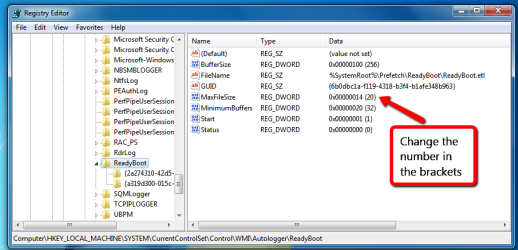
"increase the max file size! Go to: HKEY_LOCAL_MACHINE\SYSTEM\CurrentControlSet\Control\WMI\Autologger\ReadyBoot
The MaxFileSize key is a DWORD with a default decimal value of 20. Increase this to, say 60"
Applying this to my situation I would expect to find a key:

HKEY_LOCAL_MACHINE\SYSTEM\CurrentControlSet\Control\WMI\Autologger\NT Kernel Logger
but it doesn't exist:
RegAutologger.jpg

I searched the registry for "etl" and did not find an entry with "NT Kernel Logger.etl"
 
Last edited:

My Computer

Computer type
PC/Desktop
Computer Manufacturer/Model Number
custom build
OS
Win7 Ultimate x64
CPU
Intel i5-3450 3.10GHz
Motherboard
ASUS P8H61-M LE BIOS 4601 x64 9/8/2013 (UEFI)
Memory
8GB
Graphics Card(s)
Radeon HD6670, 1GB DDR3, On-Board: Intel HD 2500Graphics
Hard Drives
SanDisk Extreme SSD 120 GB SATA3 6Gps
Western Digital Blue 500GB SATA
Antivirus
Avira
Browser
Firefox x64
Hi Geoffrey, it seems you are in the wrong area. In your screen shot you are looking in Circular Kernel Context Logger & you should go lower down to ReadyBoot. The Regedit you need is:

HKEY_LOCAL_MACHINE\SYSTEM\CurrentControlSet\Control\WMI\Autologger\ReadyBoot

The MaxFileSize key is a DWORD with a default decimal value of 20. Increase this to, say 60, and the problem will go away.

Perhaps this screen shot may help you as well.

Regedit_maxfilesize.png
 

My Computer

Computer type
PC/Desktop
Computer Manufacturer/Model Number
Self built using existing case
OS
Windows 7 Home Premium 64 bit sp1
CPU
Intel i5 3570 3.4Ghz Ivy Bridge SKT 1155 quad core
Motherboard
Gigabyte Z77-HD3 SKT 1155 2xSata 3, 4x USB 3.0
Memory
G-Skill Rip Jaws 16Gb (8x2) DDR3 -1600 PC3 12800 CL 10 red
Graphics Card(s)
Gigabyte NVIDIA GT610 1Gb DDR3 810/1200 PCI-E 2.0 Silent
Sound Card
NVIDIA High Definition & Realtech High Definition Audio
Monitor(s) Displays
2 x Philips 226V4L 16:9 aspect ratio
Screen Resolution
1920 x 1080 HD
Hard Drives
Samsung 840 Pro 256gb SSD, SATA 3.
Hitachi Touro Portable 1tb, USB 3.0 HDD used for image b/ups.
PSU
Corsair VS450
Case
Codeng
Cooling
PSU fan & CPU fan
Keyboard
Logitech
Mouse
Logitech Wireless trackball M570
Internet Speed
Wireless 3G. 3mg down & 550kb up.
Antivirus
Bitdefender Internet Security 2020
Browser
Opera (Current Version) & Firefox
Other Info
MS Office 2013 Pro. Davis weather station software. MGE Nova 600 avr UPS.
Thanks, I changed it to 60 and I still got the error. The file which is C:\Windows\system32\Logfiles\WMI\NT Kernel Logger.etl I'm deleting this file to see what happens. No error. The file was recreated and has zero bytes. Can anyone explain this? Perhaps it will grow again. Why doesn't it automatically reset? What creates this file?
 

My Computer

Computer type
PC/Desktop
Computer Manufacturer/Model Number
custom build
OS
Win7 Ultimate x64
CPU
Intel i5-3450 3.10GHz
Motherboard
ASUS P8H61-M LE BIOS 4601 x64 9/8/2013 (UEFI)
Memory
8GB
Graphics Card(s)
Radeon HD6670, 1GB DDR3, On-Board: Intel HD 2500Graphics
Hard Drives
SanDisk Extreme SSD 120 GB SATA3 6Gps
Western Digital Blue 500GB SATA
Antivirus
Avira
Browser
Firefox x64
Thanks for getting back. At least you have established that the suggestion I gave did not work & you seem to have found one that does, well done & hopefully it will keep working for you.
 

My Computer

Computer type
PC/Desktop
Computer Manufacturer/Model Number
Self built using existing case
OS
Windows 7 Home Premium 64 bit sp1
CPU
Intel i5 3570 3.4Ghz Ivy Bridge SKT 1155 quad core
Motherboard
Gigabyte Z77-HD3 SKT 1155 2xSata 3, 4x USB 3.0
Memory
G-Skill Rip Jaws 16Gb (8x2) DDR3 -1600 PC3 12800 CL 10 red
Graphics Card(s)
Gigabyte NVIDIA GT610 1Gb DDR3 810/1200 PCI-E 2.0 Silent
Sound Card
NVIDIA High Definition & Realtech High Definition Audio
Monitor(s) Displays
2 x Philips 226V4L 16:9 aspect ratio
Screen Resolution
1920 x 1080 HD
Hard Drives
Samsung 840 Pro 256gb SSD, SATA 3.
Hitachi Touro Portable 1tb, USB 3.0 HDD used for image b/ups.
PSU
Corsair VS450
Case
Codeng
Cooling
PSU fan & CPU fan
Keyboard
Logitech
Mouse
Logitech Wireless trackball M570
Internet Speed
Wireless 3G. 3mg down & 550kb up.
Antivirus
Bitdefender Internet Security 2020
Browser
Opera (Current Version) & Firefox
Other Info
MS Office 2013 Pro. Davis weather station software. MGE Nova 600 avr UPS.
After less than 24 hours the etl file is 40MB. I think it will soon reach the 100MB file limit (I don't know where this limit is).
In Performance Monitor > Data Collection Sets > Event Trace Sessions > NT Kernel Logger, I found I can access properties.
The file name and directory match with the error message.
File> Log mode > Append
Stop Condition all choices are grayed out.
I'll try to change to:
File> Log mode > Circular (requires a non-zero maximum file size) >Apply > error, parameter incorrect (I couldn't change the Stop Condition, it was still grayed out).
Trace Session > Stream mode: File
I searched the registry and can't find "NT Kernel logger" "NT Kernel" or "C:\Windows\system32\Logfiles\WMI"
 

My Computer

Computer type
PC/Desktop
Computer Manufacturer/Model Number
custom build
OS
Win7 Ultimate x64
CPU
Intel i5-3450 3.10GHz
Motherboard
ASUS P8H61-M LE BIOS 4601 x64 9/8/2013 (UEFI)
Memory
8GB
Graphics Card(s)
Radeon HD6670, 1GB DDR3, On-Board: Intel HD 2500Graphics
Hard Drives
SanDisk Extreme SSD 120 GB SATA3 6Gps
Western Digital Blue 500GB SATA
Antivirus
Avira
Browser
Firefox x64
Did you change the ReadyBoot, MaxFileSize from 20 to the suggested 60 in the MS website. You said you had deleted the NT Kernel Logger & other logfiles/WMI etc, so you should not expect to find them.

Just watch to see if that file gets to 100 mb. According the the MS website increasing the ReadyBoot file size should work.
 

My Computer

Computer type
PC/Desktop
Computer Manufacturer/Model Number
Self built using existing case
OS
Windows 7 Home Premium 64 bit sp1
CPU
Intel i5 3570 3.4Ghz Ivy Bridge SKT 1155 quad core
Motherboard
Gigabyte Z77-HD3 SKT 1155 2xSata 3, 4x USB 3.0
Memory
G-Skill Rip Jaws 16Gb (8x2) DDR3 -1600 PC3 12800 CL 10 red
Graphics Card(s)
Gigabyte NVIDIA GT610 1Gb DDR3 810/1200 PCI-E 2.0 Silent
Sound Card
NVIDIA High Definition & Realtech High Definition Audio
Monitor(s) Displays
2 x Philips 226V4L 16:9 aspect ratio
Screen Resolution
1920 x 1080 HD
Hard Drives
Samsung 840 Pro 256gb SSD, SATA 3.
Hitachi Touro Portable 1tb, USB 3.0 HDD used for image b/ups.
PSU
Corsair VS450
Case
Codeng
Cooling
PSU fan & CPU fan
Keyboard
Logitech
Mouse
Logitech Wireless trackball M570
Internet Speed
Wireless 3G. 3mg down & 550kb up.
Antivirus
Bitdefender Internet Security 2020
Browser
Opera (Current Version) & Firefox
Other Info
MS Office 2013 Pro. Davis weather station software. MGE Nova 600 avr UPS.
Ranger4, I tried that again and the C:\Windows\system32\Logfiles\WMI\NT Kernel Logger.etl log became full within 3 days. So, the ReadyBoot logger logs to a different file. I'd like to know what starts the NT Kernel Logger and how to reset the file so I don't get Events 3 and 4.
 

My Computer

Computer type
PC/Desktop
Computer Manufacturer/Model Number
custom build
OS
Win7 Ultimate x64
CPU
Intel i5-3450 3.10GHz
Motherboard
ASUS P8H61-M LE BIOS 4601 x64 9/8/2013 (UEFI)
Memory
8GB
Graphics Card(s)
Radeon HD6670, 1GB DDR3, On-Board: Intel HD 2500Graphics
Hard Drives
SanDisk Extreme SSD 120 GB SATA3 6Gps
Western Digital Blue 500GB SATA
Antivirus
Avira
Browser
Firefox x64
I searched for ".etl" in the registry and can't find one associated with "kernel." NT Kernel Logger.etl is not reset to zero at shutdown/boot. The logger starts (or tries to) at boot. I really don't know what it is logging nor why it is logging so much. I'd like to prevent it from starting (disable or set to manual) and have an easy way to reset the file to zero when it gets full.
 

My Computer

Computer type
PC/Desktop
Computer Manufacturer/Model Number
custom build
OS
Win7 Ultimate x64
CPU
Intel i5-3450 3.10GHz
Motherboard
ASUS P8H61-M LE BIOS 4601 x64 9/8/2013 (UEFI)
Memory
8GB
Graphics Card(s)
Radeon HD6670, 1GB DDR3, On-Board: Intel HD 2500Graphics
Hard Drives
SanDisk Extreme SSD 120 GB SATA3 6Gps
Western Digital Blue 500GB SATA
Antivirus
Avira
Browser
Firefox x64
The NT Kernel Logger is explained nicely here:
https://docs.microsoft.com/en-us/windows-hardware/drivers/devtest/nt-kernel-logger-trace-session
It seems that it is a diagnostic tool that should only be run when called for. So, I'd like to know how to prevent it from starting. What triggers it? This is a very interesting thread which explains that NT Kernel Logger is used by diagnostic software that is installed (In this case Willamette service from Intel).
https://superuser.com/questions/1011435/why-is-nt-kernel-logger-already-running
Looking at my list of Services, I do not have any from Intel that look suspicious. I do have 3 diagnostic services:
Diagnostic Policy Service (startup is Automatic)
Diagnostic Service Host (startup is Manual)
Diagnostics Tracking Service (startup is Automatic)
These are all currently started.
Diagnostic System Host is not started and startup is Manual.
(Windows Event Log is started; it might be related in that this is a logging service)
[Although NT Kernel Logger is stopped; the service or program that started it might still be running]
Another computer has the same services running and not Events 3 and 4
I used msconfig to check Startup items (and services again) and saw nothing suspicious (no obvious diagnostic tools).
The Performance Monitor now shows NT Kernel in System Diagnostics and Performance only with no modifiable options that I can tell.
 

My Computer

Computer type
PC/Desktop
Computer Manufacturer/Model Number
custom build
OS
Win7 Ultimate x64
CPU
Intel i5-3450 3.10GHz
Motherboard
ASUS P8H61-M LE BIOS 4601 x64 9/8/2013 (UEFI)
Memory
8GB
Graphics Card(s)
Radeon HD6670, 1GB DDR3, On-Board: Intel HD 2500Graphics
Hard Drives
SanDisk Extreme SSD 120 GB SATA3 6Gps
Western Digital Blue 500GB SATA
Antivirus
Avira
Browser
Firefox x64
The NT Kernel Logger is explained nicely here:
https://docs.microsoft.com/en-us/windows-hardware/drivers/devtest/nt-kernel-logger-trace-session
It seems that it is a diagnostic tool that should only be run when called for. So, I'd like to know how to prevent it from starting. What triggers it? This is a very interesting thread which explains that NT Kernel Logger is used by diagnostic software that is installed (In this case Willamette service from Intel).
https://superuser.com/questions/1011435/why-is-nt-kernel-logger-already-running
Looking at my list of Services, I do not have any from Intel that look suspicious. I do have 3 diagnostic services:
Diagnostic Policy Service (startup is Automatic)
Diagnostic Service Host (startup is Manual)
Diagnostics Tracking Service (startup is Automatic)
These are all currently started.
Diagnostic System Host is not started and startup is Manual.
(Windows Event Log is started; it might be related in that this is a logging service)
[Although NT Kernel Logger is stopped; the service or program that started it might still be running]
Another computer has the same services running and not Events 3 and 4
I used msconfig to check Startup items (and services again) and saw nothing suspicious (no obvious diagnostic tools).
The Performance Monitor now shows NT Kernel in System Diagnostics and Performance only with no modifiable options that I can tell.
I found Realtec's ethernet diagnostic tools had been installed. Finding no way to disable them, I uninstalled this program. I still got Event 3/4. I deleted the etl log file and it was recreated at next boot - 0 bytes. On the next reboot it was 7MB. At this rate it will take 13 boots to reach its limit.
 

My Computer

Computer type
PC/Desktop
Computer Manufacturer/Model Number
custom build
OS
Win7 Ultimate x64
CPU
Intel i5-3450 3.10GHz
Motherboard
ASUS P8H61-M LE BIOS 4601 x64 9/8/2013 (UEFI)
Memory
8GB
Graphics Card(s)
Radeon HD6670, 1GB DDR3, On-Board: Intel HD 2500Graphics
Hard Drives
SanDisk Extreme SSD 120 GB SATA3 6Gps
Western Digital Blue 500GB SATA
Antivirus
Avira
Browser
Firefox x64
Hi HH,

sounds like you've got boot logging enabled.

Control panel >> administration tools >> system config > boot uncheck log.

its a troubleshooting tool and by default its OFF, unchecked

Roy
 

My Computer

Computer type
PC/Desktop
Computer Manufacturer/Model Number
medionl/Aspire 6930G/acer x55a
OS
W7 home premium 32bit/W7HP 64bit/w10 tp insider ring
CPU
E5300 dual core
Motherboard
medion MS7366
Memory
3gb
Graphics Card(s)
Nvidia Geforce 7100 Nforce 630i
Monitor(s) Displays
avixc
Internet Speed
n (isp resticted to 72)
Antivirus
mse/pands
Browser
palemoon
Other Info
Belkin Fd7050 n USB using Railink RT2870 drivers, more upto date
Thanks Roy, I looked and Boot Log is unchecked. I think that is a pretty good guess though. I rebooted to check something else and the etl file is at 36MB already. Thanks for thinking. Please give me some more ideas about how to tackle this problem. How can I narrow it down? I'm headed home now. I should check in over the weekend.
 

My Computer

Computer type
PC/Desktop
Computer Manufacturer/Model Number
custom build
OS
Win7 Ultimate x64
CPU
Intel i5-3450 3.10GHz
Motherboard
ASUS P8H61-M LE BIOS 4601 x64 9/8/2013 (UEFI)
Memory
8GB
Graphics Card(s)
Radeon HD6670, 1GB DDR3, On-Board: Intel HD 2500Graphics
Hard Drives
SanDisk Extreme SSD 120 GB SATA3 6Gps
Western Digital Blue 500GB SATA
Antivirus
Avira
Browser
Firefox x64
The file grow by about 6 MB at each boot. I used Event viewer to open and look at the contents. They were all (empty) Information Level events from yesterday from about an 8 minute period. I don't understand why this log file is increasing in size with events from yesterday at each boot. What could make it start and make it stop? What should it do when the file is full? It seems to be appending to a file. Overwriting seems more appropriate. It could be that the file size growth depends on the time between boot and login.
 

My Computer

Computer type
PC/Desktop
Computer Manufacturer/Model Number
custom build
OS
Win7 Ultimate x64
CPU
Intel i5-3450 3.10GHz
Motherboard
ASUS P8H61-M LE BIOS 4601 x64 9/8/2013 (UEFI)
Memory
8GB
Graphics Card(s)
Radeon HD6670, 1GB DDR3, On-Board: Intel HD 2500Graphics
Hard Drives
SanDisk Extreme SSD 120 GB SATA3 6Gps
Western Digital Blue 500GB SATA
Antivirus
Avira
Browser
Firefox x64

My Computer

Computer type
PC/Desktop
Computer Manufacturer/Model Number
Self built using existing case
OS
Windows 7 Home Premium 64 bit sp1
CPU
Intel i5 3570 3.4Ghz Ivy Bridge SKT 1155 quad core
Motherboard
Gigabyte Z77-HD3 SKT 1155 2xSata 3, 4x USB 3.0
Memory
G-Skill Rip Jaws 16Gb (8x2) DDR3 -1600 PC3 12800 CL 10 red
Graphics Card(s)
Gigabyte NVIDIA GT610 1Gb DDR3 810/1200 PCI-E 2.0 Silent
Sound Card
NVIDIA High Definition & Realtech High Definition Audio
Monitor(s) Displays
2 x Philips 226V4L 16:9 aspect ratio
Screen Resolution
1920 x 1080 HD
Hard Drives
Samsung 840 Pro 256gb SSD, SATA 3.
Hitachi Touro Portable 1tb, USB 3.0 HDD used for image b/ups.
PSU
Corsair VS450
Case
Codeng
Cooling
PSU fan & CPU fan
Keyboard
Logitech
Mouse
Logitech Wireless trackball M570
Internet Speed
Wireless 3G. 3mg down & 550kb up.
Antivirus
Bitdefender Internet Security 2020
Browser
Opera (Current Version) & Firefox
Other Info
MS Office 2013 Pro. Davis weather station software. MGE Nova 600 avr UPS.
Good morning from a very green and wet village in Northeastern Thailand Ranger 4. I dug around and found that Tracelog and Traceview are part of Windows Development Kit (WDK) or other development tools which I don't have (these commands are not recognized in a command prompt window). I believe I can start (and stop) an NT Kernel Logger session using Logman (it is recognized in a command prompt window). Fortunately right now I do not appear to have a problem that requires an NT Kernel Trace; so I don't need to know how to start a trace. What I need to know is how to manage the NT Kernel Logger.etl file. That might involve changing the NTKL parameters of what ever program or service is running the NTKL. I'd like to set a parameter to tell it to over write the etl file at each run. I'm not sure if there is any other useful strategy besides this. It would be nice if it could keep the last 100 MB of the file (append and delete the beginning of the file). I don't know if there is a way to do that though. So, I have to find a way to change the parameters of the NT Kernel Logger session that starts on boot. I tried checking boot log and rebooting and then unchecking it and rebooting but that didn't work. I'll dig some more. More ideas are welcome.
 

My Computer

Computer type
PC/Desktop
Computer Manufacturer/Model Number
custom build
OS
Win7 Ultimate x64
CPU
Intel i5-3450 3.10GHz
Motherboard
ASUS P8H61-M LE BIOS 4601 x64 9/8/2013 (UEFI)
Memory
8GB
Graphics Card(s)
Radeon HD6670, 1GB DDR3, On-Board: Intel HD 2500Graphics
Hard Drives
SanDisk Extreme SSD 120 GB SATA3 6Gps
Western Digital Blue 500GB SATA
Antivirus
Avira
Browser
Firefox x64
Logman does basically the same things as Performance Monitor Data Collector Sets Properties Dialog Box. In the System Folder there are two sets which show the NT Kernel Trace - The System Diagnostics Set and the System Performance Set. The properties of the NT Kernel Trace(s) show a file of a different name and a different example directory. I don't think that these are the ones that generate the .etl file that becomes too large. The Set's themselves have two interesting items on their context menus: Data Manager and Properties.
OK, so today I look at the other DCS folders and the Event Trace Sessions has NT Kernel Logger (running). Ah Ha; that's the one that's logging to this growing file. Low and behold, this morning it has grown from 79 to 99 MB. CKCL began giving out Event 2, "failed to start" messages about 10:51. That is when a new user logged on. It's lunch time; I'll be back later.
 
Last edited:

My Computer

Computer type
PC/Desktop
Computer Manufacturer/Model Number
custom build
OS
Win7 Ultimate x64
CPU
Intel i5-3450 3.10GHz
Motherboard
ASUS P8H61-M LE BIOS 4601 x64 9/8/2013 (UEFI)
Memory
8GB
Graphics Card(s)
Radeon HD6670, 1GB DDR3, On-Board: Intel HD 2500Graphics
Hard Drives
SanDisk Extreme SSD 120 GB SATA3 6Gps
Western Digital Blue 500GB SATA
Antivirus
Avira
Browser
Firefox x64
OK,in Performance Monitor, I stopped the NTKL. In Properties > File > Log mode I changed "Append" to "Circular". "Overwrite" was grayed out. It seems to work. The file size was set to 0 and is now growing.
It seems kind of funny to me that this Event Trace Sessions, NT Kernel Logger logs just information level events of OpCode: 22, 21 and 15. The sole trace provider is Windows Kernel Trace. I wonder why it is even here. I wonder what starts it.
 
Last edited:

My Computer

Computer type
PC/Desktop
Computer Manufacturer/Model Number
custom build
OS
Win7 Ultimate x64
CPU
Intel i5-3450 3.10GHz
Motherboard
ASUS P8H61-M LE BIOS 4601 x64 9/8/2013 (UEFI)
Memory
8GB
Graphics Card(s)
Radeon HD6670, 1GB DDR3, On-Board: Intel HD 2500Graphics
Hard Drives
SanDisk Extreme SSD 120 GB SATA3 6Gps
Western Digital Blue 500GB SATA
Antivirus
Avira
Browser
Firefox x64
Back
Top