Event 41 Kernel-Power random crashes

frazz402

New member
Local time
12:59 PM
Messages
19
I have recently replaced my old laptop's HDD and ever since I installed windows 7 64bit I have been getting some random system restarts. This happens with no blue screen whatsoever, it's like the power suddently went down. These system restarts have happened while browsing the internet, using a few programs (like visual studio or unity) or sometimes even when windows is booting (at the 'Windows is starting up' splash screen)

Taking a look at my event viewer I see a Event 41 Kernel-Power critical error at the time of the crash. This may or may not be relevant but I also see another entry "Broadcom NetLink(TM) Gigabit Ethernet has initialized sucessfully" at the exact same timestamp as the kernel error. I have tried updating drivers for this device with no avail.

Below is a DMLog attached

Thanks for your time
 

My Computer

Computer type
Laptop
Computer Manufacturer/Model Number
Acer 5740G
OS
Microsoft Windows 7 Home Premium 64-bit 7601 Multiprocessor Free Service Pack 1
CPU
Intel(R) Core(TM) i3 CPU M 330 @ 2.13GHz
Motherboard
Acer Aspire 5740
Memory
2x 2GB DDR3 1066
Graphics Card(s)
ATI Mobility Radeon HD 5470
Sound Card
(1) ATI HDMI Audio (2) Realtek High Definition Audio
Hard Drives
(1) TOSHIBA MQ01ABD050 ATA Device
Internet Speed
100 Mbps
Antivirus
ESET NOD32
Browser
Google Chrome
It seems to do this more often when windows is booting now. I'm running out of ideas at this point :/
 

My Computer

Computer type
Laptop
Computer Manufacturer/Model Number
Acer 5740G
OS
Microsoft Windows 7 Home Premium 64-bit 7601 Multiprocessor Free Service Pack 1
CPU
Intel(R) Core(TM) i3 CPU M 330 @ 2.13GHz
Motherboard
Acer Aspire 5740
Memory
2x 2GB DDR3 1066
Graphics Card(s)
ATI Mobility Radeon HD 5470
Sound Card
(1) ATI HDMI Audio (2) Realtek High Definition Audio
Hard Drives
(1) TOSHIBA MQ01ABD050 ATA Device
Internet Speed
100 Mbps
Antivirus
ESET NOD32
Browser
Google Chrome
There are no dump files in your logs.

  1. Open Advanced System Settings
  2. Click on Settings in Startup & Recovery
  3. Make sure both boxes indicated below are checked
  4. In the dropdown box ensure you're set to record Small Memory Dumps
picture.php
 

My Computer

Computer type
PC/Desktop
Computer Manufacturer/Model Number
Custom Build
OS
W7 Pro x64 SP1 | W10 Pro IP x64 | W8.1 Pro x64 VM | Linux Mint VM
CPU
i7-4790k @ 4GHz (4.4GHz Boost)
Motherboard
ASUS Sabertooth Z87 (BIOS Rev 2004)
Memory
16GB DDR3 Kingston HyperX Fury @ 1600MHz CL 9-9-9-27
Graphics Card(s)
EVGA GTX 980 Classified
Sound Card
Realtek Onboard
Monitor(s) Displays
Samsung S27D390
Screen Resolution
1920 x 1080
Hard Drives
240GB Intel 520 Series SSD |
Samsung 850 EVO 120GB SSD |
2TB WD Caviar Black |
2TB WD Caviar Green
PSU
Corsair HX850-80 Gold Modular
Case
Cooler Master Silencio 650
Cooling
Corsair H80i w/2 x Corsair SP120 | 2 x 120mm Noctua NF-S12B
Keyboard
Microsoft Sidewinder X4
Mouse
Gigabyte M6900 optical
Internet Speed
152mb
Antivirus
F-Secure
Browser
Firefox 38.0
Other Info
Backup Rig: Win 7 Pro 64-bit | AMD A10-5800k | ASUS F2A85-V Pro | 8GB Samsung DDR3 @1600MHz | 120GB Toshiba SDD | 2TB Seagate HDD | Cooler Master Silencio 550
Done. So should I wait for another crash before submitting another DM log file?
 

My Computer

Computer type
Laptop
Computer Manufacturer/Model Number
Acer 5740G
OS
Microsoft Windows 7 Home Premium 64-bit 7601 Multiprocessor Free Service Pack 1
CPU
Intel(R) Core(TM) i3 CPU M 330 @ 2.13GHz
Motherboard
Acer Aspire 5740
Memory
2x 2GB DDR3 1066
Graphics Card(s)
ATI Mobility Radeon HD 5470
Sound Card
(1) ATI HDMI Audio (2) Realtek High Definition Audio
Hard Drives
(1) TOSHIBA MQ01ABD050 ATA Device
Internet Speed
100 Mbps
Antivirus
ESET NOD32
Browser
Google Chrome
Yes please.
 

My Computer

Computer type
PC/Desktop
Computer Manufacturer/Model Number
Custom Build
OS
W7 Pro x64 SP1 | W10 Pro IP x64 | W8.1 Pro x64 VM | Linux Mint VM
CPU
i7-4790k @ 4GHz (4.4GHz Boost)
Motherboard
ASUS Sabertooth Z87 (BIOS Rev 2004)
Memory
16GB DDR3 Kingston HyperX Fury @ 1600MHz CL 9-9-9-27
Graphics Card(s)
EVGA GTX 980 Classified
Sound Card
Realtek Onboard
Monitor(s) Displays
Samsung S27D390
Screen Resolution
1920 x 1080
Hard Drives
240GB Intel 520 Series SSD |
Samsung 850 EVO 120GB SSD |
2TB WD Caviar Black |
2TB WD Caviar Green
PSU
Corsair HX850-80 Gold Modular
Case
Cooler Master Silencio 650
Cooling
Corsair H80i w/2 x Corsair SP120 | 2 x 120mm Noctua NF-S12B
Keyboard
Microsoft Sidewinder X4
Mouse
Gigabyte M6900 optical
Internet Speed
152mb
Antivirus
F-Secure
Browser
Firefox 38.0
Other Info
Backup Rig: Win 7 Pro 64-bit | AMD A10-5800k | ASUS F2A85-V Pro | 8GB Samsung DDR3 @1600MHz | 120GB Toshiba SDD | 2TB Seagate HDD | Cooler Master Silencio 550
I have not experienced another crash while using Windows, however it has crashed again while starting up. This is becomming more often now. Same error as before (kernel 41) and no minidump was created. :/
 
Last edited:

My Computer

Computer type
Laptop
Computer Manufacturer/Model Number
Acer 5740G
OS
Microsoft Windows 7 Home Premium 64-bit 7601 Multiprocessor Free Service Pack 1
CPU
Intel(R) Core(TM) i3 CPU M 330 @ 2.13GHz
Motherboard
Acer Aspire 5740
Memory
2x 2GB DDR3 1066
Graphics Card(s)
ATI Mobility Radeon HD 5470
Sound Card
(1) ATI HDMI Audio (2) Realtek High Definition Audio
Hard Drives
(1) TOSHIBA MQ01ABD050 ATA Device
Internet Speed
100 Mbps
Antivirus
ESET NOD32
Browser
Google Chrome
Just suffered another bsod. Minidump attached
 

My Computer

Computer type
Laptop
Computer Manufacturer/Model Number
Acer 5740G
OS
Microsoft Windows 7 Home Premium 64-bit 7601 Multiprocessor Free Service Pack 1
CPU
Intel(R) Core(TM) i3 CPU M 330 @ 2.13GHz
Motherboard
Acer Aspire 5740
Memory
2x 2GB DDR3 1066
Graphics Card(s)
ATI Mobility Radeon HD 5470
Sound Card
(1) ATI HDMI Audio (2) Realtek High Definition Audio
Hard Drives
(1) TOSHIBA MQ01ABD050 ATA Device
Internet Speed
100 Mbps
Antivirus
ESET NOD32
Browser
Google Chrome
From the single dump this one looks pretty straight forward (famous last words).

 ESET

ESET is causing the problem.
Code:
fffff880`08752ec8  fffff880`03f247f2Unable to load image ehdrv.sys, Win32 error 0n2
[COLOR=Red]*** WARNING: Unable to verify timestamp for ehdrv.sys
*** ERROR: Module load completed but symbols could not be loaded for ehdrv.sys[/COLOR]
 ehdrv+0x1c7f2
:ar: Uninstall ESET and install MS Security Essentials and MalwareBytes.

   Note
Make sure you uncheck the 'Enable Free Trial' box when installing.

picture.php

picture.php

picture.php


 DaemonTools

:ar: Uninstall Daemon Tools, a proven cause of BSODs.

1. Uninstall Daemon Tools.
2. Download the SPTD standalone installer and perform the following steps.
3. Double click the executable to open it.
4. Click the button shown below.

picture.php


   Information
If the button it is grayed out as shown in the image, there is no more SPTD installation on your system and you can close the window.
 

My Computer

Computer type
PC/Desktop
Computer Manufacturer/Model Number
Custom Build
OS
W7 Pro x64 SP1 | W10 Pro IP x64 | W8.1 Pro x64 VM | Linux Mint VM
CPU
i7-4790k @ 4GHz (4.4GHz Boost)
Motherboard
ASUS Sabertooth Z87 (BIOS Rev 2004)
Memory
16GB DDR3 Kingston HyperX Fury @ 1600MHz CL 9-9-9-27
Graphics Card(s)
EVGA GTX 980 Classified
Sound Card
Realtek Onboard
Monitor(s) Displays
Samsung S27D390
Screen Resolution
1920 x 1080
Hard Drives
240GB Intel 520 Series SSD |
Samsung 850 EVO 120GB SSD |
2TB WD Caviar Black |
2TB WD Caviar Green
PSU
Corsair HX850-80 Gold Modular
Case
Cooler Master Silencio 650
Cooling
Corsair H80i w/2 x Corsair SP120 | 2 x 120mm Noctua NF-S12B
Keyboard
Microsoft Sidewinder X4
Mouse
Gigabyte M6900 optical
Internet Speed
152mb
Antivirus
F-Secure
Browser
Firefox 38.0
Other Info
Backup Rig: Win 7 Pro 64-bit | AMD A10-5800k | ASUS F2A85-V Pro | 8GB Samsung DDR3 @1600MHz | 120GB Toshiba SDD | 2TB Seagate HDD | Cooler Master Silencio 550
Done. It's a shame to let ESET go, it looked like a good antivirus.

Will let you know if blue screens persist.
 

My Computer

Computer type
Laptop
Computer Manufacturer/Model Number
Acer 5740G
OS
Microsoft Windows 7 Home Premium 64-bit 7601 Multiprocessor Free Service Pack 1
CPU
Intel(R) Core(TM) i3 CPU M 330 @ 2.13GHz
Motherboard
Acer Aspire 5740
Memory
2x 2GB DDR3 1066
Graphics Card(s)
ATI Mobility Radeon HD 5470
Sound Card
(1) ATI HDMI Audio (2) Realtek High Definition Audio
Hard Drives
(1) TOSHIBA MQ01ABD050 ATA Device
Internet Speed
100 Mbps
Antivirus
ESET NOD32
Browser
Google Chrome
Keep us posted.
 

My Computer

Computer type
PC/Desktop
Computer Manufacturer/Model Number
Custom Build
OS
W7 Pro x64 SP1 | W10 Pro IP x64 | W8.1 Pro x64 VM | Linux Mint VM
CPU
i7-4790k @ 4GHz (4.4GHz Boost)
Motherboard
ASUS Sabertooth Z87 (BIOS Rev 2004)
Memory
16GB DDR3 Kingston HyperX Fury @ 1600MHz CL 9-9-9-27
Graphics Card(s)
EVGA GTX 980 Classified
Sound Card
Realtek Onboard
Monitor(s) Displays
Samsung S27D390
Screen Resolution
1920 x 1080
Hard Drives
240GB Intel 520 Series SSD |
Samsung 850 EVO 120GB SSD |
2TB WD Caviar Black |
2TB WD Caviar Green
PSU
Corsair HX850-80 Gold Modular
Case
Cooler Master Silencio 650
Cooling
Corsair H80i w/2 x Corsair SP120 | 2 x 120mm Noctua NF-S12B
Keyboard
Microsoft Sidewinder X4
Mouse
Gigabyte M6900 optical
Internet Speed
152mb
Antivirus
F-Secure
Browser
Firefox 38.0
Other Info
Backup Rig: Win 7 Pro 64-bit | AMD A10-5800k | ASUS F2A85-V Pro | 8GB Samsung DDR3 @1600MHz | 120GB Toshiba SDD | 2TB Seagate HDD | Cooler Master Silencio 550
I haven't seen any blue screens so far, but windows still restarts when booting up sometimes. I tried running the startup repair but it didn't do anything. It created no minidump either. Any way we can troubleshoot this?
 

My Computer

Computer type
Laptop
Computer Manufacturer/Model Number
Acer 5740G
OS
Microsoft Windows 7 Home Premium 64-bit 7601 Multiprocessor Free Service Pack 1
CPU
Intel(R) Core(TM) i3 CPU M 330 @ 2.13GHz
Motherboard
Acer Aspire 5740
Memory
2x 2GB DDR3 1066
Graphics Card(s)
ATI Mobility Radeon HD 5470
Sound Card
(1) ATI HDMI Audio (2) Realtek High Definition Audio
Hard Drives
(1) TOSHIBA MQ01ABD050 ATA Device
Internet Speed
100 Mbps
Antivirus
ESET NOD32
Browser
Google Chrome
At what point in the bootup does it restart?
 

My Computer

Computer type
PC/Desktop
Computer Manufacturer/Model Number
Custom Build
OS
W7 Pro x64 SP1 | W10 Pro IP x64 | W8.1 Pro x64 VM | Linux Mint VM
CPU
i7-4790k @ 4GHz (4.4GHz Boost)
Motherboard
ASUS Sabertooth Z87 (BIOS Rev 2004)
Memory
16GB DDR3 Kingston HyperX Fury @ 1600MHz CL 9-9-9-27
Graphics Card(s)
EVGA GTX 980 Classified
Sound Card
Realtek Onboard
Monitor(s) Displays
Samsung S27D390
Screen Resolution
1920 x 1080
Hard Drives
240GB Intel 520 Series SSD |
Samsung 850 EVO 120GB SSD |
2TB WD Caviar Black |
2TB WD Caviar Green
PSU
Corsair HX850-80 Gold Modular
Case
Cooler Master Silencio 650
Cooling
Corsair H80i w/2 x Corsair SP120 | 2 x 120mm Noctua NF-S12B
Keyboard
Microsoft Sidewinder X4
Mouse
Gigabyte M6900 optical
Internet Speed
152mb
Antivirus
F-Secure
Browser
Firefox 38.0
Other Info
Backup Rig: Win 7 Pro 64-bit | AMD A10-5800k | ASUS F2A85-V Pro | 8GB Samsung DDR3 @1600MHz | 120GB Toshiba SDD | 2TB Seagate HDD | Cooler Master Silencio 550
During the "Windows is starting" splash screen. It may restart once or twice... but eventually it manages to launch windows - it can be very random. There's a critical error in the event viewer (kernel 41), but no minidump is created.
 

My Computer

Computer type
Laptop
Computer Manufacturer/Model Number
Acer 5740G
OS
Microsoft Windows 7 Home Premium 64-bit 7601 Multiprocessor Free Service Pack 1
CPU
Intel(R) Core(TM) i3 CPU M 330 @ 2.13GHz
Motherboard
Acer Aspire 5740
Memory
2x 2GB DDR3 1066
Graphics Card(s)
ATI Mobility Radeon HD 5470
Sound Card
(1) ATI HDMI Audio (2) Realtek High Definition Audio
Hard Drives
(1) TOSHIBA MQ01ABD050 ATA Device
Internet Speed
100 Mbps
Antivirus
ESET NOD32
Browser
Google Chrome

My Computer

Computer type
PC/Desktop
Computer Manufacturer/Model Number
Custom Build
OS
W7 Pro x64 SP1 | W10 Pro IP x64 | W8.1 Pro x64 VM | Linux Mint VM
CPU
i7-4790k @ 4GHz (4.4GHz Boost)
Motherboard
ASUS Sabertooth Z87 (BIOS Rev 2004)
Memory
16GB DDR3 Kingston HyperX Fury @ 1600MHz CL 9-9-9-27
Graphics Card(s)
EVGA GTX 980 Classified
Sound Card
Realtek Onboard
Monitor(s) Displays
Samsung S27D390
Screen Resolution
1920 x 1080
Hard Drives
240GB Intel 520 Series SSD |
Samsung 850 EVO 120GB SSD |
2TB WD Caviar Black |
2TB WD Caviar Green
PSU
Corsair HX850-80 Gold Modular
Case
Cooler Master Silencio 650
Cooling
Corsair H80i w/2 x Corsair SP120 | 2 x 120mm Noctua NF-S12B
Keyboard
Microsoft Sidewinder X4
Mouse
Gigabyte M6900 optical
Internet Speed
152mb
Antivirus
F-Secure
Browser
Firefox 38.0
Other Info
Backup Rig: Win 7 Pro 64-bit | AMD A10-5800k | ASUS F2A85-V Pro | 8GB Samsung DDR3 @1600MHz | 120GB Toshiba SDD | 2TB Seagate HDD | Cooler Master Silencio 550
I ran a disk check on the C: partition (where windows is installed). There's also another partition but I only store backup files in there. Came out clean (this is a new HDD, the old one died a few weeks ago). Is there a log I have to upload here?
 

My Computer

Computer type
Laptop
Computer Manufacturer/Model Number
Acer 5740G
OS
Microsoft Windows 7 Home Premium 64-bit 7601 Multiprocessor Free Service Pack 1
CPU
Intel(R) Core(TM) i3 CPU M 330 @ 2.13GHz
Motherboard
Acer Aspire 5740
Memory
2x 2GB DDR3 1066
Graphics Card(s)
ATI Mobility Radeon HD 5470
Sound Card
(1) ATI HDMI Audio (2) Realtek High Definition Audio
Hard Drives
(1) TOSHIBA MQ01ABD050 ATA Device
Internet Speed
100 Mbps
Antivirus
ESET NOD32
Browser
Google Chrome
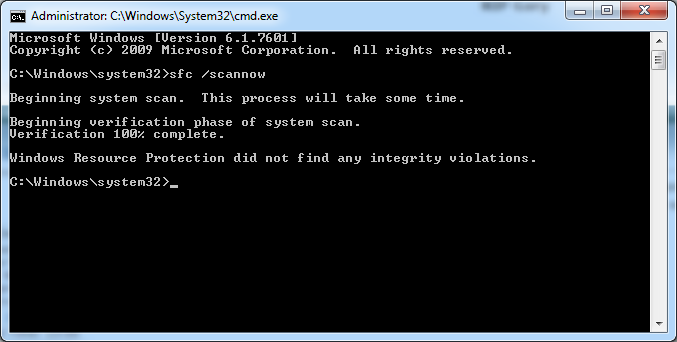
Open an elevated command prompt and type in or copy and paste sfc /scannow and hit enter.
 

My Computer

Computer type
PC/Desktop
Computer Manufacturer/Model Number
Custom Build
OS
W7 Pro x64 SP1 | W10 Pro IP x64 | W8.1 Pro x64 VM | Linux Mint VM
CPU
i7-4790k @ 4GHz (4.4GHz Boost)
Motherboard
ASUS Sabertooth Z87 (BIOS Rev 2004)
Memory
16GB DDR3 Kingston HyperX Fury @ 1600MHz CL 9-9-9-27
Graphics Card(s)
EVGA GTX 980 Classified
Sound Card
Realtek Onboard
Monitor(s) Displays
Samsung S27D390
Screen Resolution
1920 x 1080
Hard Drives
240GB Intel 520 Series SSD |
Samsung 850 EVO 120GB SSD |
2TB WD Caviar Black |
2TB WD Caviar Green
PSU
Corsair HX850-80 Gold Modular
Case
Cooler Master Silencio 650
Cooling
Corsair H80i w/2 x Corsair SP120 | 2 x 120mm Noctua NF-S12B
Keyboard
Microsoft Sidewinder X4
Mouse
Gigabyte M6900 optical
Internet Speed
152mb
Antivirus
F-Secure
Browser
Firefox 38.0
Other Info
Backup Rig: Win 7 Pro 64-bit | AMD A10-5800k | ASUS F2A85-V Pro | 8GB Samsung DDR3 @1600MHz | 120GB Toshiba SDD | 2TB Seagate HDD | Cooler Master Silencio 550

My Computer

Computer type
Laptop
Computer Manufacturer/Model Number
Acer 5740G
OS
Microsoft Windows 7 Home Premium 64-bit 7601 Multiprocessor Free Service Pack 1
CPU
Intel(R) Core(TM) i3 CPU M 330 @ 2.13GHz
Motherboard
Acer Aspire 5740
Memory
2x 2GB DDR3 1066
Graphics Card(s)
ATI Mobility Radeon HD 5470
Sound Card
(1) ATI HDMI Audio (2) Realtek High Definition Audio
Hard Drives
(1) TOSHIBA MQ01ABD050 ATA Device
Internet Speed
100 Mbps
Antivirus
ESET NOD32
Browser
Google Chrome
All good there too. Are you still having trouble booting?
 

My Computer

Computer type
PC/Desktop
Computer Manufacturer/Model Number
Custom Build
OS
W7 Pro x64 SP1 | W10 Pro IP x64 | W8.1 Pro x64 VM | Linux Mint VM
CPU
i7-4790k @ 4GHz (4.4GHz Boost)
Motherboard
ASUS Sabertooth Z87 (BIOS Rev 2004)
Memory
16GB DDR3 Kingston HyperX Fury @ 1600MHz CL 9-9-9-27
Graphics Card(s)
EVGA GTX 980 Classified
Sound Card
Realtek Onboard
Monitor(s) Displays
Samsung S27D390
Screen Resolution
1920 x 1080
Hard Drives
240GB Intel 520 Series SSD |
Samsung 850 EVO 120GB SSD |
2TB WD Caviar Black |
2TB WD Caviar Green
PSU
Corsair HX850-80 Gold Modular
Case
Cooler Master Silencio 650
Cooling
Corsair H80i w/2 x Corsair SP120 | 2 x 120mm Noctua NF-S12B
Keyboard
Microsoft Sidewinder X4
Mouse
Gigabyte M6900 optical
Internet Speed
152mb
Antivirus
F-Secure
Browser
Firefox 38.0
Other Info
Backup Rig: Win 7 Pro 64-bit | AMD A10-5800k | ASUS F2A85-V Pro | 8GB Samsung DDR3 @1600MHz | 120GB Toshiba SDD | 2TB Seagate HDD | Cooler Master Silencio 550
It happens very erratically. Some days it's fine, while others it continuously restarts and ends up going to the Windows diagnosis/repair center. I thought this might be a disk error because my old HDD had the same symphtoms before its time came. One of the times it sent me to the same disk check you suggested here "Windows needs to check D:\ for consistency" or something like that. However this is a brand new hdd so I don't understand why disk errors would be present and no it did not return any errors at the time either.

I'll keep you posted if this happens again. Thanks a lot for the help so far. :)
 

My Computer

Computer type
Laptop
Computer Manufacturer/Model Number
Acer 5740G
OS
Microsoft Windows 7 Home Premium 64-bit 7601 Multiprocessor Free Service Pack 1
CPU
Intel(R) Core(TM) i3 CPU M 330 @ 2.13GHz
Motherboard
Acer Aspire 5740
Memory
2x 2GB DDR3 1066
Graphics Card(s)
ATI Mobility Radeon HD 5470
Sound Card
(1) ATI HDMI Audio (2) Realtek High Definition Audio
Hard Drives
(1) TOSHIBA MQ01ABD050 ATA Device
Internet Speed
100 Mbps
Antivirus
ESET NOD32
Browser
Google Chrome

My Computer

Computer type
PC/Desktop
Computer Manufacturer/Model Number
Custom Build
OS
W7 Pro x64 SP1 | W10 Pro IP x64 | W8.1 Pro x64 VM | Linux Mint VM
CPU
i7-4790k @ 4GHz (4.4GHz Boost)
Motherboard
ASUS Sabertooth Z87 (BIOS Rev 2004)
Memory
16GB DDR3 Kingston HyperX Fury @ 1600MHz CL 9-9-9-27
Graphics Card(s)
EVGA GTX 980 Classified
Sound Card
Realtek Onboard
Monitor(s) Displays
Samsung S27D390
Screen Resolution
1920 x 1080
Hard Drives
240GB Intel 520 Series SSD |
Samsung 850 EVO 120GB SSD |
2TB WD Caviar Black |
2TB WD Caviar Green
PSU
Corsair HX850-80 Gold Modular
Case
Cooler Master Silencio 650
Cooling
Corsair H80i w/2 x Corsair SP120 | 2 x 120mm Noctua NF-S12B
Keyboard
Microsoft Sidewinder X4
Mouse
Gigabyte M6900 optical
Internet Speed
152mb
Antivirus
F-Secure
Browser
Firefox 38.0
Other Info
Backup Rig: Win 7 Pro 64-bit | AMD A10-5800k | ASUS F2A85-V Pro | 8GB Samsung DDR3 @1600MHz | 120GB Toshiba SDD | 2TB Seagate HDD | Cooler Master Silencio 550
Back
Top