Event Viewer Warning BTHUSB

terrilee

New member
Local time
2:20 PM
Messages
6
I just noticed that my computer is registering thousands of warnings in the Event Viewer. It started about 6.5 hours ago when I wasn't at the computer. The Event ID is 7 and the text is "A hardware error occurred. The event contains the vendor-specific error code." The Source is "BTHUSB". I've tried searching for info and haven't found anything helpful other than it relates to Bluetooth. I don't know of any bluetooth devices on this computer and when I searched for bluetooth devices through the icon at the bottom right of my screen, none showed up in the results. Any help or advice would be greatly appreciated! It's unsettling to have these warnings being added to the EV every two seconds (literally). Thanks. Edited to add additional info: I rebooted the computer and it took a while to shut down (normally the computer reboots very quickly). When it was running again, I checked the EV and there was an error, "The local Bluetooth adapter has failed in an undetermined manner and will not be used. The driver has been unloaded." Event ID 17, Source: BTHUSB. The total warnings prior to reboot, over the course of under 7 hours, is 13,068. No new warning are being recorded since rebooting, but I guess that's because the computer didn't load whatever is failing. I don't have any idea what the failure is affecting. Things seem to be operating normally so far. If I hadn't looked in the EV and noticed all the warnings, the only issue I would've noticed is the longer shutdown time.
 
Last edited:

My Computer

Computer type
PC/Desktop
Computer Manufacturer/Model Number
PowerSpec G212 Desktop
OS
Windows 7 Home Premium
CPU
Mobile QuadCore Intel Core i7-2600K, 3500 MHz
Motherboard
Asus P8 Z77-V LK
Memory
16gb
Graphics Card(s)
2 AMD Radeon HD 6790 Crossfire
Hard Drives
(2) 2tb 5,400RPM (RAID 0) & 256gb SSD
Antivirus
Avast free
Browser
Firefox
Hello terrilee. Welcome to the Forum.

This is one of those cases where without knowing your System's Specs (you fill this information out in your forum profile) we are stuck with no information to work with.

At the very least we need to know the brand and model number of your motherboard, or if this is a pre-built PC the complete model number of the PC.

I'm guessing you have a Bluetooth module on your motherboard that you never knew you had, and it has failed.
 

My Computer

Computer type
PC/Desktop
Computer Manufacturer/Model Number
Home Built - Jan 2013
OS
Windows 7 64 Bit Home Premium SP1
CPU
i7-3820
Motherboard
Asus P9X79-PRO - Bios 4608
Memory
GSkill F3-14900CL9Q - 16GB
Graphics Card(s)
EVGA GeForce GTX660 - Driver 352.86
Sound Card
On board Realtek ALC898
Monitor(s) Displays
Acer S271HL
Screen Resolution
1920 x 1080
Hard Drives
#1- Samsung 840 Pro Series
#2- Western Digital WD1002FAEX Sata3 Black
#3- Western Digital WD1002FAEX Sata3 Black
PSU
Corsair CMPSU-850TX-V2 - 850 watt (by Seasonic)
Case
Corsair Obsidian 550D
Cooling
Standard 3 120mm case fans, Cooler Master Hyper 212 EVO
Keyboard
MS KC-0405
Mouse
Intellimouse 5-button
Internet Speed
56 Mbits/Sec (on a good day)
Antivirus
Avast & Malwarebytes
Browser
Firefox
Other Info
Asus DVD - DRW-24B1ST 24X
Thanks for your reply. I'm sorry I didn't provide more information. The motherboard is an Asus P8 Z77-V LK and was installed last year when the original failed. The computer was purchased pre-built a little over two years ago, it's a PowerSpec G212 Desktop.
Here are more details:
CPU: Mobile QuadCore Intel Core i7-2600K, 3500 MHz (35 x 100)
Memory: 16gb
Graphics Cards: 2 AMD Radeon HD 6790 Crossfire
Hard Drives: (2) 2tb 5,400RPM (RAID 0) & 256gb SSD
 

My Computer

Computer type
PC/Desktop
Computer Manufacturer/Model Number
PowerSpec G212 Desktop
OS
Windows 7 Home Premium
CPU
Mobile QuadCore Intel Core i7-2600K, 3500 MHz
Motherboard
Asus P8 Z77-V LK
Memory
16gb
Graphics Card(s)
2 AMD Radeon HD 6790 Crossfire
Hard Drives
(2) 2tb 5,400RPM (RAID 0) & 256gb SSD
Antivirus
Avast free
Browser
Firefox

My Computer

Computer type
PC/Desktop
Computer Manufacturer/Model Number
Home Built - Jan 2013
OS
Windows 7 64 Bit Home Premium SP1
CPU
i7-3820
Motherboard
Asus P9X79-PRO - Bios 4608
Memory
GSkill F3-14900CL9Q - 16GB
Graphics Card(s)
EVGA GeForce GTX660 - Driver 352.86
Sound Card
On board Realtek ALC898
Monitor(s) Displays
Acer S271HL
Screen Resolution
1920 x 1080
Hard Drives
#1- Samsung 840 Pro Series
#2- Western Digital WD1002FAEX Sata3 Black
#3- Western Digital WD1002FAEX Sata3 Black
PSU
Corsair CMPSU-850TX-V2 - 850 watt (by Seasonic)
Case
Corsair Obsidian 550D
Cooling
Standard 3 120mm case fans, Cooler Master Hyper 212 EVO
Keyboard
MS KC-0405
Mouse
Intellimouse 5-button
Internet Speed
56 Mbits/Sec (on a good day)
Antivirus
Avast & Malwarebytes
Browser
Firefox
Other Info
Asus DVD - DRW-24B1ST 24X
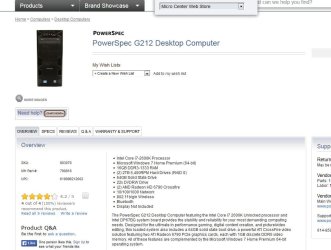
The PowerSpec G212 Desktop may have been outfitted with Bluetooth. The specs below show one with it, but the motherboard is different. Probably a case were you can customize the build when ordering.

Do you have the full specs for the system you bought? You could see if there is Bluetooth added there.

_
Capture.JPG
 

My Computer

Computer type
PC/Desktop
Computer Manufacturer/Model Number
Home Built - Jan 2013
OS
Windows 7 64 Bit Home Premium SP1
CPU
i7-3820
Motherboard
Asus P9X79-PRO - Bios 4608
Memory
GSkill F3-14900CL9Q - 16GB
Graphics Card(s)
EVGA GeForce GTX660 - Driver 352.86
Sound Card
On board Realtek ALC898
Monitor(s) Displays
Acer S271HL
Screen Resolution
1920 x 1080
Hard Drives
#1- Samsung 840 Pro Series
#2- Western Digital WD1002FAEX Sata3 Black
#3- Western Digital WD1002FAEX Sata3 Black
PSU
Corsair CMPSU-850TX-V2 - 850 watt (by Seasonic)
Case
Corsair Obsidian 550D
Cooling
Standard 3 120mm case fans, Cooler Master Hyper 212 EVO
Keyboard
MS KC-0405
Mouse
Intellimouse 5-button
Internet Speed
56 Mbits/Sec (on a good day)
Antivirus
Avast & Malwarebytes
Browser
Firefox
Other Info
Asus DVD - DRW-24B1ST 24X
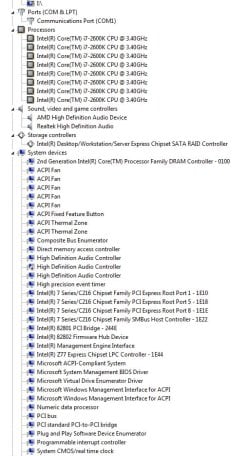
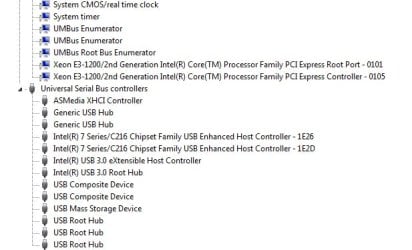
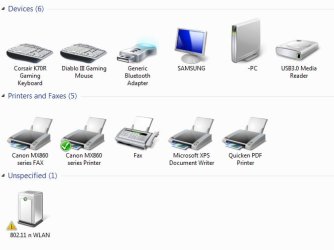
Thanks again for your help. I'm attaching screenshots of the Device Manager and will try to locate the full specs. The warnings aren't appearing since booting this morning, and there was no error listed, either. However, I know from the experience with the failing motherboard that sometimes the problem comes and goes before it finally goes for good :)

DeviceManagerImage1.jpg

DeviceManagerImage2.jpg

DeviceManagerImage3.jpg
 

My Computer

Computer type
PC/Desktop
Computer Manufacturer/Model Number
PowerSpec G212 Desktop
OS
Windows 7 Home Premium
CPU
Mobile QuadCore Intel Core i7-2600K, 3500 MHz
Motherboard
Asus P8 Z77-V LK
Memory
16gb
Graphics Card(s)
2 AMD Radeon HD 6790 Crossfire
Hard Drives
(2) 2tb 5,400RPM (RAID 0) & 256gb SSD
Antivirus
Avast free
Browser
Firefox
OK, so right off you've definitely got Bluetooth devices in the system. You've got 2 listed on top of the list, and 2 more under Network Adapters. But all of these seem to be working.

Just below Network adapters, under Other Devices you have a device that is not working (the yellow (!) indicates that).
It lists itself as your wireless adapter. Is your wireless internet connection working?

If you right click on that entry and choose "Properties", on the General Tab will be a message about the functionality of the device (normally, "This device is working properly"). It would be good to see what it say there, if different.
On the Details tab you can scroll down 1 or 2 items to get to the "Hardware IDs". There will be a long string of characters but the only one's we need are the 4 digits after VEN_ and DEV_ . Then we can see what the device actually is.
 

My Computer

Computer type
PC/Desktop
Computer Manufacturer/Model Number
Home Built - Jan 2013
OS
Windows 7 64 Bit Home Premium SP1
CPU
i7-3820
Motherboard
Asus P9X79-PRO - Bios 4608
Memory
GSkill F3-14900CL9Q - 16GB
Graphics Card(s)
EVGA GeForce GTX660 - Driver 352.86
Sound Card
On board Realtek ALC898
Monitor(s) Displays
Acer S271HL
Screen Resolution
1920 x 1080
Hard Drives
#1- Samsung 840 Pro Series
#2- Western Digital WD1002FAEX Sata3 Black
#3- Western Digital WD1002FAEX Sata3 Black
PSU
Corsair CMPSU-850TX-V2 - 850 watt (by Seasonic)
Case
Corsair Obsidian 550D
Cooling
Standard 3 120mm case fans, Cooler Master Hyper 212 EVO
Keyboard
MS KC-0405
Mouse
Intellimouse 5-button
Internet Speed
56 Mbits/Sec (on a good day)
Antivirus
Avast & Malwarebytes
Browser
Firefox
Other Info
Asus DVD - DRW-24B1ST 24X
This computer is connected directly to the router via ethernet so I haven't been using the wireless.

This is the status under the General tab: The drivers for this device are not installed. (Code 28) To find a driver for this device, click Update Driver.

Hardware IDs:

USB\VID_0DB0&PID_3871&REV_0101
USB\VID_0DB0&PID_3871

Thanks so much!
 

My Computer

Computer type
PC/Desktop
Computer Manufacturer/Model Number
PowerSpec G212 Desktop
OS
Windows 7 Home Premium
CPU
Mobile QuadCore Intel Core i7-2600K, 3500 MHz
Motherboard
Asus P8 Z77-V LK
Memory
16gb
Graphics Card(s)
2 AMD Radeon HD 6790 Crossfire
Hard Drives
(2) 2tb 5,400RPM (RAID 0) & 256gb SSD
Antivirus
Avast free
Browser
Firefox
Do you know if that desktop came with a Wireless Adapter?

VID 0DB0 comes up Micro Star International, but the PID 3871 does not show a device.

If we could determine the device you could remove it, replace it, or repair it. However Windows seems to have come up with it's own workaround (uninstalling the driver) so if it not anything you use then you could run like that, provided all remains OK in Event Viewer.

But if it were me I would want to fix it. It seems to be a USB connected device. You could try disconnecting all of your USB connected devices, one at a time between restarts, to see if you can determine the culprit.
 

My Computer

Computer type
PC/Desktop
Computer Manufacturer/Model Number
Home Built - Jan 2013
OS
Windows 7 64 Bit Home Premium SP1
CPU
i7-3820
Motherboard
Asus P9X79-PRO - Bios 4608
Memory
GSkill F3-14900CL9Q - 16GB
Graphics Card(s)
EVGA GeForce GTX660 - Driver 352.86
Sound Card
On board Realtek ALC898
Monitor(s) Displays
Acer S271HL
Screen Resolution
1920 x 1080
Hard Drives
#1- Samsung 840 Pro Series
#2- Western Digital WD1002FAEX Sata3 Black
#3- Western Digital WD1002FAEX Sata3 Black
PSU
Corsair CMPSU-850TX-V2 - 850 watt (by Seasonic)
Case
Corsair Obsidian 550D
Cooling
Standard 3 120mm case fans, Cooler Master Hyper 212 EVO
Keyboard
MS KC-0405
Mouse
Intellimouse 5-button
Internet Speed
56 Mbits/Sec (on a good day)
Antivirus
Avast & Malwarebytes
Browser
Firefox
Other Info
Asus DVD - DRW-24B1ST 24X
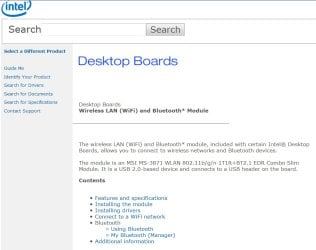
I'm thinking the MSI MS-3871 is this? Desktop Boards — Wireless LAN (WiFi) and Bluetooth* Module

Image1.jpg

The original motherboard was an Intel. Does the fact that the MSI MS-3871 is still showing up under devices mean that whoever replaced the board moved this to the Asus board? I'm not sure how to tell if there's a wireless adapter. I'm sorry for being so clueless, I know it's not making it any easier for you to figure out what the issue is! There haven't been any more warnings or errors since Windows did its own "fix". I tried disconnecting USB devices between restarts and didn't notice any changes or issues. If you think I should just let this be, I'll understand, even though normally I feel the same way you do about preferring to fix a problem rather than ignore it. Again, thanks so much for taking the time to help me!

Image2.jpg

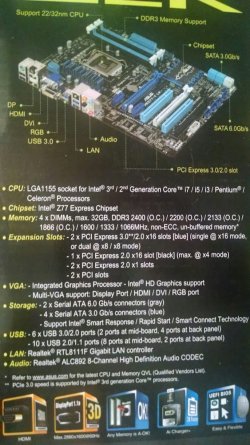
This is from the Asus box:

IMG_201505motherboardbox.jpg
 

My Computer

Computer type
PC/Desktop
Computer Manufacturer/Model Number
PowerSpec G212 Desktop
OS
Windows 7 Home Premium
CPU
Mobile QuadCore Intel Core i7-2600K, 3500 MHz
Motherboard
Asus P8 Z77-V LK
Memory
16gb
Graphics Card(s)
2 AMD Radeon HD 6790 Crossfire
Hard Drives
(2) 2tb 5,400RPM (RAID 0) & 256gb SSD
Antivirus
Avast free
Browser
Firefox
The only motherboard we are interested in is the Asus board in the PC. And according to it's specs it does not ship with a Bluetooth or wireless module.

Have you tried the test I mentioned in Post #9?
"It seems to be a USB connected device. You could try disconnecting all of your USB connected devices, one at a time between restarts, to see if you can determine the culprit. "
 

My Computer

Computer type
PC/Desktop
Computer Manufacturer/Model Number
Home Built - Jan 2013
OS
Windows 7 64 Bit Home Premium SP1
CPU
i7-3820
Motherboard
Asus P9X79-PRO - Bios 4608
Memory
GSkill F3-14900CL9Q - 16GB
Graphics Card(s)
EVGA GeForce GTX660 - Driver 352.86
Sound Card
On board Realtek ALC898
Monitor(s) Displays
Acer S271HL
Screen Resolution
1920 x 1080
Hard Drives
#1- Samsung 840 Pro Series
#2- Western Digital WD1002FAEX Sata3 Black
#3- Western Digital WD1002FAEX Sata3 Black
PSU
Corsair CMPSU-850TX-V2 - 850 watt (by Seasonic)
Case
Corsair Obsidian 550D
Cooling
Standard 3 120mm case fans, Cooler Master Hyper 212 EVO
Keyboard
MS KC-0405
Mouse
Intellimouse 5-button
Internet Speed
56 Mbits/Sec (on a good day)
Antivirus
Avast & Malwarebytes
Browser
Firefox
Other Info
Asus DVD - DRW-24B1ST 24X
I did try the test, thanks. "I tried disconnecting USB devices between restarts and didn't notice any changes or issues." There were no errors or red flags that I could see.

I've had no further warnings or errors in EV since Windows dropped the drivers. Looks like this might remain a mystery. :)
 

My Computer

Computer type
PC/Desktop
Computer Manufacturer/Model Number
PowerSpec G212 Desktop
OS
Windows 7 Home Premium
CPU
Mobile QuadCore Intel Core i7-2600K, 3500 MHz
Motherboard
Asus P8 Z77-V LK
Memory
16gb
Graphics Card(s)
2 AMD Radeon HD 6790 Crossfire
Hard Drives
(2) 2tb 5,400RPM (RAID 0) & 256gb SSD
Antivirus
Avast free
Browser
Firefox
Back
Top