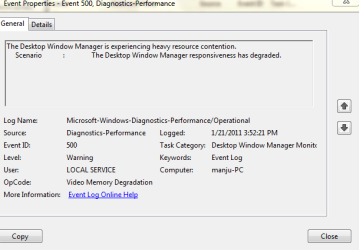
Event viewer warning

bagavan

New member
Pro User
Local time
2:57 PM
Messages
831
what is the meaning of this message? what happens during this period is that my laptop becomes unresponsive for 20 sec and high HDD activity.how do I resolve this problem?
 

Attachments

  • mem.PNG
    mem.PNG
    12 KB · Views: 25

My Computer My Computer

At a glance

Windows 8 Professional x64core 2 duo T55504 GBGMA X3100
Computer Manufacturer/Model Number
aspire 5920
OS
Windows 8 Professional x64
CPU
core 2 duo T5550
Memory
4 GB
Graphics Card(s)
GMA X3100
Hard Drives
160 GB + 320 GB
Internet Speed
2 mbps
Desktop Window Manager is responsible for the graphical effects in Windows such as aero, 3D effects, live windows previews and windows transparencies.It means the grafix subsystem is being overused.Try turning off aero and other eye candy and see if it helps.

You have 4gb ram, otherwise one would have suggested adding ram. What programs were you running at the time of these events?
 

My Computer My Computer

At a glance

Windows 7 x64 pro/ Windows 7 x86 Pro/ XP SP3 x86
Computer Manufacturer/Model Number
Too many to describe...
OS
Windows 7 x64 pro/ Windows 7 x86 Pro/ XP SP3 x86
only my chrome browser and MSE..but this has never happened before.
 

My Computer My Computer

At a glance

Windows 8 Professional x64core 2 duo T55504 GBGMA X3100
Computer Manufacturer/Model Number
aspire 5920
OS
Windows 8 Professional x64
CPU
core 2 duo T5550
Memory
4 GB
Graphics Card(s)
GMA X3100
Hard Drives
160 GB + 320 GB
Internet Speed
2 mbps
Ya, may be a one off event. What you can do is to sort by event id in the event viewer and look for event id 500. That'll tell you how often this error has occurred in the recent past.
 

My Computer My Computer

At a glance

Windows 7 x64 pro/ Windows 7 x86 Pro/ XP SP3 x86
Computer Manufacturer/Model Number
Too many to describe...
OS
Windows 7 x64 pro/ Windows 7 x86 Pro/ XP SP3 x86
How do I sort it out in event viewer can u tell me the procedure?
 

My Computer My Computer

At a glance

Windows 8 Professional x64core 2 duo T55504 GBGMA X3100
Computer Manufacturer/Model Number
aspire 5920
OS
Windows 8 Professional x64
CPU
core 2 duo T5550
Memory
4 GB
Graphics Card(s)
GMA X3100
Hard Drives
160 GB + 320 GB
Internet Speed
2 mbps
Click on Start orb, type eventvwr in the search or run box. In the eventviewer window, click on Applications and services logs-> Microsoft-> windows-> Diagnostics-performance-> Operational. Then in the right pane, click once or twice on Event Id to sort by ascending or descending order, then locate id 500.

You are already there in the snip you posted, just sort events by clicking on event id.

Also, open task manager and check ram usage at the time the slowdown happens. Again sort processes in descending order of ram usage and note down the top 5.
 

My Computer My Computer

At a glance

Windows 7 x64 pro/ Windows 7 x86 Pro/ XP SP3 x86
Computer Manufacturer/Model Number
Too many to describe...
OS
Windows 7 x64 pro/ Windows 7 x86 Pro/ XP SP3 x86
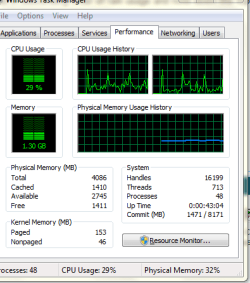
I did not find the log as I cleared the log..But during the hang process Cpu usage is 25% and Ram usage is 1.5 GB.Strange that I have noticed that HDD light is continuously on.
 

My Computer My Computer

At a glance

Windows 8 Professional x64core 2 duo T55504 GBGMA X3100
Computer Manufacturer/Model Number
aspire 5920
OS
Windows 8 Professional x64
CPU
core 2 duo T5550
Memory
4 GB
Graphics Card(s)
GMA X3100
Hard Drives
160 GB + 320 GB
Internet Speed
2 mbps
Well there are 2 separate things here. One is the video ram degradation that event viewer is talking about, the other is constant hdd activity. 1.5 gb ram usage is perfectly normal and should not cause any headaches on a 4gb system. For hdd activity, you again need to go back to task manager and arrange processes in descending order of cpu usage, then note the top 5 hogs.
 

My Computer My Computer

At a glance

Windows 7 x64 pro/ Windows 7 x86 Pro/ XP SP3 x86
Computer Manufacturer/Model Number
Too many to describe...
OS
Windows 7 x64 pro/ Windows 7 x86 Pro/ XP SP3 x86
Here u go bill

The same thing will be there during the hang up process

Also note during hanging laptop becomes unresponsive.
 

Attachments

  • taskmgr.PNG
    taskmgr.PNG
    12.3 KB · Views: 3

My Computer My Computer

At a glance

Windows 8 Professional x64core 2 duo T55504 GBGMA X3100
Computer Manufacturer/Model Number
aspire 5920
OS
Windows 8 Professional x64
CPU
core 2 duo T5550
Memory
4 GB
Graphics Card(s)
GMA X3100
Hard Drives
160 GB + 320 GB
Internet Speed
2 mbps
No no no. Click on the Processes tab in that window, then click on CPU tab to arrange in descending order like this.

Capture.JPG
 

My Computer My Computer

At a glance

Windows 7 x64 pro/ Windows 7 x86 Pro/ XP SP3 x86
Computer Manufacturer/Model Number
Too many to describe...
OS
Windows 7 x64 pro/ Windows 7 x86 Pro/ XP SP3 x86
Sorry here u go.
 

Attachments

  • gc.PNG
    gc.PNG
    12.8 KB · Views: 1

My Computer My Computer

At a glance

Windows 8 Professional x64core 2 duo T55504 GBGMA X3100
Computer Manufacturer/Model Number
aspire 5920
OS
Windows 8 Professional x64
CPU
core 2 duo T5550
Memory
4 GB
Graphics Card(s)
GMA X3100
Hard Drives
160 GB + 320 GB
Internet Speed
2 mbps
In this particular snip, theres nothing very abnormal. DWM is consuming 5% cpu which is somewhat high. Also, you've got wmp and the sidebar running. Did you take this snip in a slowdown? If yes, try switching to a classic (non-aero) theme and cut down on some Visual effects and see whether it solves the problem. Also make sure your video drivers are upto date.
 

My Computer My Computer

At a glance

Windows 7 x64 pro/ Windows 7 x86 Pro/ XP SP3 x86
Computer Manufacturer/Model Number
Too many to describe...
OS
Windows 7 x64 pro/ Windows 7 x86 Pro/ XP SP3 x86
i wonder if this problem has to do with this thread?
 

My Computer My Computer

At a glance

ultimate 64 sp1i5 2500K [email protected]8 gigs GSkill Ripjaws 1600amd hd6950
Computer Manufacturer/Model Number
mickey megabyte 1234
OS
ultimate 64 sp1
CPU
i5 2500K [email protected]
Motherboard
MSI P67A-GD53
Memory
8 gigs GSkill Ripjaws 1600
Graphics Card(s)
amd hd6950
Sound Card
creative x-fi gamer
Monitor(s) Displays
samsung 24"
Screen Resolution
1920x1080
Hard Drives
ocz vertex 2e 60 gig, samsung f3 1tb, buffalo 2tb ext
PSU
antec 550
Case
antec three hundred
Cooling
i'm a cooling fan
Keyboard
saitek eclipse ii
Mouse
logitech g3
Internet Speed
about 4 Mbps
Other Info
i love win7
this snip is during normal activity..BTW this has not occured these many days.why has this problem started all of a sudden
 

My Computer My Computer

At a glance

Windows 8 Professional x64core 2 duo T55504 GBGMA X3100
Computer Manufacturer/Model Number
aspire 5920
OS
Windows 8 Professional x64
CPU
core 2 duo T5550
Memory
4 GB
Graphics Card(s)
GMA X3100
Hard Drives
160 GB + 320 GB
Internet Speed
2 mbps
Google repeat errors in Performance log accessed by clicking WEI score link at Computer>Properties, then clicking Advanced Tools. Look for cued issues at top of Tools page, Generate a System Health Report.

Click the Advanced link at Computer>Properties then in Performance>Settings uncheck visual effects for fading, sliding, dragging intact which may be sufficient. You may already be warned about this on Tools page.

Whenever there are hangs in Win7 I would also test my RAM with memtest86 for 5-6 passes and test HD with maker's diag/repair full CD scan.

Win7 troubleshooting fundamentals: http://www.sevenforums.com/general-...-lags-every-couple-seconds-2.html#post1131640
 
NOpe.
 

My Computer My Computer

At a glance

Windows 8 Professional x64core 2 duo T55504 GBGMA X3100
Computer Manufacturer/Model Number
aspire 5920
OS
Windows 8 Professional x64
CPU
core 2 duo T5550
Memory
4 GB
Graphics Card(s)
GMA X3100
Hard Drives
160 GB + 320 GB
Internet Speed
2 mbps
Ya I got a message in tools that performance can be improved by changing visual settings.
 

My Computer My Computer

At a glance

Windows 8 Professional x64core 2 duo T55504 GBGMA X3100
Computer Manufacturer/Model Number
aspire 5920
OS
Windows 8 Professional x64
CPU
core 2 duo T5550
Memory
4 GB
Graphics Card(s)
GMA X3100
Hard Drives
160 GB + 320 GB
Internet Speed
2 mbps
Back
Top