
Exactly WHAT activity WILL prevent hibernation?

dsperber

New member
Guru
Gold Member
VIP
Local time
5:14 PM
Messages
2,752
Location
Marina Del Rey, CA
Ok... I'm confused as to why my machine DID go into hibernation, when I was in the middle of running a backup job (to tape).

Win7 Pro x64 is the environment.

I've got hibernation set at 25 minutes. This machine is also used as an HTPC and I don't want it actually running during the day when either (a) I'm not sitting there actually working on it, or (b) it is not doing any TV recording.

Even when all non-OS drives are spun-down (manually, by me using HDDScan, since because of a second unresolved issue I can't figure out why Win7 won't do that for me when their 15 minutes is reached whereas WinXP did do that) my machine still uses about 340 watts of power (about 380 watts are used when the drives are all spun up). I'd just as soon put it in hibernation when not in use, and then wake up automatically when TV recordings are scheduled to be made.

===> hibernation is set ON, after 25 minutes... which I assumed to mean 25 IDLE MINUTES!!!

Well yesterday, I started a normal periodic backup job (to DDS6 tape) using Novastor's NovaBACKUP product, and this particular job runs for about 1 1/2 hours. First time I've run the job when also having hibernation-after-25-minutes enabled.

Imagine my surprise when I came back later to discover the system in hibernation, which apparently had been initiated DURING THE BACKUP JOB!!! The backup job itself had been killed by Win7 (or more accurately, apparently by a fatal I/O error which occurred in the middle of it as hibernation was initiated).

Obviously I did not have any expectation that an ongoing "background job" (not a service or task, but an actual "job") that simply did not involve any mouse or keyboard would allow Win7 to still believe the environment was "eligible for hibernation". This was obviously NOT my intent or understanding, as to what kind of "idle" the system had to be in before sleep/hibernation would even be considered possible.

Sure, I can temporarily disable hibernation when running this backup job or program. But what if I were running a long-running "render" (or VirtualDub "save as AVI..." function) which took many hours? Obviously, these too are examples of programs which (a) use perhaps 100% of the CPU and (b) do a great deal of I/O to hard drive.

How can Win7 conceivably believe the system is "idle and eligible for hibernation" when these kinds of 100% resource consuming background jobs are running???

And yet it does seem that recording TV programs defines an "activity that DOES prevent sleep/hibernation", so at least that kind of program activity is obviously something that CAN successfully inhibit hibernation. (don't know if only WMC does this, or also if BeyondTV would benefit from the same "feature"?)

So... what are the real definitions of the kinds of program activity which CAN inhibit hibernation? I could certainly request NovaStor to make an appropriate change to NovaBACKUP in order to prevent this kind of unintended consequence of starting a backup job but getting clobbered by auto-sleep/hibernate.

Just as there are ways for a program to provide an option to manually inhibit screensaver from kicking in if that's appropriate (e.g. when watching a movie or video), it would also seem that there must be some kind of system service function a program could call that says "inhibit sleep/hibernate" until I say otherwise.

Anybody?
 

My Computer My Computer

Computer type
PC/Desktop
Computer Manufacturer/Model Number
Home-built, two systems (1) and (2)
OS
Windows 7 Pro x64 (1), Win7 Pro X64 (2)
CPU
i5-3350p 3.1Ghz/6MB-cache (1); E8400 3.0Ghz/6MB-cache (2)
Motherboard
ASUS P8Z77-V Pro (1); ASUS P5Q3 (2)
Memory
8GB PC3-12800 DDR3 (1); 4GB PC3-10600 DDR3 (2)
Graphics Card(s)
ATI HD7750 (1), (see TV cards); ATI R7 250 (2)
Sound Card
Realtek ALC892 HD Audio (1); Realtek ALC1200 HD Audio (2)
Monitor(s) Displays
Eizo HD2441W LCD, Eizo S2433W (1); Eizo 24" S2433W (2)
Screen Resolution
1920x1200, 1920x1200 (1); 1920x1200 (2)
Hard Drives
(1) 1TB SATA-II (7200RPM), 2x2TB SATA-III (7200RPM), 250GB SATA-III (10000RPM) for OS; 2x2TB external USB 3.0

(2) 320GB SATA-II (7200RPM), 750GB SATA-II (7200RPM), 150GB SATA-II (10000RPM) for OS; 2TB external USB 3.0
PSU
Nesteq ECS-6001 600W (1); Nesteq ECS-5001 500W (2)
Case
Acousti-Case 360 (1) and (2)
Cooling
Noctua NH-U12P SE2 for CPU, 2x120mm case fans (1) and (2)
Keyboard
IBM PS/2 (1) and (2)
Mouse
Logitech MX Revolution wireless (1); Microsoft wired (2)
Internet Speed
100mbps down / 10mbps up
Antivirus
Microsoft Security Essentials; Malwarebyte Anti-Malware Pro
Browser
Firefox
Other Info
Ceton InfiniTV 4-tuner cablecard-enabled TV card as well as Hauppauge HVR-2250 OTA/ATSC 2-tuner TV card in (1), running under Win7 WMC
Just change your settings with in this section to whatever you want... GL :)
 

Attachments

  • hib.PNG
    hib.PNG
    40.7 KB · Views: 408

My Computer My Computer

Computer Manufacturer/Model Number
Toshiba Satellite
OS
Windows 7 Home Premium 64-bit
CPU
Pentium(R) Dual-Core T4300 @ 2.10GHz
Motherboard
Toshiba Model KSWAA - Chipset Intel GL40 Rev 07
Memory
3 GB DDR2 PC2-6400 (400 MHz) Samsung M4 70T2864Q23-CF7
Graphics Card(s)
Mobile Intel GMA4500M 32bit OS (64bit OS) dynamically
Sound Card
Realtek ALC272-GR Software Sound
Monitor(s) Displays
16.0" HD TFT with TrueBrite Matrix colour LCD display
Screen Resolution
1366 x 768
Hard Drives
FUJITSU MJA2320BH G2-(S2) 320GB (5400RPM) Serial-ATA
Keyboard
Canadian Bilingual Keyboard 105 keys with 13 Function keys
Mouse
Touchpad Point device & Lexma USB Mouse
Internet Speed
Walking is Faster
Other Info
Wireless LAN Realtek RTL89191SE 802.11n PCI-E NIC + a
LAN Realek PCIe FE Family Controller and
TOSHIBA Software Modem
Just change your settings with in this section to whatever you want... GL :)
I think you're missing my point. I'm not pushing any buttons to make hibernate or sleep happen. This happens automatically after a user-specified "idle period of time" elapses.

(1) In RMB on Desktop -> Personalize -> Screen Saver -> Change power settings -> Change plan settings, I have (a) turn off display after 20 minutes, and (b) put the computer to sleep NEVER. Monitors off in 20 minutes of no activity, and the computer NEVER enters "sleep" state.

(2) Furthermore, if I then -> Change advanced power settings -> Sleep -> Hibernate after, I have 25 minutes specified. I DO WANT the machine to enter "hibernate" state if nothing's going on for 25 minutes... no mouse, no keyboard, no user-started running job using CPU and accessing hard drive.

So if I just walk away from an idle machine to have lunch or leave the house, with nothing "running" (that I launched, and that should not be treated as "normal background activity" e.g. Everest-like CPU monitors), I DO want the machine to enter hibernate after 25 minutes.

I DO NOT want "background" programs (e.g. Everest, DUMeter, ASUS EPU engine, Sophos anti-virus, Clockwise, etc.) to prevent hibernate... but I DO want "foreground" programs (e.g. NovaBACKUP, VirtualDub, WMC and BeyondTV recording TV programs, etc.) to prevent hibernate.

That's my question: what defines "foreground" programs that are "active" and thus prevent hibernate when obviously some other programs should certainly be considered "background" and are perfectly acceptable as "idle" and should not prevent hibernate?

I do not want to manually intervene here. This should all happen automatically. Sleep/hibernate should simply not be entered when "foreground" activity is running... even if I don't touch the mouse/keyboard for days! In contrast, "background" activity is just that... always-running in the background like a Windows Service, so it should not prevent sleep/hibernate.
 

My Computer My Computer

Computer type
PC/Desktop
Computer Manufacturer/Model Number
Home-built, two systems (1) and (2)
OS
Windows 7 Pro x64 (1), Win7 Pro X64 (2)
CPU
i5-3350p 3.1Ghz/6MB-cache (1); E8400 3.0Ghz/6MB-cache (2)
Motherboard
ASUS P8Z77-V Pro (1); ASUS P5Q3 (2)
Memory
8GB PC3-12800 DDR3 (1); 4GB PC3-10600 DDR3 (2)
Graphics Card(s)
ATI HD7750 (1), (see TV cards); ATI R7 250 (2)
Sound Card
Realtek ALC892 HD Audio (1); Realtek ALC1200 HD Audio (2)
Monitor(s) Displays
Eizo HD2441W LCD, Eizo S2433W (1); Eizo 24" S2433W (2)
Screen Resolution
1920x1200, 1920x1200 (1); 1920x1200 (2)
Hard Drives
(1) 1TB SATA-II (7200RPM), 2x2TB SATA-III (7200RPM), 250GB SATA-III (10000RPM) for OS; 2x2TB external USB 3.0

(2) 320GB SATA-II (7200RPM), 750GB SATA-II (7200RPM), 150GB SATA-II (10000RPM) for OS; 2TB external USB 3.0
PSU
Nesteq ECS-6001 600W (1); Nesteq ECS-5001 500W (2)
Case
Acousti-Case 360 (1) and (2)
Cooling
Noctua NH-U12P SE2 for CPU, 2x120mm case fans (1) and (2)
Keyboard
IBM PS/2 (1) and (2)
Mouse
Logitech MX Revolution wireless (1); Microsoft wired (2)
Internet Speed
100mbps down / 10mbps up
Antivirus
Microsoft Security Essentials; Malwarebyte Anti-Malware Pro
Browser
Firefox
Other Info
Ceton InfiniTV 4-tuner cablecard-enabled TV card as well as Hauppauge HVR-2250 OTA/ATSC 2-tuner TV card in (1), running under Win7 WMC
You can set your settings for never as well... GL :)
 

My Computer My Computer

Computer Manufacturer/Model Number
Toshiba Satellite
OS
Windows 7 Home Premium 64-bit
CPU
Pentium(R) Dual-Core T4300 @ 2.10GHz
Motherboard
Toshiba Model KSWAA - Chipset Intel GL40 Rev 07
Memory
3 GB DDR2 PC2-6400 (400 MHz) Samsung M4 70T2864Q23-CF7
Graphics Card(s)
Mobile Intel GMA4500M 32bit OS (64bit OS) dynamically
Sound Card
Realtek ALC272-GR Software Sound
Monitor(s) Displays
16.0" HD TFT with TrueBrite Matrix colour LCD display
Screen Resolution
1366 x 768
Hard Drives
FUJITSU MJA2320BH G2-(S2) 320GB (5400RPM) Serial-ATA
Keyboard
Canadian Bilingual Keyboard 105 keys with 13 Function keys
Mouse
Touchpad Point device & Lexma USB Mouse
Internet Speed
Walking is Faster
Other Info
Wireless LAN Realtek RTL89191SE 802.11n PCI-E NIC + a
LAN Realek PCIe FE Family Controller and
TOSHIBA Software Modem
just a thought

have you got any anti virus/malware/update programs to run at certain default times, these are standard, but i suspect the tape backup is a batch job outside of w7 part of bios set up also look at posting in page 2 by websquab re MS saying pc's hibernation is a hybrid
 

My Computer My Computer

Computer type
PC/Desktop
Computer Manufacturer/Model Number
medionl/Aspire 6930G/acer x55a
OS
W7 home premium 32bit/W7HP 64bit/w10 tp insider ring
CPU
E5300 dual core
Motherboard
medion MS7366
Memory
3gb
Graphics Card(s)
Nvidia Geforce 7100 Nforce 630i
Monitor(s) Displays
avixc
Internet Speed
n (isp resticted to 72)
Antivirus
mse/pands
Browser
palemoon
Other Info
Belkin Fd7050 n USB using Railink RT2870 drivers, more upto date
have you got any anti virus/malware/update programs to run at certain default times
No.


I suspect the tape backup is a batch job outside of w7 part of bios set up also look at posting in page 2 by websquab re MS saying pc's hibernation is a hybrid
Sorry... I don't understand your last statement.

I'm not concerned about hibernate vs. sleep vs. hybrid sleep, or anything else. When the machine hibernates that's what I want, and it does it right. No "hybrid" for me. BIOS is S1.

My concern is that none of this hibernate/sleep activity should even get started as long as a "batch job" (e.g. my tape backup) is running! Period! Same way hibernate/sleep does not kick in when WMC is recording a TV program!

So... how does that happen? How can WMC and other TV apps (e.g. BeyondTV) prevent going into sleep/hibernate? Is it an API call? We know WMC/BTV can bring a machine out of sleep/hibernate when it's time to record a TV show, and they also seem to be totally capable of preventing going into sleep/hibernate if they are currently recording something. I didn't set anything to make this happen... it's just the way the program were written, I suppose.

So, what is that technique? Is it just somehow the "type" of programs they are and the particular multi-media functions they are invoking, that is automatically known to be something which should prevent sleep/hibernate? Or is it a particular system service request that temporarily disables sleep/hibernate (similar to temporarily disabling screensaver)?
 

My Computer My Computer

Computer type
PC/Desktop
Computer Manufacturer/Model Number
Home-built, two systems (1) and (2)
OS
Windows 7 Pro x64 (1), Win7 Pro X64 (2)
CPU
i5-3350p 3.1Ghz/6MB-cache (1); E8400 3.0Ghz/6MB-cache (2)
Motherboard
ASUS P8Z77-V Pro (1); ASUS P5Q3 (2)
Memory
8GB PC3-12800 DDR3 (1); 4GB PC3-10600 DDR3 (2)
Graphics Card(s)
ATI HD7750 (1), (see TV cards); ATI R7 250 (2)
Sound Card
Realtek ALC892 HD Audio (1); Realtek ALC1200 HD Audio (2)
Monitor(s) Displays
Eizo HD2441W LCD, Eizo S2433W (1); Eizo 24" S2433W (2)
Screen Resolution
1920x1200, 1920x1200 (1); 1920x1200 (2)
Hard Drives
(1) 1TB SATA-II (7200RPM), 2x2TB SATA-III (7200RPM), 250GB SATA-III (10000RPM) for OS; 2x2TB external USB 3.0

(2) 320GB SATA-II (7200RPM), 750GB SATA-II (7200RPM), 150GB SATA-II (10000RPM) for OS; 2TB external USB 3.0
PSU
Nesteq ECS-6001 600W (1); Nesteq ECS-5001 500W (2)
Case
Acousti-Case 360 (1) and (2)
Cooling
Noctua NH-U12P SE2 for CPU, 2x120mm case fans (1) and (2)
Keyboard
IBM PS/2 (1) and (2)
Mouse
Logitech MX Revolution wireless (1); Microsoft wired (2)
Internet Speed
100mbps down / 10mbps up
Antivirus
Microsoft Security Essentials; Malwarebyte Anti-Malware Pro
Browser
Firefox
Other Info
Ceton InfiniTV 4-tuner cablecard-enabled TV card as well as Hauppauge HVR-2250 OTA/ATSC 2-tuner TV card in (1), running under Win7 WMC

My Computer My Computer

Computer type
PC/Desktop
Computer Manufacturer/Model Number
Home-built, two systems (1) and (2)
OS
Windows 7 Pro x64 (1), Win7 Pro X64 (2)
CPU
i5-3350p 3.1Ghz/6MB-cache (1); E8400 3.0Ghz/6MB-cache (2)
Motherboard
ASUS P8Z77-V Pro (1); ASUS P5Q3 (2)
Memory
8GB PC3-12800 DDR3 (1); 4GB PC3-10600 DDR3 (2)
Graphics Card(s)
ATI HD7750 (1), (see TV cards); ATI R7 250 (2)
Sound Card
Realtek ALC892 HD Audio (1); Realtek ALC1200 HD Audio (2)
Monitor(s) Displays
Eizo HD2441W LCD, Eizo S2433W (1); Eizo 24" S2433W (2)
Screen Resolution
1920x1200, 1920x1200 (1); 1920x1200 (2)
Hard Drives
(1) 1TB SATA-II (7200RPM), 2x2TB SATA-III (7200RPM), 250GB SATA-III (10000RPM) for OS; 2x2TB external USB 3.0

(2) 320GB SATA-II (7200RPM), 750GB SATA-II (7200RPM), 150GB SATA-II (10000RPM) for OS; 2TB external USB 3.0
PSU
Nesteq ECS-6001 600W (1); Nesteq ECS-5001 500W (2)
Case
Acousti-Case 360 (1) and (2)
Cooling
Noctua NH-U12P SE2 for CPU, 2x120mm case fans (1) and (2)
Keyboard
IBM PS/2 (1) and (2)
Mouse
Logitech MX Revolution wireless (1); Microsoft wired (2)
Internet Speed
100mbps down / 10mbps up
Antivirus
Microsoft Security Essentials; Malwarebyte Anti-Malware Pro
Browser
Firefox
Other Info
Ceton InfiniTV 4-tuner cablecard-enabled TV card as well as Hauppauge HVR-2250 OTA/ATSC 2-tuner TV card in (1), running under Win7 WMC
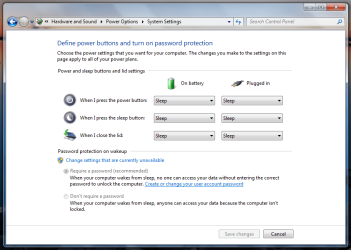
You ask, what exactly is idle. For one- not moving your mouse. Programs that are supposed to tell the machine that they are supposed to be considered as "active programs" do so explicitly by using APIs (which I'm not aware of, but I know exist :P).

Take WMP as an example. While you're playing a music file, your system will NEVER sleep/hibernate. Only when music is stopped will it take in to account your hibernation idle time. BUT it will dim or turn off your display as set in your power saving settings.

I guess your program wasn't designed to take hibernation/sleep in to account which is why Windows 7 proceeded to hibernate.
 

My Computer My Computer

Computer Manufacturer/Model Number
Asus G73SW-XN2
OS
Windows 2000 5.0 Build 2195
CPU
Intel Core i7-2630QM@2GHz(2.9GHz Turbo Boost) [Sandy Bridge]
Motherboard
Asus G73SW (Intel HM65 Chipset)
Memory
Kingston DDR3 1333 16GB (4GBx4)
Graphics Card(s)
nVidia GTX 460m 1.5GB
Sound Card
EAX Advanced HD 5.0, THX TruStudio
Monitor(s) Displays
17.3 in. primary & 23 in. secondary
Screen Resolution
1920x1080
Hard Drives
Seagate Momentus XT (SATA II) 500 GB @ 7200 RPM
Hitachi (SATA II) 500GB @ 7200 RPM

Non Raid because ASUS was crappy to choose an HM65 Chipset
Keyboard
Built-in 102-Key Backlit Keyboard
Other Info
It's a Laptop.
This will do it... GL :)
 

Attachments

  • never.PNG
    never.PNG
    33.7 KB · Views: 461

My Computer My Computer

Computer Manufacturer/Model Number
Toshiba Satellite
OS
Windows 7 Home Premium 64-bit
CPU
Pentium(R) Dual-Core T4300 @ 2.10GHz
Motherboard
Toshiba Model KSWAA - Chipset Intel GL40 Rev 07
Memory
3 GB DDR2 PC2-6400 (400 MHz) Samsung M4 70T2864Q23-CF7
Graphics Card(s)
Mobile Intel GMA4500M 32bit OS (64bit OS) dynamically
Sound Card
Realtek ALC272-GR Software Sound
Monitor(s) Displays
16.0" HD TFT with TrueBrite Matrix colour LCD display
Screen Resolution
1366 x 768
Hard Drives
FUJITSU MJA2320BH G2-(S2) 320GB (5400RPM) Serial-ATA
Keyboard
Canadian Bilingual Keyboard 105 keys with 13 Function keys
Mouse
Touchpad Point device & Lexma USB Mouse
Internet Speed
Walking is Faster
Other Info
Wireless LAN Realtek RTL89191SE 802.11n PCI-E NIC + a
LAN Realek PCIe FE Family Controller and
TOSHIBA Software Modem
Back
Top