Excel file saving problem in the network

nalin74

New member
Local time
12:52 AM
Messages
11
Location
Ruwais, Abu Dhabi, UAE
I have a problem in saving an excel file on to another pc in the network, which has windows xp. But before I used in both pc’s windows xp & that time there were no problem saving on to the other pc.
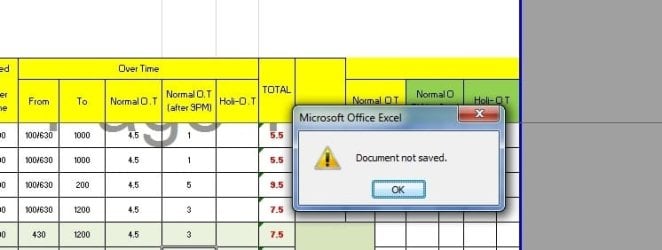
Now I use windows 7 32bit (Service pack1) in my pc & other pc on network is windows xp. Im doing some thing on Microsoft Excel 2007 (password protected file) in windows7 pc & when I saving to windows xp pc, most of the time saving bar displayed & say document not saved. But that time some TMP file will be saved in windows xp pc.
Im opening the excel file from network windows xp pc & im doing the amendments from windows7 pc & saving back to winxp pc.
Original file is at winxp pc. Im opening it from win7 pc.
I have changed the below settings also in the win7 pc. But only some times this problem occurs. Some times I can save smoothly.
I wanted to know why this problem comes only some times.
I must say when I using in both pc’s winxp OS nothing happened.
I changed the settings in win7 pc as below,
*Network discovery – off
*Enable file sharing for devices that use 40 or 56 bit encryption
Please give me a help how to solve this saving issue.
 

My Computer

Computer type
PC/Desktop
Computer Manufacturer/Model Number
HP
OS
Windows 7 32bit
CPU
Core2Duo
First of all, you're going to want Network Discovery turned on if you're sharing files on the network.

Is this only one file, only on excel, or is this a random problem saving ANY files on the network.

Please make sure each computer has full permissions over the file you are trying to edit.
 

My Computer

Computer type
PC/Desktop
Computer Manufacturer/Model Number
Custom
OS
Dual Boot: Windows 8.1 & Server 2012r2 VMs: Kali Linux, Backbox, Matriux, Windows 8.1
CPU
A10 7700 Kavari SteamRoller
Motherboard
ASUS A88XM-PLUS (FM2+ )
Memory
8GB DDR3 SDRAM PC3-8500
Graphics Card(s)
1024MB ATI AMD Radeon R7 Graphics
Sound Card
Realtek High Definition Audio
Monitor(s) Displays
Samsung
Hard Drives
SSD Crucial 120gb
WD VelociRaptor 1tb
PSU
Rosewill Gaming 650w
Case
Rosewill Galaxy 2
Internet Speed
55/12
Antivirus
Malwarebytes, MSE, SAS
Browser
FireFox, Chrome
Im not sharing any files from win7 pc, only on winxp pc, excel files I want to edit from win7 pc.

And also I gave full permission from each computer. Only this problem comes some times. Not all ways. Before I saving if I access other pc some files then I saved after that, it saves with no issue.

What is the meaning of Network discovery in win7 sharing settings? Now that option is OFF. If it's ON, this problem comes always.

Any idea?
 

My Computer

Computer type
PC/Desktop
Computer Manufacturer/Model Number
HP
OS
Windows 7 32bit
CPU
Core2Duo
Network discovery is a network setting that affects whether your computer can find other computers and devices on the network and whether other computers on the network can find your computer.

There are three network discovery states:

On

This state allows your computer to see other network computers and devices and allows people on other network computers to see your computer. This makes it easier to share files and printers.

Off

This state prevents your computer from seeing other network computers and devices and prevents people on other network computers from seeing your computer.

Custom

This is a mixed state in which some settings related to network discovery are enabled, but not all of them. For example, network discovery could be turned on, but you or your system administrator might have changed firewall settings that affect network discovery.

Network discovery requires that the DNS Client, Function Discovery Resource Publication, SSDP Discovery, and UPnP Device Host services are started, that network discovery is allowed to communicate through Windows Firewall, and that other firewalls are not interfering with network discovery. If some but not all of these are true, the network discovery state will be shown as Custom.

To turn on network discovery
Click to open Advanced sharing settings.

Click the chevron Picture of the chevron icon to expand the current network profile.

Click Turn on network discovery, and then click Save changes. Administrator permission required If you are prompted for an administrator password or confirmation, type the password or provide confirmation.

Network locations
When you connect to a network, you must choose a network location. There are four network locations: Home, Work, Public, and Domain. Based on the network location you choose, Windows assigns a network discovery state to the network and opens the appropriate Windows Firewall ports for that state. For more information about network locations, see Choosing a network location.

Can you tell me in what situation does this happen every time? Like for example, if you save it a certain way and try to bring it back over to XP, it wont save every time... does something like that happen, or is this completely random?
 

My Computer

Computer type
PC/Desktop
Computer Manufacturer/Model Number
Custom
OS
Dual Boot: Windows 8.1 & Server 2012r2 VMs: Kali Linux, Backbox, Matriux, Windows 8.1
CPU
A10 7700 Kavari SteamRoller
Motherboard
ASUS A88XM-PLUS (FM2+ )
Memory
8GB DDR3 SDRAM PC3-8500
Graphics Card(s)
1024MB ATI AMD Radeon R7 Graphics
Sound Card
Realtek High Definition Audio
Monitor(s) Displays
Samsung
Hard Drives
SSD Crucial 120gb
WD VelociRaptor 1tb
PSU
Rosewill Gaming 650w
Case
Rosewill Galaxy 2
Internet Speed
55/12
Antivirus
Malwarebytes, MSE, SAS
Browser
FireFox, Chrome
All ways im opening the excel file from win7 pc & file located in network xp pc. When i coming to office im opening in the morning & editing the file & when saving this issue comes. Today i saved from the morning 1st three times, smoothly it saved, but 4th time when i saved, it wont. so again i have to browse the network xp pc & have to save.
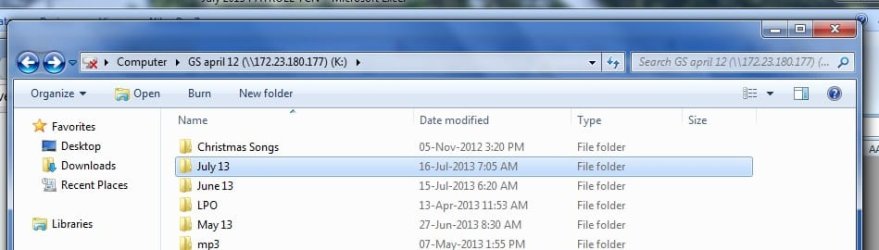
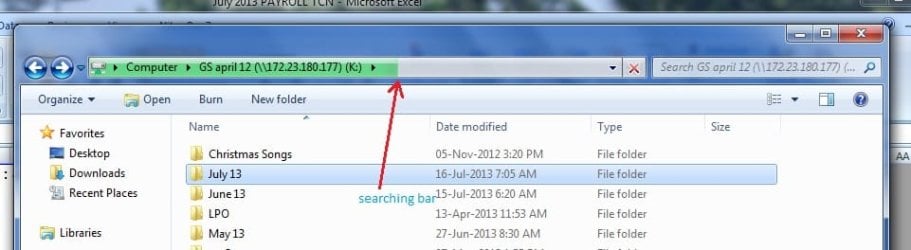
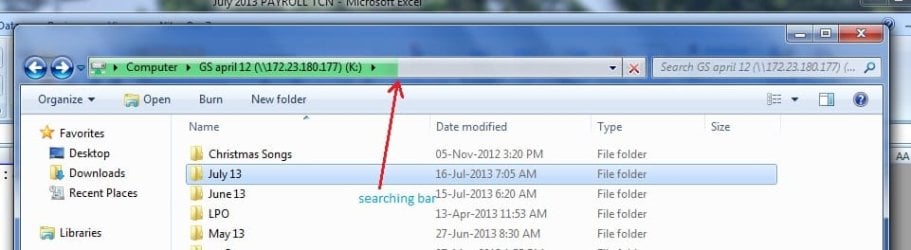
It automatically indicating a moving shaded bar going on the top searching the network. see the screen shot, now also that network xp pc not connected.
This issue comes just after the saving failure occurs.
Pls see the 2nd screen shot. when i click on one file this searching bar going.
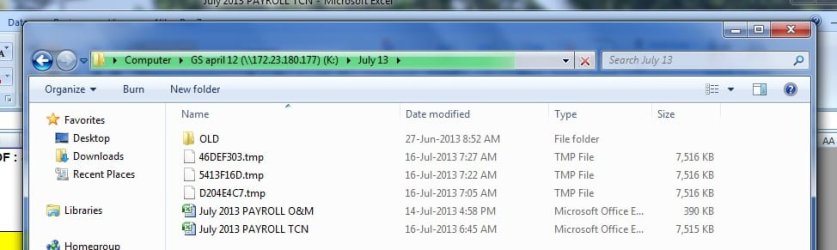
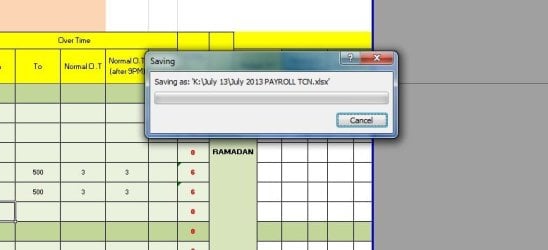
Pls check the TMP files created when the saving fails. screen shot 3
 

Attachments

  • sc1.jpg
    sc1.jpg
    77.4 KB · Views: 3
  • sc2.jpg
    sc2.jpg
    82.8 KB · Views: 3
  • sc3.jpg
    sc3.jpg
    86.7 KB · Views: 3

My Computer

Computer type
PC/Desktop
Computer Manufacturer/Model Number
HP
OS
Windows 7 32bit
CPU
Core2Duo
By any chance, does this happen when you try to save the file and both PC's have the file open via the network?
 

My Computer

Computer type
PC/Desktop
Computer Manufacturer/Model Number
Custom
OS
Dual Boot: Windows 8.1 & Server 2012r2 VMs: Kali Linux, Backbox, Matriux, Windows 8.1
CPU
A10 7700 Kavari SteamRoller
Motherboard
ASUS A88XM-PLUS (FM2+ )
Memory
8GB DDR3 SDRAM PC3-8500
Graphics Card(s)
1024MB ATI AMD Radeon R7 Graphics
Sound Card
Realtek High Definition Audio
Monitor(s) Displays
Samsung
Hard Drives
SSD Crucial 120gb
WD VelociRaptor 1tb
PSU
Rosewill Gaming 650w
Case
Rosewill Galaxy 2
Internet Speed
55/12
Antivirus
Malwarebytes, MSE, SAS
Browser
FireFox, Chrome

My Computer

Computer type
PC/Desktop
Computer Manufacturer/Model Number
Custom
OS
Dual Boot: Windows 8.1 & Server 2012r2 VMs: Kali Linux, Backbox, Matriux, Windows 8.1
CPU
A10 7700 Kavari SteamRoller
Motherboard
ASUS A88XM-PLUS (FM2+ )
Memory
8GB DDR3 SDRAM PC3-8500
Graphics Card(s)
1024MB ATI AMD Radeon R7 Graphics
Sound Card
Realtek High Definition Audio
Monitor(s) Displays
Samsung
Hard Drives
SSD Crucial 120gb
WD VelociRaptor 1tb
PSU
Rosewill Gaming 650w
Case
Rosewill Galaxy 2
Internet Speed
55/12
Antivirus
Malwarebytes, MSE, SAS
Browser
FireFox, Chrome
no no, only i opened from the network. But why some times saving & some times not?
why that TMP file created every time saving not occurred?
 

My Computer

Computer type
PC/Desktop
Computer Manufacturer/Model Number
HP
OS
Windows 7 32bit
CPU
Core2Duo
no no, only i opened from the network. But why some times saving & some times not?
why that TMP file created every time saving not occurred?

Sorry if I'm being redundant here but I want to make sure of this...

Is there ever a time where you leave the file open on the machine running XP, then go to your machine running Windows 7 and open the file from the network, edit it, then save it (while the file is open on the other PC)?
 

My Computer

Computer type
PC/Desktop
Computer Manufacturer/Model Number
Custom
OS
Dual Boot: Windows 8.1 & Server 2012r2 VMs: Kali Linux, Backbox, Matriux, Windows 8.1
CPU
A10 7700 Kavari SteamRoller
Motherboard
ASUS A88XM-PLUS (FM2+ )
Memory
8GB DDR3 SDRAM PC3-8500
Graphics Card(s)
1024MB ATI AMD Radeon R7 Graphics
Sound Card
Realtek High Definition Audio
Monitor(s) Displays
Samsung
Hard Drives
SSD Crucial 120gb
WD VelociRaptor 1tb
PSU
Rosewill Gaming 650w
Case
Rosewill Galaxy 2
Internet Speed
55/12
Antivirus
Malwarebytes, MSE, SAS
Browser
FireFox, Chrome
no no, if from xp pc that file open, when im opening from win7 pc, it gives me as read only file.
But im the one who opening 1st, but from network.
can you tell me why that searching bar going? GREEN bar in the screen shot.
If once connected to the network xp pc, why again searching? my question is that?

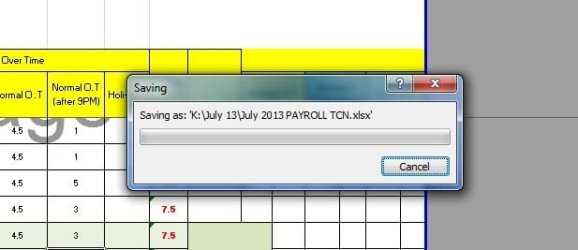
Here i attached two screen shots, when the saving error occurred.
1st coming saving window & it not goes, then i click cancel, it gives document not saved window & created the TMP file.
 

Attachments

  • 1st mess.jpg
    1st mess.jpg
    39 KB · Views: 4
  • 2nd mess.jpg
    2nd mess.jpg
    50.2 KB · Views: 3

My Computer

Computer type
PC/Desktop
Computer Manufacturer/Model Number
HP
OS
Windows 7 32bit
CPU
Core2Duo
Please try the following:

Locate the folder that contains your files on the network (and any other folders you are having this issue with), right click the folder or drive > Click 'Properties'

Click 'Customize' tab > Optimize this folder for (select General Items) > Click 'Also apply this template to other subfolders' > Then click Apply > Click Ok

Please tell me if this helps.
 

My Computer

Computer type
PC/Desktop
Computer Manufacturer/Model Number
Custom
OS
Dual Boot: Windows 8.1 & Server 2012r2 VMs: Kali Linux, Backbox, Matriux, Windows 8.1
CPU
A10 7700 Kavari SteamRoller
Motherboard
ASUS A88XM-PLUS (FM2+ )
Memory
8GB DDR3 SDRAM PC3-8500
Graphics Card(s)
1024MB ATI AMD Radeon R7 Graphics
Sound Card
Realtek High Definition Audio
Monitor(s) Displays
Samsung
Hard Drives
SSD Crucial 120gb
WD VelociRaptor 1tb
PSU
Rosewill Gaming 650w
Case
Rosewill Galaxy 2
Internet Speed
55/12
Antivirus
Malwarebytes, MSE, SAS
Browser
FireFox, Chrome
any other solution?

Experts please comment on this issue...
 

My Computer

Computer type
PC/Desktop
Computer Manufacturer/Model Number
HP
OS
Windows 7 32bit
CPU
Core2Duo
Here is the problem, this issue you are having really isn't that widespread yet and there really isnt a goto fix per se. I have found a few solutions that sound like your problem but I don't know for sure if it will help you.

(May not help, but it is useful for troubleshooting Excel saving issues)
How to troubleshoot errors when you save Excel files

Another possible solution:
You cannot save documents to a folder or change the permission settings of folders on a SMB 1.0-based remote server from a Windows-based computer that has security update 980232 (MS10-020) installed

Also, you may want to try this hotfix as it has solved this problem for others
Windows6.1-KB983458-x64.msu -> Language Neutral Windows 7 Hotfix Downloads -> Language Neutral Hotfix Downloads -> Downloads

I've been googling around after I had no more ideas as to what the problem could be and I have found this issue to be very intermittent and the fixes are wide spread. So hang in there, hopefully we can figure it out.
 

My Computer

Computer type
PC/Desktop
Computer Manufacturer/Model Number
Custom
OS
Dual Boot: Windows 8.1 & Server 2012r2 VMs: Kali Linux, Backbox, Matriux, Windows 8.1
CPU
A10 7700 Kavari SteamRoller
Motherboard
ASUS A88XM-PLUS (FM2+ )
Memory
8GB DDR3 SDRAM PC3-8500
Graphics Card(s)
1024MB ATI AMD Radeon R7 Graphics
Sound Card
Realtek High Definition Audio
Monitor(s) Displays
Samsung
Hard Drives
SSD Crucial 120gb
WD VelociRaptor 1tb
PSU
Rosewill Gaming 650w
Case
Rosewill Galaxy 2
Internet Speed
55/12
Antivirus
Malwarebytes, MSE, SAS
Browser
FireFox, Chrome
Still the problem same. Can any body tell me, why this searching bar going when I click on the network path?

See the attach screen shot
 

Attachments

  • sc2.jpg
    sc2.jpg
    82.8 KB · Views: 1

My Computer

Computer type
PC/Desktop
Computer Manufacturer/Model Number
HP
OS
Windows 7 32bit
CPU
Core2Duo

My Computer

Computer type
PC/Desktop
Computer Manufacturer/Model Number
Custom
OS
Dual Boot: Windows 8.1 & Server 2012r2 VMs: Kali Linux, Backbox, Matriux, Windows 8.1
CPU
A10 7700 Kavari SteamRoller
Motherboard
ASUS A88XM-PLUS (FM2+ )
Memory
8GB DDR3 SDRAM PC3-8500
Graphics Card(s)
1024MB ATI AMD Radeon R7 Graphics
Sound Card
Realtek High Definition Audio
Monitor(s) Displays
Samsung
Hard Drives
SSD Crucial 120gb
WD VelociRaptor 1tb
PSU
Rosewill Gaming 650w
Case
Rosewill Galaxy 2
Internet Speed
55/12
Antivirus
Malwarebytes, MSE, SAS
Browser
FireFox, Chrome
I did above also, but result is same.
This issue coming once in a way, after some time when i going to save modified excel file this issue coming, pls see the screen shot. when this happened, network also disconnected & again its searching the path with the GREEN bar.

My thinking, when I saving the password protected excel file to the WinXP pc from Win7 pc, there will be some security issue coming & network also disconnects.
After the searching the network it shows the winxp pc, then I can save the file. But some times again this network searching bar going & after that only I can save.
Im really thinking why sometimes working & sometimes not.
 

Attachments

  • scc1.jpg
    scc1.jpg
    51.8 KB · Views: 2

My Computer

Computer type
PC/Desktop
Computer Manufacturer/Model Number
HP
OS
Windows 7 32bit
CPU
Core2Duo
Experts, no comments? I wrote this issue in the Microsoft forum also, but there also no comments.

Really I cant believe this, why experts cannot solve this kind of a problem in Microsoft also.

What a SHAME......
 

My Computer

Computer type
PC/Desktop
Computer Manufacturer/Model Number
HP
OS
Windows 7 32bit
CPU
Core2Duo
Today I discover this issue too. When I try to copy a big file (eg: 600MB video file) also failed. And it says,

There is a problem accessing ''drive path''

Make sure you are connected to the network and try again.

Then the searching GREEN bar appear in the my computer window.

But I can copy small files. Like photos.

Why only for big files this issue coming.

Please help me
 

My Computer

Computer type
PC/Desktop
Computer Manufacturer/Model Number
HP
OS
Windows 7 32bit
CPU
Core2Duo
I am having a similar issue. I have a network share to a NAS on the network (Samba Share). User A with an Win XP Pro machines saves an excel file to the network and closes it. User B with a Windows 7 Pro machine opens the excel file, edits it, and saves, the file looks fine on the network drive. User A with the win xp goes to the share to open, and the file is gone, but there is a .tmp file there where the excel file used to be. I have narrowed it down to samba shares and not windows shares.
 

My Computer

Computer type
PC/Desktop
Computer Manufacturer/Model Number
Dell
OS
XP Pro
CPU
intel
Motherboard
dell stock
Memory
4gb
Graphics Card(s)
dell stock
Hard Drives
.5tb & 1tb
Antivirus
mcafee
Browser
firefox
Back
Top