exessive memory usage

PS I followed Brink's Clean Start-Up earlier in the week. The trouble is, this issue only occurs occasionally and never re-occurs after a re-start.
 

My Computer

Computer type
PC/Desktop
Computer Manufacturer/Model Number
Cyberpower PC
OS
windows 7 premium home 64bit
CPU
intel core i5 2500 3.3Ghz 6mb cache OEM
Motherboard
Asus P8Z68-V LX Intel Z68 Chipset DDR3 ATX USB 3
Memory
8GB (2x4GB) PC10666 DDR3/1333mhz Dual
Graphics Card(s)
AMD ATI Radeon Powercolor HD5670 1GB passive cooled
Sound Card
Creative/Soundblaster Digital Music Premium HD/X-Fi-HD
Monitor(s) Displays
Samsung 22; Hanns.G 19
Screen Resolution
1680 x 1050
Hard Drives
SSD: 120 GB Intel 520 Series SATA III
HDD2:West Dig 1TB SATA III 32mb 6gb/s
Hot swap HDD3: 1tb Barracuda Sata 3 32mb 6gb/s
PSU
Coolermaster Elitepower 500wt
Case
NZXT Hush 2
Cooling
Coolermaster Hyper TX3
Mouse
Logitech M570 Trackball
Internet Speed
50mbs
Antivirus
Malwarebytes3. cont' below:
Browser
IE11
Other Info
Windows Firewall.
Hitman-Pro.alert3.
Notice my post #2.
I have very little checked.
I do (zero) auto updates. One never knows what they are adding and how often they check for updates.
I have Microsoft Services at the default settings. Windows 7 know when to use it services and how.
Programs I use as needed are not checked.
----------------------------------------------

Example:
If one has Office I would have it unchecked in Startup. When and or if I want to use Office, I just tick on the icon or program. When done I close Office.
---------------------------------------------

Your picture in post #20 looks normal for all the things that are loading on boot.
Removing some of the unnecessary things from Startup and NON-Microsoft Services will help.

Jack
 

My Computer

Computer type
PC/Desktop
Computer Manufacturer/Model Number
Home made Desktop
OS
Windows 10 Pro. 64/ version 1709 Windows 7 Pro/64
CPU
Intel i7-6800K @ 4.3
Motherboard
ASUS X-99 Deluxe II
Memory
Corsair Platinum 16 gig @2400
Graphics Card(s)
EVGA GTX 1070 OC
Monitor(s) Displays
Asus 27" LED LCD/VE278Q
Screen Resolution
1920-1080 or 1280-720 HDMI
Hard Drives
INTEL SSD 730-240 Gb Sata 3.0/
PSU
EVGA Platium 1200W
Case
Phanteks Luxe Tempered Glass 8 fans/ one radiator
Cooling
XSPC/ Water Cooled CPU
Keyboard
Das 4 Professional
Mouse
Logitech M705/MX Anywhere 2-S
Internet Speed
100 mbits
Antivirus
Microsoft Security Essentials/ Malwarebytes Premium 3.0/ SAS
Browser
I.E. 11 default/Firefox/ ISP Time Warner Cable/Spectrum
Other Info
LG BluRay Burner/
Sound system-KLipsch-THX/
Icy Dock ssd Hot Swap bays.
What I still don't understand is: taking AMD External Events Utility as an example, it was set to Manual in my Local Services list but was ticked (but stopped) in the Config Services list. How can two Services readouts show different things? As I said, because I had it set to manual, and because it was stopped, I had to assume it was inactive. However, am I reading you correctly when you say that it was not disabled in the Config list and consequently was loading, or sometimes loading, at Start-up?
 

My Computer

Computer type
PC/Desktop
Computer Manufacturer/Model Number
Cyberpower PC
OS
windows 7 premium home 64bit
CPU
intel core i5 2500 3.3Ghz 6mb cache OEM
Motherboard
Asus P8Z68-V LX Intel Z68 Chipset DDR3 ATX USB 3
Memory
8GB (2x4GB) PC10666 DDR3/1333mhz Dual
Graphics Card(s)
AMD ATI Radeon Powercolor HD5670 1GB passive cooled
Sound Card
Creative/Soundblaster Digital Music Premium HD/X-Fi-HD
Monitor(s) Displays
Samsung 22; Hanns.G 19
Screen Resolution
1680 x 1050
Hard Drives
SSD: 120 GB Intel 520 Series SATA III
HDD2:West Dig 1TB SATA III 32mb 6gb/s
Hot swap HDD3: 1tb Barracuda Sata 3 32mb 6gb/s
PSU
Coolermaster Elitepower 500wt
Case
NZXT Hush 2
Cooling
Coolermaster Hyper TX3
Mouse
Logitech M570 Trackball
Internet Speed
50mbs
Antivirus
Malwarebytes3. cont' below:
Browser
IE11
Other Info
Windows Firewall.
Hitman-Pro.alert3.
I don't know if it is running.
What I know is I do not changes things in Service. Your post #8.
I just uncheck them in msconfig/Services.
I'm not sure if those programs will work at all if they are disabled.
msconfig/services (unchecked) allows me to tick on 'said program' and use it as I please.

Do you have a backup or restore point before you changed all those Services?

Note: Your memory usage is not that unusual. Your used ram in 2520 mb, 30 % of 8 gb.
My system is using 13% of 16 gb of ram.

Jack
 

My Computer

Computer type
PC/Desktop
Computer Manufacturer/Model Number
Home made Desktop
OS
Windows 10 Pro. 64/ version 1709 Windows 7 Pro/64
CPU
Intel i7-6800K @ 4.3
Motherboard
ASUS X-99 Deluxe II
Memory
Corsair Platinum 16 gig @2400
Graphics Card(s)
EVGA GTX 1070 OC
Monitor(s) Displays
Asus 27" LED LCD/VE278Q
Screen Resolution
1920-1080 or 1280-720 HDMI
Hard Drives
INTEL SSD 730-240 Gb Sata 3.0/
PSU
EVGA Platium 1200W
Case
Phanteks Luxe Tempered Glass 8 fans/ one radiator
Cooling
XSPC/ Water Cooled CPU
Keyboard
Das 4 Professional
Mouse
Logitech M705/MX Anywhere 2-S
Internet Speed
100 mbits
Antivirus
Microsoft Security Essentials/ Malwarebytes Premium 3.0/ SAS
Browser
I.E. 11 default/Firefox/ ISP Time Warner Cable/Spectrum
Other Info
LG BluRay Burner/
Sound system-KLipsch-THX/
Icy Dock ssd Hot Swap bays.
I got a little script off Brink many years back that automatically generates a Restore Point on boot up.
None of the things I unchecked were needed... ever, as far as I am aware. easy enough to re-check them should a surprise occur.
Also, I was directed to a Black Viper - again, many years ago - who supplied a Services check-list for Safe, Tweaked or Bare-Bones configuration. I have used his Tweaked setting since then except for the odd occasion when I noticed something creep in that needed configuring. as I said, I thought I had Services firmly under control.
I have to say, W7 has been a pleasure to work with all these years but very often only because of this forum's help. I am always much obliged to you folks.
Let's see if my memory problem has gone; it must have done by now.
BTW. I still don't know where the Driver Update is in WU.
Am I definitely better-off using Download, Ask to install, rather than Notify?
 

My Computer

Computer type
PC/Desktop
Computer Manufacturer/Model Number
Cyberpower PC
OS
windows 7 premium home 64bit
CPU
intel core i5 2500 3.3Ghz 6mb cache OEM
Motherboard
Asus P8Z68-V LX Intel Z68 Chipset DDR3 ATX USB 3
Memory
8GB (2x4GB) PC10666 DDR3/1333mhz Dual
Graphics Card(s)
AMD ATI Radeon Powercolor HD5670 1GB passive cooled
Sound Card
Creative/Soundblaster Digital Music Premium HD/X-Fi-HD
Monitor(s) Displays
Samsung 22; Hanns.G 19
Screen Resolution
1680 x 1050
Hard Drives
SSD: 120 GB Intel 520 Series SATA III
HDD2:West Dig 1TB SATA III 32mb 6gb/s
Hot swap HDD3: 1tb Barracuda Sata 3 32mb 6gb/s
PSU
Coolermaster Elitepower 500wt
Case
NZXT Hush 2
Cooling
Coolermaster Hyper TX3
Mouse
Logitech M570 Trackball
Internet Speed
50mbs
Antivirus
Malwarebytes3. cont' below:
Browser
IE11
Other Info
Windows Firewall.
Hitman-Pro.alert3.
Trouble again.

screenshot_Sun_Jul_23_11.07.52.png

screenshot_Sun_Jul_23_11.14.07.png

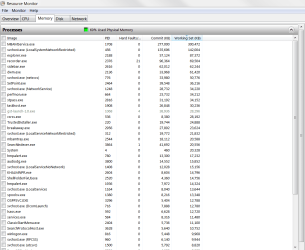
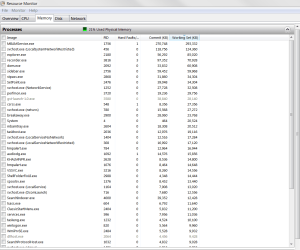
I just booted up and found memory usage at 70%.
I took a screenshot of the Resource Monitor then did a restart and it was back to its normal 21% so I took another screenshot.
Maybe there are other references beyond Resource Monitor: I have a program called Process Hacker but it never shows anything different to Resource Monitor.
Can anyone see anything in these two screenshots that might account for 50% on my memory being used by something?
Alternatively, is there anything else I can use to search for it?
 

My Computer

Computer type
PC/Desktop
Computer Manufacturer/Model Number
Cyberpower PC
OS
windows 7 premium home 64bit
CPU
intel core i5 2500 3.3Ghz 6mb cache OEM
Motherboard
Asus P8Z68-V LX Intel Z68 Chipset DDR3 ATX USB 3
Memory
8GB (2x4GB) PC10666 DDR3/1333mhz Dual
Graphics Card(s)
AMD ATI Radeon Powercolor HD5670 1GB passive cooled
Sound Card
Creative/Soundblaster Digital Music Premium HD/X-Fi-HD
Monitor(s) Displays
Samsung 22; Hanns.G 19
Screen Resolution
1680 x 1050
Hard Drives
SSD: 120 GB Intel 520 Series SATA III
HDD2:West Dig 1TB SATA III 32mb 6gb/s
Hot swap HDD3: 1tb Barracuda Sata 3 32mb 6gb/s
PSU
Coolermaster Elitepower 500wt
Case
NZXT Hush 2
Cooling
Coolermaster Hyper TX3
Mouse
Logitech M570 Trackball
Internet Speed
50mbs
Antivirus
Malwarebytes3. cont' below:
Browser
IE11
Other Info
Windows Firewall.
Hitman-Pro.alert3.
Hi,
Interesting you have a large memory "Standby" and not a larger "Free" reading in post #20.
Use task manager and performance section to see how many processes are running
I currently show 55 pretty low.
 

My Computer

Computer type
PC/Desktop
Computer Manufacturer/Model Number
Custom assembled by me :}
OS
Win-7-Pro64bit 7-H-Prem-64bit
CPU
i7-5930K 2nd i9-9940x both water blocked VRM's too
Motherboard
ASUS SABERTOOTH X99 2nd ASUS x299 Apex
Memory
Trident-z 3200C14 2nd Trident-z 3600C16
Graphics Card(s)
EVGA 1080ti ftw3 2nd Titan Xp both water blocked
Sound Card
Built-in Realtek
Monitor(s) Displays
1-AOC G2460PG 24"G-Sync 144Hz/ 2nd 1-ASUS VG248QE 24" 144Hz
Screen Resolution
1920 x 1080 144Hz
Hard Drives
2-Samsung M.2 Evo & Evo Plus
2-Samsung 850 EVO 500GB SSD's/ 3-2.5 W.D. Black 1tb-&3-1tb/3-3.5 WD Black 1tb hdd's
PSU
EVGA SuperNOVA 1000-P2 2nd 1200-P2
Case
2-Corsair Obsidian Series 450D Black ATX Mid Tower
Cooling
Custom water loops
Keyboard
Logitech G710+/ 2nd Logitech G910
Mouse
2-RedDragon M901 Perdition 16400 dpi Gaming mouse = wired
Internet Speed
Comcast Ping 19ms 89.31mbps download speed 6.12mbps upload
Antivirus
Malwarebytes Pro/ Superantispyware Pro
Browser
FireFox & Pale moon
Other Info
2nd ASUS X299 Apex/Intel i9-9940x with Custom water loop/7H-Prem-x64/Corsair 450D case/Ram Trident-z 3600C16 4x8gb / Samsung970Evo plus 500gb SSD/Dual ssd EZ swap evo/PSU EVGA SuperNova 1200w-P2 80+Platinum/GPU Titan Xp /8-ML-140 on push-pull on 2-280GTX rads
Latest reboot

"Interesting you have a large memory "Standby" and not a larger "Free" reading in post #20."

I don't understand the significance of that I'm afraid; but it does, on the surface, appear odd.
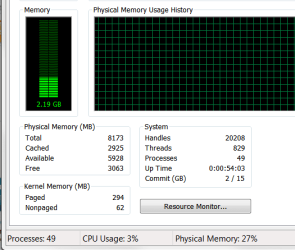
Here's what Performance looks like at present with a typical memory usage of 27% and a typical c.49 processes running.
I will check this again when it next boots with memory gobbled up.
screenshot_Sun_Jul_23_20.32.14.png
 

My Computer

Computer type
PC/Desktop
Computer Manufacturer/Model Number
Cyberpower PC
OS
windows 7 premium home 64bit
CPU
intel core i5 2500 3.3Ghz 6mb cache OEM
Motherboard
Asus P8Z68-V LX Intel Z68 Chipset DDR3 ATX USB 3
Memory
8GB (2x4GB) PC10666 DDR3/1333mhz Dual
Graphics Card(s)
AMD ATI Radeon Powercolor HD5670 1GB passive cooled
Sound Card
Creative/Soundblaster Digital Music Premium HD/X-Fi-HD
Monitor(s) Displays
Samsung 22; Hanns.G 19
Screen Resolution
1680 x 1050
Hard Drives
SSD: 120 GB Intel 520 Series SATA III
HDD2:West Dig 1TB SATA III 32mb 6gb/s
Hot swap HDD3: 1tb Barracuda Sata 3 32mb 6gb/s
PSU
Coolermaster Elitepower 500wt
Case
NZXT Hush 2
Cooling
Coolermaster Hyper TX3
Mouse
Logitech M570 Trackball
Internet Speed
50mbs
Antivirus
Malwarebytes3. cont' below:
Browser
IE11
Other Info
Windows Firewall.
Hitman-Pro.alert3.
Hi,
49 processes isn't bad I was expecting 149 :)
Recorder.exe has possibilities to use resources
Might be like photo shop in it's setting to use a default amount of ram.... ?
 

My Computer

Computer type
PC/Desktop
Computer Manufacturer/Model Number
Custom assembled by me :}
OS
Win-7-Pro64bit 7-H-Prem-64bit
CPU
i7-5930K 2nd i9-9940x both water blocked VRM's too
Motherboard
ASUS SABERTOOTH X99 2nd ASUS x299 Apex
Memory
Trident-z 3200C14 2nd Trident-z 3600C16
Graphics Card(s)
EVGA 1080ti ftw3 2nd Titan Xp both water blocked
Sound Card
Built-in Realtek
Monitor(s) Displays
1-AOC G2460PG 24"G-Sync 144Hz/ 2nd 1-ASUS VG248QE 24" 144Hz
Screen Resolution
1920 x 1080 144Hz
Hard Drives
2-Samsung M.2 Evo & Evo Plus
2-Samsung 850 EVO 500GB SSD's/ 3-2.5 W.D. Black 1tb-&3-1tb/3-3.5 WD Black 1tb hdd's
PSU
EVGA SuperNOVA 1000-P2 2nd 1200-P2
Case
2-Corsair Obsidian Series 450D Black ATX Mid Tower
Cooling
Custom water loops
Keyboard
Logitech G710+/ 2nd Logitech G910
Mouse
2-RedDragon M901 Perdition 16400 dpi Gaming mouse = wired
Internet Speed
Comcast Ping 19ms 89.31mbps download speed 6.12mbps upload
Antivirus
Malwarebytes Pro/ Superantispyware Pro
Browser
FireFox & Pale moon
Other Info
2nd ASUS X299 Apex/Intel i9-9940x with Custom water loop/7H-Prem-x64/Corsair 450D case/Ram Trident-z 3600C16 4x8gb / Samsung970Evo plus 500gb SSD/Dual ssd EZ swap evo/PSU EVGA SuperNova 1200w-P2 80+Platinum/GPU Titan Xp /8-ML-140 on push-pull on 2-280GTX rads
recorder

It's a program called Ice Cream Screen Recorder and it's only running because I am using it to take screen-shots.
It's a great little facility that works very well with video too.
As I said earlier, I have my system well pared-down and under control (I thought) although I'm still mystified by the two 'Services' displays i.e. the one in Administrative Tools and the one in Config showing different settings. I've always used the former and ignored the latter, so I didn't realise there was a potential for some services to load automatically even though they were set to manual in the former Services. They are disabled now anyway so it isn't those that are to blame.
 

My Computer

Computer type
PC/Desktop
Computer Manufacturer/Model Number
Cyberpower PC
OS
windows 7 premium home 64bit
CPU
intel core i5 2500 3.3Ghz 6mb cache OEM
Motherboard
Asus P8Z68-V LX Intel Z68 Chipset DDR3 ATX USB 3
Memory
8GB (2x4GB) PC10666 DDR3/1333mhz Dual
Graphics Card(s)
AMD ATI Radeon Powercolor HD5670 1GB passive cooled
Sound Card
Creative/Soundblaster Digital Music Premium HD/X-Fi-HD
Monitor(s) Displays
Samsung 22; Hanns.G 19
Screen Resolution
1680 x 1050
Hard Drives
SSD: 120 GB Intel 520 Series SATA III
HDD2:West Dig 1TB SATA III 32mb 6gb/s
Hot swap HDD3: 1tb Barracuda Sata 3 32mb 6gb/s
PSU
Coolermaster Elitepower 500wt
Case
NZXT Hush 2
Cooling
Coolermaster Hyper TX3
Mouse
Logitech M570 Trackball
Internet Speed
50mbs
Antivirus
Malwarebytes3. cont' below:
Browser
IE11
Other Info
Windows Firewall.
Hitman-Pro.alert3.
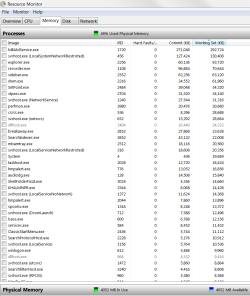
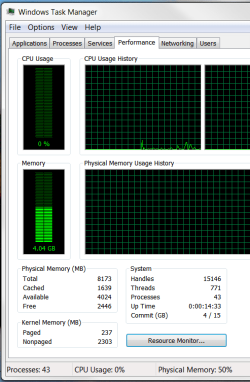
Just to remove a suspicion, I booted without my modem this morning and as luck (bad luck?) would have it I found 50% of my memory in use instead of the regular 21 - 24%.
I took these screenshots because I can't see anything accounting for this extra memory usage (regular usage screenshot is my post # 26) and I am hoping someone else can.
screenshot_Mon_Jul_24_09.03.25.png

screenshot_Mon_Jul_24_09.02.28.png
 

My Computer

Computer type
PC/Desktop
Computer Manufacturer/Model Number
Cyberpower PC
OS
windows 7 premium home 64bit
CPU
intel core i5 2500 3.3Ghz 6mb cache OEM
Motherboard
Asus P8Z68-V LX Intel Z68 Chipset DDR3 ATX USB 3
Memory
8GB (2x4GB) PC10666 DDR3/1333mhz Dual
Graphics Card(s)
AMD ATI Radeon Powercolor HD5670 1GB passive cooled
Sound Card
Creative/Soundblaster Digital Music Premium HD/X-Fi-HD
Monitor(s) Displays
Samsung 22; Hanns.G 19
Screen Resolution
1680 x 1050
Hard Drives
SSD: 120 GB Intel 520 Series SATA III
HDD2:West Dig 1TB SATA III 32mb 6gb/s
Hot swap HDD3: 1tb Barracuda Sata 3 32mb 6gb/s
PSU
Coolermaster Elitepower 500wt
Case
NZXT Hush 2
Cooling
Coolermaster Hyper TX3
Mouse
Logitech M570 Trackball
Internet Speed
50mbs
Antivirus
Malwarebytes3. cont' below:
Browser
IE11
Other Info
Windows Firewall.
Hitman-Pro.alert3.
The problem continues, and if anything, it seems to be getting worse, but it appears to have lost everyone's attention. Does anyone know where I can look to see what is using a huge chunk of my memory? When my entire system - in standby - consumes just 23% average, anything that gobbles up another 23 +% should surely be visible on the Resources Monitor page, yet there is nothing there; so where can I look to find it? Any suggestions will be, as always, gratefully received.
 

My Computer

Computer type
PC/Desktop
Computer Manufacturer/Model Number
Cyberpower PC
OS
windows 7 premium home 64bit
CPU
intel core i5 2500 3.3Ghz 6mb cache OEM
Motherboard
Asus P8Z68-V LX Intel Z68 Chipset DDR3 ATX USB 3
Memory
8GB (2x4GB) PC10666 DDR3/1333mhz Dual
Graphics Card(s)
AMD ATI Radeon Powercolor HD5670 1GB passive cooled
Sound Card
Creative/Soundblaster Digital Music Premium HD/X-Fi-HD
Monitor(s) Displays
Samsung 22; Hanns.G 19
Screen Resolution
1680 x 1050
Hard Drives
SSD: 120 GB Intel 520 Series SATA III
HDD2:West Dig 1TB SATA III 32mb 6gb/s
Hot swap HDD3: 1tb Barracuda Sata 3 32mb 6gb/s
PSU
Coolermaster Elitepower 500wt
Case
NZXT Hush 2
Cooling
Coolermaster Hyper TX3
Mouse
Logitech M570 Trackball
Internet Speed
50mbs
Antivirus
Malwarebytes3. cont' below:
Browser
IE11
Other Info
Windows Firewall.
Hitman-Pro.alert3.
Looking at your other pictures your memory at times is normal and according to your written post your memory usages is high at times.

I'm thinking that this could be cause by a program that starts at boot.
You could use this tutorial by Brink to try and find which program.

Troubleshoot Application Conflicts by Performing a Clean Startup - Windows 7 Help Forums


You could also check and see if their are programs that checks for updates or scans on some sort of schedule.
Automatic anything uses memory.

Please Note:
Because of my health problems at this time, their will be times I can't get back to you as fast as I would like to.

Jack
 

My Computer

Computer type
PC/Desktop
Computer Manufacturer/Model Number
Home made Desktop
OS
Windows 10 Pro. 64/ version 1709 Windows 7 Pro/64
CPU
Intel i7-6800K @ 4.3
Motherboard
ASUS X-99 Deluxe II
Memory
Corsair Platinum 16 gig @2400
Graphics Card(s)
EVGA GTX 1070 OC
Monitor(s) Displays
Asus 27" LED LCD/VE278Q
Screen Resolution
1920-1080 or 1280-720 HDMI
Hard Drives
INTEL SSD 730-240 Gb Sata 3.0/
PSU
EVGA Platium 1200W
Case
Phanteks Luxe Tempered Glass 8 fans/ one radiator
Cooling
XSPC/ Water Cooled CPU
Keyboard
Das 4 Professional
Mouse
Logitech M705/MX Anywhere 2-S
Internet Speed
100 mbits
Antivirus
Microsoft Security Essentials/ Malwarebytes Premium 3.0/ SAS
Browser
I.E. 11 default/Firefox/ ISP Time Warner Cable/Spectrum
Other Info
LG BluRay Burner/
Sound system-KLipsch-THX/
Icy Dock ssd Hot Swap bays.
Hello Jack. Sorry to hear of health problems. There's no urgency with this, it's been around for a couple of weeks and, other than doing a re-start, which always fixes it, it is not a major inconvenience. Now I know about your impediment I'll simply wait till it's convenient for you to respond.
I did try Brink's Clean Boot routine last week but the trouble is, a re-start is always remedied anyway so it tells me nothing. Certainly when I did perform the clean boot it showed nothing because the memory hog was not active.
I've looked at everything auto-loading and apart from one new piece of software (Breakaway) everything else has prohibited automatic updates. I've disabled Breakaway as an auto-start, even though it is actually intended to auto-start (it's a sound compression/shaping software that helps me with my deafness) and I'll see if the problem still occurs; thank-you.
Is there not a way of looking at what is loaded into memory other than Resource Monitor?
 

My Computer

Computer type
PC/Desktop
Computer Manufacturer/Model Number
Cyberpower PC
OS
windows 7 premium home 64bit
CPU
intel core i5 2500 3.3Ghz 6mb cache OEM
Motherboard
Asus P8Z68-V LX Intel Z68 Chipset DDR3 ATX USB 3
Memory
8GB (2x4GB) PC10666 DDR3/1333mhz Dual
Graphics Card(s)
AMD ATI Radeon Powercolor HD5670 1GB passive cooled
Sound Card
Creative/Soundblaster Digital Music Premium HD/X-Fi-HD
Monitor(s) Displays
Samsung 22; Hanns.G 19
Screen Resolution
1680 x 1050
Hard Drives
SSD: 120 GB Intel 520 Series SATA III
HDD2:West Dig 1TB SATA III 32mb 6gb/s
Hot swap HDD3: 1tb Barracuda Sata 3 32mb 6gb/s
PSU
Coolermaster Elitepower 500wt
Case
NZXT Hush 2
Cooling
Coolermaster Hyper TX3
Mouse
Logitech M570 Trackball
Internet Speed
50mbs
Antivirus
Malwarebytes3. cont' below:
Browser
IE11
Other Info
Windows Firewall.
Hitman-Pro.alert3.
Their is a program that many members recommend but I don't remember which one it is.

Jack
 

My Computer

Computer type
PC/Desktop
Computer Manufacturer/Model Number
Home made Desktop
OS
Windows 10 Pro. 64/ version 1709 Windows 7 Pro/64
CPU
Intel i7-6800K @ 4.3
Motherboard
ASUS X-99 Deluxe II
Memory
Corsair Platinum 16 gig @2400
Graphics Card(s)
EVGA GTX 1070 OC
Monitor(s) Displays
Asus 27" LED LCD/VE278Q
Screen Resolution
1920-1080 or 1280-720 HDMI
Hard Drives
INTEL SSD 730-240 Gb Sata 3.0/
PSU
EVGA Platium 1200W
Case
Phanteks Luxe Tempered Glass 8 fans/ one radiator
Cooling
XSPC/ Water Cooled CPU
Keyboard
Das 4 Professional
Mouse
Logitech M705/MX Anywhere 2-S
Internet Speed
100 mbits
Antivirus
Microsoft Security Essentials/ Malwarebytes Premium 3.0/ SAS
Browser
I.E. 11 default/Firefox/ ISP Time Warner Cable/Spectrum
Other Info
LG BluRay Burner/
Sound system-KLipsch-THX/
Icy Dock ssd Hot Swap bays.
Maybe someone can help out here.
 

My Computer

Computer type
PC/Desktop
Computer Manufacturer/Model Number
Cyberpower PC
OS
windows 7 premium home 64bit
CPU
intel core i5 2500 3.3Ghz 6mb cache OEM
Motherboard
Asus P8Z68-V LX Intel Z68 Chipset DDR3 ATX USB 3
Memory
8GB (2x4GB) PC10666 DDR3/1333mhz Dual
Graphics Card(s)
AMD ATI Radeon Powercolor HD5670 1GB passive cooled
Sound Card
Creative/Soundblaster Digital Music Premium HD/X-Fi-HD
Monitor(s) Displays
Samsung 22; Hanns.G 19
Screen Resolution
1680 x 1050
Hard Drives
SSD: 120 GB Intel 520 Series SATA III
HDD2:West Dig 1TB SATA III 32mb 6gb/s
Hot swap HDD3: 1tb Barracuda Sata 3 32mb 6gb/s
PSU
Coolermaster Elitepower 500wt
Case
NZXT Hush 2
Cooling
Coolermaster Hyper TX3
Mouse
Logitech M570 Trackball
Internet Speed
50mbs
Antivirus
Malwarebytes3. cont' below:
Browser
IE11
Other Info
Windows Firewall.
Hitman-Pro.alert3.
The problem is the Nonpaged kernel memory which at 2303 MB is many times a reasonable value. Typically it will be less than the Paged kernel memory which seems reasonable. Usually this is caused by a device driver, not likely a process. Sorry I cannot provide further help. I know this can be difficult to diagnose.
 

My Computer

Computer type
PC/Desktop
Computer Manufacturer/Model Number
HP
OS
Windows 7 Pro 64 bit
CPU
Xeon W3520
Memory
8 GB
Graphics Card(s)
Nvidia Geforce 210
Apparently I should be using poolmon to explore non paged memory but it seems that it was only made available for XP and earlier; is this right?
Equally important: does anyone know if it would do the job for me?
 

My Computer

Computer type
PC/Desktop
Computer Manufacturer/Model Number
Cyberpower PC
OS
windows 7 premium home 64bit
CPU
intel core i5 2500 3.3Ghz 6mb cache OEM
Motherboard
Asus P8Z68-V LX Intel Z68 Chipset DDR3 ATX USB 3
Memory
8GB (2x4GB) PC10666 DDR3/1333mhz Dual
Graphics Card(s)
AMD ATI Radeon Powercolor HD5670 1GB passive cooled
Sound Card
Creative/Soundblaster Digital Music Premium HD/X-Fi-HD
Monitor(s) Displays
Samsung 22; Hanns.G 19
Screen Resolution
1680 x 1050
Hard Drives
SSD: 120 GB Intel 520 Series SATA III
HDD2:West Dig 1TB SATA III 32mb 6gb/s
Hot swap HDD3: 1tb Barracuda Sata 3 32mb 6gb/s
PSU
Coolermaster Elitepower 500wt
Case
NZXT Hush 2
Cooling
Coolermaster Hyper TX3
Mouse
Logitech M570 Trackball
Internet Speed
50mbs
Antivirus
Malwarebytes3. cont' below:
Browser
IE11
Other Info
Windows Firewall.
Hitman-Pro.alert3.
Scrub that last statement: I miss-read the article. Poolmon is included in Windows Driver Kit.
God knows if I will be able to use it.
I see what you are talking about LMiller regarding non-paged memory: it is obviously where my problem resides.
 

My Computer

Computer type
PC/Desktop
Computer Manufacturer/Model Number
Cyberpower PC
OS
windows 7 premium home 64bit
CPU
intel core i5 2500 3.3Ghz 6mb cache OEM
Motherboard
Asus P8Z68-V LX Intel Z68 Chipset DDR3 ATX USB 3
Memory
8GB (2x4GB) PC10666 DDR3/1333mhz Dual
Graphics Card(s)
AMD ATI Radeon Powercolor HD5670 1GB passive cooled
Sound Card
Creative/Soundblaster Digital Music Premium HD/X-Fi-HD
Monitor(s) Displays
Samsung 22; Hanns.G 19
Screen Resolution
1680 x 1050
Hard Drives
SSD: 120 GB Intel 520 Series SATA III
HDD2:West Dig 1TB SATA III 32mb 6gb/s
Hot swap HDD3: 1tb Barracuda Sata 3 32mb 6gb/s
PSU
Coolermaster Elitepower 500wt
Case
NZXT Hush 2
Cooling
Coolermaster Hyper TX3
Mouse
Logitech M570 Trackball
Internet Speed
50mbs
Antivirus
Malwarebytes3. cont' below:
Browser
IE11
Other Info
Windows Firewall.
Hitman-Pro.alert3.
After a week of trial and error and many dead-ends, I discovered that the culprit is an audio processing program I installed right around the time my problem started. It had an auto-start tick, and once I disabled that, the problem disappeared; although I've waited a couple of days to be certain.
It compresses audio, so it is valuable to me, suffering as I do, with hearing issues. So now I start it when I need it; end of story.
Thank-you LMiller for pointing out the 'non-paged-memory' giveaway; and thank-you, as always, to all you folks who helped me out yet again - especially Jack the Layback Bear: I do hope you are mending.


Last edited:

My Computer

Computer type
PC/Desktop
Computer Manufacturer/Model Number
Cyberpower PC
OS
windows 7 premium home 64bit
CPU
intel core i5 2500 3.3Ghz 6mb cache OEM
Motherboard
Asus P8Z68-V LX Intel Z68 Chipset DDR3 ATX USB 3
Memory
8GB (2x4GB) PC10666 DDR3/1333mhz Dual
Graphics Card(s)
AMD ATI Radeon Powercolor HD5670 1GB passive cooled
Sound Card
Creative/Soundblaster Digital Music Premium HD/X-Fi-HD
Monitor(s) Displays
Samsung 22; Hanns.G 19
Screen Resolution
1680 x 1050
Hard Drives
SSD: 120 GB Intel 520 Series SATA III
HDD2:West Dig 1TB SATA III 32mb 6gb/s
Hot swap HDD3: 1tb Barracuda Sata 3 32mb 6gb/s
PSU
Coolermaster Elitepower 500wt
Case
NZXT Hush 2
Cooling
Coolermaster Hyper TX3
Mouse
Logitech M570 Trackball
Internet Speed
50mbs
Antivirus
Malwarebytes3. cont' below:
Browser
IE11
Other Info
Windows Firewall.
Hitman-Pro.alert3.
Back
Top