
Explorer.exe keeps crashing

Great. If it points to a specific .dll then it will be very useful. If it doesn't - it's more troubleshooting.

I will look at the dump and post back here.

Here is a tool that I used to restart explorer with a click when I had issues.

File Removed by Poster​

If you extract the executable to your desktop just double click it if explorer crashes and it will kill and restart explorer.

File safety report:

https://www.virustotal.com/en/file/...40208155d6fb145/analysis/1445128575/#analysis
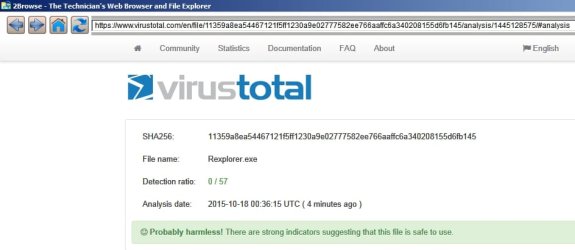
File Report.jpg

Let us know if you downloaded the file or if you don't want it - then I can remove the download link.
 
Last edited:

My Computer

Computer type
Laptop
Computer Manufacturer/Model Number
ASUS
OS
Microsoft Windows 7 Home Premium 64-bit 7601 Multiprocessor Free Service Pack 1
CPU
AMD C-60 APU with Radeon(tm) HD Graphics
Motherboard
ASUSTeK COMPUTER INC. X501U
Memory
4.00 GB
Graphics Card(s)
AMD Radeon HD 6290 Graphics
Sound Card
(1) AMD High Definition Audio Device (2) Realtek High Defi
Screen Resolution
1366 x 768 x 32 bits (4294967296 colors) @ 60 Hz
Hard Drives
Hitachi HTS545050A7E380 SATA Disk Device
Antivirus
Comodo CIS & FW, SecureAplus App Whitelisting, Threatfire
Browser
Cyberfox 64bit, Opera 64bit, Airfox
Other Info
Spy-The-Spy, HitmanPro.Alert, Norton Connect Safe, MJRegWatcher, BitDefender TrafficLight, Voodoo Shield, Zemana AntiMalware
Okay so the dump file indicates that ammemb64.dll is the probable culprit.

C:\Users\John\AppData\Local\Temp\ammemb64.dll

Also the main file seems to have a problem with it's signature:

C:\Program Files (x86)\Actual Multiple Monitors\ActualMultipleMonitorsCenter.exe | Actual Multiple Monitors | B9AE58CD705A522676B1245D237D7E74 | Bad signature : Actual Tools

From what I can find the latest version is 8.6:

ammsetup.exe October 6, 2015

Is that what you are running? If not try updating or if you have a license replace your current version.
 

My Computer

Computer type
Laptop
Computer Manufacturer/Model Number
ASUS
OS
Microsoft Windows 7 Home Premium 64-bit 7601 Multiprocessor Free Service Pack 1
CPU
AMD C-60 APU with Radeon(tm) HD Graphics
Motherboard
ASUSTeK COMPUTER INC. X501U
Memory
4.00 GB
Graphics Card(s)
AMD Radeon HD 6290 Graphics
Sound Card
(1) AMD High Definition Audio Device (2) Realtek High Defi
Screen Resolution
1366 x 768 x 32 bits (4294967296 colors) @ 60 Hz
Hard Drives
Hitachi HTS545050A7E380 SATA Disk Device
Antivirus
Comodo CIS & FW, SecureAplus App Whitelisting, Threatfire
Browser
Cyberfox 64bit, Opera 64bit, Airfox
Other Info
Spy-The-Spy, HitmanPro.Alert, Norton Connect Safe, MJRegWatcher, BitDefender TrafficLight, Voodoo Shield, Zemana AntiMalware
Alright well I don't really need the file you uploaded cause when explorer crashes it just pops up a window saying restart so I just click that and it restarts instantly. Also okay I updated to the newer version now. I'll see if it works and doesn't crash. Just wondering but is it possible to be anything else if this ends up not being the culprit?

Edit: My windows are already becoming sluggish again which always happens before it crashes so I don't think it was the problem. At least not completely. Although I could try altogether disabling it I suppose. I'm not sure. What do you think I should do?
 
Last edited:

My Computer

Computer type
PC/Desktop
Computer Manufacturer/Model Number
Custom Build
OS
Windows 7 Ultimate x64
CPU
AMD FX 8350
Motherboard
ECS A990FXM-A
Memory
12GB
Graphics Card(s)
nVidia Geforce GTX 550 ti 2GB
Hard Drives
1x 500GB
Antivirus
Microsoft Security Essentials
Browser
Chrome
It is certainly possible that something else could be the culprit. It is also possible that instead of simply updating Actual Multiple Monitors you may need to stop it from running, uninstall it, reboot, check for leftovers then reboot and test without the program being installed. If no problems arise the new version could be clean installed.

Well there are a lot of other possibilities unfortunately but hopefully the program update has taken care of the problem!
 

My Computer

Computer type
Laptop
Computer Manufacturer/Model Number
ASUS
OS
Microsoft Windows 7 Home Premium 64-bit 7601 Multiprocessor Free Service Pack 1
CPU
AMD C-60 APU with Radeon(tm) HD Graphics
Motherboard
ASUSTeK COMPUTER INC. X501U
Memory
4.00 GB
Graphics Card(s)
AMD Radeon HD 6290 Graphics
Sound Card
(1) AMD High Definition Audio Device (2) Realtek High Defi
Screen Resolution
1366 x 768 x 32 bits (4294967296 colors) @ 60 Hz
Hard Drives
Hitachi HTS545050A7E380 SATA Disk Device
Antivirus
Comodo CIS & FW, SecureAplus App Whitelisting, Threatfire
Browser
Cyberfox 64bit, Opera 64bit, Airfox
Other Info
Spy-The-Spy, HitmanPro.Alert, Norton Connect Safe, MJRegWatcher, BitDefender TrafficLight, Voodoo Shield, Zemana AntiMalware
Well I uninstalled it again and after I did the windows stopped being sluggish which is a good sign that it was the culprit but I just restarted to make sure and I'll see if it happens again. It just doesn't make any sense because on my previous install of windows, AMM worked fine without any problems. And it's kind of important because Windows 7 multiple monitor support is atrocious by default.
 

My Computer

Computer type
PC/Desktop
Computer Manufacturer/Model Number
Custom Build
OS
Windows 7 Ultimate x64
CPU
AMD FX 8350
Motherboard
ECS A990FXM-A
Memory
12GB
Graphics Card(s)
nVidia Geforce GTX 550 ti 2GB
Hard Drives
1x 500GB
Antivirus
Microsoft Security Essentials
Browser
Chrome
Bad news, explorer crashed again even after fully uninstalling AMM. Should I upload the most recent dump file? Or would it still be the same?
 

My Computer

Computer type
PC/Desktop
Computer Manufacturer/Model Number
Custom Build
OS
Windows 7 Ultimate x64
CPU
AMD FX 8350
Motherboard
ECS A990FXM-A
Memory
12GB
Graphics Card(s)
nVidia Geforce GTX 550 ti 2GB
Hard Drives
1x 500GB
Antivirus
Microsoft Security Essentials
Browser
Chrome
Yes, zip and upload the most recent dump or maybe all of them for comparison. Thanks.
 

My Computer

Computer type
Laptop
Computer Manufacturer/Model Number
ASUS
OS
Microsoft Windows 7 Home Premium 64-bit 7601 Multiprocessor Free Service Pack 1
CPU
AMD C-60 APU with Radeon(tm) HD Graphics
Motherboard
ASUSTeK COMPUTER INC. X501U
Memory
4.00 GB
Graphics Card(s)
AMD Radeon HD 6290 Graphics
Sound Card
(1) AMD High Definition Audio Device (2) Realtek High Defi
Screen Resolution
1366 x 768 x 32 bits (4294967296 colors) @ 60 Hz
Hard Drives
Hitachi HTS545050A7E380 SATA Disk Device
Antivirus
Comodo CIS & FW, SecureAplus App Whitelisting, Threatfire
Browser
Cyberfox 64bit, Opera 64bit, Airfox
Other Info
Spy-The-Spy, HitmanPro.Alert, Norton Connect Safe, MJRegWatcher, BitDefender TrafficLight, Voodoo Shield, Zemana AntiMalware
Alright so my internet isn't the best so I uploaded three of them. Hopefully that's enough.
 

My Computer

Computer type
PC/Desktop
Computer Manufacturer/Model Number
Custom Build
OS
Windows 7 Ultimate x64
CPU
AMD FX 8350
Motherboard
ECS A990FXM-A
Memory
12GB
Graphics Card(s)
nVidia Geforce GTX 550 ti 2GB
Hard Drives
1x 500GB
Antivirus
Microsoft Security Essentials
Browser
Chrome
I've looked at two dumps so far - Newer and Newest and both indicate a problem with clr.dll which I believe is part of .NET Framework

Let's see the versions that you've got.

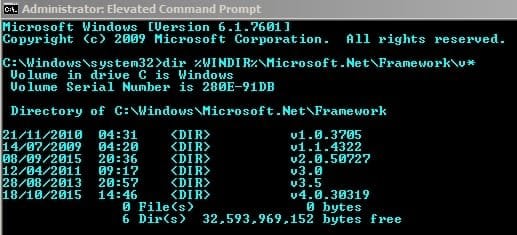
Run this from a command prompt window:

dir %WINDIR%\Microsoft.Net\Framework\v*

You should see something like this:

NET Framework versions.jpg

Post the results please.
 

My Computer

Computer type
Laptop
Computer Manufacturer/Model Number
ASUS
OS
Microsoft Windows 7 Home Premium 64-bit 7601 Multiprocessor Free Service Pack 1
CPU
AMD C-60 APU with Radeon(tm) HD Graphics
Motherboard
ASUSTeK COMPUTER INC. X501U
Memory
4.00 GB
Graphics Card(s)
AMD Radeon HD 6290 Graphics
Sound Card
(1) AMD High Definition Audio Device (2) Realtek High Defi
Screen Resolution
1366 x 768 x 32 bits (4294967296 colors) @ 60 Hz
Hard Drives
Hitachi HTS545050A7E380 SATA Disk Device
Antivirus
Comodo CIS & FW, SecureAplus App Whitelisting, Threatfire
Browser
Cyberfox 64bit, Opera 64bit, Airfox
Other Info
Spy-The-Spy, HitmanPro.Alert, Norton Connect Safe, MJRegWatcher, BitDefender TrafficLight, Voodoo Shield, Zemana AntiMalware
The oldest dump point to ammemb64.dll which you have removed.
 

My Computer

Computer type
Laptop
Computer Manufacturer/Model Number
ASUS
OS
Microsoft Windows 7 Home Premium 64-bit 7601 Multiprocessor Free Service Pack 1
CPU
AMD C-60 APU with Radeon(tm) HD Graphics
Motherboard
ASUSTeK COMPUTER INC. X501U
Memory
4.00 GB
Graphics Card(s)
AMD Radeon HD 6290 Graphics
Sound Card
(1) AMD High Definition Audio Device (2) Realtek High Defi
Screen Resolution
1366 x 768 x 32 bits (4294967296 colors) @ 60 Hz
Hard Drives
Hitachi HTS545050A7E380 SATA Disk Device
Antivirus
Comodo CIS & FW, SecureAplus App Whitelisting, Threatfire
Browser
Cyberfox 64bit, Opera 64bit, Airfox
Other Info
Spy-The-Spy, HitmanPro.Alert, Norton Connect Safe, MJRegWatcher, BitDefender TrafficLight, Voodoo Shield, Zemana AntiMalware
That actually makes sense because sometimes before it crashes it gives me an "out of memory" error which I found out was .NET framework but I didn't see what that had to do with explorer. But anyways here is what I got.
Explorer.JPG
 

My Computer

Computer type
PC/Desktop
Computer Manufacturer/Model Number
Custom Build
OS
Windows 7 Ultimate x64
CPU
AMD FX 8350
Motherboard
ECS A990FXM-A
Memory
12GB
Graphics Card(s)
nVidia Geforce GTX 550 ti 2GB
Hard Drives
1x 500GB
Antivirus
Microsoft Security Essentials
Browser
Chrome
Well that looks identical to my screenshot! You should be warned that I'm not an expert on .NET Framework issues.

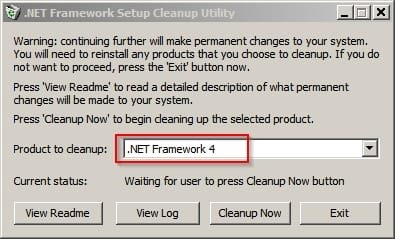
However you can try removing version 4 if you like before rebooting and reinstalling it. It will take some time.

Try the .NET Framework Cleanup Utility to remove version 4

MSDN Blogs

Alternatively try the repair tool listed in the text on the page. Note: I have never used the repair tool so cannot advise on usage.

RE: NET Framework Cleanup Utility

Try removing version 4 only

NET Framework Setup Cleanup Utility.jpg

Then reboot and run a Windows Update check. You should be re-offered .NET Framework 4 and then let windows updates take care of the install.
 

My Computer

Computer type
Laptop
Computer Manufacturer/Model Number
ASUS
OS
Microsoft Windows 7 Home Premium 64-bit 7601 Multiprocessor Free Service Pack 1
CPU
AMD C-60 APU with Radeon(tm) HD Graphics
Motherboard
ASUSTeK COMPUTER INC. X501U
Memory
4.00 GB
Graphics Card(s)
AMD Radeon HD 6290 Graphics
Sound Card
(1) AMD High Definition Audio Device (2) Realtek High Defi
Screen Resolution
1366 x 768 x 32 bits (4294967296 colors) @ 60 Hz
Hard Drives
Hitachi HTS545050A7E380 SATA Disk Device
Antivirus
Comodo CIS & FW, SecureAplus App Whitelisting, Threatfire
Browser
Cyberfox 64bit, Opera 64bit, Airfox
Other Info
Spy-The-Spy, HitmanPro.Alert, Norton Connect Safe, MJRegWatcher, BitDefender TrafficLight, Voodoo Shield, Zemana AntiMalware
What if I can't use windows update? Is there another way to reinstall?
 

My Computer

Computer type
PC/Desktop
Computer Manufacturer/Model Number
Custom Build
OS
Windows 7 Ultimate x64
CPU
AMD FX 8350
Motherboard
ECS A990FXM-A
Memory
12GB
Graphics Card(s)
nVidia Geforce GTX 550 ti 2GB
Hard Drives
1x 500GB
Antivirus
Microsoft Security Essentials
Browser
Chrome

My Computer

Computer type
Laptop
Computer Manufacturer/Model Number
ASUS
OS
Microsoft Windows 7 Home Premium 64-bit 7601 Multiprocessor Free Service Pack 1
CPU
AMD C-60 APU with Radeon(tm) HD Graphics
Motherboard
ASUSTeK COMPUTER INC. X501U
Memory
4.00 GB
Graphics Card(s)
AMD Radeon HD 6290 Graphics
Sound Card
(1) AMD High Definition Audio Device (2) Realtek High Defi
Screen Resolution
1366 x 768 x 32 bits (4294967296 colors) @ 60 Hz
Hard Drives
Hitachi HTS545050A7E380 SATA Disk Device
Antivirus
Comodo CIS & FW, SecureAplus App Whitelisting, Threatfire
Browser
Cyberfox 64bit, Opera 64bit, Airfox
Other Info
Spy-The-Spy, HitmanPro.Alert, Norton Connect Safe, MJRegWatcher, BitDefender TrafficLight, Voodoo Shield, Zemana AntiMalware
Okay thank you, I'll go do that now and post back afterwards.
 

My Computer

Computer type
PC/Desktop
Computer Manufacturer/Model Number
Custom Build
OS
Windows 7 Ultimate x64
CPU
AMD FX 8350
Motherboard
ECS A990FXM-A
Memory
12GB
Graphics Card(s)
nVidia Geforce GTX 550 ti 2GB
Hard Drives
1x 500GB
Antivirus
Microsoft Security Essentials
Browser
Chrome
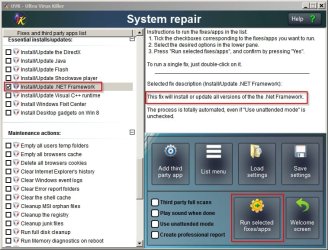
Okay forgot to mention that another way to download .NET Framework is via UVK.

UVK - NET Framework.jpg

Right Click UVK > Run as administrator> System Repair

Scroll down to Essential Updates/ Installs
 

My Computer

Computer type
Laptop
Computer Manufacturer/Model Number
ASUS
OS
Microsoft Windows 7 Home Premium 64-bit 7601 Multiprocessor Free Service Pack 1
CPU
AMD C-60 APU with Radeon(tm) HD Graphics
Motherboard
ASUSTeK COMPUTER INC. X501U
Memory
4.00 GB
Graphics Card(s)
AMD Radeon HD 6290 Graphics
Sound Card
(1) AMD High Definition Audio Device (2) Realtek High Defi
Screen Resolution
1366 x 768 x 32 bits (4294967296 colors) @ 60 Hz
Hard Drives
Hitachi HTS545050A7E380 SATA Disk Device
Antivirus
Comodo CIS & FW, SecureAplus App Whitelisting, Threatfire
Browser
Cyberfox 64bit, Opera 64bit, Airfox
Other Info
Spy-The-Spy, HitmanPro.Alert, Norton Connect Safe, MJRegWatcher, BitDefender TrafficLight, Voodoo Shield, Zemana AntiMalware
Well all seems to be going well so far. I'll give it a few more hours as it can sometimes be random when it crashes. But I haven't experienced any sluggish windows or anything like that so I'm hopeful! (:
 

My Computer

Computer type
PC/Desktop
Computer Manufacturer/Model Number
Custom Build
OS
Windows 7 Ultimate x64
CPU
AMD FX 8350
Motherboard
ECS A990FXM-A
Memory
12GB
Graphics Card(s)
nVidia Geforce GTX 550 ti 2GB
Hard Drives
1x 500GB
Antivirus
Microsoft Security Essentials
Browser
Chrome
Hopeful is probably the right word!
 

My Computer

Computer type
Laptop
Computer Manufacturer/Model Number
ASUS
OS
Microsoft Windows 7 Home Premium 64-bit 7601 Multiprocessor Free Service Pack 1
CPU
AMD C-60 APU with Radeon(tm) HD Graphics
Motherboard
ASUSTeK COMPUTER INC. X501U
Memory
4.00 GB
Graphics Card(s)
AMD Radeon HD 6290 Graphics
Sound Card
(1) AMD High Definition Audio Device (2) Realtek High Defi
Screen Resolution
1366 x 768 x 32 bits (4294967296 colors) @ 60 Hz
Hard Drives
Hitachi HTS545050A7E380 SATA Disk Device
Antivirus
Comodo CIS & FW, SecureAplus App Whitelisting, Threatfire
Browser
Cyberfox 64bit, Opera 64bit, Airfox
Other Info
Spy-The-Spy, HitmanPro.Alert, Norton Connect Safe, MJRegWatcher, BitDefender TrafficLight, Voodoo Shield, Zemana AntiMalware
Well I don't see any signs that it's going to crash again. I'm not sure if I should wait longer or mark this as solved now.
 

My Computer

Computer type
PC/Desktop
Computer Manufacturer/Model Number
Custom Build
OS
Windows 7 Ultimate x64
CPU
AMD FX 8350
Motherboard
ECS A990FXM-A
Memory
12GB
Graphics Card(s)
nVidia Geforce GTX 550 ti 2GB
Hard Drives
1x 500GB
Antivirus
Microsoft Security Essentials
Browser
Chrome
Great. I think you'd better wait for at least one day before you can say that it's solved.

:)
 

My Computer

Computer type
Laptop
Computer Manufacturer/Model Number
ASUS
OS
Microsoft Windows 7 Home Premium 64-bit 7601 Multiprocessor Free Service Pack 1
CPU
AMD C-60 APU with Radeon(tm) HD Graphics
Motherboard
ASUSTeK COMPUTER INC. X501U
Memory
4.00 GB
Graphics Card(s)
AMD Radeon HD 6290 Graphics
Sound Card
(1) AMD High Definition Audio Device (2) Realtek High Defi
Screen Resolution
1366 x 768 x 32 bits (4294967296 colors) @ 60 Hz
Hard Drives
Hitachi HTS545050A7E380 SATA Disk Device
Antivirus
Comodo CIS & FW, SecureAplus App Whitelisting, Threatfire
Browser
Cyberfox 64bit, Opera 64bit, Airfox
Other Info
Spy-The-Spy, HitmanPro.Alert, Norton Connect Safe, MJRegWatcher, BitDefender TrafficLight, Voodoo Shield, Zemana AntiMalware
Back
Top