Explorer.exe randomly crashing

dave1977nj

New member
Local time
4:43 PM
Messages
8
Hi guys, I hope you can help me out here. Just this past week I have had some random reboots and Explorer.exe crashing. I have ran multiple virus and malware scans and nothing is showing up. I have checked my start up entries and processes and nothing looks abnormal. I also ran memtest 86 and it passed fine. This is the error I received.

Problem signature:
Problem Event Name: BEX64
Application Name: Explorer.EXE
Application Version: 6.1.7601.17567
Application Timestamp: 4d672ee4
Fault Module Name: StackHash_fa09
Fault Module Version: 0.0.0.0
Fault Module Timestamp: 00000000
Exception Offset: 00000000043c0fd8
Exception Code: c0000005
Exception Data: 0000000000000008
OS Version: 6.1.7601.2.1.0.256.4
Locale ID: 1033
Additional Information 1: fa09
Additional Information 2: fa0951fe220ff82bd28cc684441ac675
Additional Information 3: 0871
Additional Information 4: 08717296514a51e926c04503d38fda23
 
Last edited:

My Computer

Computer type
PC/Desktop
Computer Manufacturer/Model Number
Custom Build
OS
Microsoft Windows 7 Ultimate 64-bit
CPU
Intel(R) Core(TM) i5-2500K CPU @ 3.30GHz
Motherboard
ASRock Z68 Extreme4 Gen3
Memory
8 GIGS
Graphics Card(s)
AMD Radeon HD 6900 Series
Antivirus
Norton
Browser
Chrome
1. Click Start
orb.png

2. In the search box, type cmd
3. In the list that appears, right-click on cmd.exe and choose Run as administrator
4. In the command window that opens, type sfc /scannow and hit enter.

Report the output from the command window once it finishes.
 

My Computer

Computer type
PC/Desktop
Computer Manufacturer/Model Number
Golden Mk. I.4
OS
Windows 10 Pro x64 ; Xubuntu x64
CPU
Intel i7 860 @ 2.80 GHz O/C'ed to 4.0GHz
Motherboard
Gigabyte P55A-UD3R Rev.1. Award BIOS F13
Memory
16GB Corsair Vengance DDR3 @ 661 MHz Dual Channel (9-9-9-24)
Graphics Card(s)
EVGA NVidia GTX 560 1024MB
Sound Card
Realtek Integrated
Monitor(s) Displays
Dual Samsung SyncMaster 2494HS
Screen Resolution
1920*1080 and 1920*1080
Hard Drives
1*Samsung 840 EVO 120GB SSD;
1*OCZ Vertex 2 60GB SSD;
2*Samsung F3 SpinPoint 1TB in RAID0;
1*Samsung F1 SpinPoint 1TB;
2*Western Digital 1TB External USB 3.0
1*Western Digital 500GB External USB 3.0
1*Seagate 500GB External USB 2.0
PSU
Thermaltake ToughPower QFan 750W
Case
Thermaltake Element S VK60001W2Z
Cooling
Corsair H60 Water Cooling, 2*230mm and 2*80mm case fans
Keyboard
Logitech G110
Mouse
Logitech MX518
Microsoft Windows [Version 6.1.7601]
Copyright (c) 2009 Microsoft Corporation. All rights reserved.

C:\Windows\system32>sfc /scannow

Beginning system scan. This process will take some time.

Beginning verification phase of system scan.
Verification 100% complete.

Windows Resource Protection did not find any integrity violations.

C:\Windows\system32>
 

My Computer

Computer type
PC/Desktop
Computer Manufacturer/Model Number
Custom Build
OS
Microsoft Windows 7 Ultimate 64-bit
CPU
Intel(R) Core(TM) i5-2500K CPU @ 3.30GHz
Motherboard
ASRock Z68 Extreme4 Gen3
Memory
8 GIGS
Graphics Card(s)
AMD Radeon HD 6900 Series
Antivirus
Norton
Browser
Chrome
Please check in C:\Windows\Minidump. Are there any .dmp files present in that folder?
 

My Computer

Computer type
PC/Desktop
Computer Manufacturer/Model Number
Golden Mk. I.4
OS
Windows 10 Pro x64 ; Xubuntu x64
CPU
Intel i7 860 @ 2.80 GHz O/C'ed to 4.0GHz
Motherboard
Gigabyte P55A-UD3R Rev.1. Award BIOS F13
Memory
16GB Corsair Vengance DDR3 @ 661 MHz Dual Channel (9-9-9-24)
Graphics Card(s)
EVGA NVidia GTX 560 1024MB
Sound Card
Realtek Integrated
Monitor(s) Displays
Dual Samsung SyncMaster 2494HS
Screen Resolution
1920*1080 and 1920*1080
Hard Drives
1*Samsung 840 EVO 120GB SSD;
1*OCZ Vertex 2 60GB SSD;
2*Samsung F3 SpinPoint 1TB in RAID0;
1*Samsung F1 SpinPoint 1TB;
2*Western Digital 1TB External USB 3.0
1*Western Digital 500GB External USB 3.0
1*Seagate 500GB External USB 2.0
PSU
Thermaltake ToughPower QFan 750W
Case
Thermaltake Element S VK60001W2Z
Cooling
Corsair H60 Water Cooling, 2*230mm and 2*80mm case fans
Keyboard
Logitech G110
Mouse
Logitech MX518
Unfortunately there is no mini dump file or folder. :(
 

My Computer

Computer type
PC/Desktop
Computer Manufacturer/Model Number
Custom Build
OS
Microsoft Windows 7 Ultimate 64-bit
CPU
Intel(R) Core(TM) i5-2500K CPU @ 3.30GHz
Motherboard
ASRock Z68 Extreme4 Gen3
Memory
8 GIGS
Graphics Card(s)
AMD Radeon HD 6900 Series
Antivirus
Norton
Browser
Chrome
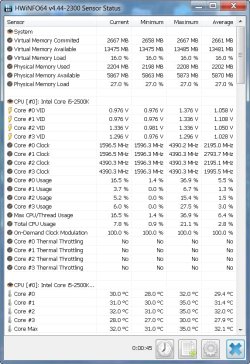
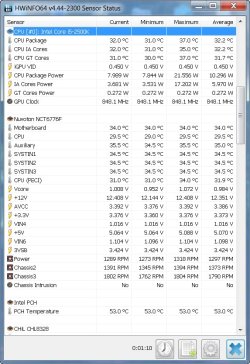
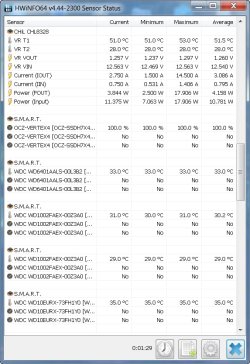
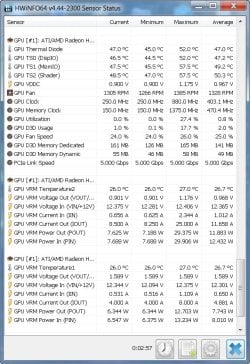
Please run HWInfo so we can look at the temperatures of the major components. Post a screen capture image of the temperatures please.

HWiNFO, HWiNFO32/64 - Download
 

My Computer

Computer type
PC/Desktop
Computer Manufacturer/Model Number
Golden Mk. I.4
OS
Windows 10 Pro x64 ; Xubuntu x64
CPU
Intel i7 860 @ 2.80 GHz O/C'ed to 4.0GHz
Motherboard
Gigabyte P55A-UD3R Rev.1. Award BIOS F13
Memory
16GB Corsair Vengance DDR3 @ 661 MHz Dual Channel (9-9-9-24)
Graphics Card(s)
EVGA NVidia GTX 560 1024MB
Sound Card
Realtek Integrated
Monitor(s) Displays
Dual Samsung SyncMaster 2494HS
Screen Resolution
1920*1080 and 1920*1080
Hard Drives
1*Samsung 840 EVO 120GB SSD;
1*OCZ Vertex 2 60GB SSD;
2*Samsung F3 SpinPoint 1TB in RAID0;
1*Samsung F1 SpinPoint 1TB;
2*Western Digital 1TB External USB 3.0
1*Western Digital 500GB External USB 3.0
1*Seagate 500GB External USB 2.0
PSU
Thermaltake ToughPower QFan 750W
Case
Thermaltake Element S VK60001W2Z
Cooling
Corsair H60 Water Cooling, 2*230mm and 2*80mm case fans
Keyboard
Logitech G110
Mouse
Logitech MX518
Here are the screenshots from HWInfo
 

Attachments

  • 1.jpg
    1.jpg
    102.3 KB · Views: 0
  • 2.jpg
    2.jpg
    92.8 KB · Views: 0
  • 3.jpg
    3.jpg
    85 KB · Views: 0
  • 5.jpg
    5.jpg
    107.6 KB · Views: 0

My Computer

Computer type
PC/Desktop
Computer Manufacturer/Model Number
Custom Build
OS
Microsoft Windows 7 Ultimate 64-bit
CPU
Intel(R) Core(TM) i5-2500K CPU @ 3.30GHz
Motherboard
ASRock Z68 Extreme4 Gen3
Memory
8 GIGS
Graphics Card(s)
AMD Radeon HD 6900 Series
Antivirus
Norton
Browser
Chrome
Back
Top