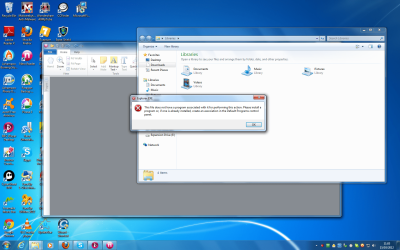
explorer.exe

gunnersmate

New member
Local time
12:55 AM
Messages
3
Hi, new to this site, recently clean install of windows 7 ultimate two weeks ago, about one week ago discovered that under 'windows explorer,' that my download icon was greyed out and when I clicked on it the attached screen popped up. Ran all the usual scans like scannow, virus with malwarebytes, restore, all to now avail. Whenever I save or download from the internet the file gets deposited on my desktop and no where else. Has anyone got a solution..I am a novice and not tech minded, so any solutions should wherever possible be in laymans language please. Thank you. :confused:
 

Attachments

  • saved file.png
    saved file.png
    282.2 KB · Views: 44

My Computer

OS
windows 7 ultimate 32 bit
Motherboard
gigabyte z68p-ds3
Memory
8gb
Monitor(s) Displays
acer
Which icon do you refer to, is it a download manager ? normally you would click a link to the file you want to download on the web site itself.
 

My Computer

Computer Manufacturer/Model Number
DIY
OS
Windows 7 home premium x64
CPU
AMD FX-4100 AM3+ 3.6GHz 12MB Black Edition
Motherboard
Asus M5A97 Pro
Memory
Crsair vengeance 12Gb DDR3 1600MHz CL9
Graphics Card(s)
Asus GTX 560 1GB
Sound Card
Realtek onboard
Monitor(s) Displays
Hanns G 1680x1050 native
Hard Drives
OCZ 128Gb Petrol ssd
2x500 Gb Samsung
PSU
OCZ StealthXstream II 500W
Internet Speed
8Mb or better
Under my favourites

Hello, quick response, see attached screen shot. The icon is under the 'myfavourites' along with recent places and desktop. Does that help. Tried right click on that icon and restore previous..but nothing is found!:( Richard
 

My Computer

OS
windows 7 ultimate 32 bit
Motherboard
gigabyte z68p-ds3
Memory
8gb
Monitor(s) Displays
acer
Can you right click on "Downloads" and click Properties?
If so, are Location and Target set to a valid folder?

Do you have another User Account you can log in with and see if there is a problem with that account?
 

My Computer

Computer type
PC/Desktop
Computer Manufacturer/Model Number
home built
OS
Multi-Boot W7_Pro_x64 W8.1_Pro_x64 W10_Pro_x64 +Linux_VMs +Chromium_VM
CPU
AMD Athlon II x4 620
Motherboard
Gigabyte GA-MA785G-UD3H
Memory
6GB GSkill DDR2 800
Graphics Card(s)
AMD 4670 GPU + AMD 4200 IGP
Sound Card
on board Realtek ALC889A
Monitor(s) Displays
RCA 40" LCD TV, Insignia 32" LCD TV, HP 15" LCD monitor
Screen Resolution
1680 x 1050
Hard Drives
OCZ Vertex 3 120GB,
Samsung F3 1TB (3),
Several others - WD, Seagate, Hitachi, ...
PSU
Corsair 500 W
Case
Rosewill mid tower
Cooling
CM 90mm rifle
Keyboard
Gyration wireless, Logitech wireless, Dell USB wired
Mouse
Gyration wireless, Logitech wireless, V7 USB wired
Internet Speed
Spectrum - 100Mbps D / 10Mbps U
Antivirus
Avast, MBAM3, EMET, WinPatrol
Browser
Pale Moon, Firefox, IE
Other Info
2 multi-boot PC's
Mainly HTPC/Office/Gen purpose (no gaming).
Trendnet USB KVM.
LG DVD burner/Blue Ray Player.
Tray system for removable SATA backup drives.

Not currently OCd, under-volted.
I use Hybrid sleep, rarely re-boot or shutdown.

Hauppauge HD-PVR, Avermedia PCIe TV Tuner, Hauppauge PCI TV Tuner.
download properties

Hello again, see screenshot as you can see it's empty. I do not have another user account .would that be a wise thing to have? Thanks for your help by the way!

Richard:)
 

Attachments

My Computer

OS
windows 7 ultimate 32 bit
Motherboard
gigabyte z68p-ds3
Memory
8gb
Monitor(s) Displays
acer
Welcome to SevenForums Richard!

Before you do anything, I suggest creating a restore point.
Here is a tutorial about this, and in there you will see a "Create" button.
http://www.sevenforums.com/tutorials/330-system-protection-turn-off.html?filter

I'm sure the blank Target is a problem, but I don't know how or why it is blank.
You can try entering a folder location in there, click apply, and see if that fixes it.

My Target is C:\Users\David\Downloads
You would have to change "David" to your username.

Also on the General tab my Location is C:\Users\David\Links
Check to see that you have a Location set.

You can create another user account and try that.
I think it's a good idea to have more than 1 account.

As I've never seen this before, you can also wait for someone else that knows more about this to post here.
That's up to you.

regards,
david
 

My Computer

Computer type
PC/Desktop
Computer Manufacturer/Model Number
home built
OS
Multi-Boot W7_Pro_x64 W8.1_Pro_x64 W10_Pro_x64 +Linux_VMs +Chromium_VM
CPU
AMD Athlon II x4 620
Motherboard
Gigabyte GA-MA785G-UD3H
Memory
6GB GSkill DDR2 800
Graphics Card(s)
AMD 4670 GPU + AMD 4200 IGP
Sound Card
on board Realtek ALC889A
Monitor(s) Displays
RCA 40" LCD TV, Insignia 32" LCD TV, HP 15" LCD monitor
Screen Resolution
1680 x 1050
Hard Drives
OCZ Vertex 3 120GB,
Samsung F3 1TB (3),
Several others - WD, Seagate, Hitachi, ...
PSU
Corsair 500 W
Case
Rosewill mid tower
Cooling
CM 90mm rifle
Keyboard
Gyration wireless, Logitech wireless, Dell USB wired
Mouse
Gyration wireless, Logitech wireless, V7 USB wired
Internet Speed
Spectrum - 100Mbps D / 10Mbps U
Antivirus
Avast, MBAM3, EMET, WinPatrol
Browser
Pale Moon, Firefox, IE
Other Info
2 multi-boot PC's
Mainly HTPC/Office/Gen purpose (no gaming).
Trendnet USB KVM.
LG DVD burner/Blue Ray Player.
Tray system for removable SATA backup drives.

Not currently OCd, under-volted.
I use Hybrid sleep, rarely re-boot or shutdown.

Hauppauge HD-PVR, Avermedia PCIe TV Tuner, Hauppauge PCI TV Tuner.
It absolutely is a problem David, no target and no start directions, clicking on it wont do anything.
You need to create a new shortcut to your downloads folder, pop it onto the desktop and check the properties to make sure their is a target.

Also though I think the liknking to a library icon could be a problem, all of those are junctions that Windows uses, as the files can be from more than one location, I don't think you can make a shortcut to a junction.
Honestly I think your best route would be to create a new folder call downloads in the My documents folder, make a shortcut to desktop.
When you want to download the first time after doing this you'll need to browse to the new location, ever afterwards that's where they'll go unless you change it.
 

My Computer

Computer Manufacturer/Model Number
DIY
OS
Windows 7 home premium x64
CPU
AMD FX-4100 AM3+ 3.6GHz 12MB Black Edition
Motherboard
Asus M5A97 Pro
Memory
Crsair vengeance 12Gb DDR3 1600MHz CL9
Graphics Card(s)
Asus GTX 560 1GB
Sound Card
Realtek onboard
Monitor(s) Displays
Hanns G 1680x1050 native
Hard Drives
OCZ 128Gb Petrol ssd
2x500 Gb Samsung
PSU
OCZ StealthXstream II 500W
Internet Speed
8Mb or better
Back
Top