Explorer Folder Tree, scroll correction?

ucm

New member
Member
Local time
4:44 PM
Messages
44
Hi everyone!

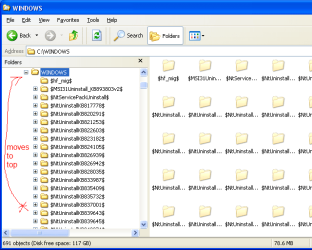
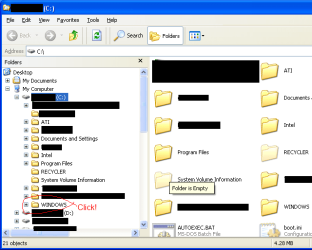
I remember in Windows Explorer on Windows XP that when you opened a folder by double clicking it then that folder would move to the top of the folder tree and then expand revealing it's sub-folders.

How can we get this behavior in Windows 7 :)
 

My Computer

Computer Manufacturer/Model Number
Acer || Meeeee
OS
XP Pro SP3 || Windows 7
CPU
Pentium-D || intel Core i5 3.2GHz ( 2 cores w/HT == 4 cpus )
Motherboard
Acer || ASUS
Memory
4GB DDR2-800MHz || 4GB DDR3-1600
Graphics Card(s)
onboard nVidia Geforce something or other
Sound Card
onboard
Monitor(s) Displays
1 21" crt
Screen Resolution
1152 x 864
Hard Drives
500GB sata2 Seagate 7200.12 || 1TB sata2 Seagate 7200.12
PSU
dont know || Ultra
Case
Acer || My old one
Cooling
fans || nicer fans
Keyboard
Acer || Microsoft <-- I LOVE this KB ^^
Mouse
Acer || Microsoft <-- I LOVE this mouse ^^
Internet Speed
Comcast || Comcast
Other Info
Companion PC || Main PC

I use these computers primarily for video game development; when I get my first release ready I'll let you know :-)

O/S Exp:
DOS, Windows 3.11 for workgroups, 95OSR2, 98SE (fav), XP Pro SP3 (fav), Windows 7 Home Premium (fav, ohh wow!!)

I have a copy of vista that came with my Acer but felt more comfortable with XP so I rebuilt it with XP Pro SP3

I don't know p
Here is xp and win 7. They both reveal subfolders at top. Are you talking about something else?
 

Attachments

  • Capture.JPG
    Capture.JPG
    24.1 KB · Views: 3
  • Capture2.JPG
    Capture2.JPG
    24.4 KB · Views: 2

My Computer

Computer Manufacturer/Model Number
Dell and Custom
OS
Systems 1 and 2: Windows 7 Enterprise x64, Win 8 Developer
CPU
System 1: i7 [email protected], System 2: AMD FX-4100 Zambezi 3.6G
Motherboard
System 1:Dell 06NWYK System 2: ASUS M5A97 AM3+
Memory
System 1: 8GB System 2: 8GB
Graphics Card(s)
System 1: ATI FirePro V4800 System 2: Radeon HD 6850
Sound Card
System 1: onboard System 2: onboard
Monitor(s) Displays
System1: Viewsonic HDMI 24"
Screen Resolution
System 1: 1920x1080 System 2: 1920x1080
Hard Drives
System 1: Mirrored .5B drives System 2: Seagate Barracuda ST1000DM003 1TB 7200 RPM 64MB Cache SATA 6.0Gb/s
Case
System 1: Dell System 2: Cooler Master
Internet Speed
10 MBPS
Whoops, sorry for the miscommunication :o

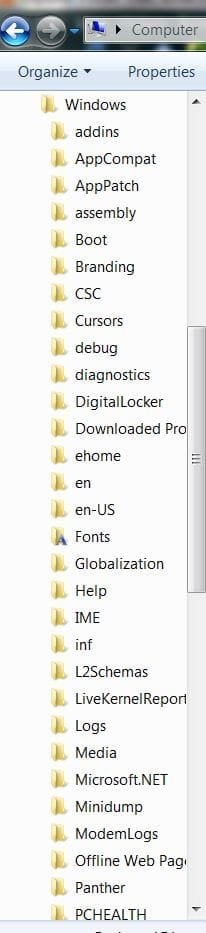
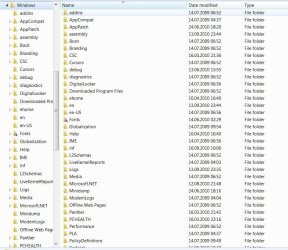
I am meaning in the left pane while you are exploring a folder with lots of sub-folders such as the windows folder. Then when you click on it, it moves to the top and then expands it's subfolders
 

Attachments

  • explorer1.png
    explorer1.png
    23.5 KB · Views: 6
  • explorer2.png
    explorer2.png
    19 KB · Views: 7

My Computer

Computer Manufacturer/Model Number
Acer || Meeeee
OS
XP Pro SP3 || Windows 7
CPU
Pentium-D || intel Core i5 3.2GHz ( 2 cores w/HT == 4 cpus )
Motherboard
Acer || ASUS
Memory
4GB DDR2-800MHz || 4GB DDR3-1600
Graphics Card(s)
onboard nVidia Geforce something or other
Sound Card
onboard
Monitor(s) Displays
1 21" crt
Screen Resolution
1152 x 864
Hard Drives
500GB sata2 Seagate 7200.12 || 1TB sata2 Seagate 7200.12
PSU
dont know || Ultra
Case
Acer || My old one
Cooling
fans || nicer fans
Keyboard
Acer || Microsoft <-- I LOVE this KB ^^
Mouse
Acer || Microsoft <-- I LOVE this mouse ^^
Internet Speed
Comcast || Comcast
Other Info
Companion PC || Main PC

I use these computers primarily for video game development; when I get my first release ready I'll let you know :-)

O/S Exp:
DOS, Windows 3.11 for workgroups, 95OSR2, 98SE (fav), XP Pro SP3 (fav), Windows 7 Home Premium (fav, ohh wow!!)

I have a copy of vista that came with my Acer but felt more comfortable with XP so I rebuilt it with XP Pro SP3

I don't know p
I don't get it. When i click on the arrow next to "windows" it goes to the top:
Capture0.JPG
one more click on the "windows" icon I have the subfolders opened on the right pane:
Capture9.JPG
I apologize if I misunderstand something, English is not my native language.
 

My Computer

Computer Manufacturer/Model Number
Micro-Star International/MS-7529
OS
Windows 7 Ultimate x32
CPU
DualCore Intel Pentium E2200, 2218 MHz (11 x 202)
Motherboard
MSI G31M3 V2 (MS-7529) (2 PCI, 1 PCI-E x16,2 DDR2 DIMM)
Memory
2 GB DDR2-800 DDR2 SDRAM
Graphics Card(s)
nVIDIA GeForce 9500GT 1GB
Sound Card
Realtek ALC888/1200 @ Intel 82801GB ICH7
Monitor(s) Displays
Samsung SyncMaster 2253BW (Digital) 22'' LCD
Screen Resolution
1680x1050
Hard Drives
SAMSUNG HD322IJ ATA Device (298 GB , IDE)

My Computer

Computer Manufacturer/Model Number
Dell and Custom
OS
Systems 1 and 2: Windows 7 Enterprise x64, Win 8 Developer
CPU
System 1: i7 [email protected], System 2: AMD FX-4100 Zambezi 3.6G
Motherboard
System 1:Dell 06NWYK System 2: ASUS M5A97 AM3+
Memory
System 1: 8GB System 2: 8GB
Graphics Card(s)
System 1: ATI FirePro V4800 System 2: Radeon HD 6850
Sound Card
System 1: onboard System 2: onboard
Monitor(s) Displays
System1: Viewsonic HDMI 24"
Screen Resolution
System 1: 1920x1080 System 2: 1920x1080
Hard Drives
System 1: Mirrored .5B drives System 2: Seagate Barracuda ST1000DM003 1TB 7200 RPM 64MB Cache SATA 6.0Gb/s
Case
System 1: Dell System 2: Cooler Master
Internet Speed
10 MBPS

My Computer

Computer Manufacturer/Model Number
Micro-Star International/MS-7529
OS
Windows 7 Ultimate x32
CPU
DualCore Intel Pentium E2200, 2218 MHz (11 x 202)
Motherboard
MSI G31M3 V2 (MS-7529) (2 PCI, 1 PCI-E x16,2 DDR2 DIMM)
Memory
2 GB DDR2-800 DDR2 SDRAM
Graphics Card(s)
nVIDIA GeForce 9500GT 1GB
Sound Card
Realtek ALC888/1200 @ Intel 82801GB ICH7
Monitor(s) Displays
Samsung SyncMaster 2253BW (Digital) 22'' LCD
Screen Resolution
1680x1050
Hard Drives
SAMSUNG HD322IJ ATA Device (298 GB , IDE)

My Computer

Computer Manufacturer/Model Number
Dell and Custom
OS
Systems 1 and 2: Windows 7 Enterprise x64, Win 8 Developer
CPU
System 1: i7 [email protected], System 2: AMD FX-4100 Zambezi 3.6G
Motherboard
System 1:Dell 06NWYK System 2: ASUS M5A97 AM3+
Memory
System 1: 8GB System 2: 8GB
Graphics Card(s)
System 1: ATI FirePro V4800 System 2: Radeon HD 6850
Sound Card
System 1: onboard System 2: onboard
Monitor(s) Displays
System1: Viewsonic HDMI 24"
Screen Resolution
System 1: 1920x1080 System 2: 1920x1080
Hard Drives
System 1: Mirrored .5B drives System 2: Seagate Barracuda ST1000DM003 1TB 7200 RPM 64MB Cache SATA 6.0Gb/s
Case
System 1: Dell System 2: Cooler Master
Internet Speed
10 MBPS
Hi everyone!

I remember in Windows Explorer on Windows XP that when you opened a folder by double clicking it then that folder would move to the top of the folder tree and then expand revealing it's sub-folders.

How can we get this behavior in Windows 7 :)

Dear UCM---If you get this solved, PLEASE send me solution--this is driving me crazy!!!!! :cry: :confused:
 

My Computer

Computer Manufacturer/Model Number
Custom
OS
Windows 7 Home Premium 64bit
CPU
Intel Core i7-870 2.93 8M 1333
Motherboard
(LGA 1156) Intel WHITESBURG DP55 WB
Memory
8GB DDR3 1333MHz
Graphics Card(s)
Gainward GTS 450 1024mb DVI HDMI DDR5
Sound Card
On motherboard
Monitor(s) Displays
ViewSonic p97f+
Hard Drives
WD WD1002FAEX 1T/7200/64MB SATA-II
Case
ATX Compucase 6AR6
Hi everyone!

I remember in Windows Explorer on Windows XP that when you opened a folder by double clicking it then that folder would move to the top of the folder tree and then expand revealing it's sub-folders.

How can we get this behavior in Windows 7 :)

Dear UCM---If you get this solved, PLEASE send me solution--this is driving me crazy!!!!! :cry: :confused:

Yes it is driving me 10 times more insane these last few weeks since i am using it far more often now with several hundred files and folders >_<

@Microsoft: I will give you my last $1.00 if you'll help us all :cry: :cry: :cry: :cry:
 

My Computer

Computer Manufacturer/Model Number
Acer || Meeeee
OS
XP Pro SP3 || Windows 7
CPU
Pentium-D || intel Core i5 3.2GHz ( 2 cores w/HT == 4 cpus )
Motherboard
Acer || ASUS
Memory
4GB DDR2-800MHz || 4GB DDR3-1600
Graphics Card(s)
onboard nVidia Geforce something or other
Sound Card
onboard
Monitor(s) Displays
1 21" crt
Screen Resolution
1152 x 864
Hard Drives
500GB sata2 Seagate 7200.12 || 1TB sata2 Seagate 7200.12
PSU
dont know || Ultra
Case
Acer || My old one
Cooling
fans || nicer fans
Keyboard
Acer || Microsoft <-- I LOVE this KB ^^
Mouse
Acer || Microsoft <-- I LOVE this mouse ^^
Internet Speed
Comcast || Comcast
Other Info
Companion PC || Main PC

I use these computers primarily for video game development; when I get my first release ready I'll let you know :-)

O/S Exp:
DOS, Windows 3.11 for workgroups, 95OSR2, 98SE (fav), XP Pro SP3 (fav), Windows 7 Home Premium (fav, ohh wow!!)

I have a copy of vista that came with my Acer but felt more comfortable with XP so I rebuilt it with XP Pro SP3

I don't know p
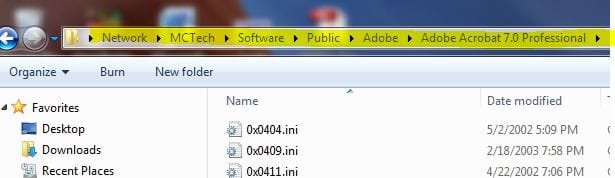
@Everyone: if this hasn't happened to you then I am envious but this seems to be happening randomly as no matter what I do I can't seem to get it to do it on purpose in any kind of way that we can track

I have also noticed many other quite issitating things with explorer such as when I click on a file in a folder and then double click on another file in the same folder ( or even elsewhere )
then
explorer will highlight that file i clicked on --but-- open the last file I had clicked @_# @_#

This behavior happens even when copying files; it will sometimes copy a file i had momements earlier clicked on regardless of the fact that I had clicked on a different file @_#


*also* <- if anyone knows a solution for this off-topic issue here; please point me in that direction, thank you :)
Internet Explorer 8 also has a very annoying bug in it in HTML textarea boxes when typing in text passed the visible area and then pasting into it; the textbox will scroll up before even the place where I pasted my text into @_#


These two issues is as though the explorer.exe and iexplore.exe had a couple minor bugs in them much like issues you get with c++ pointer references...

I desprately hope the upcoming Win7 SP1 will solve these ;(
 
Last edited:

My Computer

Computer Manufacturer/Model Number
Acer || Meeeee
OS
XP Pro SP3 || Windows 7
CPU
Pentium-D || intel Core i5 3.2GHz ( 2 cores w/HT == 4 cpus )
Motherboard
Acer || ASUS
Memory
4GB DDR2-800MHz || 4GB DDR3-1600
Graphics Card(s)
onboard nVidia Geforce something or other
Sound Card
onboard
Monitor(s) Displays
1 21" crt
Screen Resolution
1152 x 864
Hard Drives
500GB sata2 Seagate 7200.12 || 1TB sata2 Seagate 7200.12
PSU
dont know || Ultra
Case
Acer || My old one
Cooling
fans || nicer fans
Keyboard
Acer || Microsoft <-- I LOVE this KB ^^
Mouse
Acer || Microsoft <-- I LOVE this mouse ^^
Internet Speed
Comcast || Comcast
Other Info
Companion PC || Main PC

I use these computers primarily for video game development; when I get my first release ready I'll let you know :-)

O/S Exp:
DOS, Windows 3.11 for workgroups, 95OSR2, 98SE (fav), XP Pro SP3 (fav), Windows 7 Home Premium (fav, ohh wow!!)

I have a copy of vista that came with my Acer but felt more comfortable with XP so I rebuilt it with XP Pro SP3

I don't know p
Oh and dont get me wrong; i LOVE windows 7 and XP before that and 98se before that and 95 osr2 before that and 3.11/dos before that!

So I am NOT disrepecting Microsoft; as a developer myself I think that their QA department just missed one or two minor bugs which have caused these issues and I believe they will get them fixed ( i just hope it's sooner rather than later ) :-)

Sorry for double posting <.<
 
Last edited:

My Computer

Computer Manufacturer/Model Number
Acer || Meeeee
OS
XP Pro SP3 || Windows 7
CPU
Pentium-D || intel Core i5 3.2GHz ( 2 cores w/HT == 4 cpus )
Motherboard
Acer || ASUS
Memory
4GB DDR2-800MHz || 4GB DDR3-1600
Graphics Card(s)
onboard nVidia Geforce something or other
Sound Card
onboard
Monitor(s) Displays
1 21" crt
Screen Resolution
1152 x 864
Hard Drives
500GB sata2 Seagate 7200.12 || 1TB sata2 Seagate 7200.12
PSU
dont know || Ultra
Case
Acer || My old one
Cooling
fans || nicer fans
Keyboard
Acer || Microsoft <-- I LOVE this KB ^^
Mouse
Acer || Microsoft <-- I LOVE this mouse ^^
Internet Speed
Comcast || Comcast
Other Info
Companion PC || Main PC

I use these computers primarily for video game development; when I get my first release ready I'll let you know :-)

O/S Exp:
DOS, Windows 3.11 for workgroups, 95OSR2, 98SE (fav), XP Pro SP3 (fav), Windows 7 Home Premium (fav, ohh wow!!)

I have a copy of vista that came with my Acer but felt more comfortable with XP so I rebuilt it with XP Pro SP3

I don't know p
Yes it is driving me 10 times more insane these last few weeks since i am using it far more often now with several hundred files and folders >_<

@Microsoft: I will give you my last $1.00 if you'll help us all :cry: :cry: :cry: :cry:

I just read a bunch of threads on this today, and in one, everyone responding said they couldn't reproduce the problem, so they were thinking it was the first poster's problem!!!!! It was a very old post. But there were tons of other threads with MANY peope complaining. Then I went to check out the problem again to see if I could find a pattern, and guess what---for the first time, everything stayed in place!!!!! Try as I might, I couldn't get it to jump!!!! If I find anything, I will repot back.....:banghead:
 

My Computer

Computer Manufacturer/Model Number
Custom
OS
Windows 7 Home Premium 64bit
CPU
Intel Core i7-870 2.93 8M 1333
Motherboard
(LGA 1156) Intel WHITESBURG DP55 WB
Memory
8GB DDR3 1333MHz
Graphics Card(s)
Gainward GTS 450 1024mb DVI HDMI DDR5
Sound Card
On motherboard
Monitor(s) Displays
ViewSonic p97f+
Hard Drives
WD WD1002FAEX 1T/7200/64MB SATA-II
Case
ATX Compucase 6AR6
Back
Top