
Exporting from Outlook 2013

acerman64

New member
Local time
5:45 AM
Messages
43
I'm curious about what gets exported to a 'pst' file when I click on "Personal" and combine it with the instruction to incorporate sub-folders. Is 'archive' a sub-folder? Do the archived emails require an independent export like the ones given to the 'Personal'?
 

Attachments
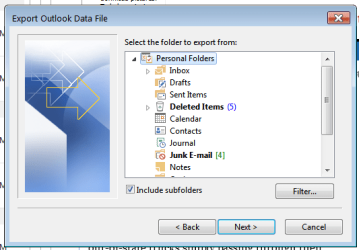
  • Untitled picture.png
    Untitled picture.png
    18.6 KB · Views: 11

My Computer

Computer type
PC/Desktop
Computer Manufacturer/Model Number
Acer
OS
Microsoft Windows 7 Professional , Service Pack 1 64 bit
CPU
Intel(R) Core(TM) i7-3770S CPU @ 3.10GHz
Motherboard
Chipset
Memory
8192 MB
Graphics Card(s)
Intel(R) HD Graphics 4000
Sound Card
Realtek High Definition Audio
Monitor(s) Displays
Samsung SyncMaster 204B
Hard Drives
ST1000DM003-1CH162, 931.51 GB
Keyboard
Acer
Mouse
Acer
Antivirus
Norton 360
Browser
IE, Firefox, Chrome
Other Info
Malwarebytes installed
Hopefully someone who knows 100% will answer, but everything I could find seems to point towards all emails being exported. Nothing I could find specifically mentions archived emails, but neither do i find that it is not exported :confused:

However, every link about what is lost when you export only mentions settings, and not emails

What is lost by exporting/importing pst-files? | MSOutlook.info

Just in case this applies to your scenario

Office 2013 (Outlook 2013) export to PST WARNING! ALERT! | Don't Panic

A Guy
 

My Computer

Computer type
PC/Desktop
OS
Windows 10 Home x64
CPU
INTEL Core i5-750 Quad-Core 3.37GHz
Motherboard
ASUS P7P55D
Memory
HyperX Fury Black Series 8GB (2 x 4GB) 1866Mhz
Graphics Card(s)
EVGA GeForce GTX 750 Superclocked 1GB 128-Bit GDDR5
Monitor(s) Displays
LG 32MA68HY 32" IPS
Screen Resolution
1920 x 1080
Hard Drives
Samsung 840 Evo 120GB, SEAGATE 500GB Barracuda® 7200.12, SATA 3 Gb/s, 7200 RPM, 16MB cache
PSU
ANTEC TruePower New TP-550, 80 PLUS, 550W
Case
ANTEC Three Hundred Illusion
Cooling
COOLER MASTER Hyper 212 Plus, 4 x 120mm 1 x 140mm Noctua's
Internet Speed
85 + Mbps
Antivirus
Avast
Browser
Vivaldi
Hi and thanks for trying to answer this!

It leads to a coupla additional questions. I notice that I have one file in the default Outlook file folder I called feb_backup.pst which I suspect is the renamed (by me) backup.pst file I created when I last exported Outlook (before copying it to a USB thumb drive). It is the only file in "C:\Users\Major User\Documents\Outlook Files" when I searched for *.pst on my C:\ partition. Being naïve, where is THE outlook file that is being used? I.E., if that is an export file, where is the working outlook file? Or is this somehow it?
 

My Computer

Computer type
PC/Desktop
Computer Manufacturer/Model Number
Acer
OS
Microsoft Windows 7 Professional , Service Pack 1 64 bit
CPU
Intel(R) Core(TM) i7-3770S CPU @ 3.10GHz
Motherboard
Chipset
Memory
8192 MB
Graphics Card(s)
Intel(R) HD Graphics 4000
Sound Card
Realtek High Definition Audio
Monitor(s) Displays
Samsung SyncMaster 204B
Hard Drives
ST1000DM003-1CH162, 931.51 GB
Keyboard
Acer
Mouse
Acer
Antivirus
Norton 360
Browser
IE, Firefox, Chrome
Other Info
Malwarebytes installed
.....And before I forget, how do you change the offline cached setting which was highlighted in one of the two refs your reply included, i.e. " Outlook 2013 will only export the OFFLINE CACHED DATA ONLY! It will not download the entire mailbox and export it. " ??
 

My Computer

Computer type
PC/Desktop
Computer Manufacturer/Model Number
Acer
OS
Microsoft Windows 7 Professional , Service Pack 1 64 bit
CPU
Intel(R) Core(TM) i7-3770S CPU @ 3.10GHz
Motherboard
Chipset
Memory
8192 MB
Graphics Card(s)
Intel(R) HD Graphics 4000
Sound Card
Realtek High Definition Audio
Monitor(s) Displays
Samsung SyncMaster 204B
Hard Drives
ST1000DM003-1CH162, 931.51 GB
Keyboard
Acer
Mouse
Acer
Antivirus
Norton 360
Browser
IE, Firefox, Chrome
Other Info
Malwarebytes installed
I believe the cached setting is the Cached Exchange Mode

As Microsoft’s web page says, users can change the amount of data that they keep – it just doesn’t tell you that you have to go to Account Settings rather than Outlook Options to do this. When you get there, you’ll find that you can select caching for 1 month, 3 months, 6 months, 1 year, 2 years, and “all”. Administrators can also use the Outlook Customization Tool to enforce a setting across multiple clients.

The Implications of Outlook 2013 Changing OST Cache Behavior | Tony Redmond's Exchange Unwashed Blog

Turn on Cached Exchange Mode - Outlook - Office.com

The stored files are hidden files. View hidden files is not selected by default in Windows Seven. Hide extensions for known file types is also checked by default.

http://www.sevenforums.com/tutorials/394-hidden-files-folders-show-hide.html

http://www.sevenforums.com/tutorials/10570-file-extensions-hide-show.html

Locating the Outlook data files - Outlook - Office.com

A Guy
 

My Computer

Computer type
PC/Desktop
OS
Windows 10 Home x64
CPU
INTEL Core i5-750 Quad-Core 3.37GHz
Motherboard
ASUS P7P55D
Memory
HyperX Fury Black Series 8GB (2 x 4GB) 1866Mhz
Graphics Card(s)
EVGA GeForce GTX 750 Superclocked 1GB 128-Bit GDDR5
Monitor(s) Displays
LG 32MA68HY 32" IPS
Screen Resolution
1920 x 1080
Hard Drives
Samsung 840 Evo 120GB, SEAGATE 500GB Barracuda® 7200.12, SATA 3 Gb/s, 7200 RPM, 16MB cache
PSU
ANTEC TruePower New TP-550, 80 PLUS, 550W
Case
ANTEC Three Hundred Illusion
Cooling
COOLER MASTER Hyper 212 Plus, 4 x 120mm 1 x 140mm Noctua's
Internet Speed
85 + Mbps
Antivirus
Avast
Browser
Vivaldi
I read that if you have a POP3 account that it won't work. I found that POP3 was greyed out. But when I select 'test message' it says something about logging on to POP3 mail server....I guess this won't work then.

I did however locate the outlook.pst file (which was where you'd expect it if it had been migrated over, as in my case it had been since a friend of mine ported it from my XP machine this one replaced).
 

My Computer

Computer type
PC/Desktop
Computer Manufacturer/Model Number
Acer
OS
Microsoft Windows 7 Professional , Service Pack 1 64 bit
CPU
Intel(R) Core(TM) i7-3770S CPU @ 3.10GHz
Motherboard
Chipset
Memory
8192 MB
Graphics Card(s)
Intel(R) HD Graphics 4000
Sound Card
Realtek High Definition Audio
Monitor(s) Displays
Samsung SyncMaster 204B
Hard Drives
ST1000DM003-1CH162, 931.51 GB
Keyboard
Acer
Mouse
Acer
Antivirus
Norton 360
Browser
IE, Firefox, Chrome
Other Info
Malwarebytes installed
Back
Top