Before I go any further there's a bit of back story to my 'issue' here http://www.sevenforums.com/installation-setup/331872-w7-w8-dual-boot-your-opinions-set-up.html
So all was going swimmingly with my dual boot setup until a couple of weeks ago, boot times were excellent and I could be into my desktop on either OS within 20 seconds. I was performing my weekly maintenance routine recently when a problem arose, I ran the usual MalwareBytes scan, a quick round of CCleaner, a SuperAntiSpyware scan and finally ran my regular Macrium imaging. I imaged my Windows 7 partition with no problem, but when running Macrium to image my Windows 8 partition Macrium hung and threw up an error, I chose to close the program and declined Windows' offer to search for a solution.
A BSOD followed (0x1000007E) so after restarting I thought I'd analyse it to see what was going on but there was no minidump for me to analyse. I tried to replicate the situation by running Macrium on my Windows 8 partition but the image was created successfully with no problems.
I carried on computing for the day and all seemed fine, and there has been no re-occurrence of the BSOD. I presumed it was Macrium that caused it but suspected my SSD so ran checks (sfc /scannow, chkdsk) and all came back good. So no bother it seemed.
It took a while for me to realise that it now took a good twenty to thirty seconds for my PC to reach the Boot Manager upon booting, I normally switch my rig on and go and make a coffee so it went undetected for a few days. I was just wondering if anybody had any ideas on what could have happened to have extended the boot time? It has to be a result of what happened when the BSOD occurred as, like I mentioned, my boot times were perfection beforehand.
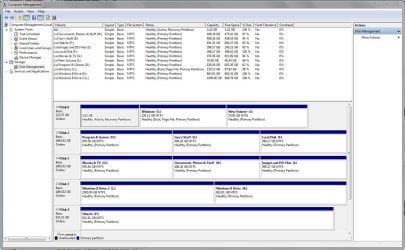
This isn't really an issue as such, more of an annoyance, but with the collective knowledge of 7F I thought it was an annoyance that could be eliminated. I've posted a screenshot of Disk Management below if it helps any, and if you'd like any more info just let me know and I'll provide it.
Thanks in advance for any input and help.
So all was going swimmingly with my dual boot setup until a couple of weeks ago, boot times were excellent and I could be into my desktop on either OS within 20 seconds. I was performing my weekly maintenance routine recently when a problem arose, I ran the usual MalwareBytes scan, a quick round of CCleaner, a SuperAntiSpyware scan and finally ran my regular Macrium imaging. I imaged my Windows 7 partition with no problem, but when running Macrium to image my Windows 8 partition Macrium hung and threw up an error, I chose to close the program and declined Windows' offer to search for a solution.
A BSOD followed (0x1000007E) so after restarting I thought I'd analyse it to see what was going on but there was no minidump for me to analyse. I tried to replicate the situation by running Macrium on my Windows 8 partition but the image was created successfully with no problems.
I carried on computing for the day and all seemed fine, and there has been no re-occurrence of the BSOD. I presumed it was Macrium that caused it but suspected my SSD so ran checks (sfc /scannow, chkdsk) and all came back good. So no bother it seemed.
It took a while for me to realise that it now took a good twenty to thirty seconds for my PC to reach the Boot Manager upon booting, I normally switch my rig on and go and make a coffee so it went undetected for a few days. I was just wondering if anybody had any ideas on what could have happened to have extended the boot time? It has to be a result of what happened when the BSOD occurred as, like I mentioned, my boot times were perfection beforehand.
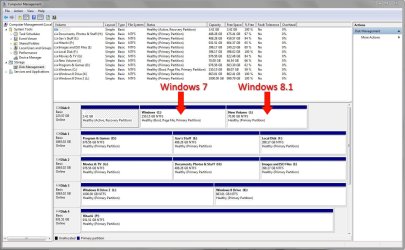
This isn't really an issue as such, more of an annoyance, but with the collective knowledge of 7F I thought it was an annoyance that could be eliminated. I've posted a screenshot of Disk Management below if it helps any, and if you'd like any more info just let me know and I'll provide it.
Thanks in advance for any input and help.
Last edited:
My Computer
At a glance
W7 Pro x64 SP1 | W10 Pro IP x64 | W8.1 Pro x6...i7-4790k @ 4GHz (4.4GHz Boost)16GB DDR3 Kingston HyperX Fury @ 1600MHz CL 9...EVGA GTX 980 Classified
- Computer type
- PC/Desktop
- Computer Manufacturer/Model Number
- Custom Build
- OS
- W7 Pro x64 SP1 | W10 Pro IP x64 | W8.1 Pro x64 VM | Linux Mint VM
- CPU
- i7-4790k @ 4GHz (4.4GHz Boost)
- Motherboard
- ASUS Sabertooth Z87 (BIOS Rev 2004)
- Memory
- 16GB DDR3 Kingston HyperX Fury @ 1600MHz CL 9-9-9-27
- Graphics Card(s)
- EVGA GTX 980 Classified
- Sound Card
- Realtek Onboard
- Monitor(s) Displays
- Samsung S27D390
- Screen Resolution
- 1920 x 1080
- Hard Drives
- 240GB Intel 520 Series SSD |
Samsung 850 EVO 120GB SSD |
2TB WD Caviar Black |
2TB WD Caviar Black |
2TB WD Caviar Green
- PSU
- Corsair HX850-80 Gold Modular
- Case
- Cooler Master Silencio 650
- Cooling
- Corsair H80i w/2 x Corsair SP120 | 2 x 120mm Noctua NF-S12B
- Keyboard
- Microsoft Sidewinder X4
- Mouse
- Gigabyte M6900 optical
- Internet Speed
- 152mb
- Antivirus
- F-Secure
- Browser
- Firefox 38.0
- Other Info
- Backup Rig: Win 7 Pro 64-bit | AMD A10-5800k | ASUS F2A85-V Pro | 8GB Samsung DDR3 @1600MHz | 120GB Toshiba SDD | 2TB Seagate HDD | Cooler Master Silencio 550