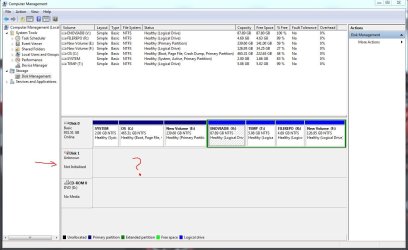
External Hard Disk, Unknown, Not Initialized ! No Unallocated Space.

Pradeep

New member
Local time
2:07 PM
Messages
3
Hi,

I'm new to this forum.

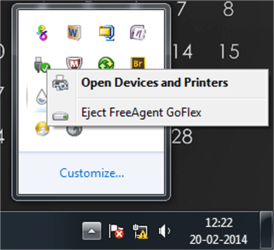
My external hard disk (Seagate) is detected in the task bar after connecting, but not visible in "My Computer".

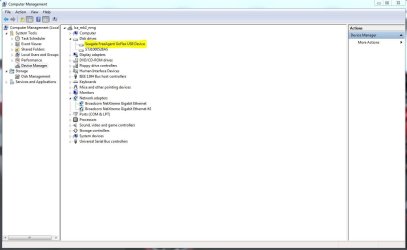
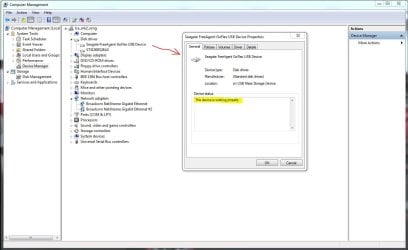
It is visible in Device manager under Disk Drives but not under USB.

There are few threads in this forum which are similar to mine, except that their Drives are visible in the Disk Management as Unallocated Space, mine is not.

SEE ATTACHMENTS !!!!!!!!!

I've tried all tools, tried in Windows XP still no solution.

Is there any way to atleast recover the data !!!!!!!!!

Your reply is appreciated !!!!!!!!

SEE ATTACHMENTS !!!!!!!!!
 

Attachments
  • Disk Management.JPG
    Disk Management.JPG
    113.7 KB · Views: 5
  • Device Manager.JPG
    Device Manager.JPG
    70 KB · Views: 5
  • Working Fine.JPG
    Working Fine.JPG
    92 KB · Views: 3
  • Task Bar.png
    Task Bar.png
    133.3 KB · Views: 1

My Computer My Computer

Computer type
PC/Desktop
OS
Windows 7 - x64
Hi Pradeep,

Welcome onboard.

" I have tried all tools" - can you please enumerate what all tools?

Have you tried running the Seagate SeaTools for Windows to diagnose/repair.

If not check your external drive now.
 

My Computer My Computer

OS
Windows 7 Home Premium 32 bit
Tried Seagate Manager - Cannot recognize the Drive!

Tried Seagate Sea Tools - Basic Scan did not work!, Short and Long Scan Failed! Advanced Scan not tried due to warning! (Loss of Data)

Tried Partition Wizard - Cannot detect the drive!

Tried connecting the drive directly to the mother board through SATA cables (CD-DVD ROM), detected in the boot menu but not detected when booted from C Drive.

Tried in Linux as well still no solution!
 

My Computer My Computer

Computer type
PC/Desktop
OS
Windows 7 - x64
You seem to have tried out everything. Good. Now it looks like the drive is a goner. *scratching my head*

I presume you tried 1, 2 and 3 with the drive in its original external case and 4 and 5 as a secondary drive (out of its enclosure)

Now looking at the Windows Disk Management screenshot in your first post , was it as an external drive or internal drive? If it was as an external drive how does it look like as an internal drive?

Well, I am just looking for anything that can give a ray of hope.:)

Without waiting for your reply, the only thing I could suggest is check whether PhotoRec could recover whatever data remains uncorrupted if it can recognise the drive.( If the HDD had been overwhelmed by a deluge of bad sectors which Seatools cannot repair then the possibility of most data having been corrupted already cannot be overruled. If Photorec could be run then there is some possibility of recovering some data since PhotoRec does not look for a file system but goes after the underlying data..)

http://www.sevenforums.com/software/193467-guide-using-photorec-recovery-software.html
 

My Computer My Computer

OS
Windows 7 Home Premium 32 bit
Hi Jumanji,

Thnks for your immediate response.....

Internal Drive - I did not remove the enclosure, rather i removed the Adapter from the External Hard Disk Drive which converges to a USB, and directly connected the Power and Data cable from the mother board (CD-DVD ROM).

Is it advisable to break open the case ????
 

My Computer My Computer

Computer type
PC/Desktop
OS
Windows 7 - x64
Oh! yours is a Seagate GoFlex drive. That I would infer is as good as taking the drive out and connecting in case of other or most other external drives..Still when directly connected without the adapter what did Disk Management show? In other words, I would like to see the Windows Disk Management with and without the adapter.

And so,no, I do not advise breaking it up.

Try PhotoRec. ( I am going out and will return late)
 

My Computer My Computer

OS
Windows 7 Home Premium 32 bit
I

Sorry for posting in old thread but Hey did you find any solution for that problem . I am facing the exact same problem with my seagate drive . And help will be appreciated
 

My Computer My Computer

Computer type
Laptop
Computer Manufacturer/Model Number
Hp -15ac083TX (N8M06PA)
OS
Windows 10 64bit
Memory
4 Gb DDR3 Ram
Graphics Card(s)
2 GB Toshiba Hard Drive
Back
Top