External Hard disk WD Element 1 TB not able to open

amolmangrulkar

New member
Local time
10:47 PM
Messages
4
Hello ,

External hard disk WD element [1 TB ] is detected .
but not able to open .

The error massage displaced is

H: is not accessible

The request could not be performed because of an I/O device error.

It do carry important data . Please help

AMol
 

Attachments

Last edited:

My Computer My Computer

At a glance

windows 7 , 64 -bits operating system4 GB Installed [ram]
Computer type
Laptop
Computer Manufacturer/Model Number
LENOVO 2522BW7
OS
windows 7 , 64 -bits operating system
Memory
4 GB Installed [ram]
Antivirus
Quickheal total security

My Computer My Computer

At a glance

Windows 10 Pro. 64/ version 1709 Windows 7 Pr...Intel i7-6800K @ 4.3Corsair Platinum 16 gig @2400EVGA GTX 1070 OC
Computer type
PC/Desktop
Computer Manufacturer/Model Number
Home made Desktop
OS
Windows 10 Pro. 64/ version 1709 Windows 7 Pro/64
CPU
Intel i7-6800K @ 4.3
Motherboard
ASUS X-99 Deluxe II
Memory
Corsair Platinum 16 gig @2400
Graphics Card(s)
EVGA GTX 1070 OC
Monitor(s) Displays
Asus 27" LED LCD/VE278Q
Screen Resolution
1920-1080 or 1280-720 HDMI
Hard Drives
INTEL SSD 730-240 Gb Sata 3.0/
PSU
EVGA Platium 1200W
Case
Phanteks Luxe Tempered Glass 8 fans/ one radiator
Cooling
XSPC/ Water Cooled CPU
Keyboard
Das 4 Professional
Mouse
Logitech M705/MX Anywhere 2-S
Internet Speed
100 mbits
Antivirus
Microsoft Security Essentials/ Malwarebytes Premium 3.0/ SAS
Browser
I.E. 11 default/Firefox/ ISP Time Warner Cable/Spectrum
Other Info
LG BluRay Burner/
Sound system-KLipsch-THX/
Icy Dock ssd Hot Swap bays.
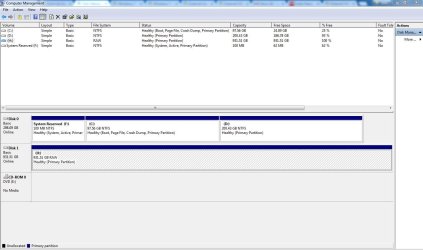
Necessary data attached .

Amol
 

Attachments

  • Error file 11.JPG
    Error file 11.JPG
    107.6 KB · Views: 5

My Computer My Computer

At a glance

windows 7 , 64 -bits operating system4 GB Installed [ram]
Computer type
Laptop
Computer Manufacturer/Model Number
LENOVO 2522BW7
OS
windows 7 , 64 -bits operating system
Memory
4 GB Installed [ram]
Antivirus
Quickheal total security
Please help resolving the issue .
Seek immediate help ...

Amol
 

My Computer My Computer

At a glance

windows 7 , 64 -bits operating system4 GB Installed [ram]
Computer type
Laptop
Computer Manufacturer/Model Number
LENOVO 2522BW7
OS
windows 7 , 64 -bits operating system
Memory
4 GB Installed [ram]
Antivirus
Quickheal total security
Please remove all other external drives/pendrives from your PC. Have only your faulty WD Elements drive connected.

Open Command prompt. Start > All programs > Accessories > Command Prompt

Type
CHKDSK I: /f /v /r /x Press enter. Note: Replace I: with the actual drive letter of the RAW drive/volume. Also note there is a space before every /

Allow check disk to complete.( Do not on any account interrupt chkdisk). Reboot your PC.

Does this resolve your problem?


My Computer My Computer

At a glance

Windows 7 Home Premium 32 bit
OS
Windows 7 Home Premium 32 bit
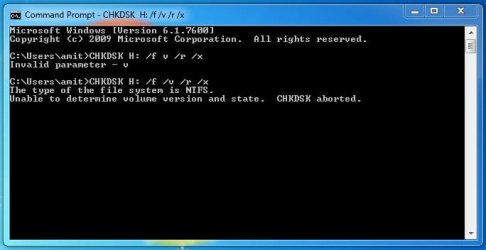
Seems , it does not work ....
The response is
The type of file system is NTFS
unable to determine volume version and state.CHKDSK aborted.

Please guide further ....

BR

AMol
 

Attachments

  • Error file 12.JPG
    Error file 12.JPG
    31.2 KB · Views: 21

My Computer My Computer

At a glance

windows 7 , 64 -bits operating system4 GB Installed [ram]
Computer type
Laptop
Computer Manufacturer/Model Number
LENOVO 2522BW7
OS
windows 7 , 64 -bits operating system
Memory
4 GB Installed [ram]
Antivirus
Quickheal total security
OK,

I am still not sure what went wrong (or know what could have gone wrong but don't want to reveal now :)) and we are still in the exploratory phase.

How many partitions were there in your external drive?

Do you have any inkling what could have precipitated this RAW condition on your external drive?

Now download the free version of GetDataback Simple https://www.runtime.org/data-recovery-software.htm and scan your external drive and let me know the results.

If it gives any error message post the screenshot.

If it shows all your files, then I don't need the screenshot :). You can just preview the files and check whether it is all right and let me know. No need to buy it now. We shall explore free alternatives.

From whatever you see and report, I may be able to correlate that info with the checkdisk error message and decide what our next step will be. All this is going to be a slow process that is further aggravated by the different day/night cycle.

It is bedtme for me now and I shall see your post only after another 10 hours.
 

My Computer My Computer

At a glance

Windows 7 Home Premium 32 bit
OS
Windows 7 Home Premium 32 bit
amolmangrulkar thank you for posting the requested picture. It's a starting point to work with.

Please follow jumanji instructions exactly as he request.
 

My Computer My Computer

At a glance

Windows 10 Pro. 64/ version 1709 Windows 7 Pr...Intel i7-6800K @ 4.3Corsair Platinum 16 gig @2400EVGA GTX 1070 OC
Computer type
PC/Desktop
Computer Manufacturer/Model Number
Home made Desktop
OS
Windows 10 Pro. 64/ version 1709 Windows 7 Pro/64
CPU
Intel i7-6800K @ 4.3
Motherboard
ASUS X-99 Deluxe II
Memory
Corsair Platinum 16 gig @2400
Graphics Card(s)
EVGA GTX 1070 OC
Monitor(s) Displays
Asus 27" LED LCD/VE278Q
Screen Resolution
1920-1080 or 1280-720 HDMI
Hard Drives
INTEL SSD 730-240 Gb Sata 3.0/
PSU
EVGA Platium 1200W
Case
Phanteks Luxe Tempered Glass 8 fans/ one radiator
Cooling
XSPC/ Water Cooled CPU
Keyboard
Das 4 Professional
Mouse
Logitech M705/MX Anywhere 2-S
Internet Speed
100 mbits
Antivirus
Microsoft Security Essentials/ Malwarebytes Premium 3.0/ SAS
Browser
I.E. 11 default/Firefox/ ISP Time Warner Cable/Spectrum
Other Info
LG BluRay Burner/
Sound system-KLipsch-THX/
Icy Dock ssd Hot Swap bays.
Many times in cases like this it was a cable problem. Can you use different cables.
 

My Computer My Computer

At a glance

Vista, Windows7, Mint Mate, Zorin, Windows 8from 1.6GHz Duo to i7
Computer Manufacturer/Model Number
HP, Dell, Gateway, Toshiba - 4 laptops and 2 desktops
OS
Vista, Windows7, Mint Mate, Zorin, Windows 8
CPU
from 1.6GHz Duo to i7
Monitor(s) Displays
2x HP w2207
Hard Drives
5x HDD, 7x SSD, 12x Externals
Keyboard
with trackball - no mices
Mouse
Trackball mice
Internet Speed
DSL 6000
Hello amolmangrulkar!

This is frustrating!

The RAW format of the drive means there's been an error with its file system, hence the system can't correctly read or give access to the drive. :/

You could try booting to a Linux-based Live CD and check if you can access the drive then. Try this tutorial from Golden:

http://www.sevenforums.com/tutorials/256518-peppermint-live-cd-dvd-usb-create-emergency-backup.html

Make sure you are trying with another cable and another system, as well. If these don't help, try using a third-party software to recover the data or look into professional data recovery company, WD has partners in this field.

Best of luck and post back!

CK_WD
 

My Computer My Computer

At a glance

Windows 7 Home Premium x64
Computer type
PC/Desktop
OS
Windows 7 Home Premium x64
Back
Top