external hard disk which is not displaying data stored in it

Hi All,

Sorry I got a bit late in logging in today.

I read the posts and understand that you all are putting in a lot of effort and just want to say thanks.....and that am really grateful. :)

Also, if you all would remember that I had written to Seagate Tech support, I finally received a response form them saying that they cannot attempt data recovery on my drive and that I should simply format it.....:mad:

I am starting with the partition find and mount now....

(just one point.....I have connected my (bad) seagate and the new one together to the laptop. Hope thats fine and is supposed to be done.)
 

My Computer My Computer

At a glance

Windows 7 64 bit
Computer type
Laptop
Computer Manufacturer/Model Number
Acer
OS
Windows 7 64 bit
You are more than welcome sheena bansal.
 

My Computer My Computer

At a glance

Win 7 HP SP1 64-bit Vista HB SP2 32-bit Linux...Intel(R) Pentium(R) CPU P6200 @ 2.13GHz4.00 GBIntel(R) Graphics Media Accelerator HD
Computer type
Laptop
Computer Manufacturer/Model Number
Fujitsu LIFEBOOK
OS
Win 7 HP SP1 64-bit Vista HB SP2 32-bit Linux Mint 18.3
CPU
Intel(R) Pentium(R) CPU P6200 @ 2.13GHz
Motherboard
FUJITSU FJNBB06
Memory
4.00 GB
Graphics Card(s)
Intel(R) Graphics Media Accelerator HD
Sound Card
[1] Realtek High Definition Audio [2] Intel(R) Display Audio
Screen Resolution
1366 x 768 x 32 bits (4294967296 colors) @ 59 Hz
Hard Drives
TOSHIBA MK5076GSX
Antivirus
AVG FREE
Sir,

On launching the 'Partition Find and Mount' application, it displays my HD. Also, it displays 3 options for scanning.

Please suggest which one shall I run.

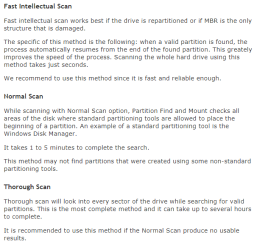
I found what all these scan do...[screenshot attached]
 

Attachments

  • 24.png
    24.png
    8.1 KB · Views: 16
  • 25.PNG
    25.PNG
    18.3 KB · Views: 16

My Computer My Computer

At a glance

Windows 7 64 bit
Computer type
Laptop
Computer Manufacturer/Model Number
Acer
OS
Windows 7 64 bit
Go from the least time-consuming to the most time consuming.

First Fast Intellectual Scan. If it shows the partitions you can mount them and check whether the files are shown and copy those.

You can skip Normal Scan. We know that the disk used the standard partitioning tool that starts the first partition at Sector 2048.

If Fast Intellectual Scan does not find the partition, go to Thorough Scan. ( It is the same with PW. If Quick Scan does not find the partitions, you are supposed to run the Full Scan which will check each and every sector for the partition data - the Volume Boot Record, also known as Partition Boot Record.)

"Seagate Tech support, I finally received a response form them saying that they cannot attempt data recovery on my drive and that I should simply format it....." That is an easy way out :-)

Just for fun download and install the free demo version of GetDatabacksimple Data Recovery Software Products - Runtime Software Products and scan your drive. (Of course read the documentation). It can show all the files if data is recoverable. You can even preview and open the files and check their integrity. Sometimes I ask the OPs to start with this to know whether the files are there and recoverable.( Also a confidence booster to the OPs when it does.) To copy you have buy it -USD 70. ( For the data recovery efforts in these forums I only use PW and TestDisk)
 

My Computer My Computer

At a glance

Windows 7 Home Premium 32 bit
OS
Windows 7 Home Premium 32 bit
Hi,

1 jumanji :
Simply Great! Awesome explanation! Thanks sir for the back to back enlightening posts!

2.I read the posts and understand that you all are putting in a lot of effort and just want to say thanks
sheena bansal: Mam, You are always welcome! ( i am doing it for my own good )

3.Just for fun download and install the free
jumanji : Sir, i don't feel partying as of now!

(((( Sir, Please excuse me, i am helpless! ): Going through your explanation, i was just thinking if ''Partition Find and Mount'' fails, we could make that ''Finish'' with partition wizard & then run it (Partition Find and Mount) to repair/find MBR,etc or just another way to repair MBR without losing the partition & data ?? ))))

Thanks & Regards. ...
 

My Computer My Computer

At a glance

Windows 7 Ultimate x32 With Sp1 + Vista Ultim...Intel Mobile Core 2 Duo T5750 @ 2.00GHz Merom...2.00GB Dual-Channel DDR2 @ 332MHz (5-5-5-15)Mobile Intel(R) 965 Express Chipset Family
Computer type
Laptop
Computer Manufacturer/Model Number
hp compaq presario c795VU notebook pc
OS
Windows 7 Ultimate x32 With Sp1 + Vista Ultimate x32 with Sp1 & Sp2 !!
CPU
Intel Mobile Core 2 Duo T5750 @ 2.00GHz Merom 65nm Technolog
Motherboard
Hewlett-Packard 30D9 (CPU)
Memory
2.00GB Dual-Channel DDR2 @ 332MHz (5-5-5-15)
Graphics Card(s)
Mobile Intel(R) 965 Express Chipset Family
Sound Card
High Definition Audio Device
Monitor(s) Displays
LP154WX4-TLCB on Mobile Intel 965 Express Chipset Family
Screen Resolution
1280x800 @ 60Hz
Hard Drives
149GB Western Digital WDC WD1600BEVS-60VAT0 ATA Device (SATA)
Keyboard
Standard 101/102-Key or Microsoft Natural PS/2 Key + HP QLB
Mouse
ALPS pointing device
Antivirus
Kaspersky AV 2017(Win 7) & AVG AntiVirus Free 2016 (VISTA)
Browser
google chrome
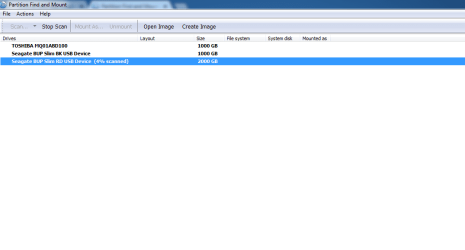
I have initiated the Fast scan as recommended.

Will post the results as soon as it finishes.
 

Attachments

  • 26.PNG
    26.PNG
    10.2 KB · Views: 0

My Computer My Computer

At a glance

Windows 7 64 bit
Computer type
Laptop
Computer Manufacturer/Model Number
Acer
OS
Windows 7 64 bit
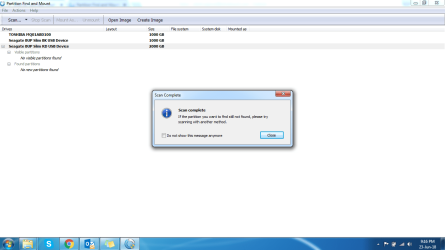
This is the result I got. Continuing with Thorough Scan now
 

Attachments

  • 27.PNG
    27.PNG
    35.8 KB · Views: 1

My Computer My Computer

At a glance

Windows 7 64 bit
Computer type
Laptop
Computer Manufacturer/Model Number
Acer
OS
Windows 7 64 bit
OK. I am keeping my fingers crossed as always :-)
 

My Computer My Computer

At a glance

Windows 7 Home Premium 32 bit
OS
Windows 7 Home Premium 32 bit
Hi,

........Going through your explanation, i was just thinking if ''Partition Find and Mount'' fails, we could make that ''Finish'' with partition wizard & then run it (Partition Find and Mount) to repair/find MBR,etc or just another way to repair MBR without losing the partition & data ?? ))))

Vineet Garg

OK, I do have it in my mind. Sometimes in data recovery, what you expect does not happen. What you did not expect happens. I had encountered this situation many times :-).

Let the OP finish the current task.
 

My Computer My Computer

At a glance

Windows 7 Home Premium 32 bit
OS
Windows 7 Home Premium 32 bit
Hi,

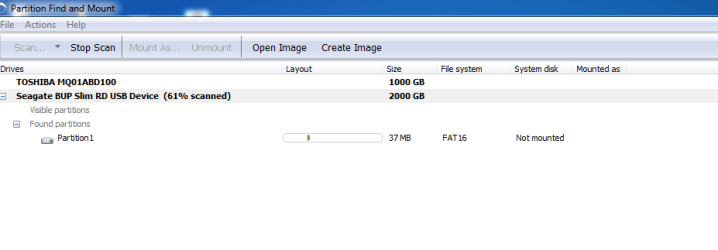
I started the scan in the morning, thinking that it would take some time and I would be unable to monitor it overnight.

So after I guess, 7 hours since i started, Current status is 61%. Hopefully its a good thing. :)
jumanji, yeah fingers and toes crossed .:D

Even my fingers are crossed.
 

Attachments

  • 28.PNG
    28.PNG
    10.2 KB · Views: 0

My Computer My Computer

At a glance

Windows 7 64 bit
Computer type
Laptop
Computer Manufacturer/Model Number
Acer
OS
Windows 7 64 bit
Keep it going and let us see
 

My Computer My Computer

At a glance

Windows 7 Home Premium 32 bit
OS
Windows 7 Home Premium 32 bit
Hi sir,

It has been 3 hours, and the scan has not moved from 64%

Edit: also, the hard disk is a bit hot to touch
 

Attachments

  • 29.PNG
    29.PNG
    10.1 KB · Views: 0

My Computer My Computer

At a glance

Windows 7 64 bit
Computer type
Laptop
Computer Manufacturer/Model Number
Acer
OS
Windows 7 64 bit
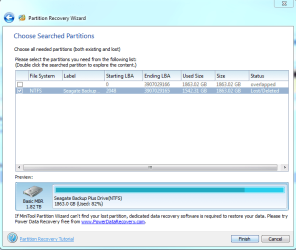
May be it is encountering a bad sector. You may stop the scan and allow your HDD to cool. When it has cooled, run Partition Recovery Wizard again. In the partitions found window click on the square on the partition starting @ sector 2048 as before ( as in your post #42.) Check that the preview map at the bottom of that Window also shows as before. Then click on Finish. That should take you to the main screen. Click on the Apply button on the top Menubar. Report what happens.

Tomorrow we will start TestDisk and try to recover the files.

Note: when not in use, safely remove the drive and keep it at rest.
 

My Computer My Computer

At a glance

Windows 7 Home Premium 32 bit
OS
Windows 7 Home Premium 32 bit
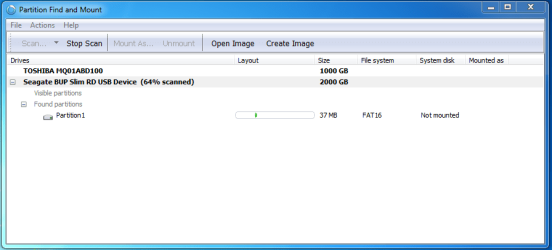
Ok sir, just posting the current screen of 'Partition find and mount' before I stop the scan.
 

Attachments

  • 30.PNG
    30.PNG
    14.5 KB · Views: 1

My Computer My Computer

At a glance

Windows 7 64 bit
Computer type
Laptop
Computer Manufacturer/Model Number
Acer
OS
Windows 7 64 bit
Following the steps mentioned:
 

Attachments

  • 31.PNG
    31.PNG
    23.9 KB · Views: 8
  • 32.PNG
    32.PNG
    33 KB · Views: 8

My Computer My Computer

At a glance

Windows 7 64 bit
Computer type
Laptop
Computer Manufacturer/Model Number
Acer
OS
Windows 7 64 bit
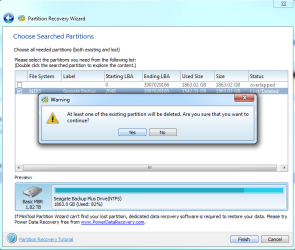
I have not clicked 'Yes' yet :o
 

My Computer My Computer

At a glance

Windows 7 64 bit
Computer type
Laptop
Computer Manufacturer/Model Number
Acer
OS
Windows 7 64 bit
jumanji Sir. Shall I click on 'yes'. coz it says that the partition will be deleted.
 

My Computer My Computer

At a glance

Windows 7 64 bit
Computer type
Laptop
Computer Manufacturer/Model Number
Acer
OS
Windows 7 64 bit
Click Yes. No problem. And then Finish >Apply.

( PW says that the other partition starting at LBA 0 - which is of course an anamoly and which shouldn't be there - will get deleted. Let the wrong partition data get deleted. We don't mind :-) )
 

My Computer My Computer

At a glance

Windows 7 Home Premium 32 bit
OS
Windows 7 Home Premium 32 bit
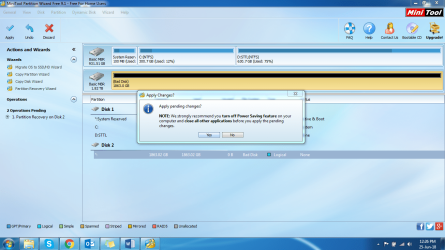
I clicked on yes. It automatically redirected to home screen. On click of 'Apply' this is what i get
 

Attachments

  • 33.PNG
    33.PNG
    244 KB · Views: 2

My Computer My Computer

At a glance

Windows 7 64 bit
Computer type
Laptop
Computer Manufacturer/Model Number
Acer
OS
Windows 7 64 bit
Back
Top