External hard drive connectivity lost

CeeGee

New member
Member
Local time
6:32 AM
Messages
16
Hi

I'm having trouble with an external hard drive which connects via USB. The drive now very rarely gets recognised and the drive letter does not appear in the directory.

I have uninstalled all the USB controllers and let windows reinstall them however this has not solved the problem. I have also done a system restore back about two weeks which is when the problem started however this has also not solved it.

I have also scanned the drive for problems. I do not get this problem when the drive is plugged into another laptop using another lead.

Any thoughts? I'm running Windows 7.
Regards
 

My Computer

OS
Windows 7
This is one of the more common problems we see here. The key information is that the drive is recognized fine in other PCs.

This indicates that your USB ports are underpowered. This is a defect and/or fault in the motherboard in your laptop which, unfortunately, is all too common also. USB specs require a minimum 5v power output. If the output drops below 5v the drive does not engage.

You can try different USB ports. Sometimes it is just one port that is faulting.

You can test to see if the problem only exists on battery power, and goes away if the power supply is plugged in.
572848925_o.jpg

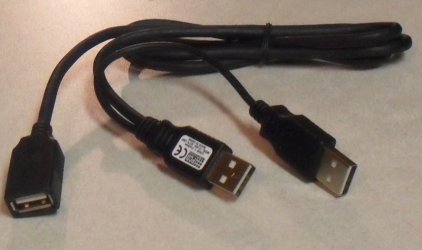
As a workaround you could purchase a powered USB hub. They also make a 2-port connector that will double the power supply that sometimes works.

But don't get too involved with toying with the OS. I doubt that is where the problem lies based upon the results you posted.
 

My Computer

Computer type
PC/Desktop
Computer Manufacturer/Model Number
Home Built - Jan 2013
OS
Windows 7 64 Bit Home Premium SP1
CPU
i7-3820
Motherboard
Asus P9X79-PRO - Bios 4608
Memory
GSkill F3-14900CL9Q - 16GB
Graphics Card(s)
EVGA GeForce GTX660 - Driver 352.86
Sound Card
On board Realtek ALC898
Monitor(s) Displays
Acer S271HL
Screen Resolution
1920 x 1080
Hard Drives
#1- Samsung 840 Pro Series
#2- Western Digital WD1002FAEX Sata3 Black
#3- Western Digital WD1002FAEX Sata3 Black
PSU
Corsair CMPSU-850TX-V2 - 850 watt (by Seasonic)
Case
Corsair Obsidian 550D
Cooling
Standard 3 120mm case fans, Cooler Master Hyper 212 EVO
Keyboard
MS KC-0405
Mouse
Intellimouse 5-button
Internet Speed
56 Mbits/Sec (on a good day)
Antivirus
Avast & Malwarebytes
Browser
Firefox
Other Info
Asus DVD - DRW-24B1ST 24X
Thank you for the reply

I have a second external drive which seems to function ok on the problem laptop. Secondly, the problem drive suffers the same fate on any of the laptop's USB ports.
Does this suggest something other than low power?

Regards

Clive
 

My Computer

OS
Windows 7
It could, of course.

If an external drive is a desktop drive and has it's own power supply then the 5v issue is moot. Then the only connectivity issue is in the milivolts and not an issue at all.

But if the external drive is 'portable' then it gets it's power from the PC through the USB connection. In that case it is almost always USB power related. (Provided it works on other PCs).

The other issue I've seen with portable drives is the interface of the actual 2.5 inch drive and the plastic case it is housed in. Sometimes the connector is a cap and it is not making full contact. But that would affect it on all machines.

The biggest clue as to whether it is software or hardware related is whether Windows recognizes the drive with the familiar "Boop-Doop" (Found Hardware) sound. If you get that and then the drive is not recognized then it is on the OS side of things.
 

My Computer

Computer type
PC/Desktop
Computer Manufacturer/Model Number
Home Built - Jan 2013
OS
Windows 7 64 Bit Home Premium SP1
CPU
i7-3820
Motherboard
Asus P9X79-PRO - Bios 4608
Memory
GSkill F3-14900CL9Q - 16GB
Graphics Card(s)
EVGA GeForce GTX660 - Driver 352.86
Sound Card
On board Realtek ALC898
Monitor(s) Displays
Acer S271HL
Screen Resolution
1920 x 1080
Hard Drives
#1- Samsung 840 Pro Series
#2- Western Digital WD1002FAEX Sata3 Black
#3- Western Digital WD1002FAEX Sata3 Black
PSU
Corsair CMPSU-850TX-V2 - 850 watt (by Seasonic)
Case
Corsair Obsidian 550D
Cooling
Standard 3 120mm case fans, Cooler Master Hyper 212 EVO
Keyboard
MS KC-0405
Mouse
Intellimouse 5-button
Internet Speed
56 Mbits/Sec (on a good day)
Antivirus
Avast & Malwarebytes
Browser
Firefox
Other Info
Asus DVD - DRW-24B1ST 24X
Hi

Have swapped components around including power leads and USB cables. The external drive is mains powered so the power drop concern was unlikely to be the cause of the problem. Swapping mains cables did in fact not result in any change. Strangely however swapping the USB cable over to a different one has brought back stability to the unit including return of plug 'n' play functionality.

Will update in a day or two if problem reoccurs but this evening so far all OK.

Regards

CeeGee
 

My Computer

OS
Windows 7
Bad USB cable. Happens.
 

My Computer

Computer type
PC/Desktop
Computer Manufacturer/Model Number
Home Built - Jan 2013
OS
Windows 7 64 Bit Home Premium SP1
CPU
i7-3820
Motherboard
Asus P9X79-PRO - Bios 4608
Memory
GSkill F3-14900CL9Q - 16GB
Graphics Card(s)
EVGA GeForce GTX660 - Driver 352.86
Sound Card
On board Realtek ALC898
Monitor(s) Displays
Acer S271HL
Screen Resolution
1920 x 1080
Hard Drives
#1- Samsung 840 Pro Series
#2- Western Digital WD1002FAEX Sata3 Black
#3- Western Digital WD1002FAEX Sata3 Black
PSU
Corsair CMPSU-850TX-V2 - 850 watt (by Seasonic)
Case
Corsair Obsidian 550D
Cooling
Standard 3 120mm case fans, Cooler Master Hyper 212 EVO
Keyboard
MS KC-0405
Mouse
Intellimouse 5-button
Internet Speed
56 Mbits/Sec (on a good day)
Antivirus
Avast & Malwarebytes
Browser
Firefox
Other Info
Asus DVD - DRW-24B1ST 24X
Back
Top