External Hard Drive Not Detected

Jorikirk,

Just like Shorty920, I also registered solely to say thanks. It was exactly a power issue with my external HD, and once I followed your advice about powering up the drive first and then connecting it to the USB port, the OS finally recognized the drive. Thanks so much for the help.
 

My Computer

OS
Windows 7 Ultimate x64
Sfraser, so glad. another yeehaw for sharing solutions!
 

My Computer

Computer Manufacturer/Model Number
HP Pavilion m8300f
OS
Windows 7
CPU
Athlon 64 X21 Dual Core 600_ 3.00 Ghz
Motherboard
NVidia MCP61 chipset, Nettle2 baseboard
Memory
3GB
Graphics Card(s)
NVIDIA GeForce 9600 GT
Sound Card
Realtek High Definition Audio
Monitor(s) Displays
NEC MultiSync LCD2690WUXi(Digital), LG 21' pnp
Hard Drives
2 - ST332082 0AS SCSI Disk, 1 - Seagate FreeAgent Pro USB external
PSU
550 W BFG GS Series ATX 12V v2.2
External Drive

I have same problem, bought an external hard drive of samsung, it was working fine but i think since last window update it is not showing in drives. i was thinking that there is something wrong with my pc ,but now i learned half world is dancing with this problem.
I also have another problem , and that is here : i dont find printers often and then i start system again and again then they appear..printer means i have pdf writer/office/and efax:mad::cry:
 

My Computer

Computer Manufacturer/Model Number
samsung r518
OS
windows 7 home premium
CPU
intel core i3
Memory
4GB
Graphics Card(s)
Nvidia
I just bought Seagate 1TB put it in a Perfectly working 3.5 external case and i cant seem to get it to show up on XP or Windows 7 is there something i need to do to this drive before i just put it in there and go

thaks for any time and info you give me
 

My Computer

OS
Windows 7 Ultamate
CPU
Quad CPU Q9000 2.0
Motherboard
I have one
Memory
6 gigs
Graphics Card(s)
512 Radion
Hi,

How is the external enclosure connected to the PC?

Golden
 

My Computer

Computer type
PC/Desktop
Computer Manufacturer/Model Number
Golden Mk. I.4
OS
Windows 10 Pro x64 ; Xubuntu x64
CPU
Intel i7 860 @ 2.80 GHz O/C'ed to 4.0GHz
Motherboard
Gigabyte P55A-UD3R Rev.1. Award BIOS F13
Memory
16GB Corsair Vengance DDR3 @ 661 MHz Dual Channel (9-9-9-24)
Graphics Card(s)
EVGA NVidia GTX 560 1024MB
Sound Card
Realtek Integrated
Monitor(s) Displays
Dual Samsung SyncMaster 2494HS
Screen Resolution
1920*1080 and 1920*1080
Hard Drives
1*Samsung 840 EVO 120GB SSD;
1*OCZ Vertex 2 60GB SSD;
2*Samsung F3 SpinPoint 1TB in RAID0;
1*Samsung F1 SpinPoint 1TB;
2*Western Digital 1TB External USB 3.0
1*Western Digital 500GB External USB 3.0
1*Seagate 500GB External USB 2.0
PSU
Thermaltake ToughPower QFan 750W
Case
Thermaltake Element S VK60001W2Z
Cooling
Corsair H60 Water Cooling, 2*230mm and 2*80mm case fans
Keyboard
Logitech G110
Mouse
Logitech MX518
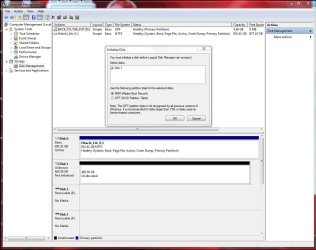
If it is a bare raw unformatted HD, it needs to be initalized & formatted.

Look for it in disk management

Start :ar: Computer Management :ar: Disk Management
 

Attachments

  • Disk_Mgmt_New_HD_500gb_WD_Initialize.JPG
    Disk_Mgmt_New_HD_500gb_WD_Initialize.JPG
    155.4 KB · Views: 504

My Computer

Computer type
PC/Desktop
Computer Manufacturer/Model Number
Built them myself, Science Experiments !
OS
Win7 Enterprise, Win7 x86 (Ult 7600), Win7 x64 Ult 7600, TechNet RTM on AMD x64 (2.8Ghz)
CPU
AMD fx8350 4ghz, AMD-32 2400mhz, AMD-64 3200mhz, AMDx64 2.8G
Motherboard
SIS 755, ECS-K8M890M-M (Ult 7600), GigaByte & others
Memory
2gb, 4gb on the Ult 7600, 4gb on Technet RTM, 32gb on FX8350
Graphics Card(s)
Draw my own Graphics, several nVidia cards
Sound Card
on motherboard
Monitor(s) Displays
19" flat scr, 28" I-Inc widescr,22" Emprex Widescr, 23" Acer
Screen Resolution
1280 x 1024, 1440 x 900, 1920 x 1080
Hard Drives
6 pata Ide HD's & 2 Sata HD's
added 80gb external on Ult 7600 computer,
numerous extra 1tb, 2TB, 3Tb SATA HD's
A collection of ext HD Docks w/ HDs
PSU
430w, 550w, 600w, 700, 800, etc
Case
All Generic Full Towers
Cooling
Open Air & a few fans, some w/ colored LEDs
Keyboard
Compaq & Dell recycled from GoodWill
Mouse
Made in China Optical Wired Mouse
Internet Speed
Fast Cable InterNet
Antivirus
AVG Free on 24 different Desktops, NO Problems!
Browser
IE 8 is preferred, but use FireFox sometimes
Other Info
Linksys Routers, switches, & Hubs
Too Many USB Flash Drives to count, Biggest is 64GB !
Eight computers in my home network.
Sixteen computers at my business network.
Linked via TeamViewer !
Lots of old used spare computer parts everywhere!
external USB 2.0 it wants me to

Select Partition Type

Primary Partition
or
Extended Partition
its only going to be external what one should i choos please thanks i found it in there right away
 

My Computer

OS
Windows 7 Ultamate
CPU
Quad CPU Q9000 2.0
Motherboard
I have one
Memory
6 gigs
Graphics Card(s)
512 Radion
I always use primary :)
 

My Computer

Computer type
PC/Desktop
Computer Manufacturer/Model Number
Built them myself, Science Experiments !
OS
Win7 Enterprise, Win7 x86 (Ult 7600), Win7 x64 Ult 7600, TechNet RTM on AMD x64 (2.8Ghz)
CPU
AMD fx8350 4ghz, AMD-32 2400mhz, AMD-64 3200mhz, AMDx64 2.8G
Motherboard
SIS 755, ECS-K8M890M-M (Ult 7600), GigaByte & others
Memory
2gb, 4gb on the Ult 7600, 4gb on Technet RTM, 32gb on FX8350
Graphics Card(s)
Draw my own Graphics, several nVidia cards
Sound Card
on motherboard
Monitor(s) Displays
19" flat scr, 28" I-Inc widescr,22" Emprex Widescr, 23" Acer
Screen Resolution
1280 x 1024, 1440 x 900, 1920 x 1080
Hard Drives
6 pata Ide HD's & 2 Sata HD's
added 80gb external on Ult 7600 computer,
numerous extra 1tb, 2TB, 3Tb SATA HD's
A collection of ext HD Docks w/ HDs
PSU
430w, 550w, 600w, 700, 800, etc
Case
All Generic Full Towers
Cooling
Open Air & a few fans, some w/ colored LEDs
Keyboard
Compaq & Dell recycled from GoodWill
Mouse
Made in China Optical Wired Mouse
Internet Speed
Fast Cable InterNet
Antivirus
AVG Free on 24 different Desktops, NO Problems!
Browser
IE 8 is preferred, but use FireFox sometimes
Other Info
Linksys Routers, switches, & Hubs
Too Many USB Flash Drives to count, Biggest is 64GB !
Eight computers in my home network.
Sixteen computers at my business network.
Linked via TeamViewer !
Lots of old used spare computer parts everywhere!
do you know of a page i can read and how to partition the drive with more then 4 partitions please isthere a way thakns
 

My Computer

OS
Windows 7 Ultamate
CPU
Quad CPU Q9000 2.0
Motherboard
I have one
Memory
6 gigs
Graphics Card(s)
512 Radion
I bought a new external hard drive today and although windows 7 initially picked it up and tried to install the drivers when this failed (unknown error without an error number) the drive disappeared and is not showing anywhere not even disk management is picking it up.
Any ideas on this as I tried disconnecting the USB hub and plugging the drive straight into the laptop. I have 2 other external hdd's which are detected without any issues. I'm currently tearing what's left of my hair out.
 

My Computer

Computer Manufacturer/Model Number
Toshiba satellite
OS
Windows Home Premium 32bit
Hard Drives
325Mb internal hdd Fujitsu MJA2320BH G2
1Tb Iomega external USB hdd
320Mb Maxtor external USB hdd
2Tb Western Digital hdd
Same Problem, Two Drives with Same Letter

I also had the same problem but was able to fix it. I discovered that my card reader had reserved drives even though they were not displayed in Windows 7 Explorer. In my case it was two drives with the letter L: (drive). After changing the external drive to N: drive the problem went away.

If you're running a card reader you might want to check which drives it has reserved.
 

My Computer

Computer Manufacturer/Model Number
Homebrew
OS
win 7 Pro - 64 bit
CPU
Intel i7 920 oc'd to 3.6G
Motherboard
ASARock Extreme
Memory
6G
Graphics Card(s)
4770
Sound Card
NA
Monitor(s) Displays
HP2475
Screen Resolution
1920 X 1200
Hard Drives
Intel 80G SSD
Hitachi Enterprise 750G
WD 640G
2TB External Storage
PSU
Corsair 750w
Case
atcs840
Cooling
Noctua U12p
It was a faulty lead supplied with the hard drive, I tried everything else I could think of including the hints you and others had given me (and some other people who had the same problem) when I changed the USB lead the drive was recognised straight away and is now working superbly. Thanks to you and everyone else who tried to help me with this problem.
 

My Computer

Computer Manufacturer/Model Number
Toshiba satellite
OS
Windows Home Premium 32bit
Hard Drives
325Mb internal hdd Fujitsu MJA2320BH G2
1Tb Iomega external USB hdd
320Mb Maxtor external USB hdd
2Tb Western Digital hdd
External Seagate Hard Drive not detected by Windows 7 64Bit

Hi there! I have a very strange problem lately. All of a sudden my external Seagate Hard Drive 320 GB SATA is NOT Showing up in the My Computer page. It was working fine earlier. I have checked the USB port which is working fine with my Pen Drive. Even the red light in the external hard drive is ON but it is not being detected by my computer. The drive was an internal laptop hard drive which was converted to an external hard drive by covering it with a Casing. It does not have any other power source input other than being connected to a laptop via a cable thru a USB port. It was working fine earlier. My system is a Dell Studio laptop 1558 64 Bit with Windows Home Premium installed. PLEASE HELP!!!

I went to the Properties of all USB Root Hubs/Generic USB Hubs and unchecked the Power Management option of "Allow the computer to turn off this device to save power". All drivers are up to date. Still it is not detecting the hard drive. I know the hard drive is fine because the light is on whenever I connect it to the USB port, also it was working perfectly earlier. Is a Windows update the culprit? Or could it be the Tweaking Softwares which tune up the Windows OS to speed up the system? What exactly is the issue here? And I can see that I am not the only one facing this problem with my Windows 7, half the world has the same problem! PLEASE HELP!!! ANYONE?
 

My Computer

OS
Windows 7 Home Premium 64Bit
Seagate external hard drive not being detected by the Dell laptop

Hi there! I have a very strange problem lately. All of a sudden my external Seagate Hard Drive 320 GB SATA is NOT Showing up in the My Computer page. It was working fine earlier. I have checked the USB port which is working fine with my Pen Drive. Even the red light in the external hard drive is ON but it is not being detected by my computer. The drive was an internal laptop hard drive which was converted to an external hard drive by covering it with a Casing. It does not have any other power source input other than being connected to a laptop via a cable thru a USB port. It was working fine earlier. My system is a Dell Studio laptop 1558 64 Bit with Windows Home Premium installed. PLEASE HELP!!!

I went to the Properties of all USB Root Hubs/Generic USB Hubs and unchecked the Power Management option of "Allow the computer to turn off this device to save power". All drivers are up to date. Still it is not detecting the hard drive. I know the hard drive is fine because the light is on whenever I connect it to the USB port, also it was working perfectly earlier. Is a Windows update the culprit? Or could it be the Tweaking Softwares which tune up the Windows OS to speed up the system? What exactly is the issue here? And I can see that I am not the only one facing this problem with my Windows 7, half the world has the same problem! PLEASE HELP!!! ANYONE?
 

My Computer

OS
Windows 7 Home Premium 64Bit

My Computer

Computer type
Laptop
Computer Manufacturer/Model Number
Sony Vaio VPCEB47GM Laptop
OS
Win 7 Pro 64-bit
CPU
Intel i5 2.4 Ghz
Memory
8GB DDR3
Graphics Card(s)
Intel HD 3000
Sound Card
IDT High Definition
Monitor(s) Displays
15.6 WGXA Anti-Glare LED
Screen Resolution
1280x800
Hard Drives
640Gb 7200rpm
Antivirus
MSE
Browser
Opera (primary) with IE9 backup
Hi Marsmimar,

Thanks for your reply. I tried the steps given in your Hidden Devices link, and changed the View Option of the Device Manager, but the External drive is still not showing up. It does not show up anywhere. The ports are all fine, the drive is also fine.....I suspect it is an issue of some windows setting or firmware. Still need help to solve this issue! :(
 

My Computer

OS
Windows 7 Home Premium 64Bit
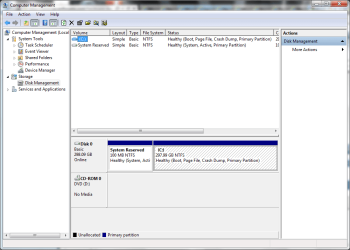
Can you post a screenshot of your Disk Management so we can see how your hard drive(s) are set up? Leave the external Seagate plugged in when you open disk management. You can open the Start menu and type Disk Management into the search field, or type diskmgmt.msc (either one should open it.) Then you can use this tutorial on how to post a screenshot in Seven Forums.

http://www.sevenforums.com/tutorials/9733-screenshots-files-upload-post-seven-forums.html
 

My Computer

Computer type
Laptop
Computer Manufacturer/Model Number
Sony Vaio VPCEB47GM Laptop
OS
Win 7 Pro 64-bit
CPU
Intel i5 2.4 Ghz
Memory
8GB DDR3
Graphics Card(s)
Intel HD 3000
Sound Card
IDT High Definition
Monitor(s) Displays
15.6 WGXA Anti-Glare LED
Screen Resolution
1280x800
Hard Drives
640Gb 7200rpm
Antivirus
MSE
Browser
Opera (primary) with IE9 backup
Trying to upload the screenshot
 

Attachments

  • Untitled.png
    Untitled.png
    85.7 KB · Views: 201

My Computer

OS
Windows 7 Home Premium 64Bit
Here is the Disc Management screenshot
 

Attachments

  • Untitled.png
    Untitled.png
    122.5 KB · Views: 205

My Computer

OS
Windows 7 Home Premium 64Bit

My Computer

Computer type
Laptop
Computer Manufacturer/Model Number
Sony Vaio VPCEB47GM Laptop
OS
Win 7 Pro 64-bit
CPU
Intel i5 2.4 Ghz
Memory
8GB DDR3
Graphics Card(s)
Intel HD 3000
Sound Card
IDT High Definition
Monitor(s) Displays
15.6 WGXA Anti-Glare LED
Screen Resolution
1280x800
Hard Drives
640Gb 7200rpm
Antivirus
MSE
Browser
Opera (primary) with IE9 backup
Back
Top