
Hi,
My problem is as follows:
External Hard Drive (1Tb WD Elements) that I've been using for a few months now has data on that I would very much like to keep.
It was working fine until yesterday in which I tried opening a VS project which became unresponsive, tried closing everything down and turning off computer which just froze the computer leading to a hard reset (button held for 5 seconds)
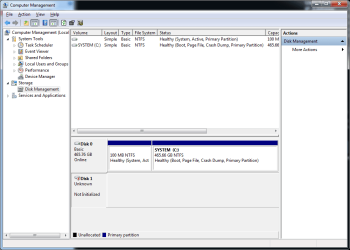
Since then the External Hard Drive has not been shown in Windows Explorer and in Disk Management is shown as "Unkown" and "Not Initialized"
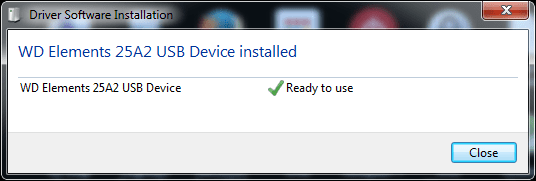
The Drive will still be seen correctly in Device Manager and if uninstalled it will say it has correctly installed and is ready to use.
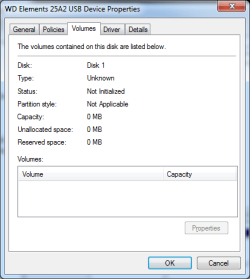
Attempts to recover data or Initialize the drive have not worked and I have followed and looked up multiple ways to recover and other similar cases. I'm fairly certain for the data recovery the drive needs to be initialized (which just throws me an I/O error upon attempting the process) as looking at the Volume section in the properties of the device the size of the drive is listed as 0Mb.
My Last resort is taking it to a data recovery shop and hope they can grab the stuff on there.
Any help is muchly appreciated thanks.
My problem is as follows:
External Hard Drive (1Tb WD Elements) that I've been using for a few months now has data on that I would very much like to keep.
It was working fine until yesterday in which I tried opening a VS project which became unresponsive, tried closing everything down and turning off computer which just froze the computer leading to a hard reset (button held for 5 seconds)
Since then the External Hard Drive has not been shown in Windows Explorer and in Disk Management is shown as "Unkown" and "Not Initialized"
The Drive will still be seen correctly in Device Manager and if uninstalled it will say it has correctly installed and is ready to use.
Attempts to recover data or Initialize the drive have not worked and I have followed and looked up multiple ways to recover and other similar cases. I'm fairly certain for the data recovery the drive needs to be initialized (which just throws me an I/O error upon attempting the process) as looking at the Volume section in the properties of the device the size of the drive is listed as 0Mb.
My Last resort is taking it to a data recovery shop and hope they can grab the stuff on there.
Any help is muchly appreciated thanks.
My Computer
- Computer type
- PC/Desktop
- OS
- Windows 7 Professional (64 bit)

