Solved External Hard Drives Not Showing Up

Maccman

New member
Member
VIP
Local time
12:50 PM
Messages
113
Location
England
I haven't used my external hard drives for quite a while and I am now having trouble getting the computer to recognise both a Seagate and a Simpledrive. I got them to show up once on "computer" but now they have both vanished again. Any advice please?
 

My Computer My Computer

OS
Windows 7 Pro x64
CPU
i7 870
Motherboard
asrock h55
Memory
8gb
Graphics Card(s)
gts450
Sound Card
onboard
Monitor(s) Displays
logik 22"
Hard Drives
1TB
Case
Achilles
do they show up in device manager?
 

My Computer My Computer

Computer type
PC/Desktop
Computer Manufacturer/Model Number
Built by badgers!!!
OS
Windows 7 Ultimate x64, & Mac OS X 10.9.2
CPU
Intel Core i5 2500k
Motherboard
Asus P8z68 LE
Memory
Corsair Vengence 8gb 1866mhz
Graphics Card(s)
Nvidia GTX 770 OC
Monitor(s) Displays
2x ASUS LED 22" IPS
Screen Resolution
3840x1080
Hard Drives
240GB Crucial M500 SSD
120gb Corsair Force 3 SSD
1TB Western Digital
PSU
Corsair HX650w Modular
Case
Corsair Air 540
Cooling
Corsair H60 Push/Pull
Keyboard
Corsair K70/ Logitech G27 wheel
Mouse
Saitek R.A.T 9
Internet Speed
Too slow!
Other Info
AMD fusion E350N Home server-Windows Home Server 2011 (also made by badgers!)
2011 Macbook 2.4ghz Core2Duo, 4gb ddr3, 120gb Ocz Vertex SSD

My Computer My Computer

OS
Windows 7 Pro x64
CPU
i7 870
Motherboard
asrock h55
Memory
8gb
Graphics Card(s)
gts450
Sound Card
onboard
Monitor(s) Displays
logik 22"
Hard Drives
1TB
Case
Achilles
Do they have a drive letter in Disk Management. And what is the format - RAW, NTFS ??
 

My Computer My Computer

Computer Manufacturer/Model Number
HP, Dell, Gateway, Toshiba - 4 laptops and 2 desktops
OS
Vista, Windows7, Mint Mate, Zorin, Windows 8
CPU
from 1.6GHz Duo to i7
Monitor(s) Displays
2x HP w2207
Hard Drives
5x HDD, 7x SSD, 12x Externals
Keyboard
with trackball - no mices
Mouse
Trackball mice
Internet Speed
DSL 6000
Do they have a drive letter in Disk Management. And what is the format - RAW, NTFS ??


Disc management doesn't seem to be loading up except for my internal hard drive.
 

My Computer My Computer

OS
Windows 7 Pro x64
CPU
i7 870
Motherboard
asrock h55
Memory
8gb
Graphics Card(s)
gts450
Sound Card
onboard
Monitor(s) Displays
logik 22"
Hard Drives
1TB
Case
Achilles
Post a picture of your Disk Management
 

My Computer My Computer

Computer Manufacturer/Model Number
HP, Dell, Gateway, Toshiba - 4 laptops and 2 desktops
OS
Vista, Windows7, Mint Mate, Zorin, Windows 8
CPU
from 1.6GHz Duo to i7
Monitor(s) Displays
2x HP w2207
Hard Drives
5x HDD, 7x SSD, 12x Externals
Keyboard
with trackball - no mices
Mouse
Trackball mice
Internet Speed
DSL 6000

My Computer My Computer

Computer Manufacturer/Model Number
HP Pavilion Elite 495UK
OS
Windows 7 Ultimate SP1 64-Bit
CPU
Intel Core i7 870 @ 2.93GHz
Motherboard
MSI 2A9C (CPU1)
Memory
8Gb Dual-Channel DDR3 @ 664MHz
Graphics Card(s)
nVidia GeForce GTX 460 1024MB dedicated RAM
Sound Card
Realtek HD Audio
Monitor(s) Displays
HP2310i
Screen Resolution
1920 x 1080
Hard Drives
1x1954GB Hitachi HDS22020ALA 330 (RAID), 1x1954GB Hitachi External for backup and storage
PSU
460W
Case
HP Elite
Cooling
Air cooled
Keyboard
Logitech K750 solar-powered keyboard
Mouse
Logitech Wireless M180 mouse
Internet Speed
2Mb
Other Info
Pure Avanti Flow Internet Radio with iPod Dock, 64Gb iPod, HP USB Speakers, Sony MDR-V500 Headphones, Sony Vaio F-Series Laptop
Please upload a screenshot of Disk management as WHS requested. And you can also try diskpart. Open an elevated command prompt (click start, in the search box type cmd, on the cmd entry right click it and select run as administrator. In the window that opens type diskpart and press enter, in a few seconds, it will reply diskpart. Type list disk then press enter. it will list all disks connected to your machine giving each one a number. Type select disk # (where # is the number of your external drive. You can tell by the size or usually it is the last drive listed) example is 'select disk 3'. it should respond with disk 3 is the selected disk. If you get this far, type 'assign' and press enter. That should assign it a drive letter and make it visible in computer (windows explorer). type exit and enter, twice.
 

My Computers My Computers

System One System Two

  • Computer type
    PC/Desktop
    Computer Manufacturer/Model Number
    ALWAYS UNDER CONSTRUCTION
    OS
    Windows 11 Pro
    CPU
    Ryzen 9 5900X
    Motherboard
    Asus X570 Crosshair Viii Hero
    Memory
    32GB G Skill DDR4-3600
    Graphics Card(s)
    EVGA RTX 3080 FTW 3 Ultra
    Sound Card
    On Board/Sennheiser PC37X Headset
    Monitor(s) Displays
    3 X Asus 27"
    Screen Resolution
    2560x1440
    Hard Drives
    2 X 1 TB NVME drives
    PSU
    EVGA 850
    Case
    Phanteks Eclipse P400A
    Cooling
    EVGA 280 AIO
    Keyboard
    Logitech G510s/ Logitech G13
    Mouse
    Logitech G502
    Internet Speed
    24/1
    Antivirus
    ESET/MBAM Pro/SAS Pro
    Browser
    Chrome/ Firefox/ Edge
  • Computer type
    Laptop
    System Manufacturer/Model Number
    Dell 16 Plus
    OS
    Windows 11 Pro
    CPU
    Intel Ultra 9 288V
    Memory
    32 GB LPDDR5X 8533
    Monitor(s) Displays
    16" Mini-LED HDR600 Touch 90 Hz
    Screen Resolution
    2560X1600
    Hard Drives
    1 TB NVME
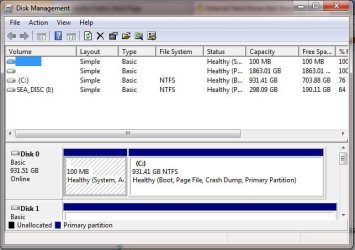
Sorry for the delay.
 

Attachments

  • Capture.JPG
    Capture.JPG
    52.3 KB · Views: 126

My Computer My Computer

OS
Windows 7 Pro x64
CPU
i7 870
Motherboard
asrock h55
Memory
8gb
Graphics Card(s)
gts450
Sound Card
onboard
Monitor(s) Displays
logik 22"
Hard Drives
1TB
Case
Achilles
You apparently have a 1.8GB drive without a drive letter. Unfortunately it does not show in the lower pane. Does it show there in RAW format?
 

My Computer My Computer

Computer Manufacturer/Model Number
HP, Dell, Gateway, Toshiba - 4 laptops and 2 desktops
OS
Vista, Windows7, Mint Mate, Zorin, Windows 8
CPU
from 1.6GHz Duo to i7
Monitor(s) Displays
2x HP w2207
Hard Drives
5x HDD, 7x SSD, 12x Externals
Keyboard
with trackball - no mices
Mouse
Trackball mice
Internet Speed
DSL 6000
Please upload a screenshot of Disk management as WHS requested. And you can also try diskpart. Open an elevated command prompt (click start, in the search box type cmd, on the cmd entry right click it and select run as administrator. In the window that opens type diskpart and press enter, in a few seconds, it will reply diskpart. Type list disk then press enter. it will list all disks connected to your machine giving each one a number. Type select disk # (where # is the number of your external drive. You can tell by the size or usually it is the last drive listed) example is 'select disk 3'. it should respond with disk 3 is the selected disk. If you get this far, type 'assign' and press enter. That should assign it a drive letter and make it visible in computer (windows explorer). type exit and enter, twice.

I tried the above but when I got to "assign" and entered it said "There is no volume specified. Please select a volume and try again".
 

My Computer My Computer

OS
Windows 7 Pro x64
CPU
i7 870
Motherboard
asrock h55
Memory
8gb
Graphics Card(s)
gts450
Sound Card
onboard
Monitor(s) Displays
logik 22"
Hard Drives
1TB
Case
Achilles
You apparently have a 1.8GB drive without a drive letter. Unfortunately it does not show in the lower pane. Does it show there in RAW format?

How do I get it to show in RAW format?
 

My Computer My Computer

OS
Windows 7 Pro x64
CPU
i7 870
Motherboard
asrock h55
Memory
8gb
Graphics Card(s)
gts450
Sound Card
onboard
Monitor(s) Displays
logik 22"
Hard Drives
1TB
Case
Achilles
I think you misunderstood - I was only asking whether it did show as RAW.
 

My Computer My Computer

Computer Manufacturer/Model Number
HP, Dell, Gateway, Toshiba - 4 laptops and 2 desktops
OS
Vista, Windows7, Mint Mate, Zorin, Windows 8
CPU
from 1.6GHz Duo to i7
Monitor(s) Displays
2x HP w2207
Hard Drives
5x HDD, 7x SSD, 12x Externals
Keyboard
with trackball - no mices
Mouse
Trackball mice
Internet Speed
DSL 6000
I think you misunderstood - I was only asking whether it did show as RAW.

No it didn't show as RAW
, this 2TB I have only just bought tonight and looking at it it is the same as the SimpleDrive that is not recognised.
 

My Computer My Computer

OS
Windows 7 Pro x64
CPU
i7 870
Motherboard
asrock h55
Memory
8gb
Graphics Card(s)
gts450
Sound Card
onboard
Monitor(s) Displays
logik 22"
Hard Drives
1TB
Case
Achilles
OK, understand. This drive you have to first Initialize and then you have to define a partition on it in order to show up in Cpmputer. I suggest you define a relatively small partition on it and leave most of it unallocated for later use.

But the I: drive should show in Computer - does it?
 

My Computer My Computer

Computer Manufacturer/Model Number
HP, Dell, Gateway, Toshiba - 4 laptops and 2 desktops
OS
Vista, Windows7, Mint Mate, Zorin, Windows 8
CPU
from 1.6GHz Duo to i7
Monitor(s) Displays
2x HP w2207
Hard Drives
5x HDD, 7x SSD, 12x Externals
Keyboard
with trackball - no mices
Mouse
Trackball mice
Internet Speed
DSL 6000
OK, understand. This drive you have to first Initialize and then you have to define a partition on it in order to show up in Cpmputer. I suggest you define a relatively small partition on it and leave most of it unallocated for later use.

But the I: drive should show in Computer - does it?

Yes the I drive shows up in Compuer.
 

My Computer My Computer

OS
Windows 7 Pro x64
CPU
i7 870
Motherboard
asrock h55
Memory
8gb
Graphics Card(s)
gts450
Sound Card
onboard
Monitor(s) Displays
logik 22"
Hard Drives
1TB
Case
Achilles
OK, understand. This drive you have to first Initialize and then you have to define a partition on it in order to show up in Cpmputer. I suggest you define a relatively small partition on it and leave most of it unallocated for later use.

But the I: drive should show in Computer - does it?


How do I initialise the hard drive?
 

My Computer My Computer

OS
Windows 7 Pro x64
CPU
i7 870
Motherboard
asrock h55
Memory
8gb
Graphics Card(s)
gts450
Sound Card
onboard
Monitor(s) Displays
logik 22"
Hard Drives
1TB
Case
Achilles
Go to disk management. In the left pane in front of the drive in question right click where it says Disk0, Disk1, etc. But check first whether it is already formatted in NTFS. If that is the case, right click on the right pane and define a partition - as small as practical.

PS: Just checked in your Disk Management snip. That drive is not yet formatted.
 

My Computer My Computer

Computer Manufacturer/Model Number
HP, Dell, Gateway, Toshiba - 4 laptops and 2 desktops
OS
Vista, Windows7, Mint Mate, Zorin, Windows 8
CPU
from 1.6GHz Duo to i7
Monitor(s) Displays
2x HP w2207
Hard Drives
5x HDD, 7x SSD, 12x Externals
Keyboard
with trackball - no mices
Mouse
Trackball mice
Internet Speed
DSL 6000
Go to disk management. In the left pane in front of the drive in question right click where it says Disk0, Disk1, etc. But check first whether it is already formatted in NTFS. If that is the case, right click on the right pane and define a partition - as small as practical.

PS: Just checked in your Disk Management snip. That drive is not yet formatted.

Disk Management kept freezing up but I did a quick search on microsoft and got it working following trichard13 advice.
Thanks for your help whs, it was probably me trying to explain my problem

http://answers.microsoft.com/en-us/...-to-date/42b1ebc3-edaf-4c3f-93cd-beda4bab2671
 

My Computer My Computer

OS
Windows 7 Pro x64
CPU
i7 870
Motherboard
asrock h55
Memory
8gb
Graphics Card(s)
gts450
Sound Card
onboard
Monitor(s) Displays
logik 22"
Hard Drives
1TB
Case
Achilles
Glad to help and happy you got it solved - somehow.
 

My Computer My Computer

Computer Manufacturer/Model Number
HP, Dell, Gateway, Toshiba - 4 laptops and 2 desktops
OS
Vista, Windows7, Mint Mate, Zorin, Windows 8
CPU
from 1.6GHz Duo to i7
Monitor(s) Displays
2x HP w2207
Hard Drives
5x HDD, 7x SSD, 12x Externals
Keyboard
with trackball - no mices
Mouse
Trackball mice
Internet Speed
DSL 6000
Back
Top