External Hard Drives: 'Size' VS 'Size on Disk' Question

AimeeUk

Engineering Student
Local time
5:24 PM
Messages
21
Location
England
Hello there, and thank you for viewing my thread!

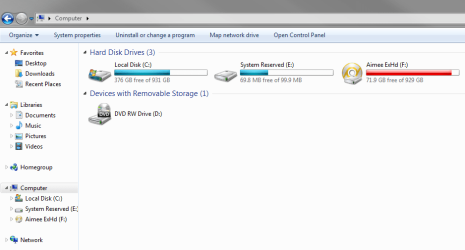
After formatting my PC, I have made a fresh back up of all of my data onto my external hard drive (as you do). The problem I have, is that the external hard drive is showing as pretty much full, but there's nowhere near that much data on it!

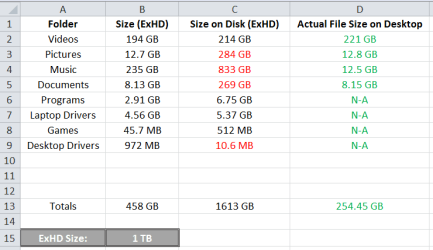
I did a little bit of digging, and noticed that when I right click a folder on the external hard drive and go to 'Properties' that the size of the file shows as one value and the size on disk value is significantly larger in most cases.

In some cases, both values do not reflect the actual size of the file on my desktop.

The ExHD is in ExFat format, and I'm assuming it's something to do with the way it's formatted, I just don't know how to fix it. I've tried it a couple of different ways, with different 'Allocation Unit Size's, but for how long it takes to complete the back-up's each time I'd rather just ask for help and find out where I'm going wrong.

If anyone could help me sort this out I'd really appreciate it.

I edit a lot of home movies of my daughter, some video files are as large as 10GB so I cannot use the 4GB file size maximum given by NTFS.

Thank you so much!
 

Attachments
  • Capture1.PNG
    Capture1.PNG
    22 KB · Views: 0
  • Capture2.PNG
    Capture2.PNG
    69 KB · Views: 2
  • Capture3.PNG
    Capture3.PNG
    11.1 KB · Views: 13

My Computer My Computer

Computer type
Laptop
Computer Manufacturer/Model Number
HP
OS
Windows 7 Professional 64 bit.
CPU
AMD A8
Memory
8GB
Graphics Card(s)
AMD Radeon R5
Hard Drives
1 TB
Internet Speed
150 mb
Antivirus
Norton
Browser
Google Chrome
Data is stored on disk on small pieces called clusters.
A cluster can't be shared by two files. For example, if you have a cluster size of 1M and you storing a 2.1M, it will take 3 clusters, 2 of them full and one with 0.1M. The remaining 0.9 will be empty. In this case you have a 2.1M of data but it takes 3M on disk.
The smallest clusters are, the more efficient disk is.

My suggestion is, unless you use the external disk on a Mac computer, format it as NTFS.
On disk manager, delete all external disk partitions, create new, format as NTFS. Default cluster size is 4k.
What Should I Set the Allocation Unit Size to When Formatting?
 

My Computers My Computers

System One System Two

  • Computer type
    PC/Desktop
    Computer Manufacturer/Model Number
    custom build
    OS
    Windows 7 HP 64
    CPU
    i5 6600K - 800MHz to 4200MHz
    Motherboard
    GA-Z170-HD3P
    Memory
    4+4G GSkill DDR4 3000
    Graphics Card(s)
    IG - Intel 530
    Monitor(s) Displays
    Samsung 226BW
    Screen Resolution
    1680x1050
    Hard Drives
    (1) -1 SM951 – 128GB M.2 AHCI PCIe SSD drive for Windows 7 and Lubuntu
    (2) -1 WD SATA 3 - 1T for Data
    (3) -1 WD SATA 3 - 1T for backup
    PSU
    Thermaltake 450W TR2 gold
    Keyboard
    Old and good Chicony mechanical keyboard
    Mouse
    Logitech mX performance - 9 buttons (had to disable some)
    Internet Speed
    500Mb/s
    Browser
    Firefox 64
    Other Info
    TinyWall firewall
  • Computer type
    Laptop
    System Manufacturer/Model Number
    Asus Q550LF
    OS
    Windows 7 Pro
    CPU
    i7-4500U 800MHz to 3.0GHz
    Motherboard
    Asus Q550LF
    Memory
    (4+4)G DDR3 1600
    Graphics Card(s)
    IG intel 4400 + NVIDIA GeForce GT 745M
    Sound Card
    Realtek
    Monitor(s) Displays
    LG Display LP156WF4-SPH1
    Screen Resolution
    1920 x 1080
    Hard Drives
    BX500 120G SSD for Windows and programs +
    1T HDD for data
    Internet Speed
    500 Mb/s
    Browser
    Firefox
    Other Info
    TinyWall firewall
Data is stored on disk on small pieces called clusters.
A cluster can't be shared by two files. For example, if you have a cluster size of 1M and you storing a 2.1M, it will take 3 clusters, 2 of them full and one with 0.1M. The remaining 0.9 will be empty. In this case you have a 2.1M of data but it takes 3M on disk.
The smallest clusters are, the more efficient disk is.

My suggestion is, unless you use the external disk on a Mac computer, format it as NTFS.
On disk manager, delete all external disk partitions, create new, format as NTFS. Default cluster size is 4k.
What Should I Set the Allocation Unit Size to When Formatting?

Thanks for replying, like I said before I cannot use NTFS because I can't put my larger files on it due to the 4GB maximum file size it allows.
 

My Computer My Computer

Computer type
Laptop
Computer Manufacturer/Model Number
HP
OS
Windows 7 Professional 64 bit.
CPU
AMD A8
Memory
8GB
Graphics Card(s)
AMD Radeon R5
Hard Drives
1 TB
Internet Speed
150 mb
Antivirus
Norton
Browser
Google Chrome
Fat32 has a maximum file size is 4GB.
NTFS is what almost everyone should be using on their hard drives
today. Its maximum volume size is 2^^64-1, and its maximum file size
is 16 × 1024^^6 bytes (way more than the biggest hard drive available
today). Its cluster size stays at 4kb, regardless of the volume size.
 

My Computers My Computers

System One System Two

  • Computer type
    PC/Desktop
    Computer Manufacturer/Model Number
    custom build
    OS
    Windows 7 HP 64
    CPU
    i5 6600K - 800MHz to 4200MHz
    Motherboard
    GA-Z170-HD3P
    Memory
    4+4G GSkill DDR4 3000
    Graphics Card(s)
    IG - Intel 530
    Monitor(s) Displays
    Samsung 226BW
    Screen Resolution
    1680x1050
    Hard Drives
    (1) -1 SM951 – 128GB M.2 AHCI PCIe SSD drive for Windows 7 and Lubuntu
    (2) -1 WD SATA 3 - 1T for Data
    (3) -1 WD SATA 3 - 1T for backup
    PSU
    Thermaltake 450W TR2 gold
    Keyboard
    Old and good Chicony mechanical keyboard
    Mouse
    Logitech mX performance - 9 buttons (had to disable some)
    Internet Speed
    500Mb/s
    Browser
    Firefox 64
    Other Info
    TinyWall firewall
  • Computer type
    Laptop
    System Manufacturer/Model Number
    Asus Q550LF
    OS
    Windows 7 Pro
    CPU
    i7-4500U 800MHz to 3.0GHz
    Motherboard
    Asus Q550LF
    Memory
    (4+4)G DDR3 1600
    Graphics Card(s)
    IG intel 4400 + NVIDIA GeForce GT 745M
    Sound Card
    Realtek
    Monitor(s) Displays
    LG Display LP156WF4-SPH1
    Screen Resolution
    1920 x 1080
    Hard Drives
    BX500 120G SSD for Windows and programs +
    1T HDD for data
    Internet Speed
    500 Mb/s
    Browser
    Firefox
    Other Info
    TinyWall firewall
I have files as large as 41GB on NTFS drives proving your info that NTFS has a maximum size of only 4GB is wrong. Almost no Windows users use anything other than NTFS for HDDs and SSDs.

You need to make sure the data on the laptop is intact, then reformat the external drive, using all the default settings. to reformat, just go to Computer in the Start Menu, right click on the drive, click on Format, then follow the prompts. Use all of the default settings. You will essentially wipe all the data on the drive so you will have to backup the laptop again.
 

My Computer My Computer

Computer type
PC/Desktop
Computer Manufacturer/Model Number
Custom Build
OS
Win 7 Ultimate 64 bit
CPU
Intel i7-3930K
Motherboard
ASUS P9X79 WS
Memory
Kingston HyperX Genesis 32GB Kit (8x4GB Modules) 1600MHz DDR
Graphics Card(s)
MSI R7850 Twin Frozr 2GD5/OC Radeon HD 7850 2GB 256-bit GDDR
Sound Card
Asus Xonar Essence STX
Monitor(s) Displays
3x Asus VG248QE 24", Vizio 32" TV
Screen Resolution
1920 x 1080, ?
Hard Drives
Samsung 128GB 840 Pro SSD (1),
Samsung 4TB 850 EVO SSDs (4)
Samsung 4TB 850 EVO SSDs (16) external backup drives used in 2.5" hot swap bays in the computer.
PSU
Corsair HX750w
Case
Antec Two Hundred v2 (modified)
Cooling
Cooler Master GeminII S524 120mm (fan replaced with a 140mm)
Keyboard
Logitech G510s
Mouse
Logitech M525 (two in use)
Internet Speed
=< 32Mbps down, 8Mbps up
Antivirus
AVAST!, MBAM, SAS, Spybot S&D (all but MBAM free) Glary Util
Browser
IE11
Other Info
LSI 9211-8i HBA card (8 SATA III ports), 2.5" & 3.5" Hot Swap Bays, HooToo HT-CR001 PCI-E to USB 3.0 Internal Hub + 6 Slot Card Reader, and LG Model CH12LS28 BD-ROM Optical Drive. Also, ScanSnap S1500 ADF duplexing scanner, Canon 9000F flat bed scanner, Corsair SP2500 2.1 speakers, Samsung CLP 415nw laser color printer, Cyberpower PP2200SW UPS
Back
Top