Hi.
So I found another thread that was similar to this, but given it was last posted on 413 days ago, it was recommended I make a new one.
I have a Seagate 500GB FreeAgent Go external usb drive that is kind of hating life right now.
I got this 6 months ago and pretty much backed up all my stuff, put it somewhere it wouldn't get all dusty, and didn't touch it again. That is, until my brother got a computer for college, and as my position of household geek, had to set things up for him.
The drive was (and kind of is) formatted NTFS, and he had to move some things from his old mac to his new HP, which wasn't too much of a problem, but then i took it back to put some more things on it, and it started telling me the disc was unreadable. At this point, it still showed up in explorer and such, and I could edit the properties and suchlike, but it would start loading the drive's contents, get up to a certain point, and pop up an error, denying me access to anything.
A good deal of frustration and some misgivings a long time later, I reformatted it. In my mind, it was the fact that I started plugging it into a Mac, which made it angry with me, so again, I put some music on it, nothing substantial, and left it in it's little hiding spot.
Now we hit a week ago. I get a fresh new computer, and set about the task of moving all my old junk onto the new unit. I plug the external into my old VAIO, and put on all my music, documents, games, etc. Then I bring it over to my new Toshiba, and plug it in. It says it could not install drivers like it usually does whenever you put in a new device. So I try another usb port. Same thing. I switch it back once more, then send it over to the USB/SATA drive, and it decides to work. I start the move of my music library. About 10 minutes in, I find it sitting inactive in the same spot of the transfer. After waiting another 10 minutes, and seeing no new activity, I try to cancel the transfer, whereupon the whole process seizes up. After hitting cancel, nothing stops doing, well, nothing, and I can't even "X" the transfer window. So after a little more fiddling, I just pull out the external, since that's the most basic killswitch I know of, yet when I plugged it back in, I no longer can find the drive, even though it's ejectable in the system tray.
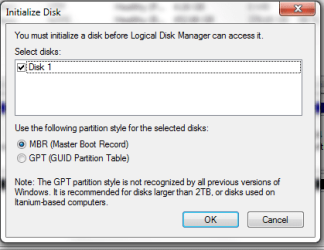
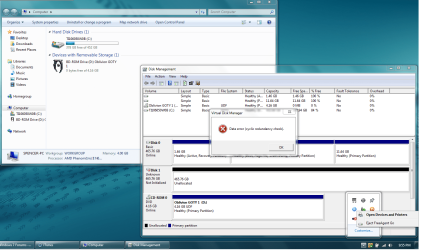
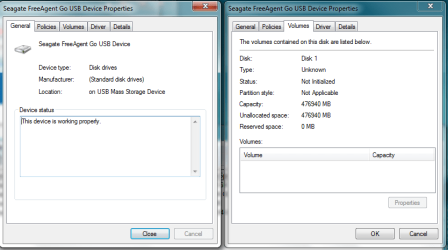
I gave the drive to a friend in school, who found it in disk management, but from there, we aren't able to do much of anything. The disc is found as not initialized, but when we tell it to initialize, i get "Data error (cyclic redundancy check)" which I really have no clue what that is. I'll attach screenshots of what I have going right now for reference.
I've been told that giving the drive a drive letter might fix it, but I'm not sure as to how to do that. Disabling and re-enabling it did nothing. The one major difference I see here is the fact the drive is not initialized, but like I said, attempts to change that just end with an error
Anyone that has thoughts or help to give, I would greatly appreciate it, since so far moving everything on a 2 gig flash drive is a MAJOR pain.
So I found another thread that was similar to this, but given it was last posted on 413 days ago, it was recommended I make a new one.
I have a Seagate 500GB FreeAgent Go external usb drive that is kind of hating life right now.
I got this 6 months ago and pretty much backed up all my stuff, put it somewhere it wouldn't get all dusty, and didn't touch it again. That is, until my brother got a computer for college, and as my position of household geek, had to set things up for him.
The drive was (and kind of is) formatted NTFS, and he had to move some things from his old mac to his new HP, which wasn't too much of a problem, but then i took it back to put some more things on it, and it started telling me the disc was unreadable. At this point, it still showed up in explorer and such, and I could edit the properties and suchlike, but it would start loading the drive's contents, get up to a certain point, and pop up an error, denying me access to anything.
A good deal of frustration and some misgivings a long time later, I reformatted it. In my mind, it was the fact that I started plugging it into a Mac, which made it angry with me, so again, I put some music on it, nothing substantial, and left it in it's little hiding spot.
Now we hit a week ago. I get a fresh new computer, and set about the task of moving all my old junk onto the new unit. I plug the external into my old VAIO, and put on all my music, documents, games, etc. Then I bring it over to my new Toshiba, and plug it in. It says it could not install drivers like it usually does whenever you put in a new device. So I try another usb port. Same thing. I switch it back once more, then send it over to the USB/SATA drive, and it decides to work. I start the move of my music library. About 10 minutes in, I find it sitting inactive in the same spot of the transfer. After waiting another 10 minutes, and seeing no new activity, I try to cancel the transfer, whereupon the whole process seizes up. After hitting cancel, nothing stops doing, well, nothing, and I can't even "X" the transfer window. So after a little more fiddling, I just pull out the external, since that's the most basic killswitch I know of, yet when I plugged it back in, I no longer can find the drive, even though it's ejectable in the system tray.
I gave the drive to a friend in school, who found it in disk management, but from there, we aren't able to do much of anything. The disc is found as not initialized, but when we tell it to initialize, i get "Data error (cyclic redundancy check)" which I really have no clue what that is. I'll attach screenshots of what I have going right now for reference.
I've been told that giving the drive a drive letter might fix it, but I'm not sure as to how to do that. Disabling and re-enabling it did nothing. The one major difference I see here is the fact the drive is not initialized, but like I said, attempts to change that just end with an error
Anyone that has thoughts or help to give, I would greatly appreciate it, since so far moving everything on a 2 gig flash drive is a MAJOR pain.
Attachments
My Computer
- OS
- Windows 7 Home Premium 64bit