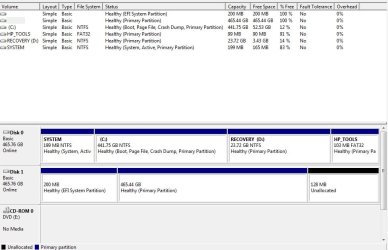
External harddrive not showing up

bethalinax56

New member
Local time
7:11 AM
Messages
3
As the title suggests I have a hard drive that isnt showing up. Its a seagate 500 gb.

The thing lights up and everything and it shows up in disk management without a letter. From what I've read from various help threads, I'm supposed to right click it and change the disk letter or something but the problem is that it all the options are greyed out

I took out this harddrive and plugged in my other WD 750 gb to see if it do the same thing but the WD harddrive already had a letter automatically assigned and did nothave the change letter option grey out.

any thoughts?
 

My Computer My Computer

OS
Windows 7 64 bit
Does the drive show up in DISKMGMT, and is it ONLINE or OFFLINE?

Does it show a file system on it (e.g. NTFS) and size/capacity? Or does it show RAW?
 

My Computer My Computer

Computer type
PC/Desktop
Computer Manufacturer/Model Number
Home-built, two systems (1) and (2)
OS
Windows 7 Pro x64 (1), Win7 Pro X64 (2)
CPU
i5-3350p 3.1Ghz/6MB-cache (1); E8400 3.0Ghz/6MB-cache (2)
Motherboard
ASUS P8Z77-V Pro (1); ASUS P5Q3 (2)
Memory
8GB PC3-12800 DDR3 (1); 4GB PC3-10600 DDR3 (2)
Graphics Card(s)
ATI HD7750 (1), (see TV cards); ATI R7 250 (2)
Sound Card
Realtek ALC892 HD Audio (1); Realtek ALC1200 HD Audio (2)
Monitor(s) Displays
Eizo HD2441W LCD, Eizo S2433W (1); Eizo 24" S2433W (2)
Screen Resolution
1920x1200, 1920x1200 (1); 1920x1200 (2)
Hard Drives
(1) 1TB SATA-II (7200RPM), 2x2TB SATA-III (7200RPM), 250GB SATA-III (10000RPM) for OS; 2x2TB external USB 3.0

(2) 320GB SATA-II (7200RPM), 750GB SATA-II (7200RPM), 150GB SATA-II (10000RPM) for OS; 2TB external USB 3.0
PSU
Nesteq ECS-6001 600W (1); Nesteq ECS-5001 500W (2)
Case
Acousti-Case 360 (1) and (2)
Cooling
Noctua NH-U12P SE2 for CPU, 2x120mm case fans (1) and (2)
Keyboard
IBM PS/2 (1) and (2)
Mouse
Logitech MX Revolution wireless (1); Microsoft wired (2)
Internet Speed
100mbps down / 10mbps up
Antivirus
Microsoft Security Essentials; Malwarebyte Anti-Malware Pro
Browser
Firefox
Other Info
Ceton InfiniTV 4-tuner cablecard-enabled TV card as well as Hauppauge HVR-2250 OTA/ATSC 2-tuner TV card in (1), running under Win7 WMC
it shows the size/capacity but it doesnt show the file system. it does show up in diskmgmt though and it does say online.
i've attached a screenshot if that helps
 

Attachments

  • qqwqeqeqe.jpg
    qqwqeqeqe.jpg
    62.9 KB · Views: 329

My Computer My Computer

OS
Windows 7 64 bit
If disk management won't play ball, I'd be inclined to try Partition Wizard to delete the partitions on the drive, and then creating another one.

This tutorial explains how: http://www.sevenforums.com/tutorials/93322-partition-wizard-use-bootable-cd.html

Just boot into Partition Wizard when you've created your boot disc, delete the existing partitions, repartition your drive, format it, and then apply the changes before booting back into Windows. You can carry out each operation singly then apply or you can stack them, and then apply the changes.
 

My Computer My Computer

Computer Manufacturer/Model Number
HP Pavilion Elite 495UK
OS
Windows 7 Ultimate SP1 64-Bit
CPU
Intel Core i7 870 @ 2.93GHz
Motherboard
MSI 2A9C (CPU1)
Memory
8Gb Dual-Channel DDR3 @ 664MHz
Graphics Card(s)
nVidia GeForce GTX 460 1024MB dedicated RAM
Sound Card
Realtek HD Audio
Monitor(s) Displays
HP2310i
Screen Resolution
1920 x 1080
Hard Drives
1x1954GB Hitachi HDS22020ALA 330 (RAID), 1x1954GB Hitachi External for backup and storage
PSU
460W
Case
HP Elite
Cooling
Air cooled
Keyboard
Logitech K750 solar-powered keyboard
Mouse
Logitech Wireless M180 mouse
Internet Speed
2Mb
Other Info
Pure Avanti Flow Internet Radio with iPod Dock, 64Gb iPod, HP USB Speakers, Sony MDR-V500 Headphones, Sony Vaio F-Series Laptop
it shows the size/capacity but it doesnt show the file system. it does show up in diskmgmt though and it does say online.
i've attached a screenshot if that helps
It's very curious that you have an EFI System Partition on that drive.

Did you ever FORMAT the drive to NTFS when you first bought it? Or is this just "out of the box" and you are simply trying to use it? Was this drive formatted by a Mac?

Here's an interesting article from someone else with what sounds like the exact same problem as yours. Also an EFI System Partition present, and also the other partition unavailable in Windows with no drive letter assigned.

Is there anything actually on the big partition on that drive? Or has it NEVER actually been usable?

If you have nothing to preserve on that drive, I'd take Seavixen32's advice and (a) use Partition Wizard to delete everything on that drive so that all 500GB is available as "unallocated", and then (b) use Partition Wizard to create a brand new NTFS partition using the whole drive if that's what you want (or you can create several NTFS partitions the same way).

That should do it I would think.
 

My Computer My Computer

Computer type
PC/Desktop
Computer Manufacturer/Model Number
Home-built, two systems (1) and (2)
OS
Windows 7 Pro x64 (1), Win7 Pro X64 (2)
CPU
i5-3350p 3.1Ghz/6MB-cache (1); E8400 3.0Ghz/6MB-cache (2)
Motherboard
ASUS P8Z77-V Pro (1); ASUS P5Q3 (2)
Memory
8GB PC3-12800 DDR3 (1); 4GB PC3-10600 DDR3 (2)
Graphics Card(s)
ATI HD7750 (1), (see TV cards); ATI R7 250 (2)
Sound Card
Realtek ALC892 HD Audio (1); Realtek ALC1200 HD Audio (2)
Monitor(s) Displays
Eizo HD2441W LCD, Eizo S2433W (1); Eizo 24" S2433W (2)
Screen Resolution
1920x1200, 1920x1200 (1); 1920x1200 (2)
Hard Drives
(1) 1TB SATA-II (7200RPM), 2x2TB SATA-III (7200RPM), 250GB SATA-III (10000RPM) for OS; 2x2TB external USB 3.0

(2) 320GB SATA-II (7200RPM), 750GB SATA-II (7200RPM), 150GB SATA-II (10000RPM) for OS; 2TB external USB 3.0
PSU
Nesteq ECS-6001 600W (1); Nesteq ECS-5001 500W (2)
Case
Acousti-Case 360 (1) and (2)
Cooling
Noctua NH-U12P SE2 for CPU, 2x120mm case fans (1) and (2)
Keyboard
IBM PS/2 (1) and (2)
Mouse
Logitech MX Revolution wireless (1); Microsoft wired (2)
Internet Speed
100mbps down / 10mbps up
Antivirus
Microsoft Security Essentials; Malwarebyte Anti-Malware Pro
Browser
Firefox
Other Info
Ceton InfiniTV 4-tuner cablecard-enabled TV card as well as Hauppauge HVR-2250 OTA/ATSC 2-tuner TV card in (1), running under Win7 WMC
eh..I was hoping there was some way to get it to work without installing anything. I'm not particularly computer savvy so..yea

The harddrive is actually my friend's (who uses a mac) so maybe thats why. I kind of assumed harddrives could just go from one comp to another lol
and I have a bunch of graduation photos and vids for school in there lol
 

My Computer My Computer

OS
Windows 7 64 bit
eh..I was hoping there was some way to get it to work without installing anything. I'm not particularly computer savvy so..yea
We're only suggesting Partition Wizard as a "guaranteed" way to wipe that drive clean and then create one or more NTFS partitions as you want. This is probably THE most reliable, dependable, and easy-to-use 3rd-party product there is for this particular need. And it is very easy to install onto your Windows system, consisting virtually of doing nothing more than running the downloaded installer file.


The harddrive is actually my friend's (who uses a mac) so maybe thats why.
Ok, now the truth comes out.


I kind of assumed harddrives could just go from one comp to another lol
Not if that large partition is formatted with a Mac-only file system. Mac and Windows are NOT super-compatible.


and I have a bunch of graduation photos and vids for school in there lol
Well you won't be able to get them off I don't think, since the file system on that partition is obviously unknown to Windows but rather only to his Mac.

How about your friend copying them onto a DVD for you, being sure you can read that DVD on your Windows machine? Experiment with one or two files first, just to be sure the project will be successful. If so, then use that method for transferring the stuff off of that drive to your own Windows machine.

Alternatively, you can use an external USB flash drive or SDHC card instead of a DVD. Again, your friend can simply copy those JPG, MPG, AVI, etc. files to the external USB device. But these external USB drive/devices are just like real discs (internal or external) and need to be first formatted say with NTFS or FAT32 for compatiblility with Windows. Again, you should then try to read one of them plugging that USB device into your Windows machine to be sure you can read it. USB pen drives and SDHC/SDXC flash cards are very inexpensive and come in sizes ranging from 4GB all the way up to 64GB, so they're much larger in size than DVDs and don't require a "burner" drive on the source machine.
 

My Computer My Computer

Computer type
PC/Desktop
Computer Manufacturer/Model Number
Home-built, two systems (1) and (2)
OS
Windows 7 Pro x64 (1), Win7 Pro X64 (2)
CPU
i5-3350p 3.1Ghz/6MB-cache (1); E8400 3.0Ghz/6MB-cache (2)
Motherboard
ASUS P8Z77-V Pro (1); ASUS P5Q3 (2)
Memory
8GB PC3-12800 DDR3 (1); 4GB PC3-10600 DDR3 (2)
Graphics Card(s)
ATI HD7750 (1), (see TV cards); ATI R7 250 (2)
Sound Card
Realtek ALC892 HD Audio (1); Realtek ALC1200 HD Audio (2)
Monitor(s) Displays
Eizo HD2441W LCD, Eizo S2433W (1); Eizo 24" S2433W (2)
Screen Resolution
1920x1200, 1920x1200 (1); 1920x1200 (2)
Hard Drives
(1) 1TB SATA-II (7200RPM), 2x2TB SATA-III (7200RPM), 250GB SATA-III (10000RPM) for OS; 2x2TB external USB 3.0

(2) 320GB SATA-II (7200RPM), 750GB SATA-II (7200RPM), 150GB SATA-II (10000RPM) for OS; 2TB external USB 3.0
PSU
Nesteq ECS-6001 600W (1); Nesteq ECS-5001 500W (2)
Case
Acousti-Case 360 (1) and (2)
Cooling
Noctua NH-U12P SE2 for CPU, 2x120mm case fans (1) and (2)
Keyboard
IBM PS/2 (1) and (2)
Mouse
Logitech MX Revolution wireless (1); Microsoft wired (2)
Internet Speed
100mbps down / 10mbps up
Antivirus
Microsoft Security Essentials; Malwarebyte Anti-Malware Pro
Browser
Firefox
Other Info
Ceton InfiniTV 4-tuner cablecard-enabled TV card as well as Hauppauge HVR-2250 OTA/ATSC 2-tuner TV card in (1), running under Win7 WMC
incidentally,
1 GB sizes are still available, however, 4 gb will give you a lower cost per gb.
 

My Computer My Computer

Computer Manufacturer/Model Number
Toshiba Satellite S875D-S7239 laptop
OS
MS Windows 7 Ultimate SP1 64-bit
CPU
AMD A10-4600M
Motherboard
AMD Pumori (Socket FT1)
Memory
6.00 GB Dual-Channel DDR3 @ 798MHz (11-11-12-28)
Graphics Card(s)
AMD Radeon HD 7660G
Sound Card
High Definition Audio Device
Monitor(s) Displays
Generic PnP Monitor (1600x900@60Hz)
Screen Resolution
1600x900@60Hz
Hard Drives
SSD 119GB Corsair CSSD-V128GB2 ATA Device
Keyboard
Standard PS/2 Keyboard
Mouse
HP Wireless Optical Mobile Mouse Model FHA-3410
Internet Speed
What the local pub, local coffee shop offers.
Other Info
Optical Drive:MATSHITA BD-CMB UJ160B ATA Device


Also have an Asus ha1002xp netbook with Win 7 Ultimate installed.
Back
Top