external harddrive roconnized but not working

Takaaaa

New member
Member
Local time
2:16 PM
Messages
77
Greetings,
I have a seagate external harddrive that suddenly stopped working on my HP dv7 laptop.
It work on my desktop computer just fine. When I plug it into my laptop it says that its running fine, shows up in my device manager, allows me to eject it, but i cant get to it. It doesnt show up in my computer hard disk drives...
I dont have any yellow ! in my device manager, and I drivers is upto date and i uninstalled it and reinstalled but same problem. I also tried different USB ports. Also ran malwarbytes but still nothing.

Anything else I can try?
 

My Computer My Computer

Computer Manufacturer/Model Number
HP DV7-2185dx
OS
Microsoft Windows 7 Ultimate 64-bit 7600 Multiprocessor Free
CPU
Intel(R) Core(TM)2 Quad CPU Q9000 @ 2.00GHz
Motherboard
Quanta 3624
Memory
DDR-2 2.00 GB/ DDR-2 4.00 GB
Graphics Card(s)
ATI Mobility Radeon HD 4650
Sound Card
(1) AMD High Definition Audio Device (2) High Definition A
Hard Drives
FUJITSU MJA2500BH G2 ATA Device 465.76 GB

My Computer My Computer

Computer type
PC/Desktop
Computer Manufacturer/Model Number
Home made Desktop
OS
Windows 10 Pro. 64/ version 1709 Windows 7 Pro/64
CPU
Intel i7-6800K @ 4.3
Motherboard
ASUS X-99 Deluxe II
Memory
Corsair Platinum 16 gig @2400
Graphics Card(s)
EVGA GTX 1070 OC
Monitor(s) Displays
Asus 27" LED LCD/VE278Q
Screen Resolution
1920-1080 or 1280-720 HDMI
Hard Drives
INTEL SSD 730-240 Gb Sata 3.0/
PSU
EVGA Platium 1200W
Case
Phanteks Luxe Tempered Glass 8 fans/ one radiator
Cooling
XSPC/ Water Cooled CPU
Keyboard
Das 4 Professional
Mouse
Logitech M705/MX Anywhere 2-S
Internet Speed
100 mbits
Antivirus
Microsoft Security Essentials/ Malwarebytes Premium 3.0/ SAS
Browser
I.E. 11 default/Firefox/ ISP Time Warner Cable/Spectrum
Other Info
LG BluRay Burner/
Sound system-KLipsch-THX/
Icy Dock ssd Hot Swap bays.

My Computer My Computer

Computer Manufacturer/Model Number
HP DV7-2185dx
OS
Microsoft Windows 7 Ultimate 64-bit 7600 Multiprocessor Free
CPU
Intel(R) Core(TM)2 Quad CPU Q9000 @ 2.00GHz
Motherboard
Quanta 3624
Memory
DDR-2 2.00 GB/ DDR-2 4.00 GB
Graphics Card(s)
ATI Mobility Radeon HD 4650
Sound Card
(1) AMD High Definition Audio Device (2) High Definition A
Hard Drives
FUJITSU MJA2500BH G2 ATA Device 465.76 GB
You did not follow the tutorial correctly. I'm unable to read your picture.
Please use the method in the tutorial to post the picture.
 

My Computer My Computer

Computer type
PC/Desktop
Computer Manufacturer/Model Number
Home made Desktop
OS
Windows 10 Pro. 64/ version 1709 Windows 7 Pro/64
CPU
Intel i7-6800K @ 4.3
Motherboard
ASUS X-99 Deluxe II
Memory
Corsair Platinum 16 gig @2400
Graphics Card(s)
EVGA GTX 1070 OC
Monitor(s) Displays
Asus 27" LED LCD/VE278Q
Screen Resolution
1920-1080 or 1280-720 HDMI
Hard Drives
INTEL SSD 730-240 Gb Sata 3.0/
PSU
EVGA Platium 1200W
Case
Phanteks Luxe Tempered Glass 8 fans/ one radiator
Cooling
XSPC/ Water Cooled CPU
Keyboard
Das 4 Professional
Mouse
Logitech M705/MX Anywhere 2-S
Internet Speed
100 mbits
Antivirus
Microsoft Security Essentials/ Malwarebytes Premium 3.0/ SAS
Browser
I.E. 11 default/Firefox/ ISP Time Warner Cable/Spectrum
Other Info
LG BluRay Burner/
Sound system-KLipsch-THX/
Icy Dock ssd Hot Swap bays.
You did not follow the tutorial correctly. I'm unable to read your picture.
Please use the method in the tutorial to post the picture.

Only thing I couldnt do is attach with the forums attachment icon. but for some reason it wont work so I put it in my post
 
Last edited:

My Computer My Computer

Computer Manufacturer/Model Number
HP DV7-2185dx
OS
Microsoft Windows 7 Ultimate 64-bit 7600 Multiprocessor Free
CPU
Intel(R) Core(TM)2 Quad CPU Q9000 @ 2.00GHz
Motherboard
Quanta 3624
Memory
DDR-2 2.00 GB/ DDR-2 4.00 GB
Graphics Card(s)
ATI Mobility Radeon HD 4650
Sound Card
(1) AMD High Definition Audio Device (2) High Definition A
Hard Drives
FUJITSU MJA2500BH G2 ATA Device 465.76 GB
That is my problem. I do not want to go off this site to see it.
Please just try again.
If you can't figure it out some one else will just have to help you.
 

My Computer My Computer

Computer type
PC/Desktop
Computer Manufacturer/Model Number
Home made Desktop
OS
Windows 10 Pro. 64/ version 1709 Windows 7 Pro/64
CPU
Intel i7-6800K @ 4.3
Motherboard
ASUS X-99 Deluxe II
Memory
Corsair Platinum 16 gig @2400
Graphics Card(s)
EVGA GTX 1070 OC
Monitor(s) Displays
Asus 27" LED LCD/VE278Q
Screen Resolution
1920-1080 or 1280-720 HDMI
Hard Drives
INTEL SSD 730-240 Gb Sata 3.0/
PSU
EVGA Platium 1200W
Case
Phanteks Luxe Tempered Glass 8 fans/ one radiator
Cooling
XSPC/ Water Cooled CPU
Keyboard
Das 4 Professional
Mouse
Logitech M705/MX Anywhere 2-S
Internet Speed
100 mbits
Antivirus
Microsoft Security Essentials/ Malwarebytes Premium 3.0/ SAS
Browser
I.E. 11 default/Firefox/ ISP Time Warner Cable/Spectrum
Other Info
LG BluRay Burner/
Sound system-KLipsch-THX/
Icy Dock ssd Hot Swap bays.
That is my problem. I do not want to go off this site to see it.
Please just try again.
If you can't figure it out some one else will just have to help you.

Ok let me try again or will zoom in so you can see it a bit better without having to click on it

Success! worked on my other computer

I am getting the CRC error though
 

Attachments

  • Save.jpg
    Save.jpg
    110.5 KB · Views: 5

My Computer My Computer

Computer Manufacturer/Model Number
HP DV7-2185dx
OS
Microsoft Windows 7 Ultimate 64-bit 7600 Multiprocessor Free
CPU
Intel(R) Core(TM)2 Quad CPU Q9000 @ 2.00GHz
Motherboard
Quanta 3624
Memory
DDR-2 2.00 GB/ DDR-2 4.00 GB
Graphics Card(s)
ATI Mobility Radeon HD 4650
Sound Card
(1) AMD High Definition Audio Device (2) High Definition A
Hard Drives
FUJITSU MJA2500BH G2 ATA Device 465.76 GB
Thank you.
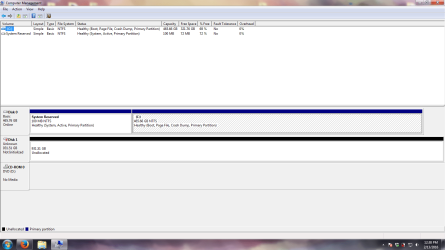
Do you have anything on Disk 1 ?

Your problem is that Disk 1 is unallocated.
Don't do any thing to Disk 1 at this time.

I also notice the your C partition is almost full. That will cause problems.
Your C partition with Windows 7 installed should have at least 10 to 15 % free space to work properly.
 

My Computer My Computer

Computer type
PC/Desktop
Computer Manufacturer/Model Number
Home made Desktop
OS
Windows 10 Pro. 64/ version 1709 Windows 7 Pro/64
CPU
Intel i7-6800K @ 4.3
Motherboard
ASUS X-99 Deluxe II
Memory
Corsair Platinum 16 gig @2400
Graphics Card(s)
EVGA GTX 1070 OC
Monitor(s) Displays
Asus 27" LED LCD/VE278Q
Screen Resolution
1920-1080 or 1280-720 HDMI
Hard Drives
INTEL SSD 730-240 Gb Sata 3.0/
PSU
EVGA Platium 1200W
Case
Phanteks Luxe Tempered Glass 8 fans/ one radiator
Cooling
XSPC/ Water Cooled CPU
Keyboard
Das 4 Professional
Mouse
Logitech M705/MX Anywhere 2-S
Internet Speed
100 mbits
Antivirus
Microsoft Security Essentials/ Malwarebytes Premium 3.0/ SAS
Browser
I.E. 11 default/Firefox/ ISP Time Warner Cable/Spectrum
Other Info
LG BluRay Burner/
Sound system-KLipsch-THX/
Icy Dock ssd Hot Swap bays.
Thank you.
Do you have anything on Disk 1 ?

Your problem is that Disk 1 is unallocated.
Don't do any thing to Disk 1 at this time.

I also notice the your C partition is almost full. That will cause problems.
Your C partition with Windows 7 installed should have at least 10 to 15 % free space to work properly.

Yes I believe that its almost full.
Ok should i look up how to fix that?
I will also free up more space on my computer
 

My Computer My Computer

Computer Manufacturer/Model Number
HP DV7-2185dx
OS
Microsoft Windows 7 Ultimate 64-bit 7600 Multiprocessor Free
CPU
Intel(R) Core(TM)2 Quad CPU Q9000 @ 2.00GHz
Motherboard
Quanta 3624
Memory
DDR-2 2.00 GB/ DDR-2 4.00 GB
Graphics Card(s)
ATI Mobility Radeon HD 4650
Sound Card
(1) AMD High Definition Audio Device (2) High Definition A
Hard Drives
FUJITSU MJA2500BH G2 ATA Device 465.76 GB
Is Disk 1 almost full?
That is your unallocated disk.

Do you want to save what is on Disk 1?
 

My Computer My Computer

Computer type
PC/Desktop
Computer Manufacturer/Model Number
Home made Desktop
OS
Windows 10 Pro. 64/ version 1709 Windows 7 Pro/64
CPU
Intel i7-6800K @ 4.3
Motherboard
ASUS X-99 Deluxe II
Memory
Corsair Platinum 16 gig @2400
Graphics Card(s)
EVGA GTX 1070 OC
Monitor(s) Displays
Asus 27" LED LCD/VE278Q
Screen Resolution
1920-1080 or 1280-720 HDMI
Hard Drives
INTEL SSD 730-240 Gb Sata 3.0/
PSU
EVGA Platium 1200W
Case
Phanteks Luxe Tempered Glass 8 fans/ one radiator
Cooling
XSPC/ Water Cooled CPU
Keyboard
Das 4 Professional
Mouse
Logitech M705/MX Anywhere 2-S
Internet Speed
100 mbits
Antivirus
Microsoft Security Essentials/ Malwarebytes Premium 3.0/ SAS
Browser
I.E. 11 default/Firefox/ ISP Time Warner Cable/Spectrum
Other Info
LG BluRay Burner/
Sound system-KLipsch-THX/
Icy Dock ssd Hot Swap bays.

My Computer My Computer

Computer Manufacturer/Model Number
HP DV7-2185dx
OS
Microsoft Windows 7 Ultimate 64-bit 7600 Multiprocessor Free
CPU
Intel(R) Core(TM)2 Quad CPU Q9000 @ 2.00GHz
Motherboard
Quanta 3624
Memory
DDR-2 2.00 GB/ DDR-2 4.00 GB
Graphics Card(s)
ATI Mobility Radeon HD 4650
Sound Card
(1) AMD High Definition Audio Device (2) High Definition A
Hard Drives
FUJITSU MJA2500BH G2 ATA Device 465.76 GB
Do nothing at this time I will ask jumanji to come and help you.
He is very good at retrieving data off of drives.
I seldom do such things but he does it often.
You must follow his instruction very closely.

Do you have a external drive to move the data to?
 

My Computer My Computer

Computer type
PC/Desktop
Computer Manufacturer/Model Number
Home made Desktop
OS
Windows 10 Pro. 64/ version 1709 Windows 7 Pro/64
CPU
Intel i7-6800K @ 4.3
Motherboard
ASUS X-99 Deluxe II
Memory
Corsair Platinum 16 gig @2400
Graphics Card(s)
EVGA GTX 1070 OC
Monitor(s) Displays
Asus 27" LED LCD/VE278Q
Screen Resolution
1920-1080 or 1280-720 HDMI
Hard Drives
INTEL SSD 730-240 Gb Sata 3.0/
PSU
EVGA Platium 1200W
Case
Phanteks Luxe Tempered Glass 8 fans/ one radiator
Cooling
XSPC/ Water Cooled CPU
Keyboard
Das 4 Professional
Mouse
Logitech M705/MX Anywhere 2-S
Internet Speed
100 mbits
Antivirus
Microsoft Security Essentials/ Malwarebytes Premium 3.0/ SAS
Browser
I.E. 11 default/Firefox/ ISP Time Warner Cable/Spectrum
Other Info
LG BluRay Burner/
Sound system-KLipsch-THX/
Icy Dock ssd Hot Swap bays.
Do nothing at this time I will ask jumanji to come and help you.
He is very good at retrieving data off of drives.
I seldom do such things but he does it often.
You must follow his instruction very closely.

Do you have a external drive to move the data to?

Thank you for all the help
Sadly I dont have another external large enough to hold everything. Unless its possible to control what I transfer, so I can move to my 500gb external and tranfers that to my desktop and transfer the other 500 after.
 

My Computer My Computer

Computer Manufacturer/Model Number
HP DV7-2185dx
OS
Microsoft Windows 7 Ultimate 64-bit 7600 Multiprocessor Free
CPU
Intel(R) Core(TM)2 Quad CPU Q9000 @ 2.00GHz
Motherboard
Quanta 3624
Memory
DDR-2 2.00 GB/ DDR-2 4.00 GB
Graphics Card(s)
ATI Mobility Radeon HD 4650
Sound Card
(1) AMD High Definition Audio Device (2) High Definition A
Hard Drives
FUJITSU MJA2500BH G2 ATA Device 465.76 GB
"It work on my desktop computer just fine"

Since you said it works on your desktop I would advice you not to do anything with the HDD on the laptop for now..

Just to confirm that you can really access it on your Desktop, post a screenshot of Windows Disk Management with that external drive only connected . Please post a full screen shot. No need for the Device Manager shot. Upload to Seven Forums server. http://www.sevenforums.com/tutorials/9733-screenshots-files-upload-post-seven-forums.html

Sample full-screenshot where I can see everything:

23-10-2015 12-35-09.jpg
 
Last edited:

My Computer My Computer

OS
Windows 7 Home Premium 32 bit
Thank you very much jumanji for coming to help!
 

My Computer My Computer

Computer type
PC/Desktop
Computer Manufacturer/Model Number
Home made Desktop
OS
Windows 10 Pro. 64/ version 1709 Windows 7 Pro/64
CPU
Intel i7-6800K @ 4.3
Motherboard
ASUS X-99 Deluxe II
Memory
Corsair Platinum 16 gig @2400
Graphics Card(s)
EVGA GTX 1070 OC
Monitor(s) Displays
Asus 27" LED LCD/VE278Q
Screen Resolution
1920-1080 or 1280-720 HDMI
Hard Drives
INTEL SSD 730-240 Gb Sata 3.0/
PSU
EVGA Platium 1200W
Case
Phanteks Luxe Tempered Glass 8 fans/ one radiator
Cooling
XSPC/ Water Cooled CPU
Keyboard
Das 4 Professional
Mouse
Logitech M705/MX Anywhere 2-S
Internet Speed
100 mbits
Antivirus
Microsoft Security Essentials/ Malwarebytes Premium 3.0/ SAS
Browser
I.E. 11 default/Firefox/ ISP Time Warner Cable/Spectrum
Other Info
LG BluRay Burner/
Sound system-KLipsch-THX/
Icy Dock ssd Hot Swap bays.
Hello,
Sorry for the late reply, was moving and everything was packed. But now that Im all settled for some reason i have the same problem on a desktop (someone elses since my desktop is getting beep codes and not booting). My external powers on but doesnt recognize. Here is what is says on my laptop.

Screenshot 2016-02-13 12.38.32.png
 

My Computer My Computer

Computer Manufacturer/Model Number
HP DV7-2185dx
OS
Microsoft Windows 7 Ultimate 64-bit 7600 Multiprocessor Free
CPU
Intel(R) Core(TM)2 Quad CPU Q9000 @ 2.00GHz
Motherboard
Quanta 3624
Memory
DDR-2 2.00 GB/ DDR-2 4.00 GB
Graphics Card(s)
ATI Mobility Radeon HD 4650
Sound Card
(1) AMD High Definition Audio Device (2) High Definition A
Hard Drives
FUJITSU MJA2500BH G2 ATA Device 465.76 GB
OK, go ahead, install and run MiniTool Partition Wizard Home Edition 9.1 MiniTool Partition Wizard | Best partition magic alternative for Windows PC and Server

Post a screenshot of how your Seagate external looks on it - the very first screen that appears when you launch it.

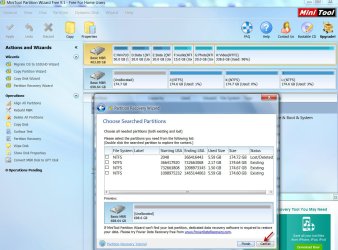
Then run Partition Recovery Wizard, select your external drive and run Quick Scan. Post a screenshot of Partitions Found Window. Once you had taken the screenshot, Cancel and then quit Partition Wizard.

Sample screenshot of Partitions Found:

14-02-2016 17-50-03.jpg

Let me see the Partitions Found window and give further instructions.( We haven't had an easy one for a long time. Let me see whether this one is that. :) )
 

My Computer My Computer

OS
Windows 7 Home Premium 32 bit
OK, go ahead, install and run MiniTool Partition Wizard Home Edition 9.1 MiniTool Partition Wizard | Best partition magic alternative for Windows PC and Server

Post a screenshot of how your Seagate external looks on it - the very first screen that appears when you launch it.

Then run Partition Recovery Wizard, select your external drive and run Quick Scan. Post a screenshot of Partitions Found Window. Once you had taken the screenshot, Cancel and then quit Partition Wizard.

Sample screenshot of Partitions Found:

View attachment 381758

Let me see the Partitions Found window and give further instructions.( We haven't had an easy one for a long time. Let me see whether this one is that. :) )

Yes I read a other thread where you help someone with similar problems, and seemed very difficult and didnt want to do anything on my own.
But here are my screen shots. fingers crossed

Screenshot 2016-02-14 12.52.31.png

Screenshot 2016-02-14 12.55.23.png
 

My Computer My Computer

Computer Manufacturer/Model Number
HP DV7-2185dx
OS
Microsoft Windows 7 Ultimate 64-bit 7600 Multiprocessor Free
CPU
Intel(R) Core(TM)2 Quad CPU Q9000 @ 2.00GHz
Motherboard
Quanta 3624
Memory
DDR-2 2.00 GB/ DDR-2 4.00 GB
Graphics Card(s)
ATI Mobility Radeon HD 4650
Sound Card
(1) AMD High Definition Audio Device (2) High Definition A
Hard Drives
FUJITSU MJA2500BH G2 ATA Device 465.76 GB
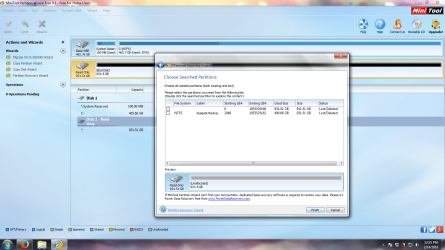
OK, Run Quick scan again, put a tick mark in the square against the second partition shown which says "NTFS Seagate Backup Starting LBA 2048 Ending LBA 1953525162 Used size 400.06GB Size 931.51GB Lost/Deleted" (by clicking on it). That is the lost partition. The preview map at the bottom should show your drive as it was before. Click on Finish and that will return you to the main screen. If the drive does not have a drive letter, right click on it > Change Letter and give it a drive letter. In the top Menu bar click on Apply and the operation would be completed.Close PW and reboot your PC.

Are you able to access your drive now?
 

My Computer My Computer

OS
Windows 7 Home Premium 32 bit
It says that "At least one of the partitions will be deleted". Will I lose all my files on my external if I do this? If so, will there be a way to fix it and keep my stuff? or is it talking about deleteing the top one only and not harm the files?
 
Last edited:

My Computer My Computer

Computer Manufacturer/Model Number
HP DV7-2185dx
OS
Microsoft Windows 7 Ultimate 64-bit 7600 Multiprocessor Free
CPU
Intel(R) Core(TM)2 Quad CPU Q9000 @ 2.00GHz
Motherboard
Quanta 3624
Memory
DDR-2 2.00 GB/ DDR-2 4.00 GB
Graphics Card(s)
ATI Mobility Radeon HD 4650
Sound Card
(1) AMD High Definition Audio Device (2) High Definition A
Hard Drives
FUJITSU MJA2500BH G2 ATA Device 465.76 GB
Back
Top