
You are using an out of date browser. It may not display this or other websites correctly.
You should upgrade or use an alternative browser.
You should upgrade or use an alternative browser.
Solved external hardrive error loading WA.FAT32
- Thread starter apple08
- Start date

I think a few more bits of info are needed here. what exactly is on this drive? has it been formatted? Please give some more info. Thanks
My Computer
- Computer type
- PC/Desktop
- Computer Manufacturer/Model Number
- custom built
- OS
- Windows 7 ultimate 64-bit
- CPU
- Intel I7 2600K 3.4ghz
- Motherboard
- Asus Evo P8P67
- Memory
- Corsair 16gb ddr3 1600mhz
- Graphics Card(s)
- Nvidia Geforce gt 430
- Sound Card
- Sound Blaster Titanium x-fi pci express
- Monitor(s) Displays
- Dell E198WFP
- Hard Drives
- 1 western digital 2TB drive.
- PSU
- Antec 1200 watt
- Case
- Inwin Dragon Rider
- Cooling
- 6 case supplied cooling fans
- Keyboard
- logitech mk700
- Mouse
- logitech m705
- Internet Speed
- 25-50mbps download; 10mbps upload(i think)
- Antivirus
- avg free 2014
- Browser
- mozilla firefox
- Other Info
- Also have a pretty bad speaker setup which is a klipsch promedia 5.1 surround speaker setup with huge subwoofer and lg blu ray player/writer. Also a hp officejet pro 8600 plus wireless all in one and a logitech s7500 webcam.

- Local time
- 2:25 PM
- Messages
- 5,915
i have my external hard drive last time is good but now i cant open it it says like this
ERROR LOADING WA.FAT32 THE SPECIFIED MODULE CANNOT BE FOUND.
please help me
OK,
First thing - Do not panic.
Second - Having posted your problem here seeking help, do not do anything on your own in haste that can make matters worse and then it will be a wild goose chase.
If you have already done something, let us know exactly what all you did between your first post and your next post before reading this post.
Third - we do need more information between " last time is good" but now it says " error message"
Did you scan your PC as well as the external HDD with any antivirus program or did it run automatically and found any malware? What was the result? ( No, do not run any scan after you read this post.Just tell what AV you have on your PC and whether it protects in realtime.)
Now unplug all other external drives from your PC, plug in only your problem external drive and post a screenshot of how your drive looks in Windows Disk Management. Follow the guidelines here http://www.sevenforums.com/tutorials/274797-disk-management-post-screen-capture-image.html
Also a screenshot of My Computer and how your external drive looks in it..Is it a shortcut?
I am retiring for the day now and check your post after 8 hours of sleep.
Last edited:
My Computer
- OS
- Windows 7 Home Premium 32 bit
Error loading wa.fat32 the specified module can not be found.

this is what you requested on me sir .. my external hardrive that i cant open it says ERROR LOADING WA.FAT32 THE SPECIFIED MODULE CAN NOT BE FOUND.
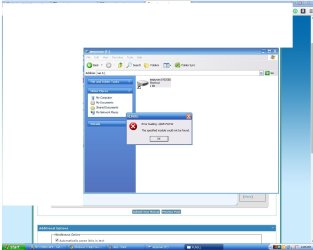
this is what you requested on me sir .. my external hardrive that i cant open it says ERROR LOADING WA.FAT32 THE SPECIFIED MODULE CAN NOT BE FOUND.
My Computer
- Computer type
- PC/Desktop
- OS
- windows xp
- Local time
- 2:25 PM
- Messages
- 5,915
Why have you started a new thread? You could have replied in the other thread http://www.sevenforums.com/hardware-devices/344605-external-hardrive-error-loading-wa-fat32.html
Anyway, as I expected your computer has been infected by the Short-cut virus.
We shall try to eliminate it using WinRAR. ( There is another thread in this very forum but at the moment I am not referring you there since you may get lost in it. )
)
( You did not answer my question whether you ran any antivirus/malware scan and whether it found any malware and deleted it. You must read the post carefully and answer all queries so that we get the correct picture to be able to help you effectively)
Download, and install WinRAR evaluation version, 32 bit version if you are running 32 bit Windows and 64 bit version if you are running 64 bit Windows.
WinRAR archiver, a powerful tool to process RAR and ZIP files
Shut down your computer, unplug your external drive( if not done already ) and then boot.
Plug-in your external drive while pressing the left Shift key so that autorun is disabled.
Now run WinRAR and explore your external drive with it.
Post a screenshot of the contents.
Screenshot 1: Here my external drive is I:
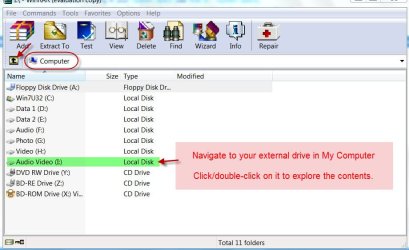
Screenshot 2: These are the contents of I: shown in WinRAR. In your case it may be F:
Post only this screenshot showing its contents.
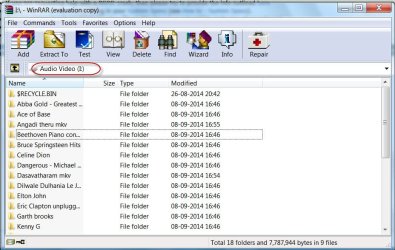
If you have any autorun.inf file in it, open it in NotePad and post its contents. In particular look for any *.exe file. Please note it down. Also post a screenshot of it.
Anyway, as I expected your computer has been infected by the Short-cut virus.
We shall try to eliminate it using WinRAR. ( There is another thread in this very forum but at the moment I am not referring you there since you may get lost in it.
)( You did not answer my question whether you ran any antivirus/malware scan and whether it found any malware and deleted it. You must read the post carefully and answer all queries so that we get the correct picture to be able to help you effectively)
Download, and install WinRAR evaluation version, 32 bit version if you are running 32 bit Windows and 64 bit version if you are running 64 bit Windows.
WinRAR archiver, a powerful tool to process RAR and ZIP files
Shut down your computer, unplug your external drive( if not done already ) and then boot.
Plug-in your external drive while pressing the left Shift key so that autorun is disabled.
Now run WinRAR and explore your external drive with it.
Post a screenshot of the contents.
Screenshot 1: Here my external drive is I:
Screenshot 2: These are the contents of I: shown in WinRAR. In your case it may be F:
Post only this screenshot showing its contents.
If you have any autorun.inf file in it, open it in NotePad and post its contents. In particular look for any *.exe file. Please note it down. Also post a screenshot of it.
My Computer
- OS
- Windows 7 Home Premium 32 bit
- Local time
- 2:25 PM
- Messages
- 5,915
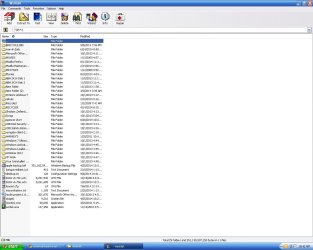
OK, it appears to be the Recycler virus.
I don't want you to go through the exercise of manually removing it which is tedious for you and me .
.
Instead you will use USBFix and Malwarebytes Anti-Malware to get rid of it.
How to remove Recycler virus from my pendrive?
Hope this helps.
(Note: Just for Info - in case you require any folder/file immediately): You can explore any folder in WinRAR. You can also copy and paste any folder/file to any other location. Select folder/file in WinRAR and in Toolbar File > Copy files to clipboard or Ctrl+C. In the new location of your choice rightclick and paste or Ctrl+V)
WARNING: You seem to be a gamer. If you visit sites of doubtful integrity and/or download and use pirated software, you are likely to get into all sorts of problems like this.
I don't want you to go through the exercise of manually removing it which is tedious for you and me
.Instead you will use USBFix and Malwarebytes Anti-Malware to get rid of it.
How to remove Recycler virus from my pendrive?
Hope this helps.
(Note: Just for Info - in case you require any folder/file immediately): You can explore any folder in WinRAR. You can also copy and paste any folder/file to any other location. Select folder/file in WinRAR and in Toolbar File > Copy files to clipboard or Ctrl+C. In the new location of your choice rightclick and paste or Ctrl+V)
WARNING: You seem to be a gamer. If you visit sites of doubtful integrity and/or download and use pirated software, you are likely to get into all sorts of problems like this.
My Computer
- OS
- Windows 7 Home Premium 32 bit
but is it ok to use my external to copy and paste my files? now?
if i will delete or scan the Recylcler Viruse the link that you just gave me ,, my files wont be affected right? sir?
I'm thankfull that my files are allright and i looked forward that it will be solved now
if i will delete or scan the Recylcler Viruse the link that you just gave me ,, my files wont be affected right? sir?
I'm thankfull that my files are allright and i looked forward that it will be solved now
Last edited:
My Computer
- Computer type
- PC/Desktop
- OS
- windows xp
- Local time
- 2:25 PM
- Messages
- 5,915
but is it ok to use my external to copy and paste my files? now?
If you have space on your internal drive, yes. Your personal data files created by you - yes. Downloaded files - No. Those may be infected. In fact those may be the source for your trouble.
But not to another external drive. It may get infected. You can still try, now that you know how to get rid of it. ( Experiment. You will also learn and we will also learn.
) In fact you should connect all your external HDDs/pendrives and cleanse those with USBFix and MBAM.
You should cleanse your PC also with MBAM.
Do any cleansing process with your internet disconnected so that the dirty dozen do not communicate to their masters.
You may now read : http://www.sevenforums.com/hardware-devices/281289-external-hard-drive-error-wv-fat32.html
( That is the first in "Similar Threads" at the bottom of this thread - if you haven't noticed it thus far.
)EDIT: Your files will in no way be affected by running USBFix and MBAM. So don't worry about it.
Last edited:
My Computer
- OS
- Windows 7 Home Premium 32 bit
- Local time
- 2:25 PM
- Messages
- 5,915
It is my pleasure and we in SevenForums do it for that little pleasure in helping others with whatever we know.
I have already put in my EDIT note in post#10 "Your files will in no way be affected by running USBFix and MBAM. So don't worry about it."
Haven't you read Flippylumpy's thread where all his data in the HDD came alive after so many exercises? He only needed to give the "unhide" command finally. (He had also copied all data to another drive using WinRAR before going through all the exercises including USBFix and MBAM)
In case you encounter any practical problems in running USBFix and MBAM, please seek help in the System Security sub-forum where there are many experts specialised in these tasks.
(Unfortunately Cottonball is not well. Otherwise I would have referred this thread to Cottonball in the beginning itself as per Cottonball's desire.)
I have already put in my EDIT note in post#10 "Your files will in no way be affected by running USBFix and MBAM. So don't worry about it."
Haven't you read Flippylumpy's thread where all his data in the HDD came alive after so many exercises? He only needed to give the "unhide" command finally. (He had also copied all data to another drive using WinRAR before going through all the exercises including USBFix and MBAM)
In case you encounter any practical problems in running USBFix and MBAM, please seek help in the System Security sub-forum where there are many experts specialised in these tasks.
(Unfortunately Cottonball is not well. Otherwise I would have referred this thread to Cottonball in the beginning itself as per Cottonball's desire.)
My Computer
- OS
- Windows 7 Home Premium 32 bit
Similar threads

- Replies
- 11
- Views
- 4K

- Replies
- 29
- Views
- 4K

- Replies
- 18
- Views
- 3K
- Replies
- 5
- Views
- 3K
