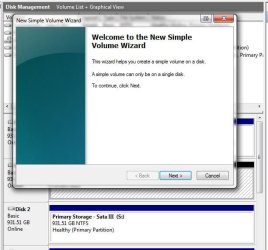
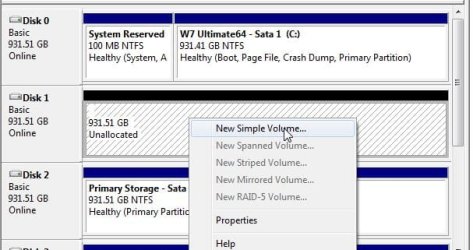
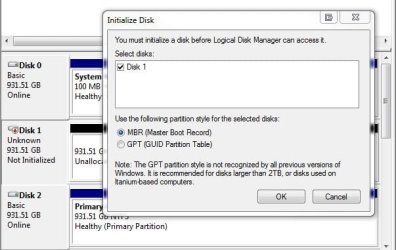
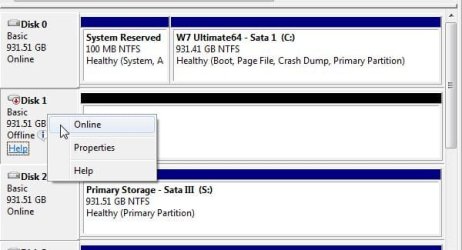
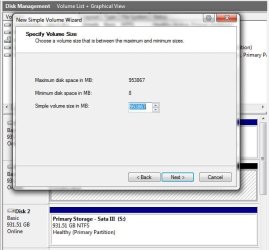
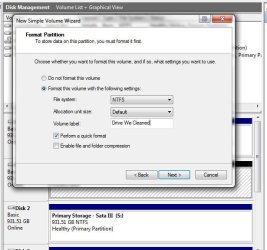
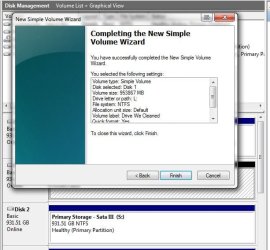
One option would be to boot from a live cd like Partition Wizard or GParted to run the format option while no Windows processes or even some 3rd party app is trying to access the drive. This will also bypass any write protection since no OS is running.
If the drive has any software such the volume being exFat to see it mounted in Vista that may be one reason for the write protection error being seen. Vista lacks any Fat support while 7 saw it returned just for things like external hard drives and flash drives, memory cards where Fat may be the default file system present.
When having one WD drive external turning out to be a GP sata II model drive enclosed in the drive saw exFat and had a form of Readi-Boost app that would bring up an installer. The installer was needed for Vista not XP or 7! I simply cleaned the drive off totally while booted live from a GParted Live cd and put a brand new NTFS partition on it.
If you already tried using the DiskPart tool and still got nowhere as far as the wipe and clean ntfs partition created the live cd option would be the next step. If that still fails you could be looking at a bad drive needing to be replaced or simply returned. Or the factory Partition Table was corrupt when you bought the drive where a full wipe is needed.
W7 Ultimate x64/W10 Pro x64/W11 Pro Triple Bo...AMD Phenom II X4 975 Deneb 3.6ghz - 965 2nd r...Kingston Hyper X DDR3 1600 1.5v 16gb - Hyper ...MSI HD Radeon 5750 1gb - MSI HD Radeon 6450 o...
Computer type
PC/Desktop
Computer Manufacturer/Model Number
Custom builds = 2
OS
W7 Ultimate x64/W10 Pro x64/W11 Pro Triple Boot - Main PC W7 Remote PC Micro ATX W7 Pro x64/W11 Pro
CPU
AMD Phenom II X4 975 Deneb 3.6ghz - 965 2nd remote pc
Motherboard
Gigabyte GA-790XTA-UD4-Gigabyte GA-880GM-D2H remote pc
Memory
Kingston Hyper X DDR3 1600 1.5v 16gb - Hyper X Fury 8gb 2nd
Graphics Card(s)
MSI HD Radeon 5750 1gb - MSI HD Radeon 6450 on mini tower
Sound Card
Creative Labs X-Fi Xtreme Audio P - Realtek onooard 2nd case
Monitor(s) Displays
ASUS VW199T-P 19" HP 2082a Main-HP 2082a 20" remote pc
Screen Resolution
Asus 1440x900 - HP 1600x900
Hard Drives
WD Black 1TB HD per OS W7, W10, and pending W11 presently on 500gb OS Drive - Pending Triple 1TB HDs for Spanned Storage/backup volume
Single 2TB external USB enclosure, single 1TB System 7 Host/Boot drive, Pending 8TB external HD for system image b
PSU
Corsair 750TX - primary / Corsair CX600 - second
Case
Antec 900-2 - SSD compatible / NZXT Vulcan mini tower
external HDD can't be initialized "The System cannot find the specifie
external HDD can't be initialized "The System cannot find the file specified"
Connection USB 3.0
Verbatim 2TB works on two other windows 7 professional computers doesn't work on mine
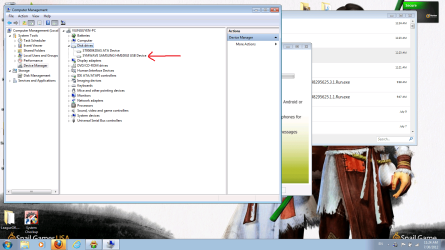
I can see the Drive in device manager.
Drive 3
Unknown
Not Initalized
Thanks in advance for any help!
Attachments
image 1.pdf
1.3 MB
· Views: 242
image 2.pdf
1.2 MB
· Views: 114
image 3.pdf
1.2 MB
· Views: 97
My Computer
At a glance
Windows 7 Professional X64Intel Core i7-960 Bloomfield 3.2GHz LGA 1366 ...12 GBATI Radeon HD 5900
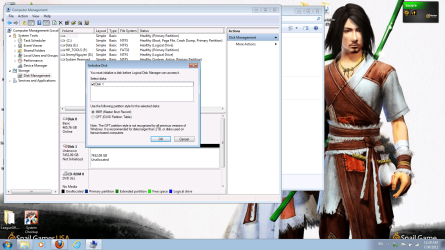
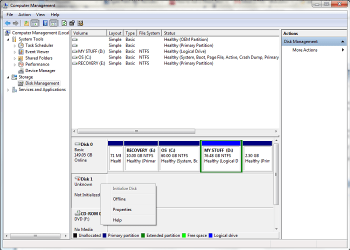
Are you plugging into a USB 3.0 or 2.0 port? The images show the Disk Management prompting to select either the MBR(Master Boot Record) or GUID option in order to see the drive initialize. That's a normal prompt where you decide if you will ever want to make it bootable or simply see a new Partition Table created.
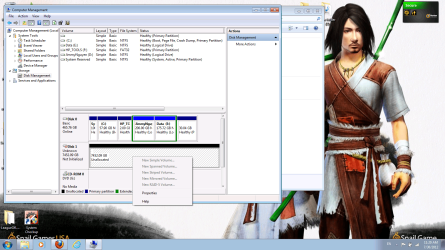
From there you should be able to create a new volume on the spot! Look over the images attached to see how that works.
W7 Ultimate x64/W10 Pro x64/W11 Pro Triple Bo...AMD Phenom II X4 975 Deneb 3.6ghz - 965 2nd r...Kingston Hyper X DDR3 1600 1.5v 16gb - Hyper ...MSI HD Radeon 5750 1gb - MSI HD Radeon 6450 o...
Computer type
PC/Desktop
Computer Manufacturer/Model Number
Custom builds = 2
OS
W7 Ultimate x64/W10 Pro x64/W11 Pro Triple Boot - Main PC W7 Remote PC Micro ATX W7 Pro x64/W11 Pro
CPU
AMD Phenom II X4 975 Deneb 3.6ghz - 965 2nd remote pc
Motherboard
Gigabyte GA-790XTA-UD4-Gigabyte GA-880GM-D2H remote pc
Memory
Kingston Hyper X DDR3 1600 1.5v 16gb - Hyper X Fury 8gb 2nd
Graphics Card(s)
MSI HD Radeon 5750 1gb - MSI HD Radeon 6450 on mini tower
Sound Card
Creative Labs X-Fi Xtreme Audio P - Realtek onooard 2nd case
Monitor(s) Displays
ASUS VW199T-P 19" HP 2082a Main-HP 2082a 20" remote pc
Screen Resolution
Asus 1440x900 - HP 1600x900
Hard Drives
WD Black 1TB HD per OS W7, W10, and pending W11 presently on 500gb OS Drive - Pending Triple 1TB HDs for Spanned Storage/backup volume
Single 2TB external USB enclosure, single 1TB System 7 Host/Boot drive, Pending 8TB external HD for system image b
PSU
Corsair 750TX - primary / Corsair CX600 - second
Case
Antec 900-2 - SSD compatible / NZXT Vulcan mini tower
Conected to USB 3.0 port on computer.
When I select either MBR or GUID I get the same response shown in image 2.
Virtual Disk Manager Window: "The System cannot find the file specified"
My Computer
At a glance
Windows 7 Professional X64Intel Core i7-960 Bloomfield 3.2GHz LGA 1366 ...12 GBATI Radeon HD 5900
You can use the snipping tool in the Start>Accessories to grab images if you want rather then the need to attach pdf files. But the first thing to look at would be in the Device Manager under storage devices to right click on the drive item you find there to see if Windows will automatically search for and install the controller driver needed for you.
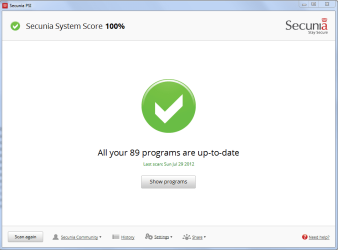
Lately I had to coach someone else who received an external enclosure as a gift on how to debug a similar problem of seeing the necessary driver go on Vista not 7 however. Checking for updates manually and looking at the optional updates might see the update you need included there or running the Secunia Personal Software Inspector would be an alternate route to take to see this cleared up for you.
W7 Ultimate x64/W10 Pro x64/W11 Pro Triple Bo...AMD Phenom II X4 975 Deneb 3.6ghz - 965 2nd r...Kingston Hyper X DDR3 1600 1.5v 16gb - Hyper ...MSI HD Radeon 5750 1gb - MSI HD Radeon 6450 o...
Computer type
PC/Desktop
Computer Manufacturer/Model Number
Custom builds = 2
OS
W7 Ultimate x64/W10 Pro x64/W11 Pro Triple Boot - Main PC W7 Remote PC Micro ATX W7 Pro x64/W11 Pro
CPU
AMD Phenom II X4 975 Deneb 3.6ghz - 965 2nd remote pc
Motherboard
Gigabyte GA-790XTA-UD4-Gigabyte GA-880GM-D2H remote pc
Memory
Kingston Hyper X DDR3 1600 1.5v 16gb - Hyper X Fury 8gb 2nd
Graphics Card(s)
MSI HD Radeon 5750 1gb - MSI HD Radeon 6450 on mini tower
Sound Card
Creative Labs X-Fi Xtreme Audio P - Realtek onooard 2nd case
Monitor(s) Displays
ASUS VW199T-P 19" HP 2082a Main-HP 2082a 20" remote pc
Screen Resolution
Asus 1440x900 - HP 1600x900
Hard Drives
WD Black 1TB HD per OS W7, W10, and pending W11 presently on 500gb OS Drive - Pending Triple 1TB HDs for Spanned Storage/backup volume
Single 2TB external USB enclosure, single 1TB System 7 Host/Boot drive, Pending 8TB external HD for system image b
PSU
Corsair 750TX - primary / Corsair CX600 - second
Case
Antec 900-2 - SSD compatible / NZXT Vulcan mini tower
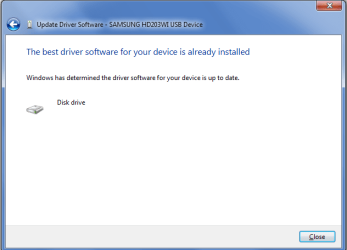
All programs and drivers are up to date. Still shown as unknown device and I can't even try to initialize it now. Will search for referenced coaching to vista issue and extenal. next step is to delete driver and reininstall driver?
Did that not change. Still cannot find specified file
Thanks for the tips.
Attachments
Up to date.PNG
18.4 KB
· Views: 34
USB drive driver status.PNG
13.4 KB
· Views: 40
drive avILble no usb yucks.PNG
36.4 KB
· Views: 27
My Computer
At a glance
Windows 7 Professional X64Intel Core i7-960 Bloomfield 3.2GHz LGA 1366 ...12 GBATI Radeon HD 5900
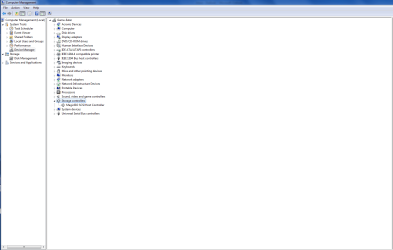
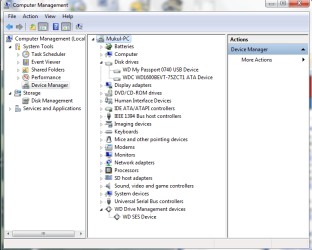
Have you looked under Storage controllers? You should see the manufacturer's name listed right away. Once the drive is initialized provided it is working as it should then you should see it appear under the Disk drives.
With one external drive without it actually having problems but having the need for an extra drive during the 7 beta/RC days I simply pulled the drive out of the enclosure to install internally and called it a day. If there's a controller problem which doesn't seem so likely or you can extract the drive carefully long enough to connect it internally if there's no eSata option you would find out if the drive itself will work or need to be replaced.
Here that old 500gb external is now presently the internal storage drive on the old Vista case rather then putting it back into the factory not so well vented casing. I have a fan cooled enclosure for any external drives instead!
W7 Ultimate x64/W10 Pro x64/W11 Pro Triple Bo...AMD Phenom II X4 975 Deneb 3.6ghz - 965 2nd r...Kingston Hyper X DDR3 1600 1.5v 16gb - Hyper ...MSI HD Radeon 5750 1gb - MSI HD Radeon 6450 o...
Computer type
PC/Desktop
Computer Manufacturer/Model Number
Custom builds = 2
OS
W7 Ultimate x64/W10 Pro x64/W11 Pro Triple Boot - Main PC W7 Remote PC Micro ATX W7 Pro x64/W11 Pro
CPU
AMD Phenom II X4 975 Deneb 3.6ghz - 965 2nd remote pc
Motherboard
Gigabyte GA-790XTA-UD4-Gigabyte GA-880GM-D2H remote pc
Memory
Kingston Hyper X DDR3 1600 1.5v 16gb - Hyper X Fury 8gb 2nd
Graphics Card(s)
MSI HD Radeon 5750 1gb - MSI HD Radeon 6450 on mini tower
Sound Card
Creative Labs X-Fi Xtreme Audio P - Realtek onooard 2nd case
Monitor(s) Displays
ASUS VW199T-P 19" HP 2082a Main-HP 2082a 20" remote pc
Screen Resolution
Asus 1440x900 - HP 1600x900
Hard Drives
WD Black 1TB HD per OS W7, W10, and pending W11 presently on 500gb OS Drive - Pending Triple 1TB HDs for Spanned Storage/backup volume
Single 2TB external USB enclosure, single 1TB System 7 Host/Boot drive, Pending 8TB external HD for system image b
PSU
Corsair 750TX - primary / Corsair CX600 - second
Case
Antec 900-2 - SSD compatible / NZXT Vulcan mini tower
Verified all drivers up to date. If i open the enclosure I loose a 7 year warranty. USB 3.0 is the only external connection besides power on the Verbatim 2tb external drive.
Attachments
storage controllers.PNG
30.5 KB
· Views: 28
My Computer
At a glance
Windows 7 Professional X64Intel Core i7-960 Bloomfield 3.2GHz LGA 1366 ...12 GBATI Radeon HD 5900
I think I have the same problem. I bought a 1tb verbatim store n go external hard drive. I accidently broke the usb connector on the external harddrive and bought a new rocketfish enclosure to replace. I plug it into my laptop and it show the hard drive on the device manager but it can't be initialized or rename. please help .. pictures should show the problem i have .Thanks
There's no partition on it to be renamed. vunguyen27 Welcome to SF! by the way.
What you see there is a raw unpartitioned and formatted drive to start with not having seen even a factory volume for either NTFS or exFat. First the Partition Table and then the partition(s) to be seen have to be created as well as formatted before the drive can be made useable.
If both of these drives are 3.5" sized drives you wouldn't be able to install them internally for sure while the use of a live cd program like Partition Wizard or GParted simply to see if a live method is able to work with them would be a thought. The screens back in Post #23 show how to do it while in the Disk Management tool. Those were created after having wiped the drive shown there using the Clean command in the DiskPart tool.
That would be the other option seen in Windows by way of the command prompt to see a new volume created. You first need something on the drive(s) however before they can actually be initialized by simply right clicking on the new volume to select a drive letter. Then Windows will proceed to mount the volume as a new logical drive.
The reeason for suggesting a live cd however is to get past any OS problems or restrictions that could be getting in the way as far as using the simple option right seen right there in the DM tool. If the controllers are good on the external casing as well as the usb enclosure you should have any problem with partitioning either of the two.
W7 Ultimate x64/W10 Pro x64/W11 Pro Triple Bo...AMD Phenom II X4 975 Deneb 3.6ghz - 965 2nd r...Kingston Hyper X DDR3 1600 1.5v 16gb - Hyper ...MSI HD Radeon 5750 1gb - MSI HD Radeon 6450 o...
Computer type
PC/Desktop
Computer Manufacturer/Model Number
Custom builds = 2
OS
W7 Ultimate x64/W10 Pro x64/W11 Pro Triple Boot - Main PC W7 Remote PC Micro ATX W7 Pro x64/W11 Pro
CPU
AMD Phenom II X4 975 Deneb 3.6ghz - 965 2nd remote pc
Motherboard
Gigabyte GA-790XTA-UD4-Gigabyte GA-880GM-D2H remote pc
Memory
Kingston Hyper X DDR3 1600 1.5v 16gb - Hyper X Fury 8gb 2nd
Graphics Card(s)
MSI HD Radeon 5750 1gb - MSI HD Radeon 6450 on mini tower
Sound Card
Creative Labs X-Fi Xtreme Audio P - Realtek onooard 2nd case
Monitor(s) Displays
ASUS VW199T-P 19" HP 2082a Main-HP 2082a 20" remote pc
Screen Resolution
Asus 1440x900 - HP 1600x900
Hard Drives
WD Black 1TB HD per OS W7, W10, and pending W11 presently on 500gb OS Drive - Pending Triple 1TB HDs for Spanned Storage/backup volume
Single 2TB external USB enclosure, single 1TB System 7 Host/Boot drive, Pending 8TB external HD for system image b
PSU
Corsair 750TX - primary / Corsair CX600 - second
Case
Antec 900-2 - SSD compatible / NZXT Vulcan mini tower
@vunguyen27: there is no solution for this even my HDD got the same problem as yours i have tried all the possibilities but no use the media in that is damaged.....
My Computer
At a glance
windows 7 ultimate 32bit
OS
windows 7 ultimate 32bit
Hard Drives
my WD external hdd is detected but not showing the drive in mycomputer how can i fix it could u please solve it and send me to my mail id [email protected]
One reason I suggested installing it internally for a 3.5" model would be on a desktop to find out if the drive itself or the controller is toast. Since one drive was placed into a separate enclosure but if still being seen in the DM that shows the drive itself is functional to a certain extend that is.
Some years I had one go belly up when you could read everything on the drive but could not write to it in any form. The write heads part was foobar! That drive wore out prematurely however rather then being a defective HD.
For anything external these days I simply slap a new drive into an enclosure rather then buying anything self contained models. That can help recover data from both ide and sata drives alike when an old case finally gives out.
That would be a consideration for you, erikegg69 over continuing to fuss with what seems like a bad controller. So far I've had one of the three models in use now for the last years and swapped drives in and out both ide and sata without one problem as long as the drive was still working.
I could have opted for one seeing an eSata connection but had to go univeral here since I seem to be the one looking after Vista and 7 laptops as well as XP, Vista, and 7 desktops.
W7 Ultimate x64/W10 Pro x64/W11 Pro Triple Bo...AMD Phenom II X4 975 Deneb 3.6ghz - 965 2nd r...Kingston Hyper X DDR3 1600 1.5v 16gb - Hyper ...MSI HD Radeon 5750 1gb - MSI HD Radeon 6450 o...
Computer type
PC/Desktop
Computer Manufacturer/Model Number
Custom builds = 2
OS
W7 Ultimate x64/W10 Pro x64/W11 Pro Triple Boot - Main PC W7 Remote PC Micro ATX W7 Pro x64/W11 Pro
CPU
AMD Phenom II X4 975 Deneb 3.6ghz - 965 2nd remote pc
Motherboard
Gigabyte GA-790XTA-UD4-Gigabyte GA-880GM-D2H remote pc
Memory
Kingston Hyper X DDR3 1600 1.5v 16gb - Hyper X Fury 8gb 2nd
Graphics Card(s)
MSI HD Radeon 5750 1gb - MSI HD Radeon 6450 on mini tower
Sound Card
Creative Labs X-Fi Xtreme Audio P - Realtek onooard 2nd case
Monitor(s) Displays
ASUS VW199T-P 19" HP 2082a Main-HP 2082a 20" remote pc
Screen Resolution
Asus 1440x900 - HP 1600x900
Hard Drives
WD Black 1TB HD per OS W7, W10, and pending W11 presently on 500gb OS Drive - Pending Triple 1TB HDs for Spanned Storage/backup volume
Single 2TB external USB enclosure, single 1TB System 7 Host/Boot drive, Pending 8TB external HD for system image b
PSU
Corsair 750TX - primary / Corsair CX600 - second
Case
Antec 900-2 - SSD compatible / NZXT Vulcan mini tower
I would start looking at the usb port you are using as well as the cable the drive came with and port on the external enclosure as a possible cause. If you have a bad port on the system or enclosure which is always possible or a bad cord needing to be replaced that will stall the works! Often the enclosures use the same type of cord as the usb cable for a printer noting the smaller square shaped connector on one end.
Once you can rule any possible usb problem removing the drive from the enclosure to install internally especially if you are running on a desktop there to see if the drive itself is good or bad. This will isolate the drive itself from everything else.
If it partitions and formats on the spot then you would know the problem is simply tracing it back to a connector or port or even bad controller on the enclosure itself. But if it still fails to see working results then you will know the drive is foobar and should return it for exchange or refund if you had just bought it.
W7 Ultimate x64/W10 Pro x64/W11 Pro Triple Bo...AMD Phenom II X4 975 Deneb 3.6ghz - 965 2nd r...Kingston Hyper X DDR3 1600 1.5v 16gb - Hyper ...MSI HD Radeon 5750 1gb - MSI HD Radeon 6450 o...
Computer type
PC/Desktop
Computer Manufacturer/Model Number
Custom builds = 2
OS
W7 Ultimate x64/W10 Pro x64/W11 Pro Triple Boot - Main PC W7 Remote PC Micro ATX W7 Pro x64/W11 Pro
CPU
AMD Phenom II X4 975 Deneb 3.6ghz - 965 2nd remote pc
Motherboard
Gigabyte GA-790XTA-UD4-Gigabyte GA-880GM-D2H remote pc
Memory
Kingston Hyper X DDR3 1600 1.5v 16gb - Hyper X Fury 8gb 2nd
Graphics Card(s)
MSI HD Radeon 5750 1gb - MSI HD Radeon 6450 on mini tower
Sound Card
Creative Labs X-Fi Xtreme Audio P - Realtek onooard 2nd case
Monitor(s) Displays
ASUS VW199T-P 19" HP 2082a Main-HP 2082a 20" remote pc
Screen Resolution
Asus 1440x900 - HP 1600x900
Hard Drives
WD Black 1TB HD per OS W7, W10, and pending W11 presently on 500gb OS Drive - Pending Triple 1TB HDs for Spanned Storage/backup volume
Single 2TB external USB enclosure, single 1TB System 7 Host/Boot drive, Pending 8TB external HD for system image b
PSU
Corsair 750TX - primary / Corsair CX600 - second
Case
Antec 900-2 - SSD compatible / NZXT Vulcan mini tower
i have got the similar problem with my wd(1 tb). it is showing up in disk management and devices and printers but not in my computer. when i try to initialise the disk in disk management, it says the request could not be performed because of an I/O device error. please tell me how to get it work again...
The next time you are in the Disk Management look for the square section at the beginning of the volume for the external drive there. Right click on that to see if you can change it from offline to online. Then go upto the menu bar>Actions to select the rescan option before a right click on the volume itself to use the Change drive letter option.
Sometimes a new drive plugged in or installed internally even will be in the offline status. Once that is back online a rescan will let Windows know it is. From there you simply assign a drive letter to get it going and appear in WE.
The other thing to do in the Device Manager while not generally needed would be looking for any "other devices" usually being the mass storage controller wasn't detected and installed automatically by Windows as it should have been since WD drives are Plug'n'Play to start with. The driver install needs a little push at times to get that going.
W7 Ultimate x64/W10 Pro x64/W11 Pro Triple Bo...AMD Phenom II X4 975 Deneb 3.6ghz - 965 2nd r...Kingston Hyper X DDR3 1600 1.5v 16gb - Hyper ...MSI HD Radeon 5750 1gb - MSI HD Radeon 6450 o...
Computer type
PC/Desktop
Computer Manufacturer/Model Number
Custom builds = 2
OS
W7 Ultimate x64/W10 Pro x64/W11 Pro Triple Boot - Main PC W7 Remote PC Micro ATX W7 Pro x64/W11 Pro
CPU
AMD Phenom II X4 975 Deneb 3.6ghz - 965 2nd remote pc
Motherboard
Gigabyte GA-790XTA-UD4-Gigabyte GA-880GM-D2H remote pc
Memory
Kingston Hyper X DDR3 1600 1.5v 16gb - Hyper X Fury 8gb 2nd
Graphics Card(s)
MSI HD Radeon 5750 1gb - MSI HD Radeon 6450 on mini tower
Sound Card
Creative Labs X-Fi Xtreme Audio P - Realtek onooard 2nd case
Monitor(s) Displays
ASUS VW199T-P 19" HP 2082a Main-HP 2082a 20" remote pc
Screen Resolution
Asus 1440x900 - HP 1600x900
Hard Drives
WD Black 1TB HD per OS W7, W10, and pending W11 presently on 500gb OS Drive - Pending Triple 1TB HDs for Spanned Storage/backup volume
Single 2TB external USB enclosure, single 1TB System 7 Host/Boot drive, Pending 8TB external HD for system image b
PSU
Corsair 750TX - primary / Corsair CX600 - second
Case
Antec 900-2 - SSD compatible / NZXT Vulcan mini tower
i am not getting the option for getting it online. please have a look at the attachments. these are the options i am getting in device manager and disk management. also rescanning disk is not helping.
i did get the option to initialize the disk earlier, but i don't know why m not getting it now. bt even on selecting the option for initializing, it just said that the request could not be performed because of an I/O device error. and now if i select the offline option, then again it says the same thing.. I/O device error...
Likely the first thing you will need to do there is see a Partition Table created. The DM shows the drive is actually online but lacking what it needs! By right clicking in the volume area you may see the prompt for this.
Is this on a WD Eseentials or newer model series? On the Essentials those are shipped with exFat volumes to be Windows/Mac compatible. The Windows only models will ship with NTFS or be found "raw". With self contained drives generally a factory volume would be present however.
The external enclosure is being reported but not the drive itself apparently. You may received a bad drive. The fact that the enclosure is online indicates the mass storage controller is showing up. This is why I suggested taking a look in the Device Manager there to see if the usb enclosure item is present.
During 7 beta and RC testing I actually followed one guide to remove the drive itself to run it internally. But the drive was seen immediately when first plugged in new with the factory partition on it.
W7 Ultimate x64/W10 Pro x64/W11 Pro Triple Bo...AMD Phenom II X4 975 Deneb 3.6ghz - 965 2nd r...Kingston Hyper X DDR3 1600 1.5v 16gb - Hyper ...MSI HD Radeon 5750 1gb - MSI HD Radeon 6450 o...
Computer type
PC/Desktop
Computer Manufacturer/Model Number
Custom builds = 2
OS
W7 Ultimate x64/W10 Pro x64/W11 Pro Triple Boot - Main PC W7 Remote PC Micro ATX W7 Pro x64/W11 Pro
CPU
AMD Phenom II X4 975 Deneb 3.6ghz - 965 2nd remote pc
Motherboard
Gigabyte GA-790XTA-UD4-Gigabyte GA-880GM-D2H remote pc
Memory
Kingston Hyper X DDR3 1600 1.5v 16gb - Hyper X Fury 8gb 2nd
Graphics Card(s)
MSI HD Radeon 5750 1gb - MSI HD Radeon 6450 on mini tower
Sound Card
Creative Labs X-Fi Xtreme Audio P - Realtek onooard 2nd case
Monitor(s) Displays
ASUS VW199T-P 19" HP 2082a Main-HP 2082a 20" remote pc
Screen Resolution
Asus 1440x900 - HP 1600x900
Hard Drives
WD Black 1TB HD per OS W7, W10, and pending W11 presently on 500gb OS Drive - Pending Triple 1TB HDs for Spanned Storage/backup volume
Single 2TB external USB enclosure, single 1TB System 7 Host/Boot drive, Pending 8TB external HD for system image b
PSU
Corsair 750TX - primary / Corsair CX600 - second
Case
Antec 900-2 - SSD compatible / NZXT Vulcan mini tower
external HDD can't be initialized "the device is not ready
hello night hawk
I have same problem,it says I/O device error and other times data error (cycle redudancy check) from disk manager.I have tried everything you have suggested and now when i try to do a clean all from cmd its says"diskpart has encountered an error,the semaphore timeout period had expired.see the system event log for more info".Have been trying to fix this WD terradisk for 2 sleepless nights now and it was sent from the USA and barely a year old.Please please help me out on this one