
I have a WD MyBook 3 TB external HDD. I can see the drive letter in Windows Explorer but the name I had for it is no longer there and the window freezes when trying to access it, disallowing viewing of any files. I was going to take a look at in through Disk Management, but when opening DiskMgmt with the hard drive plugged in the window never opens and reads 'Connecting to Virtual Disk Service'. When the hard drive is unplugged I can use Disk Management just fine.
The drive is able to be viewed in Device Manager. I tried uninstalling the drivers but this did not work.
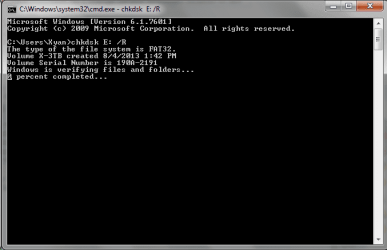
I am currently running a "chkdsk /r" on the drive. It has been running for about 9 hours now and is 0% complete on verifying files and folders. (see image) Before it started this step I noticed it was back to normal in Windows Explorer, but I did not try to open the drive to view any folders. It also showed up in Disk Management as that was open in the background when I started the command.
I found this very odd, because once this step started it was back to the issues before.
Do you think the chkdsk is working properly? I can hear the disks spinning and the light is flashing like it is being used. I would like to preserve the 2 TB of data in use, but if it's not an option I would just like to be able to use the hard drive again.
Would quitting out of this cause damage?
The issue started after using my netgear r6300v2 ReadyShare feature. I used this in the past with success, but stopped since it took forever to reindex and view folders/files when I accessed it through DLNA on my ps3. I was going through the files that were showing up and it suddenly stopped working. The drive was not even viewable through the routers settings after this happened, and all the issues listed above started showing.
I have tried it on another PC and received the same issues as well.
Any thoughts or advice? Should I just leave the chkdsk running? Should I kill it and try to duplicate the results where it appeared to be back to normal - just run a chkdsk instead of a chkdsk /r?
Any thoughts or advice would be greatly appreciated.
The drive is able to be viewed in Device Manager. I tried uninstalling the drivers but this did not work.
I am currently running a "chkdsk /r" on the drive. It has been running for about 9 hours now and is 0% complete on verifying files and folders. (see image) Before it started this step I noticed it was back to normal in Windows Explorer, but I did not try to open the drive to view any folders. It also showed up in Disk Management as that was open in the background when I started the command.
I found this very odd, because once this step started it was back to the issues before.
Do you think the chkdsk is working properly? I can hear the disks spinning and the light is flashing like it is being used. I would like to preserve the 2 TB of data in use, but if it's not an option I would just like to be able to use the hard drive again.
Would quitting out of this cause damage?
The issue started after using my netgear r6300v2 ReadyShare feature. I used this in the past with success, but stopped since it took forever to reindex and view folders/files when I accessed it through DLNA on my ps3. I was going through the files that were showing up and it suddenly stopped working. The drive was not even viewable through the routers settings after this happened, and all the issues listed above started showing.
I have tried it on another PC and received the same issues as well.
Any thoughts or advice? Should I just leave the chkdsk running? Should I kill it and try to duplicate the results where it appeared to be back to normal - just run a chkdsk instead of a chkdsk /r?
Any thoughts or advice would be greatly appreciated.
My Computer
- Computer type
- Laptop
- Computer Manufacturer/Model Number
- Asus
- OS
- Windows 7 Ultimate x64
- CPU
- Intel i7
- Memory
- 6 GB
- Graphics Card(s)
- nvidia geforce gt540m
- Hard Drives
- 750 GB
3 TB external WD HDD
- Browser
- chrome


