Solved External HDD/DSKCHK problem/question.

miztrniceguy

New member
Member
Local time
10:35 AM
Messages
64
Location
Kansas City
Hi and thanks in advance for the help.

tl;dr= Can I abort step 5 of CHKDSK /r ?

We have a fairly new (Day 27) WD My Passport USB drive that my wife was using with her laptop, which is Win 10, and it started clicking. Knowing that is a sign of impending drive failure, I hooked it up to my Win 7 laptop to image it with Macrium Reflect so as not to lose the data, and to return the drive. She had to force shutdown because her laptop froze completely.

The drive is 4TB but only has 256ish GB of data on it.

When I started the backup in Macrium I got a message in red I needed to run CHKDSK I: /F before it could do it's thing. Ok no problem Ive run into that before. It took a while to run the first 4 stages, and when I came back to it this morning, having left it running all night, it was on Stage 5, checking free space. I scrolled back thru CMD and saw it had found some errors and repaired them, and recovered some files. Two hours go by and it's gone from 16% to 19% on checking free space. I get it, 4TB is a lot of free space. Except that MY laptop froze. It seemed like Windows Explorer crashed as everything on the screen disappeared, including toolbar, start menu etc, all that was there was my background screen. I let it sit a while, in case it was a temporary hang and would resolve itself. After about 30 min with no sign of activity, no HDD lights blinking etc, I forced shutdown and restarted. Then I initiated CHKDSK /r again for that drive. It went through the first 4 with no errors, and got to step 5 again, checking free space.

As you can see ti the attached screenshot, Disk Management says the drive (I) is healthy.

So here's my real question. Can I abort CHKDSK in step 5 safely and image he drive, or do I need to wait another 24 hours for it to check free space. The intent is to return the drive during the 30 day window.

Thanks again for the help!
Michael
 

Attachments

  • Disk Mgmt and Chkdsk.JPG
    Disk Mgmt and Chkdsk.JPG
    278 KB · Views: 1

My Computers

System One System Two

  • Computer type
    PC/Desktop
    Computer Manufacturer/Model Number
    Custom build
    OS
    Win 7 Pro 64 bit
    CPU
    i5-3570K
    Motherboard
    Asus P8Z77-V
    Memory
    16GB Corsair Vengeance 1866Mhz
    Graphics Card(s)
    nVidia GeForce 220
    Monitor(s) Displays
    20 " Acer
    Hard Drives
    500 GB WD D: Data
    160 GB WD:Hackintosh OSx Mountain Lion
    128 GB Samsung 840 EVO Win 7 Pro 64bit
    PSU
    Corsair CX600
    Cooling
    Cooler Master Hyper 212 EVO
    Keyboard
    Logitech usb
    Mouse
    Logitech usb
    Internet Speed
    100Mbps Roadrunner Ultimate
    Antivirus
    Malwarebutes Pro, SAS,MSE
    Browser
    Firefox
  • Antivirus
    Malwarebytes Lifetime, SAS Lifetime, MSE
miztrniceguy

1. If you still hear the clicking noise, posthaste initiate a return request.

2. Have you to return it to a store or Will it be picked up by the vendor on a date convenient to you?

3. If you have decided to return it, you may immediately abort check disk, if it hasn't aborted by itself by now - as I read 10 hours.

4. Download,install and run GetDataBack Pro free download and check whether it shows any data on in the disk. ( Read the documentation on their webpage on how to use it.) It is a "Try before you buy" software. You can even preview and check the integrity of the files. If it successfully shows your data on it, then we can try freeware TestDisk before you return the external disk. ( We are using Getdataback only to check whether data recovery is possible}

Data Recovery Software — Downloads
 

My Computer

OS
Windows 7 Home Premium 32 bit
GBD results

1. Connected to MY laptop, no clicking. Connected to my wife's Win 10 laptop= clicking about every 30 seconds.
2. Intent is to return to Walmart for refund.
3. Aborted CHKDSK upon reading your post. It was at 21% after all night.
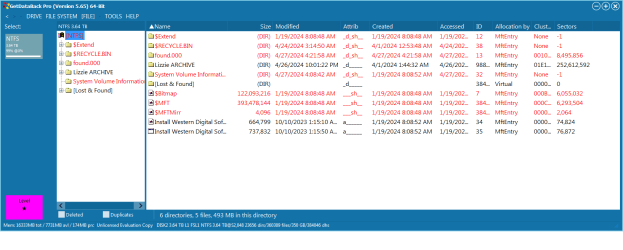
4. Ran GBD as suggested. While there are a number of files in red as you can see in attached ss, the only folder of concern is not, and is listed as Lizzie ARCHIVE.

I should be okay to rerun Macrium to image the drive now, right?

Thanks again!
 

Attachments

  • GBD screenshot.png
    GBD screenshot.png
    62.7 KB · Views: 1

My Computers

System One System Two

  • Computer type
    PC/Desktop
    Computer Manufacturer/Model Number
    Custom build
    OS
    Win 7 Pro 64 bit
    CPU
    i5-3570K
    Motherboard
    Asus P8Z77-V
    Memory
    16GB Corsair Vengeance 1866Mhz
    Graphics Card(s)
    nVidia GeForce 220
    Monitor(s) Displays
    20 " Acer
    Hard Drives
    500 GB WD D: Data
    160 GB WD:Hackintosh OSx Mountain Lion
    128 GB Samsung 840 EVO Win 7 Pro 64bit
    PSU
    Corsair CX600
    Cooling
    Cooler Master Hyper 212 EVO
    Keyboard
    Logitech usb
    Mouse
    Logitech usb
    Internet Speed
    100Mbps Roadrunner Ultimate
    Antivirus
    Malwarebutes Pro, SAS,MSE
    Browser
    Firefox
  • Antivirus
    Malwarebytes Lifetime, SAS Lifetime, MSE
....I should be okay to rerun Macrium to image the drive now, right?
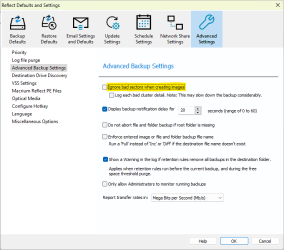
You may want to turn on 'Ignore bad sectors when creating images' in the Adavanced Backup Settings.

image.png
 

My Computers

System One System Two

  • Computer type
    Laptop
    Computer Manufacturer/Model Number
    Toshiba satellite C650D
    OS
    Windows 7 Home Premium x64
    CPU
    AMD V120
    Memory
    4GB
    Internet Speed
    150 Mbps
    Antivirus
    MSE
    Browser
    IE11, Edge, Firefox
    Other Info
    I also have W7 Pro on my System Two, and several W7 Hyper-V VMs. My other machines run Windows 10/11. Their specs are in my Ten Forums & Eleven Forum profiles.
  • Computer type
    Laptop
    System Manufacturer/Model Number
    Lenovo Thinkpad T430
    OS
    Windows 7 Pro x64
    CPU
    Intel i5-3320M
    Memory
    8 GB
    Hard Drives
    250GB Samsung SSD 860 EVO
    Other Info
    Antivirus: MSE
Dangit, even marked "Ignore bad sectors" and still get the message MFT corrupt, run CHKDSF /R

You may want to turn on 'Ignore bad sectors when creating images' in the Adavanced Backup Settings.

View attachment 423701
 

My Computers

System One System Two

  • Computer type
    PC/Desktop
    Computer Manufacturer/Model Number
    Custom build
    OS
    Win 7 Pro 64 bit
    CPU
    i5-3570K
    Motherboard
    Asus P8Z77-V
    Memory
    16GB Corsair Vengeance 1866Mhz
    Graphics Card(s)
    nVidia GeForce 220
    Monitor(s) Displays
    20 " Acer
    Hard Drives
    500 GB WD D: Data
    160 GB WD:Hackintosh OSx Mountain Lion
    128 GB Samsung 840 EVO Win 7 Pro 64bit
    PSU
    Corsair CX600
    Cooling
    Cooler Master Hyper 212 EVO
    Keyboard
    Logitech usb
    Mouse
    Logitech usb
    Internet Speed
    100Mbps Roadrunner Ultimate
    Antivirus
    Malwarebutes Pro, SAS,MSE
    Browser
    Firefox
  • Antivirus
    Malwarebytes Lifetime, SAS Lifetime, MSE

My Computers

System One System Two

  • Computer type
    Laptop
    Computer Manufacturer/Model Number
    Toshiba satellite C650D
    OS
    Windows 7 Home Premium x64
    CPU
    AMD V120
    Memory
    4GB
    Internet Speed
    150 Mbps
    Antivirus
    MSE
    Browser
    IE11, Edge, Firefox
    Other Info
    I also have W7 Pro on my System Two, and several W7 Hyper-V VMs. My other machines run Windows 10/11. Their specs are in my Ten Forums & Eleven Forum profiles.
  • Computer type
    Laptop
    System Manufacturer/Model Number
    Lenovo Thinkpad T430
    OS
    Windows 7 Pro x64
    CPU
    Intel i5-3320M
    Memory
    8 GB
    Hard Drives
    250GB Samsung SSD 860 EVO
    Other Info
    Antivirus: MSE
Thank you, that worked and image is in process!
 

My Computers

System One System Two

  • Computer type
    PC/Desktop
    Computer Manufacturer/Model Number
    Custom build
    OS
    Win 7 Pro 64 bit
    CPU
    i5-3570K
    Motherboard
    Asus P8Z77-V
    Memory
    16GB Corsair Vengeance 1866Mhz
    Graphics Card(s)
    nVidia GeForce 220
    Monitor(s) Displays
    20 " Acer
    Hard Drives
    500 GB WD D: Data
    160 GB WD:Hackintosh OSx Mountain Lion
    128 GB Samsung 840 EVO Win 7 Pro 64bit
    PSU
    Corsair CX600
    Cooling
    Cooler Master Hyper 212 EVO
    Keyboard
    Logitech usb
    Mouse
    Logitech usb
    Internet Speed
    100Mbps Roadrunner Ultimate
    Antivirus
    Malwarebutes Pro, SAS,MSE
    Browser
    Firefox
  • Antivirus
    Malwarebytes Lifetime, SAS Lifetime, MSE
Let the Macrium Image complete. Good advice from Bree.

I saw your post with the GetDataBack screenshot. Just I was about to respond, I had some visitor, my daughter :-) with her birthday cake. So had been away. The GetDataBack screenshot - shows that the Master File Table is corrupt. Checkdisk could have deleted many files with corrupt MFT entries. All that is in RED are system files/MFT entries.

On the left Pane in GetDataback I could still see Lizzie ARCHIVE which is intact. Why didn't you click on the + to open it and check the files in it in the right pane? That is the only intact folder. You can open the lost and found folder also and check the files in it.

TestDisk unfortunately will not repair corrupt MFT - check disk has already deleted many and marked some as Lost and found,. I am not sure whether you will be able to get the files in that folders from the Macrium Image. I will leave it to Bree
:-)


My Computer

OS
Windows 7 Home Premium 32 bit
Thanks for responding, Jumanji.
I actually figured out after my post that the system files were red. I then was looking at the expanded ARCHIVE folder. A lot of the files are greyed out. Does that mean they aren't recoverable? Image should be done in about a half hour.
 

My Computers

System One System Two

  • Computer type
    PC/Desktop
    Computer Manufacturer/Model Number
    Custom build
    OS
    Win 7 Pro 64 bit
    CPU
    i5-3570K
    Motherboard
    Asus P8Z77-V
    Memory
    16GB Corsair Vengeance 1866Mhz
    Graphics Card(s)
    nVidia GeForce 220
    Monitor(s) Displays
    20 " Acer
    Hard Drives
    500 GB WD D: Data
    160 GB WD:Hackintosh OSx Mountain Lion
    128 GB Samsung 840 EVO Win 7 Pro 64bit
    PSU
    Corsair CX600
    Cooling
    Cooler Master Hyper 212 EVO
    Keyboard
    Logitech usb
    Mouse
    Logitech usb
    Internet Speed
    100Mbps Roadrunner Ultimate
    Antivirus
    Malwarebutes Pro, SAS,MSE
    Browser
    Firefox
  • Antivirus
    Malwarebytes Lifetime, SAS Lifetime, MSE
As I said in my earlier posts , whatever files are shown, you can click on it to open and check the integrity, For example if it is a .doc file, it should open in Office. If it is an audio file it should play in the player. If the files do not open, well , those are corrupted.

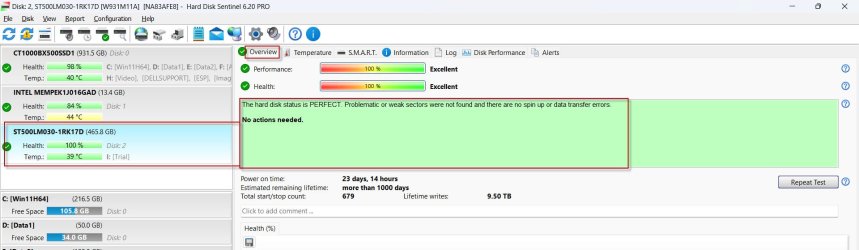
Edit: Once the image is completed, check the health of your external disk with the Trail version of Hard Disk Sentinel. Hard Disk Sentinel Trial version - HDD health and temperature monitoring

Sample screnshot:
28-04-2024 19-47-14.jpg
 
Last edited:

My Computer

OS
Windows 7 Home Premium 32 bit
I checked several files with GDB and they all opened with their respective folders.

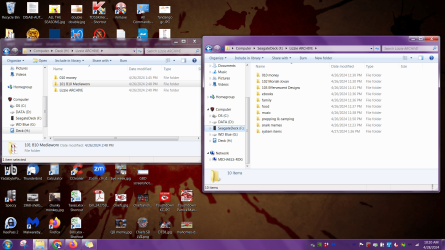
I was looking for an option to restore only one folder with subfolders from the Lizzie Archive folder in the image. I selected the option to view files in the image, as I didn't see the option in the Restore section to select that folder.
As shown in the left window, it's the folder called 101 B10 MediaWorx, opened as H drive by Reflect. I want to restore it to the new Seagate drive, which my wife has already put files on. I had created a partition on the drive to restore the full image to, but when I got to the final step in that restore process it said it was going to erase data on both partitions, even though I had selected just the one partition I had just created, so I cancelled that and changed it back to just the one partition.

Thank you again!
 

Attachments

  • files from Reflect Image.png
    files from Reflect Image.png
    1.1 MB · Views: 1

My Computers

System One System Two

  • Computer type
    PC/Desktop
    Computer Manufacturer/Model Number
    Custom build
    OS
    Win 7 Pro 64 bit
    CPU
    i5-3570K
    Motherboard
    Asus P8Z77-V
    Memory
    16GB Corsair Vengeance 1866Mhz
    Graphics Card(s)
    nVidia GeForce 220
    Monitor(s) Displays
    20 " Acer
    Hard Drives
    500 GB WD D: Data
    160 GB WD:Hackintosh OSx Mountain Lion
    128 GB Samsung 840 EVO Win 7 Pro 64bit
    PSU
    Corsair CX600
    Cooling
    Cooler Master Hyper 212 EVO
    Keyboard
    Logitech usb
    Mouse
    Logitech usb
    Internet Speed
    100Mbps Roadrunner Ultimate
    Antivirus
    Malwarebutes Pro, SAS,MSE
    Browser
    Firefox
  • Antivirus
    Malwarebytes Lifetime, SAS Lifetime, MSE
I think @Bree should be able to help you with his expertise.. ( I had never attempted to copy partition or copy files from an image and as such not qualified :-))
 

My Computer

OS
Windows 7 Home Premium 32 bit
Neither have I, as in the past I have only done full image restore when upgrading to a bigger drive, or a new computer.

It seems that when selecting the file and folder restore option it then looks for an *mbak file to retrieve folders from and doesn't see the .mrimg file

- - - Updated - - -

Neither have I, as in the past I have only done full image restore when upgrading to a bigger drive, or a new computer.

I think @Bree should be able to help you with his expertise.. ( I had never attempted to copy partition or copy files from an image and as such not qualified :-))

- - - Updated - - -

I may have figured it out. It seems I needed to create a backup file (*mbak) from the .mrimg file and then will be able to restore from that. It's in process, as that folder is the bulk of the files.
 

My Computers

System One System Two

  • Computer type
    PC/Desktop
    Computer Manufacturer/Model Number
    Custom build
    OS
    Win 7 Pro 64 bit
    CPU
    i5-3570K
    Motherboard
    Asus P8Z77-V
    Memory
    16GB Corsair Vengeance 1866Mhz
    Graphics Card(s)
    nVidia GeForce 220
    Monitor(s) Displays
    20 " Acer
    Hard Drives
    500 GB WD D: Data
    160 GB WD:Hackintosh OSx Mountain Lion
    128 GB Samsung 840 EVO Win 7 Pro 64bit
    PSU
    Corsair CX600
    Cooling
    Cooler Master Hyper 212 EVO
    Keyboard
    Logitech usb
    Mouse
    Logitech usb
    Internet Speed
    100Mbps Roadrunner Ultimate
    Antivirus
    Malwarebutes Pro, SAS,MSE
    Browser
    Firefox
  • Antivirus
    Malwarebytes Lifetime, SAS Lifetime, MSE
I was looking for an option to restore only one folder with subfolders from the Lizzie Archive folder in the image. I selected the option to view files in the image, as I didn't see the option in the Restore section to select that folder.....
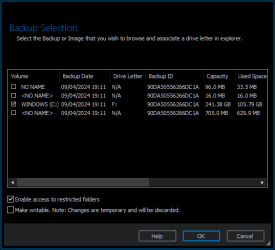
The simplest way to restore some of the files and folders from a Reflect image is to mount the .mrimg file as a virtual drive. You can then just use File Explorer to copy the files/folders that you want. Double-click on the .mrimg file to mount it. Make sure you tick the box to enable access to restricted folders.


image.png
 

My Computers

System One System Two

  • Computer type
    Laptop
    Computer Manufacturer/Model Number
    Toshiba satellite C650D
    OS
    Windows 7 Home Premium x64
    CPU
    AMD V120
    Memory
    4GB
    Internet Speed
    150 Mbps
    Antivirus
    MSE
    Browser
    IE11, Edge, Firefox
    Other Info
    I also have W7 Pro on my System Two, and several W7 Hyper-V VMs. My other machines run Windows 10/11. Their specs are in my Ten Forums & Eleven Forum profiles.
  • Computer type
    Laptop
    System Manufacturer/Model Number
    Lenovo Thinkpad T430
    OS
    Windows 7 Pro x64
    CPU
    Intel i5-3320M
    Memory
    8 GB
    Hard Drives
    250GB Samsung SSD 860 EVO
    Other Info
    Antivirus: MSE
Thank you Bree and Jumanji for your help. I have recovered all the files and formatted the faulty drive, and will return it tomorrow. Now I can concentrate on watching my Chiefs figure out who is gonna make the team as wait for the season to start! #3peat #ChiefsKingdom.

Have a good week!
 
Last edited:

My Computers

System One System Two

  • Computer type
    PC/Desktop
    Computer Manufacturer/Model Number
    Custom build
    OS
    Win 7 Pro 64 bit
    CPU
    i5-3570K
    Motherboard
    Asus P8Z77-V
    Memory
    16GB Corsair Vengeance 1866Mhz
    Graphics Card(s)
    nVidia GeForce 220
    Monitor(s) Displays
    20 " Acer
    Hard Drives
    500 GB WD D: Data
    160 GB WD:Hackintosh OSx Mountain Lion
    128 GB Samsung 840 EVO Win 7 Pro 64bit
    PSU
    Corsair CX600
    Cooling
    Cooler Master Hyper 212 EVO
    Keyboard
    Logitech usb
    Mouse
    Logitech usb
    Internet Speed
    100Mbps Roadrunner Ultimate
    Antivirus
    Malwarebutes Pro, SAS,MSE
    Browser
    Firefox
  • Antivirus
    Malwarebytes Lifetime, SAS Lifetime, MSE
Hail Bree who took you on to the shore and good luck to you. ( I am totally innocent of "#3peat #ChiefsKingdom- something to do with football ????".)
 
Last edited:

My Computer

OS
Windows 7 Home Premium 32 bit
Back
Top