
External HDD, hearing some subtle clicking sounds

Rain08

New member
Member
VIP
Local time
10:32 AM
Messages
265
Location
Manila, Philippines
Hey guys, I'm having a problem with my external HDD, just happened today, after I plugged it in, a dialog appeared saying "Do you want to scan and fix ,<insert drive name and letter here>", I clicked the option below which is continue unscanned if I can remember and because I was just gonna add a some .txt files, after pressing the option I heard subtle clicking sounds which has an interval of around 0.5~1.0 seconds, I immediately presumed that it's the click of death, I quickly remove the external drive, I returned it in place and did the scan and fix thing by windows, I'm currently not hearing some clicking sounds now. Question is, does the clicking sound appears when you don't do a check disk an external or internal drive? Just tell me if it's really need to go to a repair shop if needed.
External HDD:
Western Digital 32000BEV External HDD 298.09 GB (1 year and 9 months old)

Edit: I don't want to do the freezer trick because it's hot in here, the ice may condense and turn in to water, I'll only do it if I place it in a plastic and it has no air inside it and problem is don't have a vacuum.
Edit 2: The checkdisk stopped without any reason, when ever I click the check this disk, the dialog closes automatically, I can access the files inside though.
Edit 3: Currently doing a checkdisk for the external drive it's 3/4 on the way to the end.
 
Last edited:

My Computer My Computer

Computer type
PC/Desktop
Computer Manufacturer/Model Number
Built
OS
Windows 7 Professional 64-bit (6.1, Build 7601)
CPU
Intel Pentium G3258 @ 3.80 GHz (OC'd)
Motherboard
Gigabyte Z97-HD3
Memory
Team Elite 4 GB DDR3 1600 MHz
Graphics Card(s)
Palit GTX 1060 6 GB Super JetStream
Monitor(s) Displays
HP x20 LED Series Wide LCD Monitor
Screen Resolution
1600x900 pixels
Hard Drives
Western Digital Caviar Blue WD10EZRZ 1TB @ 7200 RPM,
Western Digital 3200BEV External HDD 298.09 GB, WD Elements WDBUZG0010BBK-05 External HDD 1TB
PSU
Seasonic G-550 550W 80+ Gold
Keyboard
Corsair K70 Rapidfire RGB
Mouse
Logitech G300S and G502
Internet Speed
2.00 Mbps
Antivirus
MSE, MBAM, MBAE
Browser
IE, Google Chrome, FF, Safari.
Other Info
Old PC:
HP Pavilion P6640D, Windows 7 Ultimate 32-bit (6.1, Build 7601), Intel Pentium Dual Core CPU E6700 @ 3.20 GHz, Foxconn 2A8C, Kingmax 2 GB DDR3 1066 MHz, Palit NVIDIA GeForce GT 610 2048 MB, Western Digital WD Blue WD5000AAKX 500 GB @ 7200 RPM, Seagate Barracuda ST3320418AS 320 GB @ 7200 RPM (former drive), Bestec ATX-250-12Z 250 Watts
Your first task is to backup all data from that drive. Do not do anything else until that is done.

Then run the hard drive manufacturer's diagnostic test program on the drive. You can download these from their website. See what it finds.

The click could be a disk head parking problem. It is possible for this to be a one-off event, but most times it is an indication of a larger, hardware based fault inside the drive.
 

My Computer My Computer

Computer type
PC/Desktop
Computer Manufacturer/Model Number
Home Built - Jan 2013
OS
Windows 7 64 Bit Home Premium SP1
CPU
i7-3820
Motherboard
Asus P9X79-PRO - Bios 4608
Memory
GSkill F3-14900CL9Q - 16GB
Graphics Card(s)
EVGA GeForce GTX660 - Driver 352.86
Sound Card
On board Realtek ALC898
Monitor(s) Displays
Acer S271HL
Screen Resolution
1920 x 1080
Hard Drives
#1- Samsung 840 Pro Series
#2- Western Digital WD1002FAEX Sata3 Black
#3- Western Digital WD1002FAEX Sata3 Black
PSU
Corsair CMPSU-850TX-V2 - 850 watt (by Seasonic)
Case
Corsair Obsidian 550D
Cooling
Standard 3 120mm case fans, Cooler Master Hyper 212 EVO
Keyboard
MS KC-0405
Mouse
Intellimouse 5-button
Internet Speed
56 Mbits/Sec (on a good day)
Antivirus
Avast & Malwarebytes
Browser
Firefox
Other Info
Asus DVD - DRW-24B1ST 24X
What hard drive manufacturer should I get? When I visited some websites earlier, I saw that WD isn't a reliable manufacturer, is that true? I need an amount that is equivalent to mine which is 298.09 GB or more (better), thinking of the cap is around 500 GB, don't care if it's large as long as I can place my data on it without worrying something bad will happen, price range of 40~50$ and the most important, it's reliable and can last for a very long time. Currently checking on newegg, can't find some yet.

Edit: USB 2.0 too, it would be better if it has a high capacity but around those price range.
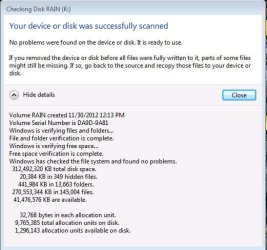
Edit 2: Forgot to add this one, after the check disk, the clicking sounds disappeared, dialog said no problems found, and it's normal as it is, but I won't plug that often, I'll just plug it in when only needed, that way I can reduce the chance of the drive failing.
 

Attachments

  • CHKDSK report for External HDD.jpg
    CHKDSK report for External HDD.jpg
    41.1 KB · Views: 3

My Computer My Computer

Computer type
PC/Desktop
Computer Manufacturer/Model Number
Built
OS
Windows 7 Professional 64-bit (6.1, Build 7601)
CPU
Intel Pentium G3258 @ 3.80 GHz (OC'd)
Motherboard
Gigabyte Z97-HD3
Memory
Team Elite 4 GB DDR3 1600 MHz
Graphics Card(s)
Palit GTX 1060 6 GB Super JetStream
Monitor(s) Displays
HP x20 LED Series Wide LCD Monitor
Screen Resolution
1600x900 pixels
Hard Drives
Western Digital Caviar Blue WD10EZRZ 1TB @ 7200 RPM,
Western Digital 3200BEV External HDD 298.09 GB, WD Elements WDBUZG0010BBK-05 External HDD 1TB
PSU
Seasonic G-550 550W 80+ Gold
Keyboard
Corsair K70 Rapidfire RGB
Mouse
Logitech G300S and G502
Internet Speed
2.00 Mbps
Antivirus
MSE, MBAM, MBAE
Browser
IE, Google Chrome, FF, Safari.
Other Info
Old PC:
HP Pavilion P6640D, Windows 7 Ultimate 32-bit (6.1, Build 7601), Intel Pentium Dual Core CPU E6700 @ 3.20 GHz, Foxconn 2A8C, Kingmax 2 GB DDR3 1066 MHz, Palit NVIDIA GeForce GT 610 2048 MB, Western Digital WD Blue WD5000AAKX 500 GB @ 7200 RPM, Seagate Barracuda ST3320418AS 320 GB @ 7200 RPM (former drive), Bestec ATX-250-12Z 250 Watts
For backups it's good to have an external drive, USB connected. I prefer the larger desktop externals that have their own power source than the smaller portable ones that draw power through the USB port, but this is a highly individualized choice. I use mine strictly for backup and do not need portability. I have had connectivity problems with portable drives and they have annoyed me.

Western Digital, Seagate, and Samsung/Fujitsu all make nice drives and are relatively reliable. All of these manufacturers have had their 'bad day'. People who have had a hard drive crash are not very forgiving of the experience, so the flaming you will read of any one of these companies is quite normal.

Basically we buy for the best deal and hope for the best.
 

My Computer My Computer

Computer type
PC/Desktop
Computer Manufacturer/Model Number
Home Built - Jan 2013
OS
Windows 7 64 Bit Home Premium SP1
CPU
i7-3820
Motherboard
Asus P9X79-PRO - Bios 4608
Memory
GSkill F3-14900CL9Q - 16GB
Graphics Card(s)
EVGA GeForce GTX660 - Driver 352.86
Sound Card
On board Realtek ALC898
Monitor(s) Displays
Acer S271HL
Screen Resolution
1920 x 1080
Hard Drives
#1- Samsung 840 Pro Series
#2- Western Digital WD1002FAEX Sata3 Black
#3- Western Digital WD1002FAEX Sata3 Black
PSU
Corsair CMPSU-850TX-V2 - 850 watt (by Seasonic)
Case
Corsair Obsidian 550D
Cooling
Standard 3 120mm case fans, Cooler Master Hyper 212 EVO
Keyboard
MS KC-0405
Mouse
Intellimouse 5-button
Internet Speed
56 Mbits/Sec (on a good day)
Antivirus
Avast & Malwarebytes
Browser
Firefox
Other Info
Asus DVD - DRW-24B1ST 24X
Back
Top