External HDD is not initialized and produces error when initializing

pkbrennan

New member
Local time
6:17 AM
Messages
3
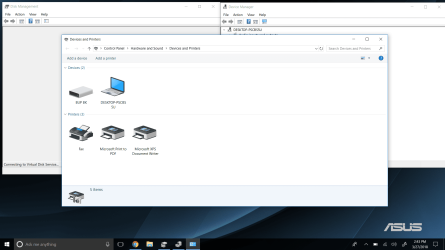
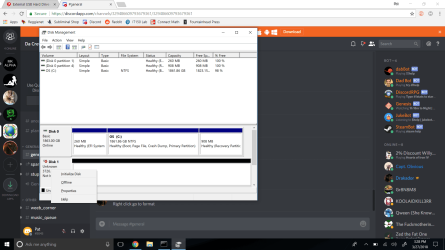
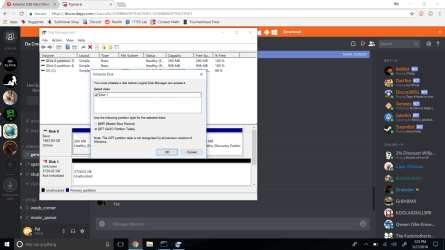
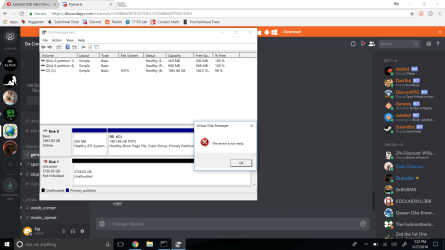
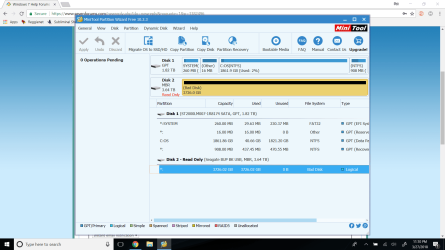
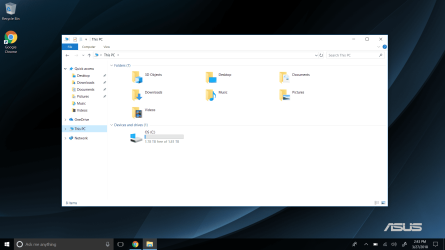
My 4TB seagate external HDD was working fine until a few days ago. When I plug it in I hear the boodoop sound and I can "Eject" it. It shows in device manager just fine but is goofy in disk management. The pictures show me attempting to initialize it and the error it produces. Mini tools partition wizard says its a bad disk and read only.
 

Attachments
  • Screenshot (1).png
    Screenshot (1).png
    163.4 KB · Views: 2
  • Screenshot (2).png
    Screenshot (2).png
    103.9 KB · Views: 1
  • Screenshot (5).png
    Screenshot (5).png
    115.6 KB · Views: 1
  • Screenshot (4).png
    Screenshot (4).png
    125.2 KB · Views: 1
  • Screenshot (6).png
    Screenshot (6).png
    121.5 KB · Views: 2

My Computer My Computer

Computer type
PC/Desktop
OS
Win 10 64 Bit
Welcome to Seven Forums.

Are you in USA?

1. Please post a screenshot of how your 4TB Seagate external HDD looks like in Partition Wizard. I need to see whether it is shown as an MBR drive or GPT drive.

2. Please read the label on the external HDD and post the exact model number.

3. For how long have you been using it? When did you buy it? Is it still under warranty?
 

My Computer My Computer

OS
Windows 7 Home Premium 32 bit
Yes I am from the USA. Central USA to be exact. SRD00F1 is the model number. I got it 9 days ago. It stopped working this past weekend. It is under warranty but I have no receipt (Idiot mistake) and I paid in cash.
 

Attachments

  • Screenshot (7).png
    Screenshot (7).png
    78.4 KB · Views: 1

My Computer My Computer

Computer type
PC/Desktop
OS
Win 10 64 Bit
Your Seagate Backup plus 4GB external drive certainly has become defective. Try to return it to the vendor and get a replacement. He must be able to trace your purchase and oblige.( I don't know how it is possible to purchase something without a bill in USA. I had never purchased one like that, cash or card, be it RadioShack, BestBuy, Target, Circuit City, Office Depot and the like or even a 5$ Marlboro in street corner Gas station convenience store )
 
Last edited:

My Computer My Computer

OS
Windows 7 Home Premium 32 bit
So there is no fix? And I got a receipt, I just threw it out:/ Such a bonehead move
 

My Computer My Computer

Computer type
PC/Desktop
OS
Win 10 64 Bit
As I said, Try to return it to the vendor and get a replacement. He must be able to trace your purchase and oblige. That would be the easiest solution or ask him to give a certified duplicate of your bill with which you can RMA your HDD.

As for any other fix, you can

1. Try your external drive on another working PC. If it is still a problem go to 2

2. Read this External Hard Drive failure. after power failure Solved - Windows 7 Help Forums This one is exactly the same problem encountered by you - drive Read only in PW. The OP took the HDD out and made a direct connection as an internal drive. His drive showed up and he could access the files ( OP's post #23). Will it be successful in your case? Cannot be said with any certainty since there are other electronics which may be faulty as shown in the third youtube video below..

Seagate Expansion Portable Drive SRD00F1 Opening Uncasing - YouTube

How to open a Seagate Backup Plus Drive - YouTube

Seagate backup plus portable Drive SRD00F1 ST1000LM035 100809471 repair data recovery - YouTube

In your case it is a 4TB drive. Even if your HDD shows up as good on direct connection, you may not be able to retrieve the data since it may be using a logical sector size of 4096 ( instead of conventional 512) in case it is an MBR drive. We may have to use TestDisk to read the drive and copy the data ( and I may come in to help at that stage). But all this only if your drive shows up as good on direct connection. ( If you do not have a desktop where you can connect directly to the motherboard, you can put the HDD in any other working external case)
 

My Computer My Computer

OS
Windows 7 Home Premium 32 bit
Boot your computer into Linux Live, and see if you can read the drive. If so, copy off all of the data that you want to keep. Then run GPARTED, delete the partition on the external drive, and create a new NTFS partition which occupies all drive space. Then format the new partition as NTFS.

Important! Double check to make sure you are doing the partition and format tasks on the external drive, not on the internal drive!

Now reboot into Windows, and see if you can use the drive.
 

My Computer My Computer

Computer type
PC/Desktop
Computer Manufacturer/Model Number
Dell
OS
Linux Mint 18.2 xfce 64-bit (VMWare host) / Windows 8.1 Pro 32-bit (VMWare guest)
CPU
Haswell
Memory
4 GB
Monitor(s) Displays
Acer 23"
Screen Resolution
1920 x 1080
Hard Drives
Two hard drives, 1TB each: One for Linux, one for my data.
Keyboard
IBM Model M
Antivirus
Sophos (Linux), Trend Micro (Windows)
Browser
Firefox, Opera
Other Info
I use Samba to share my data drive with the other computers at my house and with my guest session in VMWare Workstation Player.
Back
Top