
DelMonte733
New member
- Local time
- 4:08 PM
- Messages
- 1
Hi,
I have a Dell Inspiron 6000 that I purchased back in 2006. I replaced the internal HDD a couple of years ago with a larger one by Western Digital and have been using the old HDD as an external drive with a casing and USB cable. I am running Windows 7 Ultimate SP 1 32 bit. I have 4 GB of RAM and the WD internal is a 120 GB 5400 RPM HDD. I have kept my system pretty well updated and perform regular maintenance on it (which is the only way I am still able to use a laptop purchased in 2006 with little to no problems).
Recently, when plugging in the old internal hard drive and trying to access it, I receive the error message "E:\ is not accessible. The request could not be performed because of an I/O device error." I have received this error in the past from accidentally bumping the USB cable when working on a file on the old internal hard drive. In the past I have run check disk and it has fixed it. This time, when I run check disk as /f /r and /x, I receive the message "Cannot open volume for direct access."
The old external drive is a Hitatchi Travelstar Model: HTS541060G9AT00. It is a 60 GB 5400RPM disk drive. I am using iMicro (TM) 2.5" IDE HDD External Enclosure to make it an external hard drive. I have updated drivers and have run check disk. I have also restarted the computer. I have tried accessing it while in safe mode. Yet, still I cannot figure out what is wrong or how to fix it. I have searched other forums/threads and they say to create a system repair disk and attempt that. However, I doubt that will help considering it does not have separate partitions on it since I have reformatted it since it was an internal HDD and have been using it as an external with one partition and no OS files on it.
If anyone has and ideas please let me know. I have some files on there that I need to access ASAP if they are still recoverable. Thank you.
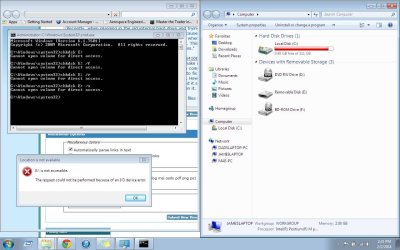
(I have attached a screen shot showing that the drive is visible in My Computer, the first error message, and the error messages from the check disk. I am running command prompt as administrator.)
I have a Dell Inspiron 6000 that I purchased back in 2006. I replaced the internal HDD a couple of years ago with a larger one by Western Digital and have been using the old HDD as an external drive with a casing and USB cable. I am running Windows 7 Ultimate SP 1 32 bit. I have 4 GB of RAM and the WD internal is a 120 GB 5400 RPM HDD. I have kept my system pretty well updated and perform regular maintenance on it (which is the only way I am still able to use a laptop purchased in 2006 with little to no problems).
Recently, when plugging in the old internal hard drive and trying to access it, I receive the error message "E:\ is not accessible. The request could not be performed because of an I/O device error." I have received this error in the past from accidentally bumping the USB cable when working on a file on the old internal hard drive. In the past I have run check disk and it has fixed it. This time, when I run check disk as /f /r and /x, I receive the message "Cannot open volume for direct access."
The old external drive is a Hitatchi Travelstar Model: HTS541060G9AT00. It is a 60 GB 5400RPM disk drive. I am using iMicro (TM) 2.5" IDE HDD External Enclosure to make it an external hard drive. I have updated drivers and have run check disk. I have also restarted the computer. I have tried accessing it while in safe mode. Yet, still I cannot figure out what is wrong or how to fix it. I have searched other forums/threads and they say to create a system repair disk and attempt that. However, I doubt that will help considering it does not have separate partitions on it since I have reformatted it since it was an internal HDD and have been using it as an external with one partition and no OS files on it.
If anyone has and ideas please let me know. I have some files on there that I need to access ASAP if they are still recoverable. Thank you.
(I have attached a screen shot showing that the drive is visible in My Computer, the first error message, and the error messages from the check disk. I am running command prompt as administrator.)
Attachments
My Computer
- Computer type
- Laptop
- Computer Manufacturer/Model Number
- Dell Inspiron 6000
- OS
- Windows 7 Ultimate SP 1 32bit
- Memory
- 4GB
- Hard Drives
- WD1200BEVE-00A0HT0 ATA Device - Western Digital 5400rpm 120GB
- Antivirus
- Avast
- Browser
- Chrome


