External HDD Not Showing Up on Minitool Partition Wizard

Amiys

New member
Local time
4:37 PM
Messages
3
Hello everyone. I have a Transcend Storejet HDD which suddenly not working. I have checked Disk Management, it says unallocated, not initialized. After reading few suggestions on this forums, I downloaded the Minitool Partition Wizard and TestDisk. However my HDD did not show up on both program. Is there anyone who has any idea on how to solve this problem. There are so many important things on the HDD that I need to access.
:confused:
 

My Computer My Computer

At a glance

windows 7 ultimate x64
Computer type
Laptop
Computer Manufacturer/Model Number
Asus
OS
windows 7 ultimate x64
Hello Amiys!

I'm sorry for your external drive! :/

If the drive was suddenly shown as Unallocated, this would mean a problem with its file system, most likely. This means that there is no way for the system to correctly read or recognize, hence give access, to the drive.

My advice would be to change the cable, change the system and try again. Also, try booting to a Linux-based Live CD:

http://www.sevenforums.com/tutorials/256518-peppermint-live-cd-dvd-usb-create-emergency-backup.html

Also, try with other data recovery softwares, but they could accidentally damage the drive more. :/

Good luck, post back!

CK_WD
 

My Computer My Computer

At a glance

Windows 7 Home Premium x64
Computer type
PC/Desktop
OS
Windows 7 Home Premium x64
Hi there, my drive stopped showing up on my computer once, I went to the properties and > driver and uninstalled the driver and then went to Device Manager and select scan for Hard Ware Changes, next time when Windows automatically installed the External HDD Drivers my drive started showing up again.
 

My Computer My Computer

At a glance

windows 7 Home 64 bit
Computer type
PC/Desktop
OS
windows 7 Home 64 bit
Hello Amiys!

I'm sorry for your external drive! :/

If the drive was suddenly shown as Unallocated, this would mean a problem with its file system, most likely. This means that there is no way for the system to correctly read or recognize, hence give access, to the drive.

My advice would be to change the cable, change the system and try again. Also, try booting to a Linux-based Live CD:

http://www.sevenforums.com/tutorials/256518-peppermint-live-cd-dvd-usb-create-emergency-backup.html

Also, try with other data recovery softwares, but they could accidentally damage the drive more. :/

Good luck, post back!

CK_WD

Oh man, I believe that is beyond my capabilities. :(
I wanted to try other data recovery system but since you said it could do more damage, I think I'll pass on that for the time being. I think I really have to send it to somebody else who knows how to use the Linux system. But by any chance is 7-Data Recovery or EaseUS Data Recovery Wizard would be the best alternative to MiniTool Data Recovery?

Hi there, my drive stopped showing up on my computer once, I went to the properties and > driver and uninstalled the driver and then went to Device Manager and select scan for Hard Ware Changes, next time when Windows automatically installed the External HDD Drivers my drive started showing up again.

I did that the first time. The HDD shows up on the Devices and Printers but not in Computer. I checked Disk Management and it says to initialized the HDD before I can use it. I read that if I try to initialize it, the HDD would be formatted and the data would be lost. Am I mistaken?

Thank you both for your replies. :)
 

My Computer My Computer

At a glance

windows 7 ultimate x64
Computer type
Laptop
Computer Manufacturer/Model Number
Asus
OS
windows 7 ultimate x64
Hi Amiys,

If your Transcend Storejet shows up in Windows Disk Management, I fail to understand why it is not showing up in MiniTool Partition Wizard. Did you plug in your external drive after starting Partiton Wizard?

Please do the following:

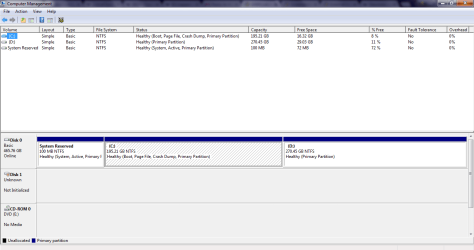
1. Run Windows Disk Management and post a full screen screenshot as per the guidelines here http://www.sevenforums.com/tutorials/274797-disk-management-post-screen-capture-image.html

Uploading Screenshots: http://www.sevenforums.com/tutorials/9733-screenshots-files-upload-post-seven-forums.html

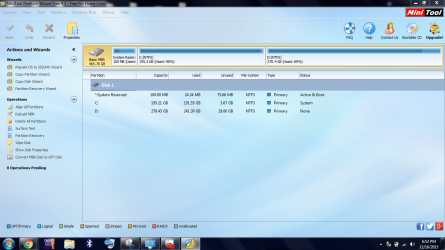
2. Please ensure that your external drive is plugged in, run Partition Wizard and post the screenshot.

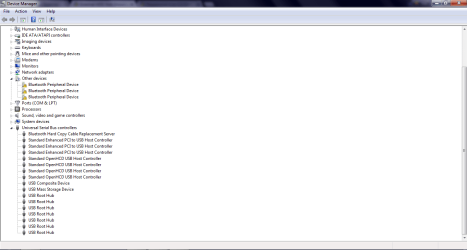
3. By what name does your external drive show up under disk drives in the Device Manager? If you can post the screenshot better.
 
Last edited:

My Computer My Computer

At a glance

Windows 7 Home Premium 32 bit
OS
Windows 7 Home Premium 32 bit
I would agree with Jumanji, please post screenshots of your Disk Management, the software and Device Manager.

Otherwise, what I have given you above is a tutorial from sevenforums on how to create the Live Linux-based CD. It explains how to make a USB stick bootable (in order for it to be able to load an OS) and how to install Peppermint (the Linux-based system in this case) on it, you have all the links you need in the tutorial. :)

From there, it is also explained how to load the OS, by connecting the flash drive and setting it as first boot in BIOS. Then you have guidance on how to try and access the damaged drive, if possible.

You don't need any other expert as this tutorial is quite simply explained, with all screenshots and links to softwares, thanks to @Golden. :)

The problem here seems to be that you cannot access your external as it is now turned to Unallocated, not Initialized, meaning damaged file system, hence no way for your OS to read it correctly. The drive may also be having additional issues, as it is not showed in the software you want to use, which could be considered odd.

In any case, before trying whichever option, make sure the drive is well connected and it spins up.

Post back and good luck! :)

CK_WD
 

My Computer My Computer

At a glance

Windows 7 Home Premium x64
Computer type
PC/Desktop
OS
Windows 7 Home Premium x64
Just an off the wall possibility. When booting other than O/S (Part Wiz or Eas ) make sure drive is in USB2. 3 may not be live.
Art.
 

My Computer My Computer

At a glance

Win7 sp1 Pro 64bit / XP sp2 Pro (games only)Intel Core 2 Duo E8400 @ 3.00GHz8.00 GB Dual-Channel DDR2 @ 400MHz (5-5-5-18)1024MB GeForce GTX 560
Computer type
PC/Desktop
Computer Manufacturer/Model Number
Home built
OS
Win7 sp1 Pro 64bit / XP sp2 Pro (games only)
CPU
Intel Core 2 Duo E8400 @ 3.00GHz
Motherboard
Intel Corporation DP35DP (CPU1)
Memory
8.00 GB Dual-Channel DDR2 @ 400MHz (5-5-5-18)
Graphics Card(s)
1024MB GeForce GTX 560
Sound Card
NVIDIA High Definition Audio
Monitor(s) Displays
SyncMaster (2048x1152@60Hz)
Hard Drives
240GB Sandisc Extreme Pro SSD
244GB Seagate ST3250410AS
488GB Seagate ST500DM002-1BD142
931GB Western Digital WDC WD1003FZEX
PSU
Corsair 720
Case
ATX
Keyboard
HID Keyboard Device Logitech
Mouse
HID-compliant mouse Microsoft
Other Info
TSSTcorp CDDVDW SH-S223L

HL-DT-ST BD-RE BH12LS35
Hello everyone sorry for the late reply. I was swamped with workload for the past week.

I, too, fail to understand why it didn't show up in the application. I tried plugged in my sister's broken HDD, it showed up as Bad Disk while mine didn't.

I made sure to plug in the HDD then only only I start the application.

Here are the screenshots I made.

The HDD showed up as USB Mass Storage Device.
 

Attachments

  • disk manage.PNG
    disk manage.PNG
    22.3 KB · Views: 2
  • minitool 2.PNG
    minitool 2.PNG
    251.6 KB · Views: 2
  • usb storage.PNG
    usb storage.PNG
    20.5 KB · Views: 2

My Computer My Computer

At a glance

windows 7 ultimate x64
Computer type
Laptop
Computer Manufacturer/Model Number
Asus
OS
windows 7 ultimate x64
hi guys, sorry if i am hijacking this thread but since there wasnt any reply and this is the same situation as i am facing, thought i would *bump* it..

any ideas how to solve this?
 

My Computer My Computer

At a glance

Windows 7 Home Premium x64
Computer type
PC/Desktop
OS
Windows 7 Home Premium x64
Back
Top