
External USB drives using letter E: not showing in "My Computer"

Toucan

New member
Local time
3:34 PM
Messages
12
External USB drives using letter E: not showing in "My Computer"

When I plug any hard drive or memory stick into either USB port on my Dell XP computer, the default E: drive letter and device does not appear in the "My Computer" window. I can see it when I access the administrative tool for storage devices and access it there also.

If I change the drive letter to any other letter, all works fine and the drive is forever denoted with whatever drive letter I have assigned. The problem is that the E: is always the default and therefore any new device requires a manual letter assignment in order to make it operate.

I think the problem began when I was downloading a large set of files from a friend's external hard drive. It all went okay until one of the files hung up the system due to some sort of fault in the file. I waited a long time for the computer to resolve the problem but nothing happened. Instead of trying the Task Manager to stop the process, I forced a shutdown with the on/off button.

I have tried uninstalling the USB driver and also uninstalling various drives. All the drives work fine in my other computers. My friend's drive worked okay after I re-booted, and I was able to complete the upload. The problem seemed to start after I got a blue screen when performing another boot-up the next day. I shut down from the blue screen (it just said there was a serious error without defining it) and restarted normally and all - except the drive letter issue - worked fine.

I would appreciate any assistance.
 

My Computer My Computer

At a glance

Winbdows 7 Home Premium 64 bit
Computer type
PC/Desktop
OS
Winbdows 7 Home Premium 64 bit
Hi Toucan,

Welcome to Seven Forums.

OK, it looks like some program you had installed had disabled the automount and always looks for and assigns a drive letter to the pen drive. (my guess). This in most cases can be corrected by entering into the program settings and making the necessary changes.

Can you recollect any such program that looks for a drive?

What programs/games did you install recently?

What are those "large set of files" you downloaded?
 

My Computer My Computer

At a glance

Windows 7 Home Premium 32 bit
OS
Windows 7 Home Premium 32 bit
Hi Jumanji,

Thanks for the reply.

I have not installed any programs recently. I have only been uploading and downloading lots of music and book files as part of backing up my data. Uploading music was the last one used before the problem occurred. The hard drive that I was reading from did not have any programs on it. I haven't loaded any new programs or games for a very long time.
 

My Computer My Computer

At a glance

Winbdows 7 Home Premium 64 bit
Computer type
PC/Desktop
OS
Winbdows 7 Home Premium 64 bit
OK, then we are going to shoot in the dark.:) ( If it misses the target the bullet just flies off into oblivion without doing any harm, so no worries.)
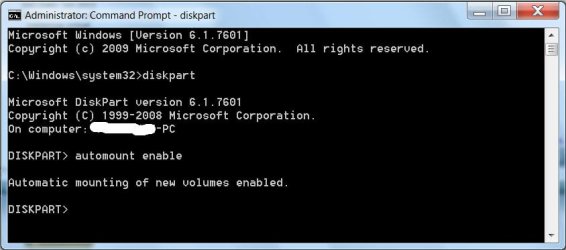
Pull out all USB drives and do a drive cleanup . My post #2 here http://www.sevenforums.com/hardware...-recognised-not-drive-letter.html#post2477076

After the drive cleanup, reboot.

Go to Start > All Programs > Accessories Right click on the Command Prompt and Run as administrator

as in the screenshot enable automount .

22-02-2014 08-49-58.jpg

diskpart [Enter]

automount enable [Enter]

exit [Enter]

exit [Enter]

Now plug in your pendrives and check.

Let us know whether the problem is resolved.
 

My Computer My Computer

At a glance

Windows 7 Home Premium 32 bit
OS
Windows 7 Home Premium 32 bit
Will do. It'll be a day before I get back to you as the problem is with the computer that I don't have with me right now - and I will definitely let you know what happens.

Thanks again...
 

My Computer My Computer

At a glance

Winbdows 7 Home Premium 64 bit
Computer type
PC/Desktop
OS
Winbdows 7 Home Premium 64 bit
I followed your suggestion today and it made no difference. I ran some other checks and found that if I have a device plugged into a USB port that defaults to E: and doesn't show, then plug another device into the other USB port (I have only two), the second device is recognized as F: and all is fine with that device. If I unplug both devices then plug the second one in again by itself, Windows picks it up still as F:. That tells me that it permanently assigned F: to that device. If I plug the wireless mouse into the USB 2 port, which is what I usually do, then an external hard drive or memory stick into the SS USB port, the problem remains the same. However, if I plug the mouse into the SS port and then a device into the regular speed port, the computer won't recognize it at all and the storage manager part of computer management locks up. Maybe this extra info will help you?
 

My Computer My Computer

At a glance

Winbdows 7 Home Premium 64 bit
Computer type
PC/Desktop
OS
Winbdows 7 Home Premium 64 bit

My Computer My Computer

At a glance

Windows 7 Home Premium 32 bit
OS
Windows 7 Home Premium 32 bit
I found a Microsoft forum where someone with the identical problem was advised of a fix. I tried that fix (uninstalling all the USB ports - which I think is what the drivecleanup did? - then downloading and running Intel Matrix Storage Manager. The computer would not run the program, showing a notice that my computer was not able to run it. So I guess I'm still stuck. Right now I am going to go back to see if there is anything else from Microsoft.

Thank you for your efforts. If I find a fix, I will post it here.
 

My Computer My Computer

At a glance

Winbdows 7 Home Premium 64 bit
Computer type
PC/Desktop
OS
Winbdows 7 Home Premium 64 bit
You should perhaps let us know your motherboard details.

If you have a USB to PS2 connector or a PS2 mouse try it instead of the USB mouse. ( After such a mouse is connected run drive cleanup after removing all USB devices so that all non-present devices and their registry entries are cleared.)

Also please give the reference to the MS thread you found.
 

My Computer My Computer

At a glance

Windows 7 Home Premium 32 bit
OS
Windows 7 Home Premium 32 bit
The machine processor is Intel Core 2.8 ghz, I7-2640M CPU 2.8 ghz. Ram is 8 gbytes. 64 - bit operating system. It's running Windows Home Premium Service Pack 1. Is this what you wanted?

I don't have any non-USB wireless mice. When I ran drive cleanup, I had already unplugged the mouse and left it unplugged while using the touchpad instead.

The forum was called Windows 7 IT Pro Forum and it referred to this site:
http://www.sevenforums.com/hardware...it-assigning-drive-letters-automatically.html

I am going to head back there now and poke around to see if I can learn some more...
 

My Computer My Computer

At a glance

Winbdows 7 Home Premium 64 bit
Computer type
PC/Desktop
OS
Winbdows 7 Home Premium 64 bit

My Computer My Computer

At a glance

Windows 10 Pro. 64/ version 1709 Windows 7 Pr...Intel i7-6800K @ 4.3Corsair Platinum 16 gig @2400EVGA GTX 1070 OC
Computer type
PC/Desktop
Computer Manufacturer/Model Number
Home made Desktop
OS
Windows 10 Pro. 64/ version 1709 Windows 7 Pro/64
CPU
Intel i7-6800K @ 4.3
Motherboard
ASUS X-99 Deluxe II
Memory
Corsair Platinum 16 gig @2400
Graphics Card(s)
EVGA GTX 1070 OC
Monitor(s) Displays
Asus 27" LED LCD/VE278Q
Screen Resolution
1920-1080 or 1280-720 HDMI
Hard Drives
INTEL SSD 730-240 Gb Sata 3.0/
PSU
EVGA Platium 1200W
Case
Phanteks Luxe Tempered Glass 8 fans/ one radiator
Cooling
XSPC/ Water Cooled CPU
Keyboard
Das 4 Professional
Mouse
Logitech M705/MX Anywhere 2-S
Internet Speed
100 mbits
Antivirus
Microsoft Security Essentials/ Malwarebytes Premium 3.0/ SAS
Browser
I.E. 11 default/Firefox/ ISP Time Warner Cable/Spectrum
Other Info
LG BluRay Burner/
Sound system-KLipsch-THX/
Icy Dock ssd Hot Swap bays.
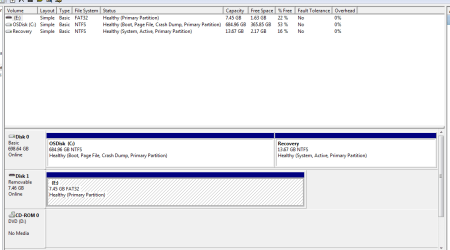
Oh me! I thought you had a desktop PC. You may give your laptop manufacturer and model Number and also as Layback suggested the Disk Management screenshot.

Referring to the old (year 2010 thread) in SevenForums, we have a more recent Dec 2013 thread here http://www.sevenforums.com/hardware...-letter-every-time-i-use-my-external-hdd.html where diskpart automount enable cleared the problem for the op. You have already tried it .

But where is that thread involving Intel Matrix Storage Manager you referred?

Worst comes worst, you may be required to do a repair install for your laptop but I shall leave the whole problem for other experienced experts to tackle.( Half-knowledge - mine- is dangerous.:))
 

My Computer My Computer

At a glance

Windows 7 Home Premium 32 bit
OS
Windows 7 Home Premium 32 bit
The machine is a Dell XPS 14Z. I'll see about a screen capture image of the screen management page...
 

My Computer My Computer

At a glance

Winbdows 7 Home Premium 64 bit
Computer type
PC/Desktop
OS
Winbdows 7 Home Premium 64 bit
Here's the captured image. Note that this particular memory stick I had plugged in was a FAT system while the computer itself is NTFS. Both types of drives or memory sticks work (or don't work) the same way in this E: drive problem.
 

Attachments

  • Capture.PNG
    Capture.PNG
    13.6 KB · Views: 2

My Computer My Computer

At a glance

Winbdows 7 Home Premium 64 bit
Computer type
PC/Desktop
OS
Winbdows 7 Home Premium 64 bit
Toucans My System Specs. Is this correct.

Computer type PC/Desktop
OS Winbdows 7 Home Premium 64 bit
 

My Computer My Computer

At a glance

Windows 10 Pro. 64/ version 1709 Windows 7 Pr...Intel i7-6800K @ 4.3Corsair Platinum 16 gig @2400EVGA GTX 1070 OC
Computer type
PC/Desktop
Computer Manufacturer/Model Number
Home made Desktop
OS
Windows 10 Pro. 64/ version 1709 Windows 7 Pro/64
CPU
Intel i7-6800K @ 4.3
Motherboard
ASUS X-99 Deluxe II
Memory
Corsair Platinum 16 gig @2400
Graphics Card(s)
EVGA GTX 1070 OC
Monitor(s) Displays
Asus 27" LED LCD/VE278Q
Screen Resolution
1920-1080 or 1280-720 HDMI
Hard Drives
INTEL SSD 730-240 Gb Sata 3.0/
PSU
EVGA Platium 1200W
Case
Phanteks Luxe Tempered Glass 8 fans/ one radiator
Cooling
XSPC/ Water Cooled CPU
Keyboard
Das 4 Professional
Mouse
Logitech M705/MX Anywhere 2-S
Internet Speed
100 mbits
Antivirus
Microsoft Security Essentials/ Malwarebytes Premium 3.0/ SAS
Browser
I.E. 11 default/Firefox/ ISP Time Warner Cable/Spectrum
Other Info
LG BluRay Burner/
Sound system-KLipsch-THX/
Icy Dock ssd Hot Swap bays.
The operating system is correct.

It is a Dell laptop - XPS 14Z
 

My Computer My Computer

At a glance

Winbdows 7 Home Premium 64 bit
Computer type
PC/Desktop
OS
Winbdows 7 Home Premium 64 bit
Try this: add a new environemt variable to your user profile
Variable name: devmgr_show_nonpresent_devices
Variable value: 1

Then go to Device Manager and select show hidden devices on the view menu

Expand the USB category and provide a screenshot

The Drive Tools for Windows should have taken care of any ghosts, but I'd like to verify what's there.
 

My Computer My Computer

At a glance

x64 (6.3.9600) Win8.1 Pro & soon dual boot x6...AMD A6-3420M APU with Radeon(tm) HD Graphics6.00 GBAMD Radeon(TM) HD 6520G
Computer type
Laptop
Computer Manufacturer/Model Number
HP Pavilion dv6-6c10us
OS
x64 (6.3.9600) Win8.1 Pro & soon dual boot x64 (6.1.7601) Win7_SP1 HomePrem
CPU
AMD A6-3420M APU with Radeon(tm) HD Graphics
Motherboard
Hewlett-Packard 1805
Memory
6.00 GB
Graphics Card(s)
AMD Radeon(TM) HD 6520G
Sound Card
(1) AMD High Definition Audio Device (2) IDT High Definiti
Monitor(s) Displays
HP W2072a 20" LCD (1600 x 900) @ 60 Hz
Screen Resolution
1366 x 768 x 32 bits (4294967296 colors) @ 60 Hz
Hard Drives
ST640LM0 00 HM641JI SATA Disk Device
Keyboard
Logitech k520 wireless KB
Mouse
Logitech m320 wireless mouse (bundled with KB)
Internet Speed
15/5 | 54 MB Wireless 'n'
Antivirus
Realtime: Defender or Avast | On-demand: Malwarebytes, ESET
Browser
IE 11 on Win8, IE 10 on win 7
Other Info
Media: [Gimp, Audacity, VLC] || Comm: [WEmail 2012, Skype] || Productivity: [OpenOffice,| Textpad] || Utils: [Sysinternals, cCleaner, Speccy, Defraggler]
First I want to thank you all for your efforts to help me out.

I am sorry, but how do I add the new variable to my user profile? I'll take care of your request as soon as I can.
 

My Computer My Computer

At a glance

Winbdows 7 Home Premium 64 bit
Computer type
PC/Desktop
OS
Winbdows 7 Home Premium 64 bit
Right click on Computer
  1. Select Properties
  2. Click on Advanced system settings in the left pane
  3. Click on the Environment Variables button in the bottom right area of the System Properties window
  4. Click on the New... button under your user variables (not System variables)
  5. Enter the following in the text boxes
Variable name: devmgr_show_nonpresent_devices
Variable value: 1
Click OK out of all System Properties windows

When you select View - > Show Hidden Devices in Device Manager there will be entries that are grayed out.

These are devices that are longer present. They could be a device that just isn't connected or they could be devices that have not been completely removed by an uninstall.

This is what I'd like to see - what if any devices are ghost devices for the USB category.

Bill
.
 

My Computer My Computer

At a glance

x64 (6.3.9600) Win8.1 Pro & soon dual boot x6...AMD A6-3420M APU with Radeon(tm) HD Graphics6.00 GBAMD Radeon(TM) HD 6520G
Computer type
Laptop
Computer Manufacturer/Model Number
HP Pavilion dv6-6c10us
OS
x64 (6.3.9600) Win8.1 Pro & soon dual boot x64 (6.1.7601) Win7_SP1 HomePrem
CPU
AMD A6-3420M APU with Radeon(tm) HD Graphics
Motherboard
Hewlett-Packard 1805
Memory
6.00 GB
Graphics Card(s)
AMD Radeon(TM) HD 6520G
Sound Card
(1) AMD High Definition Audio Device (2) IDT High Definiti
Monitor(s) Displays
HP W2072a 20" LCD (1600 x 900) @ 60 Hz
Screen Resolution
1366 x 768 x 32 bits (4294967296 colors) @ 60 Hz
Hard Drives
ST640LM0 00 HM641JI SATA Disk Device
Keyboard
Logitech k520 wireless KB
Mouse
Logitech m320 wireless mouse (bundled with KB)
Internet Speed
15/5 | 54 MB Wireless 'n'
Antivirus
Realtime: Defender or Avast | On-demand: Malwarebytes, ESET
Browser
IE 11 on Win8, IE 10 on win 7
Other Info
Media: [Gimp, Audacity, VLC] || Comm: [WEmail 2012, Skype] || Productivity: [OpenOffice,| Textpad] || Utils: [Sysinternals, cCleaner, Speccy, Defraggler]
@Toucan

1) Check for network mapped drives (they can cause drive letter conflicts as well)
> Open an command prompt window , type net use and see what's listed.
> You can delete all network mapped drives opening an admin command prompt window and typing
Code:
net use * /delete
2) Unplug your USB Mass Storage (UMS) devices again - like flash, USB disks and CD/DVD again. Run the DriveCleanup tool again. Now download DriveLetterView. Is E: still assigned?
 

My Computer My Computer

At a glance

Desk 1: Win 7 Pro x32; Desk 2: Windows 10 x64
Computer type
PC/Desktop
Computer Manufacturer/Model Number
Dell Optiplex 360 and Optiplex 755
OS
Desk 1: Win 7 Pro x32; Desk 2: Windows 10 x64
Hard Drives
500GB Crucial SSD in both Desktops
Other Info
Buffalo 6TB NAS, Raid 1
Back
Top