
- Local time
- 12:04 AM
- Messages
- 69
Sharing files, a friend just gave me FAT32 formatted USB3 external disk that he used with his Mac. The thing is that this disk does not seem to be recognized by Win Explorer, so I cannot pull any of the files from it. Looking at similar issues in this forum and elsewhere, did not really give me any solutions.
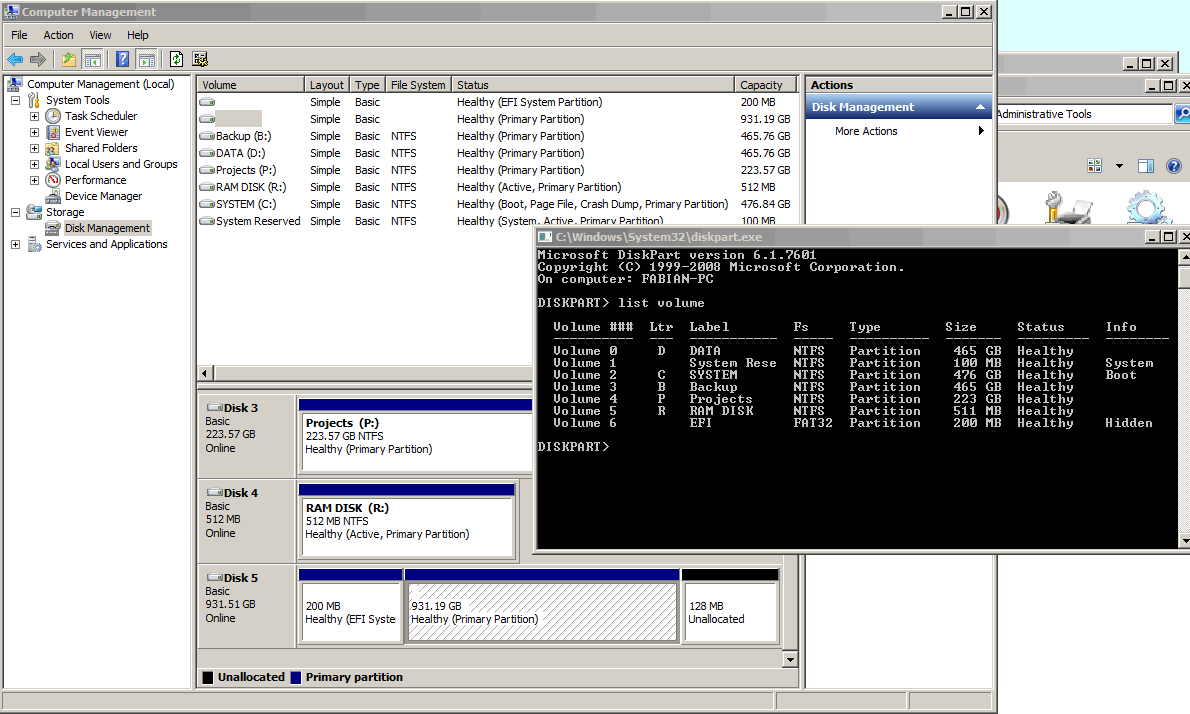
Below is a screen dump of what it looks like in Disk Management and Diskpart. As can be seen, Diskpart does not see the main 930 GB partition, while Disk Management does see it. In Disk Management, when I right-click that partition, though, all menu choices except "Delete Volume..." are greyed out. Obviously I do not want to delete the volume.
Any ideas anyone?
Below is a screen dump of what it looks like in Disk Management and Diskpart. As can be seen, Diskpart does not see the main 930 GB partition, while Disk Management does see it. In Disk Management, when I right-click that partition, though, all menu choices except "Delete Volume..." are greyed out. Obviously I do not want to delete the volume.
Any ideas anyone?
My Computer
- OS
- Win 7


