Extremely long shut down & hibernate

What I understand is the issue is, even after SP1 and some routine maintenance, we still have a system here that takes minutes to hibernate or shut down/reboot, yes?

Yes!
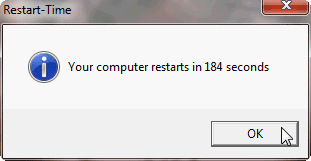
OK, installing SP1 seems to have had some effect. Hibernation times now around 1 minute 40 seconds, shut down a bit over 2 minutes. Restart time over three minutes:

149990-extremely-long-shut-down-hibernate-restart_time_19-apr-2011_laptop-2.png


This with all possible apps closed from Task Manager, all not needed processes ended, Windows set to auto login. About 40 to 45 seconds of this restart time was booting, the rest shutting down.

So, already a lot better but still too long.

Kari

And:
I have done all the normal things like these registry modifications, disabled clearing the page file when shutting down, and so on.

Kari
 

My Computer My Computer

Computer type
Laptop
Computer Manufacturer/Model Number
HP ENVY 17-1150eg
OS
Windows 10 Pro x64 EN-GB
CPU
1.6 GHz Intel Core i7-720QM Processor
Memory
6 GB
Graphics Card(s)
ATI Mobility Radeon HD 5850 Graphics
Sound Card
Beats sound system with integrated subwoofer
Monitor(s) Displays
17" laptop display, 22" LED and 32" Full HD TV through HDMI
Screen Resolution
1600*900 (1), 1920*1080 (2&3)
Hard Drives
Internal: 2 x 500 GB SATA Hard Disk Drive 7200 rpm
External: 2TB for backups, 3TB USB3 network drive for media
Cooling
As Envy runs a bit warm, I have it on a Cooler Master pad
Keyboard
Logitech diNovo Media Desktop Laser (bluetooth)
Mouse
Logitech Performance Mouse MX
Internet Speed
50/10 Mbps VDSL
Antivirus
Windows Defender 4.3.9431.0
Browser
Maxthon 3.5.2., IE11
Understood. If you can get a trace, that would be most helpful for me.
 

My Computer My Computer

Computer type
PC/Desktop
Computer Manufacturer/Model Number
Custom
OS
Windows 10 Pro x64
CPU
Intel Core i7 4790K @ 4.5GHz
Motherboard
Asus Maximus Hero VII
Memory
32GB DDR3
Graphics Card(s)
Nvidia GeForce GTX970
Sound Card
Realtek HD Audio
Screen Resolution
1920x1200
Hard Drives
1x Samsung 250GB SSD
4x WD RE 2TB (RAIDZ)
PSU
Corsair AX760i
Case
Fractal Design Define R4
Cooling
Noctua NH-D15
I uploaded it? Or did I upload wrong file (HP_DV7-1099.rar) in this post? It's the .etl file, packed to a RAR archive, uploaded to my SkyDrive.

BTW, I get now reboot times between 3 and 5 minutes. Made a test just now, first ended all process absolutely not needed:

11111.png

Remaining processes are ones I could not end. Then rebooted, and got my record: only 3 minutes 4 seconds!

Restart_time_20-APR-2011_Laptop-2.png

Kari
 

My Computer My Computer

Computer type
Laptop
Computer Manufacturer/Model Number
HP ENVY 17-1150eg
OS
Windows 10 Pro x64 EN-GB
CPU
1.6 GHz Intel Core i7-720QM Processor
Memory
6 GB
Graphics Card(s)
ATI Mobility Radeon HD 5850 Graphics
Sound Card
Beats sound system with integrated subwoofer
Monitor(s) Displays
17" laptop display, 22" LED and 32" Full HD TV through HDMI
Screen Resolution
1600*900 (1), 1920*1080 (2&3)
Hard Drives
Internal: 2 x 500 GB SATA Hard Disk Drive 7200 rpm
External: 2TB for backups, 3TB USB3 network drive for media
Cooling
As Envy runs a bit warm, I have it on a Cooler Master pad
Keyboard
Logitech diNovo Media Desktop Laser (bluetooth)
Mouse
Logitech Performance Mouse MX
Internet Speed
50/10 Mbps VDSL
Antivirus
Windows Defender 4.3.9431.0
Browser
Maxthon 3.5.2., IE11
No, that was it - I just missed it entirely ;). Downloading now.
 

My Computer My Computer

Computer type
PC/Desktop
Computer Manufacturer/Model Number
Custom
OS
Windows 10 Pro x64
CPU
Intel Core i7 4790K @ 4.5GHz
Motherboard
Asus Maximus Hero VII
Memory
32GB DDR3
Graphics Card(s)
Nvidia GeForce GTX970
Sound Card
Realtek HD Audio
Screen Resolution
1920x1200
Hard Drives
1x Samsung 250GB SSD
4x WD RE 2TB (RAIDZ)
PSU
Corsair AX760i
Case
Fractal Design Define R4
Cooling
Noctua NH-D15
A few things I see here right away - SQLserver is taking a LONG time to shut down (50+ seconds AFTER the terminate of session 1 is completed). Also, you have a makecab.exe running on shutdown spawned from a conhost.exe, which adds 20 or so seconds to shutdown (and competing with SQL flushing DBs during shutdown too, it seems, from the summary disk graph). One other thing to note, is that your Logitech bluetooth service is causing a process / service shutdown delay of over 10 seconds as well, on top of what you have (it appears to pend all service shutdowns until it finishes, for some reason that I cannot explain). The last thing would be the file layout on disk is very spread out and sporadic - it's not fragmented, per se, but it most certainly would not be considered optimal head travel either (especially considering all the writing your disk is doing on shutdown, for almost the whole sequence). If this is an SSD of course that doesn't matter, but especially towards the last 50% of the trace you have a LOT of cache flushing going on, which could be caused by slower seek times related to head travel. There's also an odd virtual router that's shutting down at the end that takes about 10 - 11 seconds as well, although that could be from VM software or any network virtualization device (it's still a long time to terminate, so I thought I'd bring it up).

I'd start with those - do you need SQL running? What is causing the makecab? Can you update the Logitech software with something that doesn't take so long to stop? Good places to start, not to mention optimizing the disk filesystem layout. The reason for the slow shutdown is disk I/O and cache utilization, so anything that can be done to speed that up will speed your boot process (as described above). You will run into the laws of physics with a mechanical HDD at some point though, so you will have a floor as to how much time you can shave off of this depending on what of this disk writing during shutdown you actually need to be occurring.
 

My Computer My Computer

Computer type
PC/Desktop
Computer Manufacturer/Model Number
Custom
OS
Windows 10 Pro x64
CPU
Intel Core i7 4790K @ 4.5GHz
Motherboard
Asus Maximus Hero VII
Memory
32GB DDR3
Graphics Card(s)
Nvidia GeForce GTX970
Sound Card
Realtek HD Audio
Screen Resolution
1920x1200
Hard Drives
1x Samsung 250GB SSD
4x WD RE 2TB (RAIDZ)
PSU
Corsair AX760i
Case
Fractal Design Define R4
Cooling
Noctua NH-D15
Thanks, Cluberti.

Sadly, it looks there's not so much I can do except trying to optimize the HD's. Long story short, I really need that SQLserver and it seems to be the biggest culprit. Maybe I just have to learn to stop the service before hibernating / shutting down. Makecab belongs to Visual Studio which I have almost always running in one or another form (old coders need to play!).

Logitech might be something I could check, although I have to say it took time and effort to find correct version of SetPoint (Logitech drivers) to work with my Bluetooth mouse / mediapad / kb combo on this rig.

Virtual Router is an excellent small app from Microsoft MVP Chris Pietschmann. It's the easiest possible way to use a computer as a Hot Spot. When sitting in garden, this laptop can get the WiFi signal from the house but for instance my Nokia or my wife's older netbook not, so using Virtual Router I kind of have a repeater in garden.

I'm very grateful for your analyze.

Kari
 

My Computer My Computer

Computer type
Laptop
Computer Manufacturer/Model Number
HP ENVY 17-1150eg
OS
Windows 10 Pro x64 EN-GB
CPU
1.6 GHz Intel Core i7-720QM Processor
Memory
6 GB
Graphics Card(s)
ATI Mobility Radeon HD 5850 Graphics
Sound Card
Beats sound system with integrated subwoofer
Monitor(s) Displays
17" laptop display, 22" LED and 32" Full HD TV through HDMI
Screen Resolution
1600*900 (1), 1920*1080 (2&3)
Hard Drives
Internal: 2 x 500 GB SATA Hard Disk Drive 7200 rpm
External: 2TB for backups, 3TB USB3 network drive for media
Cooling
As Envy runs a bit warm, I have it on a Cooler Master pad
Keyboard
Logitech diNovo Media Desktop Laser (bluetooth)
Mouse
Logitech Performance Mouse MX
Internet Speed
50/10 Mbps VDSL
Antivirus
Windows Defender 4.3.9431.0
Browser
Maxthon 3.5.2., IE11
Downloaded. Thanks, Greg.

Kari
 

My Computer My Computer

Computer type
Laptop
Computer Manufacturer/Model Number
HP ENVY 17-1150eg
OS
Windows 10 Pro x64 EN-GB
CPU
1.6 GHz Intel Core i7-720QM Processor
Memory
6 GB
Graphics Card(s)
ATI Mobility Radeon HD 5850 Graphics
Sound Card
Beats sound system with integrated subwoofer
Monitor(s) Displays
17" laptop display, 22" LED and 32" Full HD TV through HDMI
Screen Resolution
1600*900 (1), 1920*1080 (2&3)
Hard Drives
Internal: 2 x 500 GB SATA Hard Disk Drive 7200 rpm
External: 2TB for backups, 3TB USB3 network drive for media
Cooling
As Envy runs a bit warm, I have it on a Cooler Master pad
Keyboard
Logitech diNovo Media Desktop Laser (bluetooth)
Mouse
Logitech Performance Mouse MX
Internet Speed
50/10 Mbps VDSL
Antivirus
Windows Defender 4.3.9431.0
Browser
Maxthon 3.5.2., IE11
Good luck - I know all about needing tools, too ;). Perhaps you could write a script or a batch to start some or all of those services up when needed, and then another to shut some or all of them down when you're done with them. That way you wouldn't necessarily have to remember to do it on sleep, but either way might make a good bit of difference. Puran is pretty good too, as far as being good at optimizing files on the platters.
 

My Computer My Computer

Computer type
PC/Desktop
Computer Manufacturer/Model Number
Custom
OS
Windows 10 Pro x64
CPU
Intel Core i7 4790K @ 4.5GHz
Motherboard
Asus Maximus Hero VII
Memory
32GB DDR3
Graphics Card(s)
Nvidia GeForce GTX970
Sound Card
Realtek HD Audio
Screen Resolution
1920x1200
Hard Drives
1x Samsung 250GB SSD
4x WD RE 2TB (RAIDZ)
PSU
Corsair AX760i
Case
Fractal Design Define R4
Cooling
Noctua NH-D15
I think I'm going to do scripts to launch most of the tools. Start service, run app, close app, end service.

Puran says C: is 34% fragmented... :o

Kari
 

My Computer My Computer

Computer type
Laptop
Computer Manufacturer/Model Number
HP ENVY 17-1150eg
OS
Windows 10 Pro x64 EN-GB
CPU
1.6 GHz Intel Core i7-720QM Processor
Memory
6 GB
Graphics Card(s)
ATI Mobility Radeon HD 5850 Graphics
Sound Card
Beats sound system with integrated subwoofer
Monitor(s) Displays
17" laptop display, 22" LED and 32" Full HD TV through HDMI
Screen Resolution
1600*900 (1), 1920*1080 (2&3)
Hard Drives
Internal: 2 x 500 GB SATA Hard Disk Drive 7200 rpm
External: 2TB for backups, 3TB USB3 network drive for media
Cooling
As Envy runs a bit warm, I have it on a Cooler Master pad
Keyboard
Logitech diNovo Media Desktop Laser (bluetooth)
Mouse
Logitech Performance Mouse MX
Internet Speed
50/10 Mbps VDSL
Antivirus
Windows Defender 4.3.9431.0
Browser
Maxthon 3.5.2., IE11
Be careful with Puran defrag. It messed up a couple of drives on a few machines very badly. So badly that they would not boot or run properly. I don't know what exactly those people set up of course. They just said they had used Puran defrag. I have never used it myself.

You might like to have a look at this, gives you a lot of control regarding placement etc.

UltimateDefrag - The Defragger For Power Users - About

Regards....Mike Connor
 

My Computer My Computer

OS
Several, including Windows 7 x64 Ultimate
PS. As you are doubtless well aware, but it occurred to me so I thought I would post it anyway, if your disc is actually 34% fragmented, then it is being subjected to massive wear and tear, and you will soon start getting a lot of read and write errors. This increases exponentially, especially if you are using things like databases with lots of reads/writes to small data blocks, and the drive will eventually fail.

If you can possibly manage it, it is better to put such software on its own disc.

Regards....Mike Connor
 

My Computer My Computer

OS
Several, including Windows 7 x64 Ultimate
I can not understand such a big defragmentation percentage. According to Puran, it was mostly because of two files, VMware vm's vdi file where I installed Windows 8 M1 last weekend, and the second vhd I created for this W8 vm as drive D:. Made a mistake when installing W8 and selected fixed size vhd's instead of dynamically expanding.

I normally defrag and maintain my rigs regularly, but it seems this one vm and its two 35 GB vhd's were spread all around my system.

I have no fears for testing Puran, my last full system image is from yesterday morning.

Kari
 

My Computer My Computer

Computer type
Laptop
Computer Manufacturer/Model Number
HP ENVY 17-1150eg
OS
Windows 10 Pro x64 EN-GB
CPU
1.6 GHz Intel Core i7-720QM Processor
Memory
6 GB
Graphics Card(s)
ATI Mobility Radeon HD 5850 Graphics
Sound Card
Beats sound system with integrated subwoofer
Monitor(s) Displays
17" laptop display, 22" LED and 32" Full HD TV through HDMI
Screen Resolution
1600*900 (1), 1920*1080 (2&3)
Hard Drives
Internal: 2 x 500 GB SATA Hard Disk Drive 7200 rpm
External: 2TB for backups, 3TB USB3 network drive for media
Cooling
As Envy runs a bit warm, I have it on a Cooler Master pad
Keyboard
Logitech diNovo Media Desktop Laser (bluetooth)
Mouse
Logitech Performance Mouse MX
Internet Speed
50/10 Mbps VDSL
Antivirus
Windows Defender 4.3.9431.0
Browser
Maxthon 3.5.2., IE11
OK. One last point which may be relevant, some defragmentation software automatically skips files above a certain size, and some wont defrag large files at all.

Problems often arise when these files are written because they are written in a completely fragmented state to begin with, which actually excacerbates the problems even more.

Anyway, will be interesting to hear the results of this.

Regards....Mike Connor
 
Last edited:

My Computer My Computer

OS
Several, including Windows 7 x64 Ultimate
True - Windows' own defrag.exe will skip large files by default, and depending on how large the fragments are they can be less detriment (in Windows 7) than they used to be.
Disk Defragmentation
In Windows XP, any file that is split into more than one piece is considered fragmented. Not so in Windows Vista if the fragments are large enough – the defragmentation algorithm was changed (from Windows XP) to ignore pieces of a file that are larger than 64MB. As a result, defrag in XP and defrag in Vista will report different amounts of fragmentation on a volume. So, which one is correct? Well, before the question can be answered we must understand why defrag in Vista was changed. In Vista, we analyzed the impact of defragmentation and determined that the most significant performance gains from defrag are when pieces of files are combined into sufficiently large chunks such that the impact of disk-seek latency is not significant relative to the latency associated with sequentially reading the file. This means that there is a point after which combining fragmented pieces of files has no discernible benefit. In fact, there are actually negative consequences of doing so. For example, for defrag to combine fragments that are 64MB or larger requires significant amounts of disk I/O, which is against the principle of minimizing I/O that we discussed earlier (since it decreases total available disk bandwidth for user initiated I/O), and puts more pressure on the system to find large, contiguous blocks of free space. Here is a scenario where a certainly amount of fragmentation of data is just fine – doing nothing to decrease this fragmentation turns out to be the right answer!
However, this doesn't address problems when a lot of large fragments cause file system layout to be suboptimal - I guess the decision was made that someone who defrags regularly probably won't hit this issue, and the likelihood that a "regular" user is going to have a 35 - 40GB file (or multiples of them) on the same volume is probably a corner scenario that doesn't make much sense to address (especially when products like Defraggler, Puran, O&O, Auslogics, etc. address these sorts of scenarios, in different ways, of course). Defrag -w still exists, but no longer works (for defragmenting large files), and -b doesn't appear to be documented (for boot file defrag). Not sure how long these will live, but it appears -w still "works" just does a no-op) for backwards compat with scripts written for Vista. It no longer defrags files larger than 64MB.
 

My Computer My Computer

Computer type
PC/Desktop
Computer Manufacturer/Model Number
Custom
OS
Windows 10 Pro x64
CPU
Intel Core i7 4790K @ 4.5GHz
Motherboard
Asus Maximus Hero VII
Memory
32GB DDR3
Graphics Card(s)
Nvidia GeForce GTX970
Sound Card
Realtek HD Audio
Screen Resolution
1920x1200
Hard Drives
1x Samsung 250GB SSD
4x WD RE 2TB (RAIDZ)
PSU
Corsair AX760i
Case
Fractal Design Define R4
Cooling
Noctua NH-D15
Indeed. For some special purpose file placement optimisation scenarios this works pretty well;

Disktrix - Two Amazing Defragmentation Software Titles - UltimateDefrag And DefragExpress

and in the right circumstances can give very significant performance gains.

But personally I think this is pointless for "normal" users. For most "normal" users the Windows defragmentation software is adequate.

Some scenarios like this are now becoming fairly widespread though, as larger numbers of users are using much larger files ( Movies, High resolution graphics, etc), often coupled with poor general maintenance. Doubtless if this becomes more of a problem, then Microsoft will address it.

I think virtualisation will be playing more and more of a role here as well and more and more "cloud" orientierung.

Regards....Mike Connor
 

My Computer My Computer

OS
Several, including Windows 7 x64 Ultimate
If you want, you can also use contig from sysinternals to try and remove fragmentation on specific files.
 

My Computer My Computer

Computer type
PC/Desktop
Computer Manufacturer/Model Number
Custom
OS
Windows 10 Pro x64
CPU
Intel Core i7 4790K @ 4.5GHz
Motherboard
Asus Maximus Hero VII
Memory
32GB DDR3
Graphics Card(s)
Nvidia GeForce GTX970
Sound Card
Realtek HD Audio
Screen Resolution
1920x1200
Hard Drives
1x Samsung 250GB SSD
4x WD RE 2TB (RAIDZ)
PSU
Corsair AX760i
Case
Fractal Design Define R4
Cooling
Noctua NH-D15
I am also seeing a long period to shut down my system now.
2 events that took place at the same time this started: I updated my BIOS, and installed SP1.
I ran Cluberti's diagnostics, and everything active appears to be shutting down properly and within reasonable time (just it doesn't add up to the time before computer finally shuts down or a system reset/restart).

I am taking a guess here that the BIOS upgrade possibly has a lot to do with the delay I am experiencing.
Am not sure what it could be doing to cause this though.

Note I did shorten (via the registry) the process kill time from 12 seconds down to 1 second, just to see if that helps any.
 

My Computer My Computer

Computer Manufacturer/Model Number
Personal build
OS
Windows 7 Ultimate x64 (Retail)
CPU
Intel I7-860
Motherboard
Asus Maximus III Formula
Memory
G.Skill RipJaw DDR3-1333 16GB (4x4GB)
Graphics Card(s)
Nvidia GTS-250 1GB
Sound Card
SupremeFX X-Fi 7.1 HD sound system.
Monitor(s) Displays
VisionQuest VQL-22WSHD LCD Monitor
Screen Resolution
1680x1050
Hard Drives
1x Seagate ST3500418AS 500G SATA2 HDD
1x Western Digital Caviar SE16 500G SATA2 HDD
1x Western Digital Caviar SE16 750G SATA2 HDD
2x Western Digital Caviar Green 2TB SATA2 HDD, configured RAID1
PSU
OCZ EliteXtream OCZ1000EXS 1000W ATX12V 20/24 Pin Active PFC
Case
Antec 1200
Cooling
Swifteck H2O-220 Ultima XT Liquid Cooling w/ 320 Radiator
Keyboard
Logitech G11 Keyboard
Mouse
Logitech MX518 Optical Mouse
Internet Speed
Cable Modem
Other Info
Visiontek TV Wonder 650 Theater PCI-E TV Tuner Card
Logitech 9000 Pro Web Camera
Logitech Cordless RumblePad 2 game controller
LG 18x SuperMulti SATA2 DVD Writer
NmediaPC CR98 Multi Card reader
Nmedia Pro-LCD
Corsair Dominator Memory Fan
Coolermaster R4-L2R-20ac 120mm Case Fan x2
If your shutdown takes a long time, but the trace tool doesn't match the time (nor matches a delay), the problem is happening after Windows is unloaded (the trace is tracing all of the ETW events in Windows, so if the data doesn't match, the likelihood is you are correct - your BIOS upgrade is going to be the root cause.
 

My Computer My Computer

Computer type
PC/Desktop
Computer Manufacturer/Model Number
Custom
OS
Windows 10 Pro x64
CPU
Intel Core i7 4790K @ 4.5GHz
Motherboard
Asus Maximus Hero VII
Memory
32GB DDR3
Graphics Card(s)
Nvidia GeForce GTX970
Sound Card
Realtek HD Audio
Screen Resolution
1920x1200
Hard Drives
1x Samsung 250GB SSD
4x WD RE 2TB (RAIDZ)
PSU
Corsair AX760i
Case
Fractal Design Define R4
Cooling
Noctua NH-D15
Back
Top