Extremely long shut down & hibernate

Kari

An Angry Old Man
Guru
VIP
SF Team
Local time
6:05 PM
Messages
17,473
Location
A Finnish ex-pat in Leipzig, Germany
My favorite rig, the HP laptop mentioned in my specs, takes over 5 minutes to hibernate and anything between 5 and 10 minutes to shut down.

Clearing Page File when shutting down is disabled as this is often mentioned to be the culprit for long shut down times.

Absolutely no other issues. Laptop boots quite fast, wakes up from sleep and hibernation in seconds. Runs smoothly, is in every sense a dream machine for me. Running Seven Ultimate, SP1 not yet installed, all other updates OK.

Malware scans come back with nothing, Event Viewer shows nothing special. The only other issue, although very small and one that does not bother me, is a 5 to 10 second freeze when opening a new tab in IE9; whole machine freezes, mouse and kb do not respond, if watching streaming video it stops, until the new tab is opened.

When hibernating or shutting down the HD spins all the time it takes to finally shut down or go to sleep. When shutting down, Windows goes in seconds to Logging off screen, which then stays several minutes. After that, the Logging off text on screen changes to Shutting down, which also takes several minutes.

Any ideas welcome.

Kari
 

My Computer

Computer type
Laptop
Computer Manufacturer/Model Number
HP ENVY 17-1150eg
OS
Windows 10 Pro x64 EN-GB
CPU
1.6 GHz Intel Core i7-720QM Processor
Memory
6 GB
Graphics Card(s)
ATI Mobility Radeon HD 5850 Graphics
Sound Card
Beats sound system with integrated subwoofer
Monitor(s) Displays
17" laptop display, 22" LED and 32" Full HD TV through HDMI
Screen Resolution
1600*900 (1), 1920*1080 (2&3)
Hard Drives
Internal: 2 x 500 GB SATA Hard Disk Drive 7200 rpm
External: 2TB for backups, 3TB USB3 network drive for media
Cooling
As Envy runs a bit warm, I have it on a Cooler Master pad
Keyboard
Logitech diNovo Media Desktop Laser (bluetooth)
Mouse
Logitech Performance Mouse MX
Internet Speed
50/10 Mbps VDSL
Antivirus
Windows Defender 4.3.9431.0
Browser
Maxthon 3.5.2., IE11
I seem to recall those issues being caused by processes that won't stop until some timeout limit is met. Sometimes an external device or network connection is working.

You can test the easy stuff by disconecting any external devices, then any network connections and shut down.

Otherwise there is the mind-numbing task of going into task manager and turning off individual processes and shutting down to test until you find the offending process (you can do them 3 or 5 at a time to speed thing up).

Once you know what process is causing the delay you can deduce what device or program is the cause and work from there.
 

My Computer

Computer type
PC/Desktop
Computer Manufacturer/Model Number
Home Built - Jan 2013
OS
Windows 7 64 Bit Home Premium SP1
CPU
i7-3820
Motherboard
Asus P9X79-PRO - Bios 4608
Memory
GSkill F3-14900CL9Q - 16GB
Graphics Card(s)
EVGA GeForce GTX660 - Driver 352.86
Sound Card
On board Realtek ALC898
Monitor(s) Displays
Acer S271HL
Screen Resolution
1920 x 1080
Hard Drives
#1- Samsung 840 Pro Series
#2- Western Digital WD1002FAEX Sata3 Black
#3- Western Digital WD1002FAEX Sata3 Black
PSU
Corsair CMPSU-850TX-V2 - 850 watt (by Seasonic)
Case
Corsair Obsidian 550D
Cooling
Standard 3 120mm case fans, Cooler Master Hyper 212 EVO
Keyboard
MS KC-0405
Mouse
Intellimouse 5-button
Internet Speed
56 Mbits/Sec (on a good day)
Antivirus
Avast & Malwarebytes
Browser
Firefox
Other Info
Asus DVD - DRW-24B1ST 24X
A good idea. Have to wait until I have a lot of time to test this, it can take quite a long time to check everything for I have normally between 110 and 120 processes running.

I have tested disconnecting all external devices, this has not helped.

Kari
 

My Computer

Computer type
Laptop
Computer Manufacturer/Model Number
HP ENVY 17-1150eg
OS
Windows 10 Pro x64 EN-GB
CPU
1.6 GHz Intel Core i7-720QM Processor
Memory
6 GB
Graphics Card(s)
ATI Mobility Radeon HD 5850 Graphics
Sound Card
Beats sound system with integrated subwoofer
Monitor(s) Displays
17" laptop display, 22" LED and 32" Full HD TV through HDMI
Screen Resolution
1600*900 (1), 1920*1080 (2&3)
Hard Drives
Internal: 2 x 500 GB SATA Hard Disk Drive 7200 rpm
External: 2TB for backups, 3TB USB3 network drive for media
Cooling
As Envy runs a bit warm, I have it on a Cooler Master pad
Keyboard
Logitech diNovo Media Desktop Laser (bluetooth)
Mouse
Logitech Performance Mouse MX
Internet Speed
50/10 Mbps VDSL
Antivirus
Windows Defender 4.3.9431.0
Browser
Maxthon 3.5.2., IE11
Yikes! That is a lot of processes. I've only got 50.

I wonder if there is a list of "normal" processes? That way you can skip those when testing.

I had an XP machine that had a long delay shutting down because it was querying the network for Scheduled Tasks on other machines. I disabled that search with a registry edit and it worked.
 

My Computer

Computer type
PC/Desktop
Computer Manufacturer/Model Number
Home Built - Jan 2013
OS
Windows 7 64 Bit Home Premium SP1
CPU
i7-3820
Motherboard
Asus P9X79-PRO - Bios 4608
Memory
GSkill F3-14900CL9Q - 16GB
Graphics Card(s)
EVGA GeForce GTX660 - Driver 352.86
Sound Card
On board Realtek ALC898
Monitor(s) Displays
Acer S271HL
Screen Resolution
1920 x 1080
Hard Drives
#1- Samsung 840 Pro Series
#2- Western Digital WD1002FAEX Sata3 Black
#3- Western Digital WD1002FAEX Sata3 Black
PSU
Corsair CMPSU-850TX-V2 - 850 watt (by Seasonic)
Case
Corsair Obsidian 550D
Cooling
Standard 3 120mm case fans, Cooler Master Hyper 212 EVO
Keyboard
MS KC-0405
Mouse
Intellimouse 5-button
Internet Speed
56 Mbits/Sec (on a good day)
Antivirus
Avast & Malwarebytes
Browser
Firefox
Other Info
Asus DVD - DRW-24B1ST 24X
Hi Kari - You may have already tried this, but:

Try unchecking everything in msconfig>Startup except AV and gadgets/stickies if you use them.

After a few restarts see what's crept back in and turn it off in it's Program preferences or by uninstalling.

Next on Services tab in msconfig, hide all MS Services and see what is running without your knowledge. Turn that off in it's Preferences or by uninstalling.

Now you have a clean boot. If the problem persists use the tool the Pro's use to trace these hangs: Trace Windows 7 boot-shutdown-hibernate-standby-resume issues - MSFN Forums

The tool's admin Cluberti is perhaps the foremost expert on this in the world and will gladly read your .etl file trace output if you load it to a file server and link it back here or to him.

Hope it helps,
Greg :)
 
I'll start to dig in to this issue, am currently installing SP1 to see if it changes the behavior and have to wait now until it's done. Next step is to try that tool Greg suggested, I'll post the results when I have them.

Kari
 

My Computer

Computer type
Laptop
Computer Manufacturer/Model Number
HP ENVY 17-1150eg
OS
Windows 10 Pro x64 EN-GB
CPU
1.6 GHz Intel Core i7-720QM Processor
Memory
6 GB
Graphics Card(s)
ATI Mobility Radeon HD 5850 Graphics
Sound Card
Beats sound system with integrated subwoofer
Monitor(s) Displays
17" laptop display, 22" LED and 32" Full HD TV through HDMI
Screen Resolution
1600*900 (1), 1920*1080 (2&3)
Hard Drives
Internal: 2 x 500 GB SATA Hard Disk Drive 7200 rpm
External: 2TB for backups, 3TB USB3 network drive for media
Cooling
As Envy runs a bit warm, I have it on a Cooler Master pad
Keyboard
Logitech diNovo Media Desktop Laser (bluetooth)
Mouse
Logitech Performance Mouse MX
Internet Speed
50/10 Mbps VDSL
Antivirus
Windows Defender 4.3.9431.0
Browser
Maxthon 3.5.2., IE11

My Computer

Computer Manufacturer/Model Number
HP, Dell, Gateway, Toshiba - 4 laptops and 2 desktops
OS
Vista, Windows7, Mint Mate, Zorin, Windows 8
CPU
from 1.6GHz Duo to i7
Monitor(s) Displays
2x HP w2207
Hard Drives
5x HDD, 7x SSD, 12x Externals
Keyboard
with trackball - no mices
Mouse
Trackball mice
Internet Speed
DSL 6000
Hi Kari - You may have already tried this, but:

Try unchecking everything in msconfig>Startup except AV and gadgets/stickies if you use them.

After a few restarts see what's crept back in and turn it off in it's Program preferences or by uninstalling.

Next on Services tab in msconfig, hide all MS Services and see what is running without your knowledge. Turn that off in it's Preferences or by uninstalling.

Now you have a clean boot. If the problem persists use the tool the Pro's use to trace these hangs: Trace Windows 7 boot-shutdown-hibernate-standby-resume issues - MSFN Forums

The tool's admin Cluberti is perhaps the foremost expert on this in the world and will gladly read your .etl file trace output if you load it to a file server and link it back here or to him.

Hope it helps,
Greg :)

OK.

Installed SP1, shut down time was strange enough cut down to "only" a few minutes. Used the tool, .etl file as a RAR package here: HP_DV7-1099.rar - Windows Live

@Wolfgang: Thanks, reading that article now.

Kari
 

My Computer

Computer type
Laptop
Computer Manufacturer/Model Number
HP ENVY 17-1150eg
OS
Windows 10 Pro x64 EN-GB
CPU
1.6 GHz Intel Core i7-720QM Processor
Memory
6 GB
Graphics Card(s)
ATI Mobility Radeon HD 5850 Graphics
Sound Card
Beats sound system with integrated subwoofer
Monitor(s) Displays
17" laptop display, 22" LED and 32" Full HD TV through HDMI
Screen Resolution
1600*900 (1), 1920*1080 (2&3)
Hard Drives
Internal: 2 x 500 GB SATA Hard Disk Drive 7200 rpm
External: 2TB for backups, 3TB USB3 network drive for media
Cooling
As Envy runs a bit warm, I have it on a Cooler Master pad
Keyboard
Logitech diNovo Media Desktop Laser (bluetooth)
Mouse
Logitech Performance Mouse MX
Internet Speed
50/10 Mbps VDSL
Antivirus
Windows Defender 4.3.9431.0
Browser
Maxthon 3.5.2., IE11
To enable fast shutdown, open the registry editor:


1. Click Start, type Regedit.
2. go to: HKEY_LOCAL_MACHINE\SYSTEM\CurrentControlSet\Control
3. Double click “WaitToKillServiceTimeout”
4. Change the default value from 12000 to 1000
5. Done


You can also try other timings. ( The default is 12000 ms), Going below 300 can cause other problems.


This will also do it for you, especially if certain processes hanging is the problem;

Code:
Windows Registry Editor Version 5.00
  [HKEY_LOCAL_MACHINE\SYSTEM\CurrentControlSet\Control]
“WaitToKillServiceTimeout”=”1000”
  [HKEY_LOCAL_MACHINE\SYSTEM\CurrentControlSet\Control\Session Manager\Memory Management]
“DisablePagingExecutive”=”1”
“LargeSystemCache”=”1”
  [HKEY_USERS\.DEFAULT\Control Panel\Desktop]
“AutoEndTasks”=”1″
Save the file as Fastclose.reg ( or whatever), and then merge it.

Regards....Mike Connor
 

My Computer

OS
Several, including Windows 7 x64 Ultimate
Mike, that was about the first thing I did when trying to solve this issue.

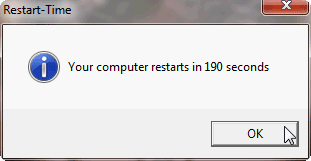
OK, installing SP1 seems to have had some effect. Hibernation times now around 1 minute 40 seconds, shut down a bit over 2 minutes. Restart time over three minutes:

Restart_time_19-APR-2011_Laptop-2.png

This with all possible apps closed from Task Manager, all not needed processes ended, Windows set to auto login. About 40 to 45 seconds of this restart time was booting, the rest shutting down.

So, already a lot better but still too long.

Kari
 

My Computer

Computer type
Laptop
Computer Manufacturer/Model Number
HP ENVY 17-1150eg
OS
Windows 10 Pro x64 EN-GB
CPU
1.6 GHz Intel Core i7-720QM Processor
Memory
6 GB
Graphics Card(s)
ATI Mobility Radeon HD 5850 Graphics
Sound Card
Beats sound system with integrated subwoofer
Monitor(s) Displays
17" laptop display, 22" LED and 32" Full HD TV through HDMI
Screen Resolution
1600*900 (1), 1920*1080 (2&3)
Hard Drives
Internal: 2 x 500 GB SATA Hard Disk Drive 7200 rpm
External: 2TB for backups, 3TB USB3 network drive for media
Cooling
As Envy runs a bit warm, I have it on a Cooler Master pad
Keyboard
Logitech diNovo Media Desktop Laser (bluetooth)
Mouse
Logitech Performance Mouse MX
Internet Speed
50/10 Mbps VDSL
Antivirus
Windows Defender 4.3.9431.0
Browser
Maxthon 3.5.2., IE11
Mike, that was about the first thing I did when trying to solve this issue.

Kari

Sorry it was no help.

There is of course no way for me to know what you have or have not tried.

Regards....Mike Connor
 

My Computer

OS
Several, including Windows 7 x64 Ultimate
I did not mean to sound so harsh. It's just that I have done all the normal things like these registry modifications, disabled clearing the page file when shutting down, and so on.

I'm frustrated.

Kari
 

My Computer

Computer type
Laptop
Computer Manufacturer/Model Number
HP ENVY 17-1150eg
OS
Windows 10 Pro x64 EN-GB
CPU
1.6 GHz Intel Core i7-720QM Processor
Memory
6 GB
Graphics Card(s)
ATI Mobility Radeon HD 5850 Graphics
Sound Card
Beats sound system with integrated subwoofer
Monitor(s) Displays
17" laptop display, 22" LED and 32" Full HD TV through HDMI
Screen Resolution
1600*900 (1), 1920*1080 (2&3)
Hard Drives
Internal: 2 x 500 GB SATA Hard Disk Drive 7200 rpm
External: 2TB for backups, 3TB USB3 network drive for media
Cooling
As Envy runs a bit warm, I have it on a Cooler Master pad
Keyboard
Logitech diNovo Media Desktop Laser (bluetooth)
Mouse
Logitech Performance Mouse MX
Internet Speed
50/10 Mbps VDSL
Antivirus
Windows Defender 4.3.9431.0
Browser
Maxthon 3.5.2., IE11
There is also BIOS time. On this desktop that is longer than the boot time. But then I have a lot of devices attached that the BIOS has to check.
 

My Computer

Computer Manufacturer/Model Number
HP, Dell, Gateway, Toshiba - 4 laptops and 2 desktops
OS
Vista, Windows7, Mint Mate, Zorin, Windows 8
CPU
from 1.6GHz Duo to i7
Monitor(s) Displays
2x HP w2207
Hard Drives
5x HDD, 7x SSD, 12x Externals
Keyboard
with trackball - no mices
Mouse
Trackball mice
Internet Speed
DSL 6000
I PM'd Cluberti to read your .etl trace output file. He may be traveling at the moment.

The tutorial should be able to get you started on interpreting the results.
 
I did not mean to sound so harsh. It's just that I have done all the normal things like these registry modifications, disabled clearing the page file when shutting down, and so on.

I'm frustrated.

Kari

No problem.

Regards....Mike Connor
 

My Computer

OS
Several, including Windows 7 x64 Ultimate
May or may not help but my pc started to have a very long shutdown ( 2.5 min ). So I followed all the msconfig and pagefile ideas here. In the end I think I may have solved it by powering off my old Epson Scanner. Suddenly back to shutdown of about 8 secs from the logging off screen.

Will need a few more days of testing but I would suggest you unplug any external drives/printers/scanners etc and see what happens.

Worth a try at least ?

:cool:
 

My Computer

Computer type
PC/Desktop
Computer Manufacturer/Model Number
Self Build
OS
Windows 7 64 bit
CPU
Intel 2500K @4.3 GHz
Motherboard
ASUS P8Z68-V PRO
Memory
Corsair 16gb DDR3
Graphics Card(s)
ATI Radeon HD 5670
Monitor(s) Displays
19 inch Asus
Hard Drives
Samsung Evo 850 256gb
Toshiba 2TB
Toshiba 4TB
WD Green 2TB
PSU
Antec 650
Case
NZXT BETA EVO
Cooling
Arctic Freezer 13
Keyboard
Logitech Wireless
Mouse
Logitech Wireless
Internet Speed
120 to 160mbps Virgin Cable
Antivirus
MS Essentials
Browser
Firefox
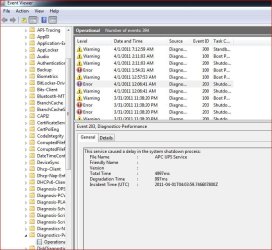
Kari have you looked into any recent driver updates. I know some of them tend to cause shutdown issues from time to time ATI Cat drivers for example.

Also I think you said you checked event viewer but if not you might give it a look - specifically things dealing with drivers.

Here's an example dealing with my UPS driver.....

Event Viewer.JPG

My two cents.
 

My Computer

Computer type
PC/Desktop
Computer Manufacturer/Model Number
Custom built by me.
OS
Windows 10 Pro
CPU
Intel Core i7-4770K (3.5Ghz)
Motherboard
Gigabyte G1 Sniper 5 (F10 Bios)
Memory
32 gig Corsair Dominator Platinum (4x8Gig)
Graphics Card(s)
Sapphire Tri-X R9 Fury
Sound Card
Soundblaster ZXR
Monitor(s) Displays
NEC PA242W 24" LCD Monitor
Screen Resolution
1920 x 1200
Hard Drives
Primary - Samsung 850 Pro (512gig), Samsung 840 Pro (256gig), 2TB WD Caviar Black.
PSU
EVGA Supernova 1000 G2
Case
Cooler Master HAF X
Cooling
Corsair H100i with Corsair Air Series SP120 Quiet Fans
Keyboard
Logitech Wireless Wave
Mouse
Logitech Performance MX
Internet Speed
High Speed Cable
Antivirus
Norton Security
Browser
IE11
Other Info
Memory Timings - 1866MHz @ 9-9-9-27-1T @ 1.5 volts
Sorry guys - I am on a really crappy connection in the middle of nowhere Maine at the moment. What I understand is the issue is, even after SP1 and some routine maintenance, we still have a system here that takes minutes to hibernate or shut down/reboot, yes? If so, if you can get an .etl trace, I can start to investigate why.
 

My Computer

Computer type
PC/Desktop
Computer Manufacturer/Model Number
Custom
OS
Windows 10 Pro x64
CPU
Intel Core i7 4790K @ 4.5GHz
Motherboard
Asus Maximus Hero VII
Memory
32GB DDR3
Graphics Card(s)
Nvidia GeForce GTX970
Sound Card
Realtek HD Audio
Screen Resolution
1920x1200
Hard Drives
1x Samsung 250GB SSD
4x WD RE 2TB (RAIDZ)
PSU
Corsair AX760i
Case
Fractal Design Define R4
Cooling
Noctua NH-D15
Take your time, Cluberti. I can live with this issue but would be very pleased if I got back to normal, faster times.

Kari
 

My Computer

Computer type
Laptop
Computer Manufacturer/Model Number
HP ENVY 17-1150eg
OS
Windows 10 Pro x64 EN-GB
CPU
1.6 GHz Intel Core i7-720QM Processor
Memory
6 GB
Graphics Card(s)
ATI Mobility Radeon HD 5850 Graphics
Sound Card
Beats sound system with integrated subwoofer
Monitor(s) Displays
17" laptop display, 22" LED and 32" Full HD TV through HDMI
Screen Resolution
1600*900 (1), 1920*1080 (2&3)
Hard Drives
Internal: 2 x 500 GB SATA Hard Disk Drive 7200 rpm
External: 2TB for backups, 3TB USB3 network drive for media
Cooling
As Envy runs a bit warm, I have it on a Cooler Master pad
Keyboard
Logitech diNovo Media Desktop Laser (bluetooth)
Mouse
Logitech Performance Mouse MX
Internet Speed
50/10 Mbps VDSL
Antivirus
Windows Defender 4.3.9431.0
Browser
Maxthon 3.5.2., IE11
Sorry guys - I am on a really crappy connection in the middle of nowhere Maine at the moment. What I understand is the issue is, even after SP1 and some routine maintenance, we still have a system here that takes minutes to hibernate or shut down/reboot, yes? If so, if you can get an .etl trace, I can start to investigate why.
But that must not be on all systems. After SP1, my reboot time (on the laptop) went up by 1 second, from 51sec to 52 sec. But Hibernate I never use. It is a longer on my desktop. That is because of my very long BIOS time checking all the gear.
 

My Computer

Computer Manufacturer/Model Number
HP, Dell, Gateway, Toshiba - 4 laptops and 2 desktops
OS
Vista, Windows7, Mint Mate, Zorin, Windows 8
CPU
from 1.6GHz Duo to i7
Monitor(s) Displays
2x HP w2207
Hard Drives
5x HDD, 7x SSD, 12x Externals
Keyboard
with trackball - no mices
Mouse
Trackball mice
Internet Speed
DSL 6000
Back
Top