Extremely slow startup after Windows 7 clean install

cheffrey428

New member
Local time
12:29 AM
Messages
18
I recently did a clean install from Windows Vista 32 bit to Windows 7 Ultimate 64 bit. Each time I try to restart or turn on my computer, it takes about 15 minutes to boot. It gets stuck at the starting Windows screen for the majority of that time and it looks like the hard drive does not show any action. After about 15 minutes it eventually boots up.I am also having issues with my sound not working so I am wondering if its an issue with those drivers or if it is something else. Any help would be greatly appreciated.

System Manufacturer/Model Number Acer Aspire M5100
OS Windows 7 Ultimate 64-bit 7600
CPU AMD Athlon 64 X2 4400
Memory 4GB
Graphics Card(s) ATI Radeon X1200 Series
Sound Card Integrated Realtek ALC888-GR, colayered with ALC883 Realtek
 

My Computer

Computer Manufacturer/Model Number
Acer Aspire M5100
OS
Windows 7 Ultimate 64-bit
CPU
AMD Athlon 64 X2 4400
Memory
4GB
Graphics Card(s)
ATI Radeon X1200 Series
Sound Card
Integrated Realtek ALC888-GR, colayered with ALC883 Realtek
Monitor(s) Displays
HP w2207h
I recently did a clean install from Windows Vista 32 bit to Windows 7 Ultimate 64 bit. Each time I try to restart or turn on my computer, it takes about 15 minutes to boot. It gets stuck at the starting Windows screen for the majority of that time and it looks like the hard drive does not show any action. After about 15 minutes it eventually boots up.I am also having issues with my sound not working so I am wondering if its an issue with those drivers or if it is something else. Any help would be greatly appreciated.

System Manufacturer/Model Number Acer Aspire M5100
OS Windows 7 Ultimate 64-bit 7600
CPU AMD Athlon 64 X2 4400
Memory 4GB
Graphics Card(s) ATI Radeon X1200 Series
Sound Card Integrated Realtek ALC888-GR, colayered with ALC883 Realtek

I just responded to yor other post regarding sound issue... so you have more than one problem... Hmmmm.

A few questions to help us help you...
  1. Where did you get your copy of 7 Ultimate?
  2. Was Win7 performing updates? (Usually after a new install Win7 will DL and install all updates... most often takes 2-4 updates to catch all of them... this can cause the slow startup you are speaking of... the system may still be installing updates.)
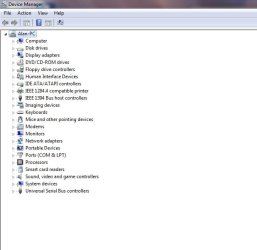
  3. Can you post a screenshot of Device Manager please?
 

My Computer

Computer Manufacturer/Model Number
Homebrew PC - "Alpha_Dawg"
OS
Windows 7 Ultimate 64 bit Steve Ballmer Signature Edition
CPU
Intel Core 2 Quad - Q9550 - 2.83GHz stock - OC'd to 3.6GHz
Motherboard
Gigabyte EP45-UD3P
Memory
4GB DDR2 800MHz (PC6400) OCZ Reaper
Graphics Card(s)
Nvidia GE Force 8800 GTS
Sound Card
Asus Xonar DX
Monitor(s) Displays
Samsung SyncMaster 2333HD
Screen Resolution
1920 x 1080
Hard Drives
WD Caviar Black 750GB - 7200RPM - 32MB cache
WD Caviar Green 1.5TB - 5400RPM - 64MB cache
WD Caviar Green 2.0TB - 5400RPM - 64MB cache
PSU
PC Power & Cooling Silencer 750
Case
Gigabyte 3D Aurora
Cooling
Case is Air - 5ea. 120mm fans (mix of Arctic and Xigmatec)
Keyboard
MS Natural Wireless KB
Mouse
MS Wireless Mouse
Internet Speed
50 mbps down/5 mbps up
Other Info
AVerMedia - AVerTVHD G2 Dual Tuner Card
I bought my copy online through a college discount program, I received a DVD in the mail and installed via that disk. Windows 7 has performed several updates since I installed so I think it should be up to date. Here is a screenshot of my device manager, do you need me to expand any areas?
moz-screenshot.png
 

Attachments

  • device mgr.jpg
    device mgr.jpg
    30.6 KB · Views: 162

My Computer

Computer Manufacturer/Model Number
Acer Aspire M5100
OS
Windows 7 Ultimate 64-bit
CPU
AMD Athlon 64 X2 4400
Memory
4GB
Graphics Card(s)
ATI Radeon X1200 Series
Sound Card
Integrated Realtek ALC888-GR, colayered with ALC883 Realtek
Monitor(s) Displays
HP w2207h
Everything looks fine here in dm...

Force a few more updates... until win updates sez its up to date.... just in case.
 

My Computer

Computer Manufacturer/Model Number
Homebrew PC - "Alpha_Dawg"
OS
Windows 7 Ultimate 64 bit Steve Ballmer Signature Edition
CPU
Intel Core 2 Quad - Q9550 - 2.83GHz stock - OC'd to 3.6GHz
Motherboard
Gigabyte EP45-UD3P
Memory
4GB DDR2 800MHz (PC6400) OCZ Reaper
Graphics Card(s)
Nvidia GE Force 8800 GTS
Sound Card
Asus Xonar DX
Monitor(s) Displays
Samsung SyncMaster 2333HD
Screen Resolution
1920 x 1080
Hard Drives
WD Caviar Black 750GB - 7200RPM - 32MB cache
WD Caviar Green 1.5TB - 5400RPM - 64MB cache
WD Caviar Green 2.0TB - 5400RPM - 64MB cache
PSU
PC Power & Cooling Silencer 750
Case
Gigabyte 3D Aurora
Cooling
Case is Air - 5ea. 120mm fans (mix of Arctic and Xigmatec)
Keyboard
MS Natural Wireless KB
Mouse
MS Wireless Mouse
Internet Speed
50 mbps down/5 mbps up
Other Info
AVerMedia - AVerTVHD G2 Dual Tuner Card
When did this start happening? Could it be a program that you installed that is causing the hang?

Also, what anti-virus are you using?
 

My Computer

Computer Manufacturer/Model Number
Custom
OS
Windows 7 Professional x64
CPU
Intel i7 2600K OC'd @ 4620 MHz
Motherboard
Asus P8Z68-V Pro
Memory
16GB GSkill Sniper 2133 Mhz (4x4GB)
Graphics Card(s)
EVGA GeForce GTX 480 SuperClocked+
Sound Card
Realtek High Definition Audio
Monitor(s) Displays
2x Acer S273HLbmii 27"
Screen Resolution
2 x 1920x1080
Hard Drives
64GB Crucial M4 SSD

Storage: Hitachi 1TB 5400RPM, Samsung 1.5TB 5400RPM
PSU
Corsair HW Series 750w (modular)
Case
Cooler Master HAF 932 Advanced Blue Edition
Cooling
CM Hyper 212+ CPU cooler, 3x 230mm + 1x 140mm case fans
Keyboard
Logitech MK320 (wireless)
Mouse
Logitech MK320 (wireless)
Internet Speed
30 Mb/s : 2 Mb/s
I haven't installed my antivirus yet because I didn't want to add to this problem, I just installed Windows 7 2 days ago and the slow startup was evident immediately so I don't think it is due to any installed programs.
 

My Computer

Computer Manufacturer/Model Number
Acer Aspire M5100
OS
Windows 7 Ultimate 64-bit
CPU
AMD Athlon 64 X2 4400
Memory
4GB
Graphics Card(s)
ATI Radeon X1200 Series
Sound Card
Integrated Realtek ALC888-GR, colayered with ALC883 Realtek
Monitor(s) Displays
HP w2207h
I wonder if it is a piece of hardware causing the hang. Disconnect all USB drives, video cards, etc and try rebooting.
 

My Computer

Computer Manufacturer/Model Number
Custom
OS
Windows 7 Professional x64
CPU
Intel i7 2600K OC'd @ 4620 MHz
Motherboard
Asus P8Z68-V Pro
Memory
16GB GSkill Sniper 2133 Mhz (4x4GB)
Graphics Card(s)
EVGA GeForce GTX 480 SuperClocked+
Sound Card
Realtek High Definition Audio
Monitor(s) Displays
2x Acer S273HLbmii 27"
Screen Resolution
2 x 1920x1080
Hard Drives
64GB Crucial M4 SSD

Storage: Hitachi 1TB 5400RPM, Samsung 1.5TB 5400RPM
PSU
Corsair HW Series 750w (modular)
Case
Cooler Master HAF 932 Advanced Blue Edition
Cooling
CM Hyper 212+ CPU cooler, 3x 230mm + 1x 140mm case fans
Keyboard
Logitech MK320 (wireless)
Mouse
Logitech MK320 (wireless)
Internet Speed
30 Mb/s : 2 Mb/s
I removed all USB devices and it started up in less than 60 seconds. I then plugged in my keyboard, mouse, and wireless network adapter and now it is hanging up again. I am using my laptop to write this because my PC is still stuck at the starting Windows screen. It seems that the problem is with a USB device now I just have to figure out which one through trial and error.
 

My Computer

Computer Manufacturer/Model Number
Acer Aspire M5100
OS
Windows 7 Ultimate 64-bit
CPU
AMD Athlon 64 X2 4400
Memory
4GB
Graphics Card(s)
ATI Radeon X1200 Series
Sound Card
Integrated Realtek ALC888-GR, colayered with ALC883 Realtek
Monitor(s) Displays
HP w2207h
Yes, let me guess it is the wireless adapter.
 

My Computer

Computer Manufacturer/Model Number
Custom
OS
Windows 7 Professional x64
CPU
Intel i7 2600K OC'd @ 4620 MHz
Motherboard
Asus P8Z68-V Pro
Memory
16GB GSkill Sniper 2133 Mhz (4x4GB)
Graphics Card(s)
EVGA GeForce GTX 480 SuperClocked+
Sound Card
Realtek High Definition Audio
Monitor(s) Displays
2x Acer S273HLbmii 27"
Screen Resolution
2 x 1920x1080
Hard Drives
64GB Crucial M4 SSD

Storage: Hitachi 1TB 5400RPM, Samsung 1.5TB 5400RPM
PSU
Corsair HW Series 750w (modular)
Case
Cooler Master HAF 932 Advanced Blue Edition
Cooling
CM Hyper 212+ CPU cooler, 3x 230mm + 1x 140mm case fans
Keyboard
Logitech MK320 (wireless)
Mouse
Logitech MK320 (wireless)
Internet Speed
30 Mb/s : 2 Mb/s
Hopefully you are correct, I have to run some errands, i will investigate further in a couple hrs
 

My Computer

Computer Manufacturer/Model Number
Acer Aspire M5100
OS
Windows 7 Ultimate 64-bit
CPU
AMD Athlon 64 X2 4400
Memory
4GB
Graphics Card(s)
ATI Radeon X1200 Series
Sound Card
Integrated Realtek ALC888-GR, colayered with ALC883 Realtek
Monitor(s) Displays
HP w2207h
I removed all USB devices and it started up in less than 60 seconds. I then plugged in my keyboard, mouse, and wireless network adapter and now it is hanging up again. I am using my laptop to write this because my PC is still stuck at the starting Windows screen. It seems that the problem is with a USB device now I just have to figure out which one through trial and error.

cheffrey:

What USB wireless adapter are you using? Make and model #?

Also, to see if it really is the wireless nic, try startup with only that removed and see if it is still slow.

More food for thought... What USB KB & Mouse, and does Win7 properly ID them in Devices and Printers?
 

My Computer

Computer Manufacturer/Model Number
Homebrew PC - "Alpha_Dawg"
OS
Windows 7 Ultimate 64 bit Steve Ballmer Signature Edition
CPU
Intel Core 2 Quad - Q9550 - 2.83GHz stock - OC'd to 3.6GHz
Motherboard
Gigabyte EP45-UD3P
Memory
4GB DDR2 800MHz (PC6400) OCZ Reaper
Graphics Card(s)
Nvidia GE Force 8800 GTS
Sound Card
Asus Xonar DX
Monitor(s) Displays
Samsung SyncMaster 2333HD
Screen Resolution
1920 x 1080
Hard Drives
WD Caviar Black 750GB - 7200RPM - 32MB cache
WD Caviar Green 1.5TB - 5400RPM - 64MB cache
WD Caviar Green 2.0TB - 5400RPM - 64MB cache
PSU
PC Power & Cooling Silencer 750
Case
Gigabyte 3D Aurora
Cooling
Case is Air - 5ea. 120mm fans (mix of Arctic and Xigmatec)
Keyboard
MS Natural Wireless KB
Mouse
MS Wireless Mouse
Internet Speed
50 mbps down/5 mbps up
Other Info
AVerMedia - AVerTVHD G2 Dual Tuner Card
Is your BIOS and drivers up to date?

There are updated Realtek R2.42 (x64) drivers for your Soundcard on the Realtek site and ATI Catalyst 9.11 (x64) drivers for your videocard on the ATI/AMD site but make sure you look under Windows Vista (x64)/integrated motherboard/X1200 series for your videocard, they are compatible with Windows 7.

:p
 

My Computer

OS
Windows 7 Professional
CPU
Intel Core i7-2670QM
Memory
Samsung 8GB
Graphics Card(s)
NVIDIA GT 555M
Hard Drives
Intel 525 120GB | HGST Travelstar 1TB
Mouse
CM Storm Xornet | Microsoft Sculpt Comfort
Internet Speed
25 Mbps | 600 Kbps
Other Info
Centrino 6205 | Seagate Backup Plus 1TB
Thanks Nemix, I have tried the Realtek 2.42. drivers but I still get no sound, I will try to install the ATI Catalyst driver. They have a v10.2 for 64 bit should I download that one or use v 9.11?
 

My Computer

Computer Manufacturer/Model Number
Acer Aspire M5100
OS
Windows 7 Ultimate 64-bit
CPU
AMD Athlon 64 X2 4400
Memory
4GB
Graphics Card(s)
ATI Radeon X1200 Series
Sound Card
Integrated Realtek ALC888-GR, colayered with ALC883 Realtek
Monitor(s) Displays
HP w2207h
Just saw this 2.42 driver didnt work, eh? Yes try the latest driver Nemix suggested and as always let us know.
 

My Computer

Computer Manufacturer/Model Number
Homebrew PC - "Alpha_Dawg"
OS
Windows 7 Ultimate 64 bit Steve Ballmer Signature Edition
CPU
Intel Core 2 Quad - Q9550 - 2.83GHz stock - OC'd to 3.6GHz
Motherboard
Gigabyte EP45-UD3P
Memory
4GB DDR2 800MHz (PC6400) OCZ Reaper
Graphics Card(s)
Nvidia GE Force 8800 GTS
Sound Card
Asus Xonar DX
Monitor(s) Displays
Samsung SyncMaster 2333HD
Screen Resolution
1920 x 1080
Hard Drives
WD Caviar Black 750GB - 7200RPM - 32MB cache
WD Caviar Green 1.5TB - 5400RPM - 64MB cache
WD Caviar Green 2.0TB - 5400RPM - 64MB cache
PSU
PC Power & Cooling Silencer 750
Case
Gigabyte 3D Aurora
Cooling
Case is Air - 5ea. 120mm fans (mix of Arctic and Xigmatec)
Keyboard
MS Natural Wireless KB
Mouse
MS Wireless Mouse
Internet Speed
50 mbps down/5 mbps up
Other Info
AVerMedia - AVerTVHD G2 Dual Tuner Card
The ATI Catalyst 10.2 does not support legacy onboard videocards, e.g. X1200 series.

There are no specific Windows 7 drivers for the X1200 series just Vista drivers but ATI support says they're compatible and I've been using (Vista drivers) with Windows 7 since launch, just make sure you get the 64-bit Vista drivers.

Here's a link: Graphics Drivers & Software

Choose Vista 64-Bit_Integrated/Motherbaord_Express 1200

Should bring you up to the 9.11's, read the bottom part and they are compatible with Windows 7.

:p
 

My Computer

OS
Windows 7 Professional
CPU
Intel Core i7-2670QM
Memory
Samsung 8GB
Graphics Card(s)
NVIDIA GT 555M
Hard Drives
Intel 525 120GB | HGST Travelstar 1TB
Mouse
CM Storm Xornet | Microsoft Sculpt Comfort
Internet Speed
25 Mbps | 600 Kbps
Other Info
Centrino 6205 | Seagate Backup Plus 1TB
You did not say anything about no sound on the original post.

Does Realtek soundcard show up in the device manager with the R2.42 driver?

Also, are you sure nothing is loose (speakers), muted (keyboard function, Realtek audio manager, Windows sound manager) or disabled (Realtek soundcard in device manager) on your computer?

:p
 

My Computer

OS
Windows 7 Professional
CPU
Intel Core i7-2670QM
Memory
Samsung 8GB
Graphics Card(s)
NVIDIA GT 555M
Hard Drives
Intel 525 120GB | HGST Travelstar 1TB
Mouse
CM Storm Xornet | Microsoft Sculpt Comfort
Internet Speed
25 Mbps | 600 Kbps
Other Info
Centrino 6205 | Seagate Backup Plus 1TB
Reinstalled Realtek 2.42, upon restart soundcard shows up but the only sound is still static. I tried plugging in several sets of speakers and headphones into both the front and rear audio jacks to make sure it wasn't the speakers and on all devices I just get the static. Also, my digital HDMI output to my monitor is all static and buzzing. I installed the ATI Catalyst software that you recommended, can't tell if that is helping anything. I also tried booting up in safe mode with networking to see if the slow startup time continued but there was no problem booting up in safe mode. Sorry to write about both issues but I figured I could address them both here as they may be related I think?
 

My Computer

Computer Manufacturer/Model Number
Acer Aspire M5100
OS
Windows 7 Ultimate 64-bit
CPU
AMD Athlon 64 X2 4400
Memory
4GB
Graphics Card(s)
ATI Radeon X1200 Series
Sound Card
Integrated Realtek ALC888-GR, colayered with ALC883 Realtek
Monitor(s) Displays
HP w2207h
Just to be clear after rebooting from safe mode, it is still taking upwards of 15 minutes.
 

My Computer

Computer Manufacturer/Model Number
Acer Aspire M5100
OS
Windows 7 Ultimate 64-bit
CPU
AMD Athlon 64 X2 4400
Memory
4GB
Graphics Card(s)
ATI Radeon X1200 Series
Sound Card
Integrated Realtek ALC888-GR, colayered with ALC883 Realtek
Monitor(s) Displays
HP w2207h
I really tried my best cause you motherboard is very identical to mine.

Did you have these problem with Vista?

Sorry, I couldn't help.

:p
 

My Computer

OS
Windows 7 Professional
CPU
Intel Core i7-2670QM
Memory
Samsung 8GB
Graphics Card(s)
NVIDIA GT 555M
Hard Drives
Intel 525 120GB | HGST Travelstar 1TB
Mouse
CM Storm Xornet | Microsoft Sculpt Comfort
Internet Speed
25 Mbps | 600 Kbps
Other Info
Centrino 6205 | Seagate Backup Plus 1TB
No, never had any problems with Vista. I did have Vista 32 bit and I installed Windows 7 64 bit so wondering if that has something to do with it. Thanks for all your help though!
 

My Computer

Computer Manufacturer/Model Number
Acer Aspire M5100
OS
Windows 7 Ultimate 64-bit
CPU
AMD Athlon 64 X2 4400
Memory
4GB
Graphics Card(s)
ATI Radeon X1200 Series
Sound Card
Integrated Realtek ALC888-GR, colayered with ALC883 Realtek
Monitor(s) Displays
HP w2207h
Back
Top