Failure to install windows update

maiduguri

New member
Local time
10:46 AM
Messages
11
I tried to install an urgent Windows update [IE9 for w7x64-based systems] but got error code 80070002. Tried to fix problem with Microsoft Fix It, but all it did was to change the error code to 80246007 the next time I tried to install the update. Any thoughts on how to rectify this?
 

My Computer

Computer Manufacturer/Model Number
Dell Inspiron R15
OS
windows 7 home premium
Failure to install windows update.

Many thanks for your quick reply.

No, I have not yet tried a System Restore, but I did clean out the temporary files, and that is when the error code changed from 80070002 to 80246007
 

My Computer

Computer Manufacturer/Model Number
Dell Inspiron R15
OS
windows 7 home premium
Try a system restore first, however, if the system restore doesn't resolve the issue try this article for the second error:

Windows Update error 80246007

The BITS is a service which provides the system updates, and this article will reset the BITS.

Hope this resolves your problem,

Harry
 

My Computer

Computer type
Laptop
Failure to install Windows update

Firstly, I was unable to do a System Restore. Even tried to do so in safe mode, but still could not.

Then tried your suggestion of "Windows Update error 80246007", but after, when I tried to install the Windows update again, I got code 9C48, which is the third different code I have had today.
 

My Computer

Computer Manufacturer/Model Number
Dell Inspiron R15
OS
windows 7 home premium
Background Intelligent Transfer Service (BITS). Can you start that service succesfully?
 

My Computer

Computer type
Laptop
Computer Manufacturer/Model Number
ACER ASPIRE 5742G
OS
Microsoft Windows 7 Home Premium 64-bits 7601 Multiprocessor Free Service Pack 1
CPU
Intel(R) Core(TM) i3 CPU M 370 @ 2.40GHz
Motherboard
Acer Aspire 5742G
Memory
4,00 GB
Graphics Card(s)
ATI Mobility Radeon HD 5400 Series
Sound Card
(1) AMD High Definition Audio Device (2) Realtek High Defi
Screen Resolution
1366 x 768 x 32 bits (4294967296 colors) @ 60 Hz
Hard Drives
WDC WD5000BEVT-22ZAT0
Try uninstalling IE9, restarting the computer, download the IE9 installer, disconnect from the internet, install IE9 .exe file and restart the computer, reconnect to the internet:

IE9 32-bit - Download: Windows Internet Explorer 9 for Windows 7 - Microsoft Download Center - Download Details
IE9 64-bit - Download: Windows Internet Explorer 9 for Windows 7 64-bit Edition and Windows Server 2008 R2 64-bit Edition - Microsoft Download Center - Download Details

Install the IE9 which matches your operating system; install the 32-bit version if your OS is 32-bit or install the 64-bit version if your OS is 64-bit.
 

My Computer

Computer type
Laptop
Hi X Blue Robot

Have tried to uninstall IE9 but get message "An error has occurred. Not all of the updates were successfully uninstalled" Have tried three times with the same result.
 

My Computer

Computer Manufacturer/Model Number
Dell Inspiron R15
OS
windows 7 home premium
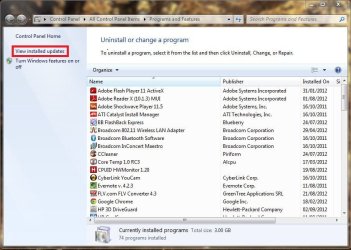
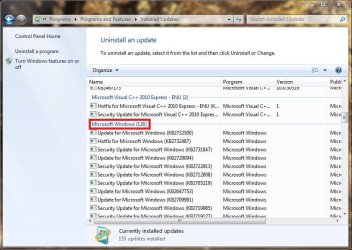
Try uninstalling IE9 from Installed Updates rather than from the Control Panel, use this method:

Start > Type "Programs and Features" within the search bar > View Installed Updates within the left pane > Uninstall a Update > Microsoft Windows > Right-Click IE9 > Uninstall > Restart Now
 

Attachments

  • 1.JPG
    1.JPG
    82.9 KB · Views: 8
  • 2.JPG
    2.JPG
    86.2 KB · Views: 12
  • 3.JPG
    3.JPG
    92.3 KB · Views: 12

My Computer

Computer type
Laptop
That is exactly the way I tried, because going through control panel, then uninstall programs, I could not see IE mentioned.
 

My Computer

Computer Manufacturer/Model Number
Dell Inspiron R15
OS
windows 7 home premium

My Computer

Computer type
Laptop
Computer Manufacturer/Model Number
ACER ASPIRE 5742G
OS
Microsoft Windows 7 Home Premium 64-bits 7601 Multiprocessor Free Service Pack 1
CPU
Intel(R) Core(TM) i3 CPU M 370 @ 2.40GHz
Motherboard
Acer Aspire 5742G
Memory
4,00 GB
Graphics Card(s)
ATI Mobility Radeon HD 5400 Series
Sound Card
(1) AMD High Definition Audio Device (2) Realtek High Defi
Screen Resolution
1366 x 768 x 32 bits (4294967296 colors) @ 60 Hz
Hard Drives
WDC WD5000BEVT-22ZAT0
Okay hmm... have you tried opening command prompt as the admin, and using this command:

FORFILES /P %WINDIR%\servicing\Packages /M Microsoft-Windows-InternetExplorer-*9.*.mum /c "cmd /c echo Uninstalling package @fname && start /w pkgmgr /up:@fname /norestart"

http://support.microsoft.com/kb/2579295
 

My Computer

Computer type
Laptop
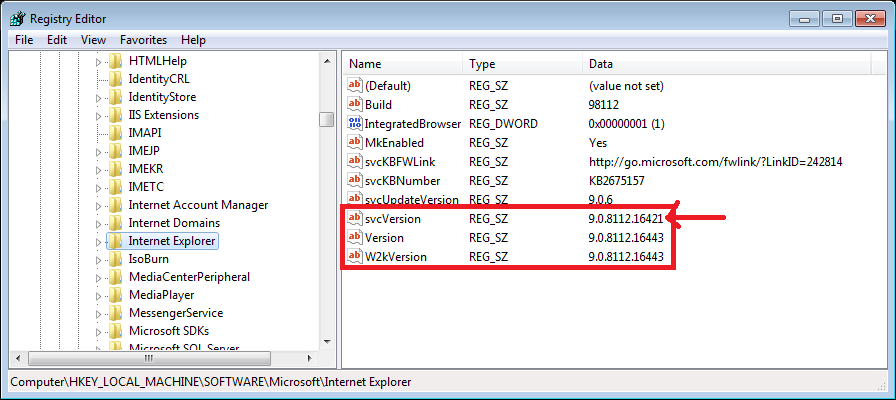
run REGEDIT and browse to HKEY_LOCAL_MACHINE\SOFTWARE\Microsoft\Internet Explorer
What is listed on the right at key svcVersion, Version and W2kVersion?

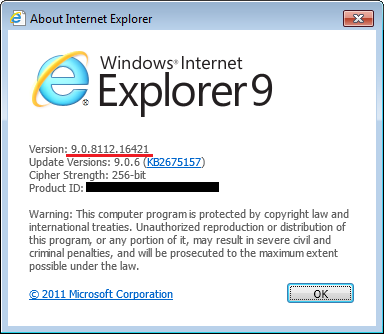
Internet explorer->help->about . What version do you see?
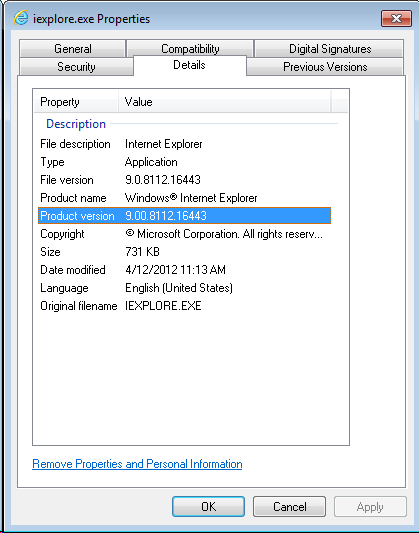
To see the version conflict, browse to C:\Program Files (x86)\Internet Explorer\iexplore.exe, view the properties, then the details tab, and note the Product version number:

In my case, it is 9.00.8112.16443 (file version is 9.0.8112.16443)

Now, within Internet Explorer, got to Tools –> About Internet Explorer
 

My Computer

Computer type
Laptop
Computer Manufacturer/Model Number
ACER ASPIRE 5742G
OS
Microsoft Windows 7 Home Premium 64-bits 7601 Multiprocessor Free Service Pack 1
CPU
Intel(R) Core(TM) i3 CPU M 370 @ 2.40GHz
Motherboard
Acer Aspire 5742G
Memory
4,00 GB
Graphics Card(s)
ATI Mobility Radeon HD 5400 Series
Sound Card
(1) AMD High Definition Audio Device (2) Realtek High Defi
Screen Resolution
1366 x 768 x 32 bits (4294967296 colors) @ 60 Hz
Hard Drives
WDC WD5000BEVT-22ZAT0
run REGEDIT and browse to HKEY_LOCAL_MACHINE\SOFTWARE\Microsoft\Internet Explorer
What is listed on the right at key svcVersion, Version and W2kVersion?

All values are 9.0.8112.16421?

It looks like this version conflict is a registry setting:

In HKEY_LOCAL_MACHINE\SOFTWARE\Microsoft\Internet Explorer (and also HKEY_LOCAL_MACHINE\SOFTWARE\Wow6432Node\Microsoft\Internet Explorer), svcVersion should match Version and W2kVersion.
 

My Computer

Computer type
Laptop
Computer Manufacturer/Model Number
ACER ASPIRE 5742G
OS
Microsoft Windows 7 Home Premium 64-bits 7601 Multiprocessor Free Service Pack 1
CPU
Intel(R) Core(TM) i3 CPU M 370 @ 2.40GHz
Motherboard
Acer Aspire 5742G
Memory
4,00 GB
Graphics Card(s)
ATI Mobility Radeon HD 5400 Series
Sound Card
(1) AMD High Definition Audio Device (2) Realtek High Defi
Screen Resolution
1366 x 768 x 32 bits (4294967296 colors) @ 60 Hz
Hard Drives
WDC WD5000BEVT-22ZAT0
I should have added in my last post that I have still not had any success.
 

My Computer

Computer Manufacturer/Model Number
Dell Inspiron R15
OS
windows 7 home premium
run REGEDIT and browse to HKEY_LOCAL_MACHINE\SOFTWARE\Microsoft\Internet Explorer
What is listed on the right at key svcVersion, Version and W2kVersion?

All values are 9.0.8112.16421?

It looks like this version conflict is a registry setting:

In HKEY_LOCAL_MACHINE\SOFTWARE\Microsoft\Internet Explorer (and also HKEY_LOCAL_MACHINE\SOFTWARE\Wow6432Node\Microsoft\Internet Explorer), svcVersion should match Version and W2kVersion.

Please post both registry screens
In HKEY_LOCAL_MACHINE\SOFTWARE\Microsoft\Internet Explorer (and also HKEY_LOCAL_MACHINE\SOFTWARE\Wow6432Node\Microsoft\Internet Explorer), svcVersion should match Version and W2kVersion.
 

My Computer

Computer type
Laptop
Computer Manufacturer/Model Number
ACER ASPIRE 5742G
OS
Microsoft Windows 7 Home Premium 64-bits 7601 Multiprocessor Free Service Pack 1
CPU
Intel(R) Core(TM) i3 CPU M 370 @ 2.40GHz
Motherboard
Acer Aspire 5742G
Memory
4,00 GB
Graphics Card(s)
ATI Mobility Radeon HD 5400 Series
Sound Card
(1) AMD High Definition Audio Device (2) Realtek High Defi
Screen Resolution
1366 x 768 x 32 bits (4294967296 colors) @ 60 Hz
Hard Drives
WDC WD5000BEVT-22ZAT0
Unable to do windows update

Thanks for all the suggestions.

Going thro' C:// Program Files (X86)---- , I get
File version = 9.0.8112.16447
Product version= 9.0.8112.16447

Within IE, Tools ---, I get
Version= 9.0.8112.16421 (64-bit edition)
Update version= 9.0.8 (KB2719177)

Also,
Svc Version REG_SZ = 9.0.8112.16421
Version REG_SZ = 9.0.8112.16421
W2k version REG_SZ = 9.0.8112.16421

How do I proceed from here?
 

My Computer

Computer Manufacturer/Model Number
Dell Inspiron R15
OS
windows 7 home premium
Thanks for all the suggestions.

Going thro' C:// Program Files (X86)---- , I get
File version = 9.0.8112.16447
Product version= 9.0.8112.16447

Within IE, Tools ---, I get
Version= 9.0.8112.16421 (64-bit edition)
Update version= 9.0.8 (KB2719177)

Also,
Svc Version REG_SZ = 9.0.8112.16421
Version REG_SZ = 9.0.8112.16421
W2k version REG_SZ = 9.0.8112.16421

How do I proceed from here?

check HKEY_LOCAL_MACHINE\SOFTWARE\Microsoft\Internet Explorer (and also HKEY_LOCAL_MACHINE\SOFTWARE\Wow6432Node\Microsoft\Internet Explorer
Both keys have:
Svc Version REG_SZ = 9.0.8112.16421
Version REG_SZ = 9.0.8112.16421
W2k version REG_SZ = 9.0.8112.16421
????
 

My Computer

Computer type
Laptop
Computer Manufacturer/Model Number
ACER ASPIRE 5742G
OS
Microsoft Windows 7 Home Premium 64-bits 7601 Multiprocessor Free Service Pack 1
CPU
Intel(R) Core(TM) i3 CPU M 370 @ 2.40GHz
Motherboard
Acer Aspire 5742G
Memory
4,00 GB
Graphics Card(s)
ATI Mobility Radeon HD 5400 Series
Sound Card
(1) AMD High Definition Audio Device (2) Realtek High Defi
Screen Resolution
1366 x 768 x 32 bits (4294967296 colors) @ 60 Hz
Hard Drives
WDC WD5000BEVT-22ZAT0
Back
Top