Fallout 3 Downloadable Content...?

yuanshi23

New member
Local time
8:25 AM
Messages
3
Hey guys, I've been browsing for a problem to the Fallout 3 downloadable content problem, and I think I have found it. Sadly, because I'm using Windows 7, I have absolutely no idea what is going on. In order for me to play the recently released Operation Anchorage DLC for Fallout 3, I need to find ...

C:\Documents and Settings\Your User Name\Local Settings\Application Data\Microsoft\Xlive\DLC

OR

C:\Users\Your User Name\AppData\Local\Microsoft\XLive\DLC

I checked my computer, program files, user name file, EVERYTHING and I CANNOT find this folder or any of the folders similar. IT's really pissing me off that I paid $12.50 and I can't even find the file Games For Windows downloaded into. In order for me to play the DLC, I need to move 3 key components in the folder above to my Fallout 3 folder. I have found my fallout 3 folder, but not the damn DLC FOLDER!! Please help me as soon as you guys can
 

My Computer

OS
Windows 7
These directories are normally hidden by default.
Select show hidden files and protected files.
You should be able to find them now.
 

My Computer

Computer Manufacturer/Model Number
Self built
OS
Windows 7 64bit home premium
CPU
I5 3570K
Motherboard
Gigabyte Z77-DS3H
Memory
4 x 4GB Crucial Ballistix Sport DDR3 1600 Mhz
Graphics Card(s)
Gigabyte Geforce 660 TI
Sound Card
creative x-fi
Monitor(s) Displays
Primary CiBox 22" Widescreen LCD ,Secondary Dell 22" Widescr
Screen Resolution
Both 1680 x 1050
Hard Drives
2 x 500G HD (SATA) 1 x 2 TB USB
PSU
Corsair HX 620W ATX2.2 Modular SLI Complient PSU
Case
Antec 900 Ultimate Gaming Case
Cooling
3xfront 1xside 1xrear blue fan, 1 200mm blue top fan 1
Keyboard
Trust ds-3200 Wireless keyboard and mouse
Mouse
Trust ds-3200 Wireless keyboard and mouse
Internet Speed
288 / 4000
Other Info
Creative Inspire 7.1 T7900 Speakers
Trust Graphics Tablet
Thank you so much for the help. I'll try to see if this works now
 

My Computer

OS
Windows 7
you should have gone to mega games and downloaded the nocd patch it bypasses the windows live crap and you dont even need to enter your product key.
 

My Computer

Computer Manufacturer/Model Number
Home Brew
OS
Windows 7 Ultimate Vista Ultimate x64
CPU
Core 2 Duo E8500 3.16Ghz @ 3.8Ghz
Motherboard
eVGA 750i FTW
Memory
2x2Gigs Patriot PC2-6400 LL
Graphics Card(s)
Inno3D GeForce GTX260 216 SP
Monitor(s) Displays
ASUS VW222U 22" 2ms Response time
Screen Resolution
1680x1050
Hard Drives
SATA 150GB
SATA II 250GB
USB IDE 750GB Ext.
PSU
HYTEC 600W & Thermaltake 650W Toughpower Power Exp
Case
Thermaltake Armor LCS (Liquid Cooling System)
Cooling
Liquid Cooling System
Keyboard
Logitech G15 Gaming Keyboard
Mouse
Logitech G9 Gaming Mouse
Or copy these files straight into:

C:\Program Files (x86)\Bethesda Softworks\Fallout 3\Data

Anchorage -main.bsa
Anchorage - Sounds.bsa
Anchorage.esm

and select anchorage.esm from the data menu in the fallout launcher.
 

My Computer

Computer type
PC/Desktop
Computer Manufacturer/Model Number
Systems by SmartEyeball
OS
8 Pro x64
CPU
i7 3770K 4.6GHz
Motherboard
ASUS P8Z77 WS
Memory
16GB G.Skill Trident X 2666mhz
Graphics Card(s)
x2 EVGA 780 Ti Superclocked SLI
Sound Card
SB X-FI Surround 5.1 PRO USB / ATH-AD900 Headphones
Monitor(s) Displays
x3 Dell U2410 / 58" Samsung
Screen Resolution
5760*1200/ 1920*1200
Hard Drives
2x Intel 520 240GB (RAID 0) * 2x WD Caviar Blacks 2TB (RAID 0) * 2TB WD Caviar Black * Sony Optirac DVD
PSU
Silverstone Strider Evolution 1200W
Case
Thermaltake Level 10 GT Snow Edition
Cooling
Noctua NH-D14
Keyboard
Topre Realforce // Ducky Shine MX Black // Filco Ninja TKL
Mouse
Thermaltake Theron (Highly Recommended) + Razer Imperator
Antivirus
MSE
Browser
IE, FF, WaterFox
Other Info
GT Extreme V2 Sim Racing Cockpit + 40" LCD and K/B Mouse stand ▼
Fanatec CSR Elite Wheel + Clubsport V1 Pedals + CSR shifter/7G-H ▼Saitek X52 Pro ▼ TrackIR 5 Pro
Buttkicker v2 Seat Rumbler with Dedicated 5.1 and Sub Woofer attached to frame ▼
=
Bloody Big Grin
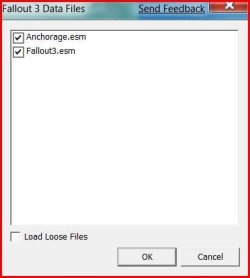
Ok. I did everything you guys suggested. I was so excited when I finally restored Windows 7 to a previous time and fixed some things up, but when I clicked on the Anchorage.esm check in the Data Files part of the launcher, nothing happened. I saw that it was checked, and just to be sure, clicked on Data Files again. It popped out not checked. Well I go "ok...maybe it's just like that". Well I start up Fallout 3 and wander around for 4 hours. No Operation Anchorage. This...is starting to tick me off. I don't know what could be wrong
 

My Computer

OS
Windows 7
So the anchorage.esm is not staying ticked in the data files box?

anchor2.JPG


Double check your C:\Program Files (x86)\Bethesda Softworks\Fallout 3\Data and see if it's like this:

anchor.JPG

Your not having any problems saving games etc? Already given permission to the save game folder?

You'll know if anchorage is working, because it only takes about 5-10 min before you get the 'signal'.
 

My Computer

Computer type
PC/Desktop
Computer Manufacturer/Model Number
Systems by SmartEyeball
OS
8 Pro x64
CPU
i7 3770K 4.6GHz
Motherboard
ASUS P8Z77 WS
Memory
16GB G.Skill Trident X 2666mhz
Graphics Card(s)
x2 EVGA 780 Ti Superclocked SLI
Sound Card
SB X-FI Surround 5.1 PRO USB / ATH-AD900 Headphones
Monitor(s) Displays
x3 Dell U2410 / 58" Samsung
Screen Resolution
5760*1200/ 1920*1200
Hard Drives
2x Intel 520 240GB (RAID 0) * 2x WD Caviar Blacks 2TB (RAID 0) * 2TB WD Caviar Black * Sony Optirac DVD
PSU
Silverstone Strider Evolution 1200W
Case
Thermaltake Level 10 GT Snow Edition
Cooling
Noctua NH-D14
Keyboard
Topre Realforce // Ducky Shine MX Black // Filco Ninja TKL
Mouse
Thermaltake Theron (Highly Recommended) + Razer Imperator
Antivirus
MSE
Browser
IE, FF, WaterFox
Other Info
GT Extreme V2 Sim Racing Cockpit + 40" LCD and K/B Mouse stand ▼
Fanatec CSR Elite Wheel + Clubsport V1 Pedals + CSR shifter/7G-H ▼Saitek X52 Pro ▼ TrackIR 5 Pro
Buttkicker v2 Seat Rumbler with Dedicated 5.1 and Sub Woofer attached to frame ▼
=
Bloody Big Grin
do this to fix

if you have forget go and get the updates for fallout
that will fix the tick box problem!!!!!
 

My Computer

Computer Manufacturer/Model Number
medion
OS
vista/severn
CPU
ADM phantom X4
Memory
5gb
Graphics Card(s)
ATI Radem HD
Monitor(s) Displays
3 HD PLASMAS
Hard Drives
1.5TB
Cooling
hyro fans
So the anchorage.esm is not staying ticked in the data files box?

View attachment 3913


Double check your C:\Program Files (x86)\Bethesda Softworks\Fallout 3\Data and see if it's like this:

View attachment 3914

Your not having any problems saving games etc? Already given permission to the save game folder?

You'll know if anchorage is working, because it only takes about 5-10 min before you get the 'signal'.


Don't worry i have the DLC and it doesn't matter if it's ticked or not missions will appear in your PipBoy(just tick them the first time)!
 

My Computer

Computer type
PC/Desktop
Computer Manufacturer/Model Number
Custom
OS
Windows 7 SP1 x64
CPU
Intel E8400 3.0 GHz
Motherboard
Gigabyte EP45-DS3R
Memory
4x1 Trascend DDR2 800 Mhz
Graphics Card(s)
Gainward 8800GT 512 Mb
Sound Card
Realtek HD Audio 889A
Monitor(s) Displays
LG L204WS
Screen Resolution
1680x1050
Hard Drives
Intel 520 Series 120Gb SSD (System)
Western Digital 6400AAKS 640Gb (Data)
PSU
Cooler Master 650W
Case
Cooler Master Centurion 532
Cooling
2x 12 cm fans
Keyboard
Logitech Wave
Mouse
Logitech G5
Internet Speed
10 Mbit Cable Flat
Antivirus
NOD32 Smart Security
Browser
Google Chrome
Back
Top