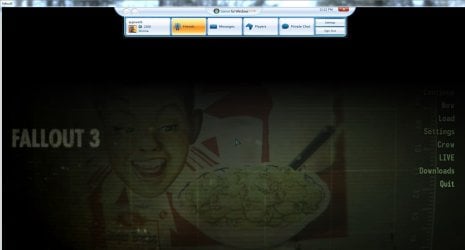
Fallout 3 working for me...

sygnus21

New member
Guru
Gold Member
VIP
Local time
3:38 PM
Messages
7,684
Location
Hampton VA
After hearing all the complaints about FO3 not working with Windows 7 I thought I’d give my retail copy (Fallout 3 GOTY (Game Of The Year) Edition) a try. And thus far, after playing for an hour, no issues. This is on a Win 7 machine. Click System Specs link to see specs.

A few things to note…

Not sure how the steam version goes (i.e. if it also uses GFWL) but if you’re playing the retail version, it DOES require that you have a Game For Windows Live (now Game for Windows Market Place) account! So if you’re running the game without either of those game managers (GFWL, Steam), the game is hacked, and it will be problematic!!! That said, for the retail version…

- Install the game…
- Install the latest patch - 1.7 which you can get here - Bethsoft.com - Support
- If you have a GFLW account, login (if not, you’ll need to create one)….
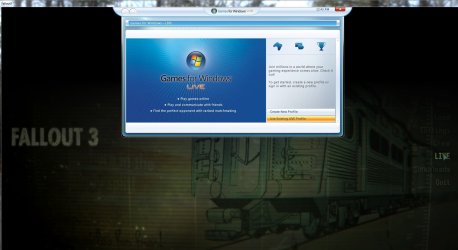
FO3 Live Sign-in.JPG

Once you login, you’ll be asked to provide the game’s product ID….

FO3 PID Screen.JPG

Once done, your profile will begin downloading, and the game may also ask to be allowed through your firewall.
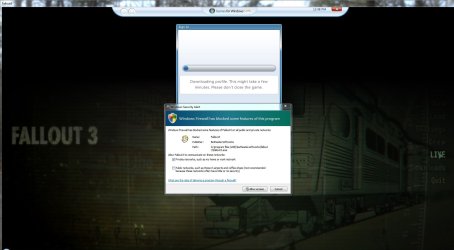
FO3 Profile DL.JPG

From here all should be good, and the game should be automatically updated,
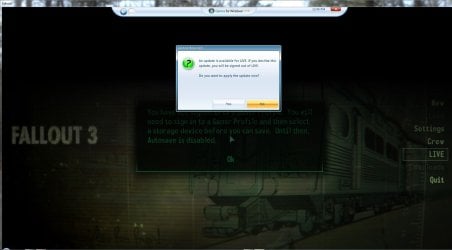
FO3 Updates.JPG

but…. GFLW can be a pain in the ass and you may get this….
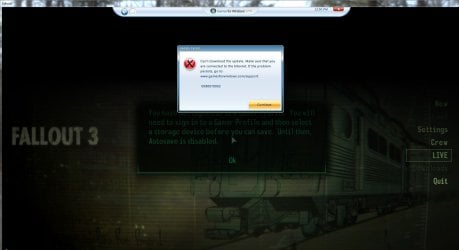
FO3 Update Error.JPG

even if you have the latest version of GFWL – (which should be Games for Windows Marketplace) installed!!! What I did…

- First, make sure you’re signed out of GFWL (Marketplace)
- Then, as I mentioned earlier, patch the game, then…
- Search the disc and find the redistributable g4wl exe and install
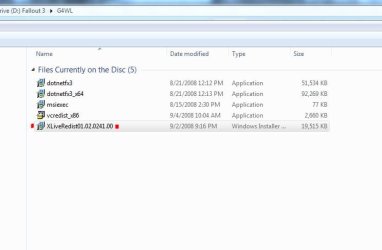
g4wl install.JPG

After that, launce FO3 again, sign into your Live account, it should properly update, and you will probably kick you back to the desktop once done. Simply re-launch the game, login to your live account, and all should be good. Play the game.
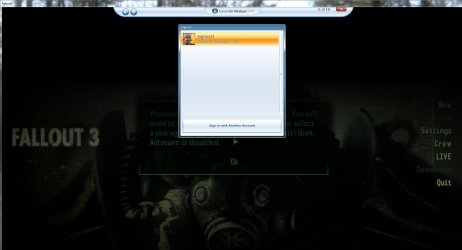
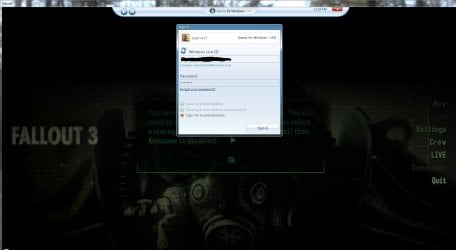
gflw signin.JPG
gflw signin -b.JPG
gflw signin-a.JPG

Yes, I realize this may not solve the issue of FO3 and Windows 7, but with the above procedures, for me, all is good. You just need to make sure you have a legit copy that can be activated. And you need a Live account (though I'm not sure about Steam).

Good luck.
 

My Computer

Computer type
PC/Desktop
Computer Manufacturer/Model Number
Custom built by me.
OS
Windows 10 Pro
CPU
Intel Core i7-4770K (3.5Ghz)
Motherboard
Gigabyte G1 Sniper 5 (F10 Bios)
Memory
32 gig Corsair Dominator Platinum (4x8Gig)
Graphics Card(s)
Sapphire Tri-X R9 Fury
Sound Card
Soundblaster ZXR
Monitor(s) Displays
NEC PA242W 24" LCD Monitor
Screen Resolution
1920 x 1200
Hard Drives
Primary - Samsung 850 Pro (512gig), Samsung 840 Pro (256gig), 2TB WD Caviar Black.
PSU
EVGA Supernova 1000 G2
Case
Cooler Master HAF X
Cooling
Corsair H100i with Corsair Air Series SP120 Quiet Fans
Keyboard
Logitech Wireless Wave
Mouse
Logitech Performance MX
Internet Speed
High Speed Cable
Antivirus
Norton Security
Browser
IE11
Other Info
Memory Timings - 1866MHz @ 9-9-9-27-1T @ 1.5 volts
How do you know this! lol i had so much problems with this i just went onto the xbox live website and made an new account for windows games and then it finally logged me in.
 

My Computer

Computer type
PC/Desktop
Computer Manufacturer/Model Number
Cyber Power
OS
Windows 8.1 PRO
CPU
AMD FX-4100 3.60 GHz Quad-Core AM3+ CPU 4MB
Motherboard
ASUS M5A78L-M/USB3 AMD 760G (780L)
Memory
8GB (2x4GB) Kingston
Graphics Card(s)
XfX HD R7850 AMD 2GB
Monitor(s) Displays
LG gaming flatron monitor
Screen Resolution
1920×1080
Hard Drives
1TB hitachi 7200RPM 64mb cache
1TB Western digital 7200RPM 64mb cache
PSU
500watt coolermaster gaming power supply
Case
Coolermaster elite gaming case 430
Cooling
CoolerMaster Hyper TX3 Evo + 5 case fans and GPU fan
Keyboard
Razor blackwidow ultimate
Mouse
Razor death adder 3500dpi
Internet Speed
slow :(
Antivirus
F-secure premium
Browser
Google chrome
Its been my experience that every game that need GFWL, you are better off going to the site and installing it before you install any GFWL game.
If I let the games install it I end up with hiccups getting things running properly for whatever reason. But if its already there, no issues.


I have the Steam version of FO3 GOTY here:
Same as the retail, it does require GFWL, except there's no patching required. (Steam gives the patched version of FO3 when you DL it)
Otherwise, same as sygnus21's post.

I always instal GFWL first. Then, install. Run the game 1 time, then off to modding :)
No issues with Steam version and Win7 here either.
 

My Computer

Computer Manufacturer/Model Number
Custom (Self Build)
OS
Windows 7 Home Premium 64bit
CPU
Intel Core i7 2700k
Motherboard
eVGA P67 SLI
Memory
8GB Mushkin Redline Ridgebacks @1866
Graphics Card(s)
EVGA GTX570 SC
Sound Card
XiFi Titanium HD
Monitor(s) Displays
LG W2453V
Screen Resolution
1920x1080
Hard Drives
Intel 320 80GB -- Intel X25-V 40GB --WD Black 1TB x2 -- WD Blue 640GB
PSU
Seasonic x750
Case
Corsair 600T SE White
Cooling
eVGA Superclocked CPU Cooler
Keyboard
Saitek Cyborg
Antivirus
Kaspersky
Browser
IE
Other Info
LG BD/DVD
How do you know this! lol i had so much problems with this i just went onto the xbox live website and made an new account for windows games and then it finally logged me in.

Huh??? :huh:

I know this because I obviously did this, thus my written instructions ;)

As for GFWL (now Marketplace), the thing is, I had the latest version. The problem is FO3 wouldn't accept it, thus installing the (older) version from the game's disc, and then letting it update from there. Getting it directly from the site didn't help because it's the latest version. You might want to re-read my post.

As for FO3 working, I have zero issues running it and I've put in about 6 hours since reinstalling it.
 

My Computer

Computer type
PC/Desktop
Computer Manufacturer/Model Number
Custom built by me.
OS
Windows 10 Pro
CPU
Intel Core i7-4770K (3.5Ghz)
Motherboard
Gigabyte G1 Sniper 5 (F10 Bios)
Memory
32 gig Corsair Dominator Platinum (4x8Gig)
Graphics Card(s)
Sapphire Tri-X R9 Fury
Sound Card
Soundblaster ZXR
Monitor(s) Displays
NEC PA242W 24" LCD Monitor
Screen Resolution
1920 x 1200
Hard Drives
Primary - Samsung 850 Pro (512gig), Samsung 840 Pro (256gig), 2TB WD Caviar Black.
PSU
EVGA Supernova 1000 G2
Case
Cooler Master HAF X
Cooling
Corsair H100i with Corsair Air Series SP120 Quiet Fans
Keyboard
Logitech Wireless Wave
Mouse
Logitech Performance MX
Internet Speed
High Speed Cable
Antivirus
Norton Security
Browser
IE11
Other Info
Memory Timings - 1866MHz @ 9-9-9-27-1T @ 1.5 volts
Odd as Ive had the opposite experience. Issues with older version updating, but fine with latest version already present.
Not sure why that is. I suppose it may just be that GFWL is finicky.
 

My Computer

Computer Manufacturer/Model Number
Custom (Self Build)
OS
Windows 7 Home Premium 64bit
CPU
Intel Core i7 2700k
Motherboard
eVGA P67 SLI
Memory
8GB Mushkin Redline Ridgebacks @1866
Graphics Card(s)
EVGA GTX570 SC
Sound Card
XiFi Titanium HD
Monitor(s) Displays
LG W2453V
Screen Resolution
1920x1080
Hard Drives
Intel 320 80GB -- Intel X25-V 40GB --WD Black 1TB x2 -- WD Blue 640GB
PSU
Seasonic x750
Case
Corsair 600T SE White
Cooling
eVGA Superclocked CPU Cooler
Keyboard
Saitek Cyborg
Antivirus
Kaspersky
Browser
IE
Other Info
LG BD/DVD
Yes, GFWL is finicky to say the least. It's the most buggiest game manager of the big 3 - Steam, EA/Origin, and buggy GFWL.

Anyway having the latest version doesn't mean success when running older games. Example my post on getting Halo working under Windows 7. You have to basically do the same thing, resort to an older version, then let it update from there - http://www.sevenforums.com/gaming/252972-how-get-halo-2-working-under-windows-7-a.html

At any rate I did (and still do) have the latest version of GFWL (Marketplace) and still got the error shown.

Anyway I wrote these for those having problems. It also deals with those pesky GFWL issues.

I just thought of something, by you (Wishmaster) having the Steam version, which already comes patched, that may have had something to do with the way your version worked with GFWL. Your game was already patched. Just a guess.

And I did say I didn't know how the Steam version worked in relation to GFWL.
 

My Computer

Computer type
PC/Desktop
Computer Manufacturer/Model Number
Custom built by me.
OS
Windows 10 Pro
CPU
Intel Core i7-4770K (3.5Ghz)
Motherboard
Gigabyte G1 Sniper 5 (F10 Bios)
Memory
32 gig Corsair Dominator Platinum (4x8Gig)
Graphics Card(s)
Sapphire Tri-X R9 Fury
Sound Card
Soundblaster ZXR
Monitor(s) Displays
NEC PA242W 24" LCD Monitor
Screen Resolution
1920 x 1200
Hard Drives
Primary - Samsung 850 Pro (512gig), Samsung 840 Pro (256gig), 2TB WD Caviar Black.
PSU
EVGA Supernova 1000 G2
Case
Cooler Master HAF X
Cooling
Corsair H100i with Corsair Air Series SP120 Quiet Fans
Keyboard
Logitech Wireless Wave
Mouse
Logitech Performance MX
Internet Speed
High Speed Cable
Antivirus
Norton Security
Browser
IE11
Other Info
Memory Timings - 1866MHz @ 9-9-9-27-1T @ 1.5 volts
Yes, GFWL is finicky to say the least. It's the most buggiest game manager of the big 3 - Steam, EA/Origin, and buggy GFWL.

Anyway having the latest version doesn't mean success when running older games. Example my post on getting Halo working under Windows 7. You have to basically do the same thing, resort to an older version, then let it update from there - http://www.sevenforums.com/gaming/252972-how-get-halo-2-working-under-windows-7-a.html

At any rate I did (and still do) have the latest version of GFWL (Marketplace) and still got the error shown.

Anyway I wrote these for those having problems. It also deals with those pesky GFWL issues.


Steam I am very confortable with, Origin I can deal with (not as good as steam, but they are getting there), but GFWL...tried it once never again, worst manager of all. Just my opinion :)
 

My Computer

Computer type
PC/Desktop
Computer Manufacturer/Model Number
Dude Build
OS
Windows 10 Pro X64
CPU
Intel(R) Core(TM) i5-3570K CPU OC@ 4.5GHZ Turbo
Motherboard
MSI Z77A-G45 Gaming
Memory
8.00 GB DDR3 1600Mhz
Graphics Card(s)
MSI Gaming X GTX 1070
Sound Card
Realtek High Definition
Monitor(s) Displays
Dell S23O9W, HP L1710
Screen Resolution
DELL-1920 x 1080 HP-1280 x1024
Hard Drives
Crucial m4 256 SSD, WD 7200RPM 500GB WD 1TB
PSU
Seasonic X650 GOLD
Case
Zalman Z12
Cooling
Antec Kuhler 920
Keyboard
Logitech
Mouse
MSI DS100 Interceptor
Internet Speed
50 down and 5 up
Antivirus
MSE
Browser
Chrome, IE 11
Other Info
Logitech X-620 Speakers
Back
Top