
- Local time
- 7:47 PM
- Messages
- 41
Hi all,
Not sure if this is the type of question for these particular forums, as it's more of a general hardware query, but the community here has been very helpful in the past!
I've got a fairly old W7 Ultimate Q6600 PC with a 500w GX Lite PSU and recently ordered an cheap VTX 7870 graphics card. I've been thinking about doing it for some time, but thought now is the perfect time to add more cooling to my PC to mitigate the extra noise from the card.
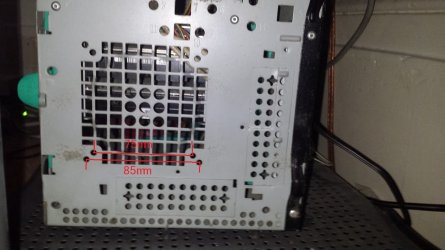
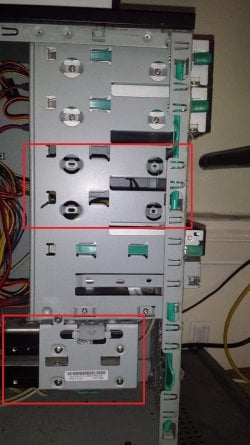
I've attached some photos of my case - I've got a standard 120mm fan at the back of the case, and there is a vent which looks like it would fit a fan at the front which has screw holes 75mm and 85mm apart (but the vent itself is 90mm across, see photo 'front vent'). However since I got the PC about 6/7 years ago, the HDD bays have been attached to the bottom, which would obscure a front case fan (see photo 'bays'). This photo also shows two spare bays below my two optical drives so I think I should simply be able to move the HDD bay up to the two empty bays and create space for the air to be sucked into the case.
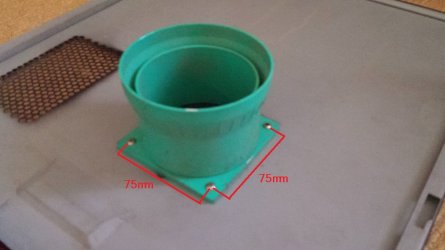
I've also got a vent on the removable panel on the side of the case (see photo - this funnel extends to over the stock CPU cooler). I assume I can't fit a fan to this as the panel needs to be removed!
So what would you guys recommend as the best solution:
1. Moving the HDDs and adding the front vent fan (would this be a 90mm or 85mm fan because I can't see 85mm fans on scan etc)
2. Getting a VGA cooler for the GPU fan (never done this before though and not sure that will help cooling for the increased load on the PSU etc?)
3. Something else??
I could do with the a new mobo/cpu/ram and the case is old and huge, but I'm really not in the position to do this at the moment, and hopefully anything I buy now will come in handy when I eventually do upgrade the rest!
Thanks in advance for any help or advice, gratefully appreciated as ever!
Tim
Not sure if this is the type of question for these particular forums, as it's more of a general hardware query, but the community here has been very helpful in the past!
I've got a fairly old W7 Ultimate Q6600 PC with a 500w GX Lite PSU and recently ordered an cheap VTX 7870 graphics card. I've been thinking about doing it for some time, but thought now is the perfect time to add more cooling to my PC to mitigate the extra noise from the card.
I've attached some photos of my case - I've got a standard 120mm fan at the back of the case, and there is a vent which looks like it would fit a fan at the front which has screw holes 75mm and 85mm apart (but the vent itself is 90mm across, see photo 'front vent'). However since I got the PC about 6/7 years ago, the HDD bays have been attached to the bottom, which would obscure a front case fan (see photo 'bays'). This photo also shows two spare bays below my two optical drives so I think I should simply be able to move the HDD bay up to the two empty bays and create space for the air to be sucked into the case.
I've also got a vent on the removable panel on the side of the case (see photo - this funnel extends to over the stock CPU cooler). I assume I can't fit a fan to this as the panel needs to be removed!
So what would you guys recommend as the best solution:
1. Moving the HDDs and adding the front vent fan (would this be a 90mm or 85mm fan because I can't see 85mm fans on scan etc)
2. Getting a VGA cooler for the GPU fan (never done this before though and not sure that will help cooling for the increased load on the PSU etc?)
3. Something else??
I could do with the a new mobo/cpu/ram and the case is old and huge, but I'm really not in the position to do this at the moment, and hopefully anything I buy now will come in handy when I eventually do upgrade the rest!
Thanks in advance for any help or advice, gratefully appreciated as ever!
Tim
Attachments
My Computer
- Computer Manufacturer/Model Number
- Evesham
- OS
- Windows 7 Ultimate 32bit
- CPU
- Intel Core 2 Quad 2.4ghz
- Motherboard
- Foxconn946 7MA Seris
- Memory
- 4GB (3.25GB usable)
- Graphics Card(s)
- HD5670
- Screen Resolution
- 1050
- Hard Drives
- 250GB western digital (C)
1TB Samsung F3 (D)


