Favorites - Add or Remove from Navigation Pane

How to Add or Remove Favorites from Navigation Pane in Windows 7


   Information
This tutorial will show you how to add or remove the Favorites folder in the Windows Explorer Navigation Pane in Windows 7.

   Tip
The default folder for Favorites is the Links folder located at the location below.

C:\Users\(user-name)\Links


   Warning

  • You can only do this while logged into an administrator account.
  • This will affect all user account's on the computer.
EXAMPLE: Favorites in Navigation Pane
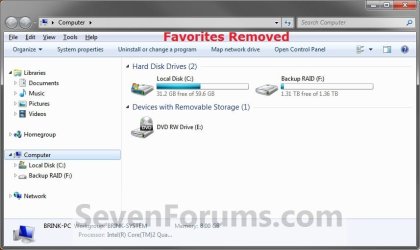
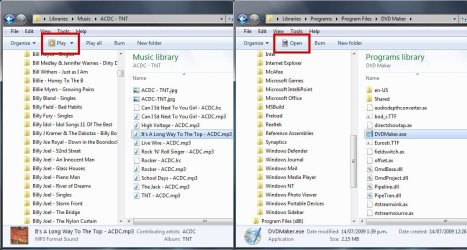
NOTE: This is the Favorites group added (default) (left screenshot below) and removed (right screenshot below) from the Navigation Pane.
Default.jpg

Removed.jpg

Here's How:
1. Open the Start Menu and type regedit.exe in the search line, then press enter.

2. If prompted by UAC, then click on Yes.

3. In Regedit, go to the location below: (See screenshot below step 4)
Code:
HKEY\CLASSES_ROOT\CLSID\{323CA680-C24D-4099-B94D-446DD2D7249E}\ShellFolder
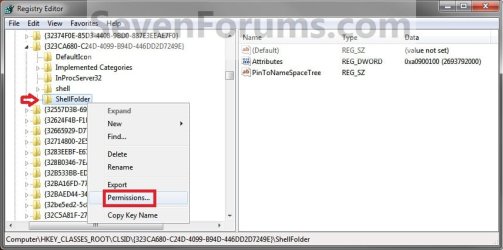
4. In the left pane of regedit, right click on the ShellFolder key and click on Permissions. (See screenshot below)
Step1.jpg
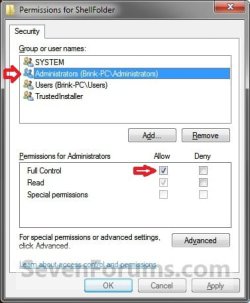
5. At the top, select the Administrators group. At the bottom, check the Allow box to the right of Full Control and click on OK. (See screenshot below)
Step2.jpg
6. In the right pane of regedit, right click on Attributes and click on Modify. (See screenshot below)
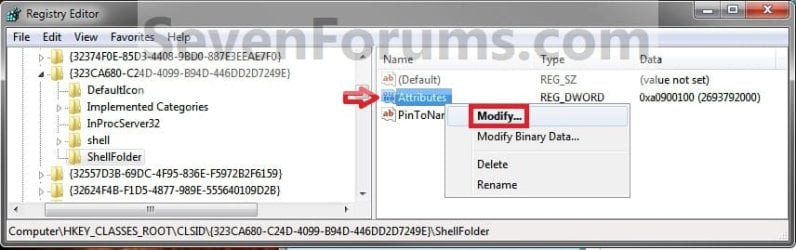
Step3.jpg
7. To Add Favorites to the Navigation Pane
NOTE: This is the default setting.
A) Type in a0900100 and click on OK. (see screenshot below)
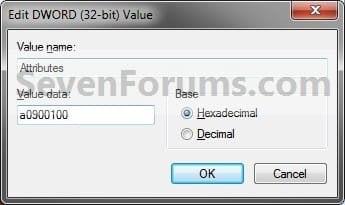
Step4.jpg
B) Go to step 9.
8. To Remove Favorites from the Navigation Pane
A) Type in a9400100 and click on OK. (see screenshot below)
Step5.jpg
9. If you have 64-bit Windows 7 Installed
   Note
CREDIT TO: Kookster for this addition.

To also add or remove Favorites from the "Open" and "Save as" type windows as well in 64-bit Windows 7, you will also need to do this step.

If you have a 32-bit Windows 7 installed, then skip this step since doing steps 1 to 7/8 will add or remove Favorites from the "Open" and "Save as" type windows as well.

A) In Regedit, go to the location below:
Code:
HKEY_LOCAL_MACHINE\SOFTWARE\Wow6432Node\Classes\CLSID\{323CA680-C24D-4099-B94D-446DD2D7249E}\ShellFolder
B) Repeat steps 4 to 7/8 above.
10. Close regedit.

11. Restart the computer to fully apply.
That's it,
Shawn


Last edited:
Hi there, I've tried it twice and it hasn't worked. Nothing's broken or looking funny - Favorites is just still there, working as usual. I've rechecked the regkey to make sure it hasn't changed back to default but it still says a9400100. Also for the part to remove Favorites from Open/Save dialog, I'm running W7 64-bit but I don't have a node named HKEY_Local_Machine\Software\Wow6432Node. Cheers.
 

My Computer My Computer

At a glance

windows 7 Home PremiumIntel Core i5 @ 2.27GHz 32nm TechnologyDDR3 4.0GBIntel(R) Graphics Media Accelerator HD
Computer Manufacturer/Model Number
Acer Aspire 5741
OS
windows 7 Home Premium
CPU
Intel Core i5 @ 2.27GHz 32nm Technology
Motherboard
Acer Aspire 5741 (CPU)
Memory
DDR3 4.0GB
Graphics Card(s)
Intel(R) Graphics Media Accelerator HD
Sound Card
Realtek High Definition Audio Intel(R) Display Audio
Monitor(s) Displays
Generic PnP Monitor on Intel Graphics Media Accelerator HD
Screen Resolution
1366x768
Hard Drives
Seagate 2.5" SATA 500GB
Keyboard
Synaptics PS/2 Port TouchPad
Mouse
Microsoft Comfort Mouse 4500 (IntelliPoint)
Hello Kiwichick,

It definitely works. Double check through the steps to make sure that you have followed them exactly step by step. You may have missed a step or made a mistake with one.

Are you sure that you have 64-bit Windows 7? If you do, you should have the HKEY_LOCAL_MACHINE\SOFTWARE\Wow6432Node key.
 

My Computer My Computer

At a glance

64-bit Windows 11 Pro for WorkstationsIntel i7-8700K OC'd to 5 GHz64 GB (4x16GB) G.SKILL TridentZ RGB DDR4 3600...ASUS ROG-STRIX-GTX1080TI-O11G-GAMING
Computer type
PC/Desktop
Computer Manufacturer/Model Number
Self built custom
OS
64-bit Windows 11 Pro for Workstations
CPU
Intel i7-8700K OC'd to 5 GHz
Motherboard
ASUS ROG Maximus XI Formula Z390
Memory
64 GB (4x16GB) G.SKILL TridentZ RGB DDR4 3600 MHz
Graphics Card(s)
ASUS ROG-STRIX-GTX1080TI-O11G-GAMING
Sound Card
Integrated
Monitor(s) Displays
2 x Samsung Odyssey G7 27"
Screen Resolution
2560x1440
Hard Drives
1TB Samsung 990 PRO M.2,
4TB Samsung 990 PRO PRO M.2,
TerraMaster F8 SSD Plus NAS
PSU
Seasonic Prime Titanium 850W
Case
Thermaltake Core P3
Cooling
Corsair Hydro H115i
Keyboard
Logitech wireless K800
Mouse
Logitech MX Master 4
Internet Speed
2 Gb/s Download and 100 Mb/s Upload
Antivirus
Malwarebyte Anti-Malware Premium
Browser
Google Chrome
Other Info
Logitech Z625 speaker system,
Logitech BRIO 4K Pro webcam,
HP Color LaserJet Pro MFP M477fdn,
APC SMART-UPS RT 1000 XL - SURT1000XLI,
Galaxy S23 Plus phone
Hi Brink, Thanks for the reply. Hopefully these screenshots will help.

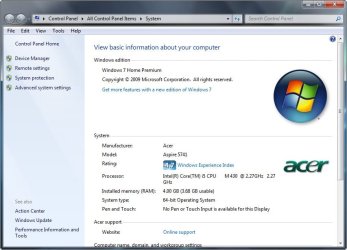
Definitely running Windows 7 64-Bit

Windows 7 64-bit.jpg

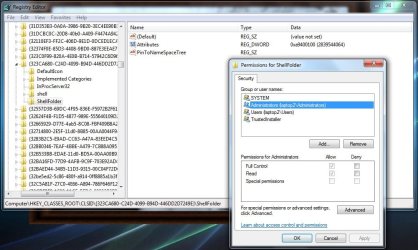
Location looks correct. Permissions look correct, Attributes look correct.

HKCR-CLSID-Attributes&Permissions.jpg

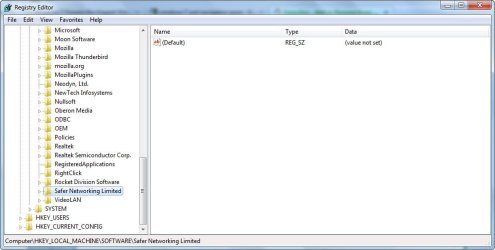
Location looks correct but no Wow6432Node

regedit HKLM-Software-noWowNode.jpg

I am more than willing to admit that I may have done something wrong but I can't see what.
 

My Computer My Computer

At a glance

windows 7 Home PremiumIntel Core i5 @ 2.27GHz 32nm TechnologyDDR3 4.0GBIntel(R) Graphics Media Accelerator HD
Computer Manufacturer/Model Number
Acer Aspire 5741
OS
windows 7 Home Premium
CPU
Intel Core i5 @ 2.27GHz 32nm Technology
Motherboard
Acer Aspire 5741 (CPU)
Memory
DDR3 4.0GB
Graphics Card(s)
Intel(R) Graphics Media Accelerator HD
Sound Card
Realtek High Definition Audio Intel(R) Display Audio
Monitor(s) Displays
Generic PnP Monitor on Intel Graphics Media Accelerator HD
Screen Resolution
1366x768
Hard Drives
Seagate 2.5" SATA 500GB
Keyboard
Synaptics PS/2 Port TouchPad
Mouse
Microsoft Comfort Mouse 4500 (IntelliPoint)
Kiwichick,

Agreed. Everything looks correct except that you are missing Wow6432Node. Do think you may have deleted it by mistake, or deleted it with a registry cleaning program?

Did you restart the computer afterwards?
 

My Computer My Computer

At a glance

64-bit Windows 11 Pro for WorkstationsIntel i7-8700K OC'd to 5 GHz64 GB (4x16GB) G.SKILL TridentZ RGB DDR4 3600...ASUS ROG-STRIX-GTX1080TI-O11G-GAMING
Computer type
PC/Desktop
Computer Manufacturer/Model Number
Self built custom
OS
64-bit Windows 11 Pro for Workstations
CPU
Intel i7-8700K OC'd to 5 GHz
Motherboard
ASUS ROG Maximus XI Formula Z390
Memory
64 GB (4x16GB) G.SKILL TridentZ RGB DDR4 3600 MHz
Graphics Card(s)
ASUS ROG-STRIX-GTX1080TI-O11G-GAMING
Sound Card
Integrated
Monitor(s) Displays
2 x Samsung Odyssey G7 27"
Screen Resolution
2560x1440
Hard Drives
1TB Samsung 990 PRO M.2,
4TB Samsung 990 PRO PRO M.2,
TerraMaster F8 SSD Plus NAS
PSU
Seasonic Prime Titanium 850W
Case
Thermaltake Core P3
Cooling
Corsair Hydro H115i
Keyboard
Logitech wireless K800
Mouse
Logitech MX Master 4
Internet Speed
2 Gb/s Download and 100 Mb/s Upload
Antivirus
Malwarebyte Anti-Malware Premium
Browser
Google Chrome
Other Info
Logitech Z625 speaker system,
Logitech BRIO 4K Pro webcam,
HP Color LaserJet Pro MFP M477fdn,
APC SMART-UPS RT 1000 XL - SURT1000XLI,
Galaxy S23 Plus phone
Yes restarted computer afterwards.

Yes may have deleted Wow node with regcleaner. But will that matter to the navigation pane since it says in the post that Wow is only to remove Favs from Open/Save?
 

My Computer My Computer

At a glance

windows 7 Home PremiumIntel Core i5 @ 2.27GHz 32nm TechnologyDDR3 4.0GBIntel(R) Graphics Media Accelerator HD
Computer Manufacturer/Model Number
Acer Aspire 5741
OS
windows 7 Home Premium
CPU
Intel Core i5 @ 2.27GHz 32nm Technology
Motherboard
Acer Aspire 5741 (CPU)
Memory
DDR3 4.0GB
Graphics Card(s)
Intel(R) Graphics Media Accelerator HD
Sound Card
Realtek High Definition Audio Intel(R) Display Audio
Monitor(s) Displays
Generic PnP Monitor on Intel Graphics Media Accelerator HD
Screen Resolution
1366x768
Hard Drives
Seagate 2.5" SATA 500GB
Keyboard
Synaptics PS/2 Port TouchPad
Mouse
Microsoft Comfort Mouse 4500 (IntelliPoint)
Yes, Wow will only affect the Open/Save type windows in this tutorial, but there's no telling what else the reg cleaner, or something else, may have affected this from working for you as well. :(
 

My Computer My Computer

At a glance

64-bit Windows 11 Pro for WorkstationsIntel i7-8700K OC'd to 5 GHz64 GB (4x16GB) G.SKILL TridentZ RGB DDR4 3600...ASUS ROG-STRIX-GTX1080TI-O11G-GAMING
Computer type
PC/Desktop
Computer Manufacturer/Model Number
Self built custom
OS
64-bit Windows 11 Pro for Workstations
CPU
Intel i7-8700K OC'd to 5 GHz
Motherboard
ASUS ROG Maximus XI Formula Z390
Memory
64 GB (4x16GB) G.SKILL TridentZ RGB DDR4 3600 MHz
Graphics Card(s)
ASUS ROG-STRIX-GTX1080TI-O11G-GAMING
Sound Card
Integrated
Monitor(s) Displays
2 x Samsung Odyssey G7 27"
Screen Resolution
2560x1440
Hard Drives
1TB Samsung 990 PRO M.2,
4TB Samsung 990 PRO PRO M.2,
TerraMaster F8 SSD Plus NAS
PSU
Seasonic Prime Titanium 850W
Case
Thermaltake Core P3
Cooling
Corsair Hydro H115i
Keyboard
Logitech wireless K800
Mouse
Logitech MX Master 4
Internet Speed
2 Gb/s Download and 100 Mb/s Upload
Antivirus
Malwarebyte Anti-Malware Premium
Browser
Google Chrome
Other Info
Logitech Z625 speaker system,
Logitech BRIO 4K Pro webcam,
HP Color LaserJet Pro MFP M477fdn,
APC SMART-UPS RT 1000 XL - SURT1000XLI,
Galaxy S23 Plus phone
Ok this is really strange.

I rebooted into safe mode and checked the registry. Wow node was there so I exported it then restarted normally and ran the exported reg file but I got an error about not all info being added ....

I rebooted into safe mode again and ran the exported reg file but got error message again.

So I created a new user account and Wow node was in there so I exported that but got same error when running it back on normal account.

So I went back to new user account and made registry changes there then restarted into new user account again and Favorites was gone from navigation pane.

And when I rebooted back into normal account Favorites is gone from navigation pane there too.

Now in regards to my obviously now corrupted registry. I have registry backup that I did before the regclean. I backed it up via method two in this topic: http://www.sevenforums.com/tutorials/4230-registry-backup-restore.html. Would you advise restoring via method two since this topic explains why I was getting the errors?

Thanks for all your patience and help.
 
Last edited:

My Computer My Computer

At a glance

windows 7 Home PremiumIntel Core i5 @ 2.27GHz 32nm TechnologyDDR3 4.0GBIntel(R) Graphics Media Accelerator HD
Computer Manufacturer/Model Number
Acer Aspire 5741
OS
windows 7 Home Premium
CPU
Intel Core i5 @ 2.27GHz 32nm Technology
Motherboard
Acer Aspire 5741 (CPU)
Memory
DDR3 4.0GB
Graphics Card(s)
Intel(R) Graphics Media Accelerator HD
Sound Card
Realtek High Definition Audio Intel(R) Display Audio
Monitor(s) Displays
Generic PnP Monitor on Intel Graphics Media Accelerator HD
Screen Resolution
1366x768
Hard Drives
Seagate 2.5" SATA 500GB
Keyboard
Synaptics PS/2 Port TouchPad
Mouse
Microsoft Comfort Mouse 4500 (IntelliPoint)
Kiwichick,

I'm happy to hear that you got it working.

The error message you see at the bottom in that tutorial is only a what to do if you get that error only while doing that specific tutorial, and not for anything else.

If you are not having any problems currently now, then you might consider leaving things as is. If you are having other issues, then you might consider doing a system restore using a restore point dated before you had the issues.
 

My Computer My Computer

At a glance

64-bit Windows 11 Pro for WorkstationsIntel i7-8700K OC'd to 5 GHz64 GB (4x16GB) G.SKILL TridentZ RGB DDR4 3600...ASUS ROG-STRIX-GTX1080TI-O11G-GAMING
Computer type
PC/Desktop
Computer Manufacturer/Model Number
Self built custom
OS
64-bit Windows 11 Pro for Workstations
CPU
Intel i7-8700K OC'd to 5 GHz
Motherboard
ASUS ROG Maximus XI Formula Z390
Memory
64 GB (4x16GB) G.SKILL TridentZ RGB DDR4 3600 MHz
Graphics Card(s)
ASUS ROG-STRIX-GTX1080TI-O11G-GAMING
Sound Card
Integrated
Monitor(s) Displays
2 x Samsung Odyssey G7 27"
Screen Resolution
2560x1440
Hard Drives
1TB Samsung 990 PRO M.2,
4TB Samsung 990 PRO PRO M.2,
TerraMaster F8 SSD Plus NAS
PSU
Seasonic Prime Titanium 850W
Case
Thermaltake Core P3
Cooling
Corsair Hydro H115i
Keyboard
Logitech wireless K800
Mouse
Logitech MX Master 4
Internet Speed
2 Gb/s Download and 100 Mb/s Upload
Antivirus
Malwarebyte Anti-Malware Premium
Browser
Google Chrome
Other Info
Logitech Z625 speaker system,
Logitech BRIO 4K Pro webcam,
HP Color LaserJet Pro MFP M477fdn,
APC SMART-UPS RT 1000 XL - SURT1000XLI,
Galaxy S23 Plus phone
I can't do a system restore because there isn't a restore point from before the regclean. I know there used to be one but I think it was probably deleted by the system after subsequent restore points were made because the default disk space reserved for system restore was really small - only 2%. I have changed it to 15% on advice from another topic here but too late for a regfix.

I really want the node back along with anything else I've removed. This is a new computer and I don't want to start off with registry issues. And you said yourself that who knows what other things it may be affecting. Explorer is showing an odd behavior since I got the Favorites thing sorted. And the reason I want to get rid of the Favorites was because of this other topic I posted http://www.sevenforums.com/general-...-favorites-opening-new-window.html#post814036 which now looks as though it's probably happening because of my regclean.

I will do a complete recovery if I have to but I'd rather not if I can try something else first. So is a command line registry restore better than a full system recovery? Or do you know of anything else I can try? Could I at least copy all the Wow6432Node entries in the regbackup to a new regkey and run that from the command prompt?
 

My Computer My Computer

At a glance

windows 7 Home PremiumIntel Core i5 @ 2.27GHz 32nm TechnologyDDR3 4.0GBIntel(R) Graphics Media Accelerator HD
Computer Manufacturer/Model Number
Acer Aspire 5741
OS
windows 7 Home Premium
CPU
Intel Core i5 @ 2.27GHz 32nm Technology
Motherboard
Acer Aspire 5741 (CPU)
Memory
DDR3 4.0GB
Graphics Card(s)
Intel(R) Graphics Media Accelerator HD
Sound Card
Realtek High Definition Audio Intel(R) Display Audio
Monitor(s) Displays
Generic PnP Monitor on Intel Graphics Media Accelerator HD
Screen Resolution
1366x768
Hard Drives
Seagate 2.5" SATA 500GB
Keyboard
Synaptics PS/2 Port TouchPad
Mouse
Microsoft Comfort Mouse 4500 (IntelliPoint)
Kiwichick,

I do not know of any other way to get back to like it was without doing a factory recovery/restore. If you decide to do this, be sure to backup anything that you do not want to lose first. :(
 

My Computer My Computer

At a glance

64-bit Windows 11 Pro for WorkstationsIntel i7-8700K OC'd to 5 GHz64 GB (4x16GB) G.SKILL TridentZ RGB DDR4 3600...ASUS ROG-STRIX-GTX1080TI-O11G-GAMING
Computer type
PC/Desktop
Computer Manufacturer/Model Number
Self built custom
OS
64-bit Windows 11 Pro for Workstations
CPU
Intel i7-8700K OC'd to 5 GHz
Motherboard
ASUS ROG Maximus XI Formula Z390
Memory
64 GB (4x16GB) G.SKILL TridentZ RGB DDR4 3600 MHz
Graphics Card(s)
ASUS ROG-STRIX-GTX1080TI-O11G-GAMING
Sound Card
Integrated
Monitor(s) Displays
2 x Samsung Odyssey G7 27"
Screen Resolution
2560x1440
Hard Drives
1TB Samsung 990 PRO M.2,
4TB Samsung 990 PRO PRO M.2,
TerraMaster F8 SSD Plus NAS
PSU
Seasonic Prime Titanium 850W
Case
Thermaltake Core P3
Cooling
Corsair Hydro H115i
Keyboard
Logitech wireless K800
Mouse
Logitech MX Master 4
Internet Speed
2 Gb/s Download and 100 Mb/s Upload
Antivirus
Malwarebyte Anti-Malware Premium
Browser
Google Chrome
Other Info
Logitech Z625 speaker system,
Logitech BRIO 4K Pro webcam,
HP Color LaserJet Pro MFP M477fdn,
APC SMART-UPS RT 1000 XL - SURT1000XLI,
Galaxy S23 Plus phone
Thanks heaps Brink. Yip that's exactly what I'm going to do. It'll just eliminate any possibility of further problems. I'm backing stuff up right now. Thanks for all your help. Windows 7 Forums ROCKS !!!!
 

My Computer My Computer

At a glance

windows 7 Home PremiumIntel Core i5 @ 2.27GHz 32nm TechnologyDDR3 4.0GBIntel(R) Graphics Media Accelerator HD
Computer Manufacturer/Model Number
Acer Aspire 5741
OS
windows 7 Home Premium
CPU
Intel Core i5 @ 2.27GHz 32nm Technology
Motherboard
Acer Aspire 5741 (CPU)
Memory
DDR3 4.0GB
Graphics Card(s)
Intel(R) Graphics Media Accelerator HD
Sound Card
Realtek High Definition Audio Intel(R) Display Audio
Monitor(s) Displays
Generic PnP Monitor on Intel Graphics Media Accelerator HD
Screen Resolution
1366x768
Hard Drives
Seagate 2.5" SATA 500GB
Keyboard
Synaptics PS/2 Port TouchPad
Mouse
Microsoft Comfort Mouse 4500 (IntelliPoint)
I hope the install goes smoothly for you. Please let us know how it turns out. :)
 

My Computer My Computer

At a glance

64-bit Windows 11 Pro for WorkstationsIntel i7-8700K OC'd to 5 GHz64 GB (4x16GB) G.SKILL TridentZ RGB DDR4 3600...ASUS ROG-STRIX-GTX1080TI-O11G-GAMING
Computer type
PC/Desktop
Computer Manufacturer/Model Number
Self built custom
OS
64-bit Windows 11 Pro for Workstations
CPU
Intel i7-8700K OC'd to 5 GHz
Motherboard
ASUS ROG Maximus XI Formula Z390
Memory
64 GB (4x16GB) G.SKILL TridentZ RGB DDR4 3600 MHz
Graphics Card(s)
ASUS ROG-STRIX-GTX1080TI-O11G-GAMING
Sound Card
Integrated
Monitor(s) Displays
2 x Samsung Odyssey G7 27"
Screen Resolution
2560x1440
Hard Drives
1TB Samsung 990 PRO M.2,
4TB Samsung 990 PRO PRO M.2,
TerraMaster F8 SSD Plus NAS
PSU
Seasonic Prime Titanium 850W
Case
Thermaltake Core P3
Cooling
Corsair Hydro H115i
Keyboard
Logitech wireless K800
Mouse
Logitech MX Master 4
Internet Speed
2 Gb/s Download and 100 Mb/s Upload
Antivirus
Malwarebyte Anti-Malware Premium
Browser
Google Chrome
Other Info
Logitech Z625 speaker system,
Logitech BRIO 4K Pro webcam,
HP Color LaserJet Pro MFP M477fdn,
APC SMART-UPS RT 1000 XL - SURT1000XLI,
Galaxy S23 Plus phone
Well the recovery went well. Wow6432 back in registry. Everything seems to be going fine now. I have noticed a couple of small things though.

In Explorer on the button toolbar next to the Organize button is what I guess is an 'Action' button and it displays an icon depending on what filetype is selected. I'm not sure if this was happening before the recovery but when I select an EXE file the icon isn't displayed.

broken exe.jpg

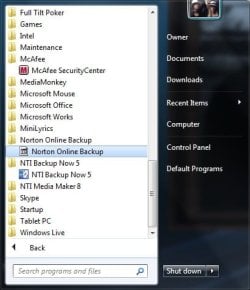
I also noticed a couple of program shortcut icons in the start menu weren't displaying either. You can see the NTI icon displays correctly. Norton doesn't. McAfee was the other one that didn't display correctly but I changed it. But I couldn't change it via right-click / properties. I had to go the program folder and create a new shortcut.

broken exe start menu.jpg
 

My Computer My Computer

At a glance

windows 7 Home PremiumIntel Core i5 @ 2.27GHz 32nm TechnologyDDR3 4.0GBIntel(R) Graphics Media Accelerator HD
Computer Manufacturer/Model Number
Acer Aspire 5741
OS
windows 7 Home Premium
CPU
Intel Core i5 @ 2.27GHz 32nm Technology
Motherboard
Acer Aspire 5741 (CPU)
Memory
DDR3 4.0GB
Graphics Card(s)
Intel(R) Graphics Media Accelerator HD
Sound Card
Realtek High Definition Audio Intel(R) Display Audio
Monitor(s) Displays
Generic PnP Monitor on Intel Graphics Media Accelerator HD
Screen Resolution
1366x768
Hard Drives
Seagate 2.5" SATA 500GB
Keyboard
Synaptics PS/2 Port TouchPad
Mouse
Microsoft Comfort Mouse 4500 (IntelliPoint)

My Computer My Computer

At a glance

64-bit Windows 11 Pro for WorkstationsIntel i7-8700K OC'd to 5 GHz64 GB (4x16GB) G.SKILL TridentZ RGB DDR4 3600...ASUS ROG-STRIX-GTX1080TI-O11G-GAMING
Computer type
PC/Desktop
Computer Manufacturer/Model Number
Self built custom
OS
64-bit Windows 11 Pro for Workstations
CPU
Intel i7-8700K OC'd to 5 GHz
Motherboard
ASUS ROG Maximus XI Formula Z390
Memory
64 GB (4x16GB) G.SKILL TridentZ RGB DDR4 3600 MHz
Graphics Card(s)
ASUS ROG-STRIX-GTX1080TI-O11G-GAMING
Sound Card
Integrated
Monitor(s) Displays
2 x Samsung Odyssey G7 27"
Screen Resolution
2560x1440
Hard Drives
1TB Samsung 990 PRO M.2,
4TB Samsung 990 PRO PRO M.2,
TerraMaster F8 SSD Plus NAS
PSU
Seasonic Prime Titanium 850W
Case
Thermaltake Core P3
Cooling
Corsair Hydro H115i
Keyboard
Logitech wireless K800
Mouse
Logitech MX Master 4
Internet Speed
2 Gb/s Download and 100 Mb/s Upload
Antivirus
Malwarebyte Anti-Malware Premium
Browser
Google Chrome
Other Info
Logitech Z625 speaker system,
Logitech BRIO 4K Pro webcam,
HP Color LaserJet Pro MFP M477fdn,
APC SMART-UPS RT 1000 XL - SURT1000XLI,
Galaxy S23 Plus phone
Thanks yet again Brink, Would be nice if it showed the application icon but it's definitely better than before. I was wondering if it might have been something I just hadn't noticed. Glad to know it's a bug and not my computer.
 

My Computer My Computer

At a glance

windows 7 Home PremiumIntel Core i5 @ 2.27GHz 32nm TechnologyDDR3 4.0GBIntel(R) Graphics Media Accelerator HD
Computer Manufacturer/Model Number
Acer Aspire 5741
OS
windows 7 Home Premium
CPU
Intel Core i5 @ 2.27GHz 32nm Technology
Motherboard
Acer Aspire 5741 (CPU)
Memory
DDR3 4.0GB
Graphics Card(s)
Intel(R) Graphics Media Accelerator HD
Sound Card
Realtek High Definition Audio Intel(R) Display Audio
Monitor(s) Displays
Generic PnP Monitor on Intel Graphics Media Accelerator HD
Screen Resolution
1366x768
Hard Drives
Seagate 2.5" SATA 500GB
Keyboard
Synaptics PS/2 Port TouchPad
Mouse
Microsoft Comfort Mouse 4500 (IntelliPoint)
You're most welcome Kiwichick. :)
 

My Computer My Computer

At a glance

64-bit Windows 11 Pro for WorkstationsIntel i7-8700K OC'd to 5 GHz64 GB (4x16GB) G.SKILL TridentZ RGB DDR4 3600...ASUS ROG-STRIX-GTX1080TI-O11G-GAMING
Computer type
PC/Desktop
Computer Manufacturer/Model Number
Self built custom
OS
64-bit Windows 11 Pro for Workstations
CPU
Intel i7-8700K OC'd to 5 GHz
Motherboard
ASUS ROG Maximus XI Formula Z390
Memory
64 GB (4x16GB) G.SKILL TridentZ RGB DDR4 3600 MHz
Graphics Card(s)
ASUS ROG-STRIX-GTX1080TI-O11G-GAMING
Sound Card
Integrated
Monitor(s) Displays
2 x Samsung Odyssey G7 27"
Screen Resolution
2560x1440
Hard Drives
1TB Samsung 990 PRO M.2,
4TB Samsung 990 PRO PRO M.2,
TerraMaster F8 SSD Plus NAS
PSU
Seasonic Prime Titanium 850W
Case
Thermaltake Core P3
Cooling
Corsair Hydro H115i
Keyboard
Logitech wireless K800
Mouse
Logitech MX Master 4
Internet Speed
2 Gb/s Download and 100 Mb/s Upload
Antivirus
Malwarebyte Anti-Malware Premium
Browser
Google Chrome
Other Info
Logitech Z625 speaker system,
Logitech BRIO 4K Pro webcam,
HP Color LaserJet Pro MFP M477fdn,
APC SMART-UPS RT 1000 XL - SURT1000XLI,
Galaxy S23 Plus phone
Hate to poor water on the flames but this tutorial just does not work for me and I suspect for others as well.

I have Win 7 x64 and have tried 3 variations of the tutorial:
1/ as written
2/ just the 32 bit section
3/ just the 64 bit section

and none work, in addition the registry location given for the 64 bit change appears to be incorrect. I installed the system yesterday so there is no registry corruption or whatever, this is what I believe the 64bit registry entry you are referring to is:

HKEY_LOCAL_MACHINE\SOFTWARE\Classes\Wow6432Node\CLSID\{323CA680-C24D-4099-B94D-446DD2D7249E}\ShellFolder

In the mean time anyone else reading this tutorial please be aware of my results.
 

My Computer My Computer

At a glance

Windows 7 X64I5 2500 K16 gig DDR 3 1600GTX 560 Ti
Computer Manufacturer/Model Number
Self made
OS
Windows 7 X64
CPU
I5 2500 K
Motherboard
ASRock Extreme 4
Memory
16 gig DDR 3 1600
Graphics Card(s)
GTX 560 Ti
Sound Card
Soundblaster X-Fi Titanium
Monitor(s) Displays
LG W2452T
Hard Drives
1 x Intel 120Gb SSD
4 x Seagate 2Tb HDD
1 x Seagate 250Gb HDD (Dual Boot Win XP)
PSU
Silverstone 850W
Case
Cooler Master HAF 922
Cooling
Antec Kuhler (Water)
Hello Shag, and welcome to Seven Forums.

I'm sorry to hear that. Did it work for you using the other registry location that you mentioned?

The tutorial has been thoroughly tested on both 32-bit and 64-bit and does work perfectly as written. Please double check to make sure that you have not made a mistake somewhere in the steps, or missed one.


HKEY_LOCAL_MACHINE\SOFTWARE\Wow6432Node\Classes is a symbolic link to HKEY_LOCAL_MACHINE\SOFTWARE\Classes\Wow6432Node, so a change in one will be made to the other after restarting the computer. It really doesn't matter which one you use.

See this Microsoft link for more information about these two registry locations.

Registry Keys Affected by WOW64 (Windows)
 

My Computer My Computer

At a glance

64-bit Windows 11 Pro for WorkstationsIntel i7-8700K OC'd to 5 GHz64 GB (4x16GB) G.SKILL TridentZ RGB DDR4 3600...ASUS ROG-STRIX-GTX1080TI-O11G-GAMING
Computer type
PC/Desktop
Computer Manufacturer/Model Number
Self built custom
OS
64-bit Windows 11 Pro for Workstations
CPU
Intel i7-8700K OC'd to 5 GHz
Motherboard
ASUS ROG Maximus XI Formula Z390
Memory
64 GB (4x16GB) G.SKILL TridentZ RGB DDR4 3600 MHz
Graphics Card(s)
ASUS ROG-STRIX-GTX1080TI-O11G-GAMING
Sound Card
Integrated
Monitor(s) Displays
2 x Samsung Odyssey G7 27"
Screen Resolution
2560x1440
Hard Drives
1TB Samsung 990 PRO M.2,
4TB Samsung 990 PRO PRO M.2,
TerraMaster F8 SSD Plus NAS
PSU
Seasonic Prime Titanium 850W
Case
Thermaltake Core P3
Cooling
Corsair Hydro H115i
Keyboard
Logitech wireless K800
Mouse
Logitech MX Master 4
Internet Speed
2 Gb/s Download and 100 Mb/s Upload
Antivirus
Malwarebyte Anti-Malware Premium
Browser
Google Chrome
Other Info
Logitech Z625 speaker system,
Logitech BRIO 4K Pro webcam,
HP Color LaserJet Pro MFP M477fdn,
APC SMART-UPS RT 1000 XL - SURT1000XLI,
Galaxy S23 Plus phone
Thank you for your reply Brink,

sorry I was not clear in my first post, the link I gave I substituted for the link in the tutorial as it was obviously the key that was being referred to, so to answer your question, no it did not work.

If I understand you correctly then both 64bit registry key paths should work, assuming this is so, can the path I provided be included in the tutorial? After having read your Microsoft link I do not understand why that key path is not in my registry as it essentially a mirror. Do you think it may be because I only have the Home Premium version?

I will have another go at the tutorial some time in the next few days and report back.
 

My Computer My Computer

At a glance

Windows 7 X64I5 2500 K16 gig DDR 3 1600GTX 560 Ti
Computer Manufacturer/Model Number
Self made
OS
Windows 7 X64
CPU
I5 2500 K
Motherboard
ASRock Extreme 4
Memory
16 gig DDR 3 1600
Graphics Card(s)
GTX 560 Ti
Sound Card
Soundblaster X-Fi Titanium
Monitor(s) Displays
LG W2452T
Hard Drives
1 x Intel 120Gb SSD
4 x Seagate 2Tb HDD
1 x Seagate 250Gb HDD (Dual Boot Win XP)
PSU
Silverstone 850W
Case
Cooler Master HAF 922
Cooling
Antec Kuhler (Water)
Shag00,

There's not a point in adding the other registry path in the tutorial since they are linked, and a change made in one will change the other.

Double check your registry. Sometimes they tend to blend together and are not easy to notice, but you should have the path that's in the tutorial as well.
 
Last edited:

My Computer My Computer

At a glance

64-bit Windows 11 Pro for WorkstationsIntel i7-8700K OC'd to 5 GHz64 GB (4x16GB) G.SKILL TridentZ RGB DDR4 3600...ASUS ROG-STRIX-GTX1080TI-O11G-GAMING
Computer type
PC/Desktop
Computer Manufacturer/Model Number
Self built custom
OS
64-bit Windows 11 Pro for Workstations
CPU
Intel i7-8700K OC'd to 5 GHz
Motherboard
ASUS ROG Maximus XI Formula Z390
Memory
64 GB (4x16GB) G.SKILL TridentZ RGB DDR4 3600 MHz
Graphics Card(s)
ASUS ROG-STRIX-GTX1080TI-O11G-GAMING
Sound Card
Integrated
Monitor(s) Displays
2 x Samsung Odyssey G7 27"
Screen Resolution
2560x1440
Hard Drives
1TB Samsung 990 PRO M.2,
4TB Samsung 990 PRO PRO M.2,
TerraMaster F8 SSD Plus NAS
PSU
Seasonic Prime Titanium 850W
Case
Thermaltake Core P3
Cooling
Corsair Hydro H115i
Keyboard
Logitech wireless K800
Mouse
Logitech MX Master 4
Internet Speed
2 Gb/s Download and 100 Mb/s Upload
Antivirus
Malwarebyte Anti-Malware Premium
Browser
Google Chrome
Other Info
Logitech Z625 speaker system,
Logitech BRIO 4K Pro webcam,
HP Color LaserJet Pro MFP M477fdn,
APC SMART-UPS RT 1000 XL - SURT1000XLI,
Galaxy S23 Plus phone
Back
Top